MCP server for AI-driven IT operations

MCP server for AI-driven IT operations

ops-mcp-server•byheht571

An IT operations management solution that integrates the Model Context Protocol and LLMs to provide automated server monitoring, anomaly detection, and natural language interaction with infrastructure.

License: MIT License•Runtime: Awaiting documentation review•Category: cloud devops

WHAT IT DOES

  • •Performs real-time server monitoring of CPU, memory, disk, system load, processes, services, network interfaces, and OS information.
  • •Supports security-focused checks such as log analysis, configuration backup, SSH login and firewall status vulnerability scans.
  • •Manages Docker containers, images, and volumes, including resource usage monitoring, log retrieval, and health checks.
  • •Manages multi-vendor network devices with switch port, VLAN, router route checks, ACL analysis, and optical module monitoring.

BEST FOR

  • •IT teams needing AI-assisted server monitoring and troubleshooting through natural language over MCP.
  • •Operators managing Docker containers and health checks via an AI agent.
  • •Network administrators performing batch checks across Cisco, Huawei, and H3C devices.

ABOUT OPS-MCP-SERVER

MCP server for AI-driven IT operations is cataloged as an MCP server attributed to heht571. An IT operations management solution that integrates the Model Context Protocol and LLMs to provide automated server monitoring, anomaly detection, and natural language interaction with infrastructure. It is categorized under cloud devops. See the capability inspector for recorded interfaces and their independent review status; consult upstream documentation for the current interface.

HOW TO INSTALL

Installation configuration is not reviewed. No executable setup is offered for this entry; inspect the source repository before proceeding.

LICENSE

Catalog license label: MIT License. Check the source repository's current license and terms before using, modifying or distributing this software.

Capability inspector

Capability definitions are not reviewed. Unreviewed imports are not exposed as trusted interfaces.

Tools (0)

No reviewed records to display. This does not establish that upstream lacks this capability.

Resources (0)

No reviewed records to display. This does not establish that upstream lacks this capability.

Prompts (0)

No reviewed records to display. This does not establish that upstream lacks this capability.

NEWSLETTER - COMING LATER

Newsletter subscriptions are not open yet

Email delivery is not connected. This page does not collect email addresses or create subscriptions.

Browse the registry for current listings instead.

Community Reviews

Coming later

Reviews for MCP server for AI-driven IT operations are not available yet

Review publishing and storage are not connected. This page does not collect or publish ratings or comments, including after sign-in.

FREQUENTLY ASKED QUESTIONS

How can the MCP server be deployed for remote access?

It can be deployed over SSE using UV or via Docker Compose as documented under remote deployment sections.

What kinds of devices does network management support?

Network device management supports multiple vendors including Cisco, Huawei, and H3C.

Upstream README

View this exact version on GitHub

README.md · 5e7bc7ec0faf · Fetched 2026-11-13 08:59:58 UTC

Original upstream text, without AI rewriting. Scripts, forms and unsafe links are filtered for safety.

Showing the last retrieved documentation snapshot; check the source for current changes.


ops-mcp-server

中文

ops-mcp-server: an AI-driven IT operations platform that fuses LLMs and MCP architecture to enable intelligent monitoring, anomaly detection, and natural human-infrastructure interaction with enterprise-grade security and scalability.


📖 Table of Contents


🚀 Project Overview

ops-mcp-server is an IT operations management solution for the AI era. It achieves intelligent IT operations through the seamless integration of the Model Context Protocol (MCP) and Large Language Models (LLMs). By leveraging the power of LLMs and MCP's distributed architecture, it transforms traditional IT operations into an AI-driven experience, enabling automated server monitoring, intelligent anomaly detection, and context-aware troubleshooting. The system acts as a bridge between human operators and complex IT infrastructure, providing natural language interaction for tasks ranging from routine maintenance to complex problem diagnosis, while maintaining enterprise-grade security and scalability.


🌟 Key Features

🖥️ Server Monitoring

  • Real-time CPU, memory, disk inspections.
  • System load and process monitoring.
  • Service and network interface checks.
  • Log analysis and configuration backup.
  • Security vulnerability scans (SSH login, firewall status).
  • Detailed OS information retrieval.

📦 Container Management (Docker)

  • Container, image, and volume management.
  • Container resource usage monitoring.
  • Log retrieval and health checks.

🌐 Network Device Management

  • Multi-vendor support (Cisco, Huawei, H3C).
  • Switch port, VLAN, and router route checks.
  • ACL security configuration analysis.
  • Optical module and device performance monitoring.

➕ Additional Capabilities

  • Extensible plugin architecture.
  • Batch operations across multiple devices.
  • Tool listing and descriptive commands.

🎬 Demo Videos

📌 Project Demo

On Cherry Studio
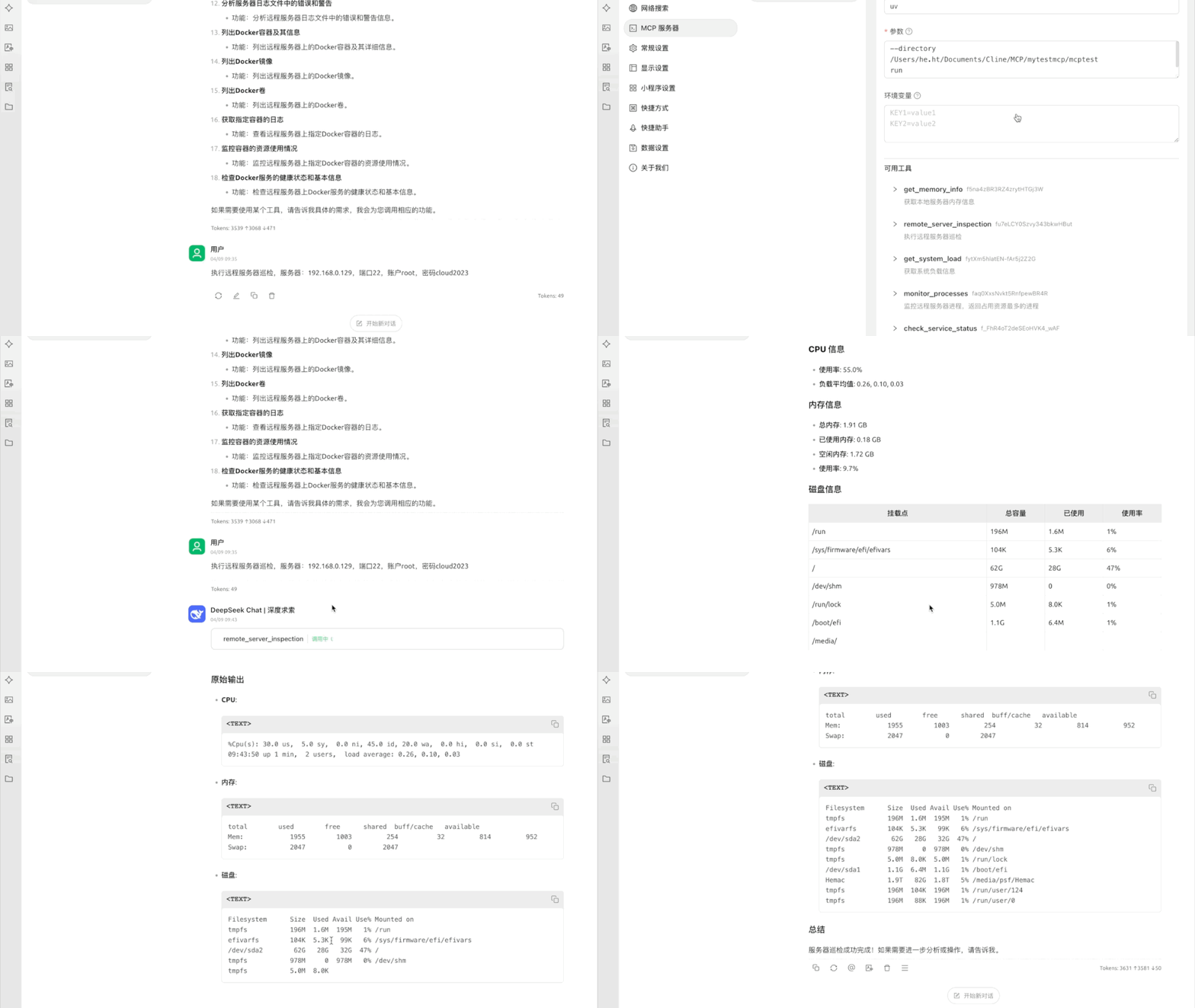
Demo Animation

📌 Interactive Client Demo

On Terminal
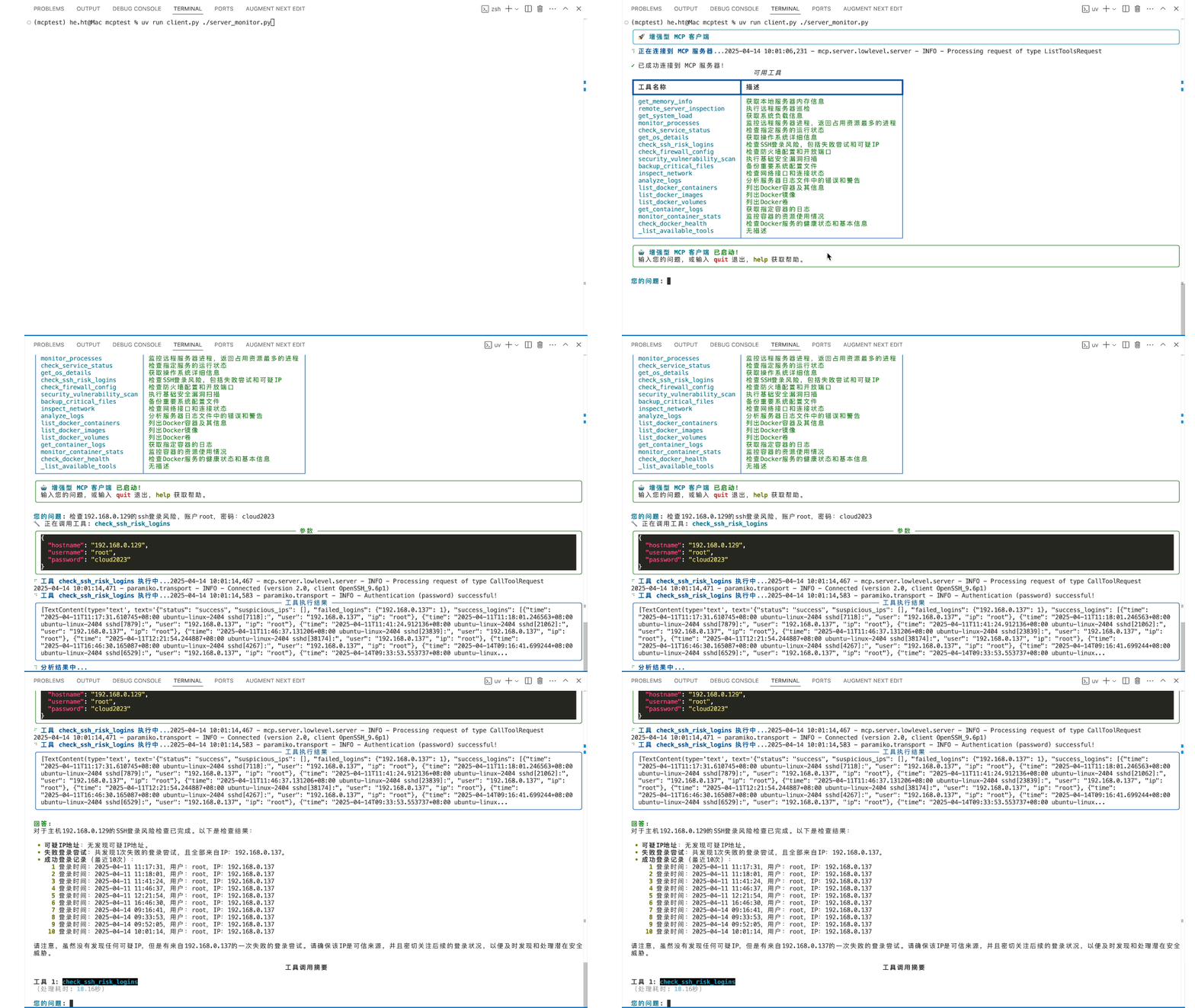
Client Demo Animation


⚙️ Installation

Ensure you have Python 3.10+ installed. This project uses uv for dependency and environment management.

1. Install UV

curl -LsSf https://astral.sh/uv/install.sh | sh

2. Set Up Virtual Environment

uv venv .venv

# Activate the environment
source .venv/bin/activate      # Linux/macOS
.\.venv\Scripts\activate       # Windows

3. Install Dependencies

uv pip install -r requirements.txt

Dependencies are managed via pyproject.toml.


🚧 Deployment

📡 SSE Remote Deployment (UV)

cd server_monitor_sse

# Install dependencies
pip install -r requirements.txt

# Start service
cd ..
uv run server_monitor_sse --transport sse --port 8000

🐳 SSE Remote Deployment (Docker Compose)

Ensure Docker and Docker Compose are installed.

cd server_monitor_sse
docker compose up -d

# Check status
docker compose ps

# Logs monitoring
docker compose logs -f

🛠️ Local MCP Server Configuration (Stdio)

Add this configuration to your MCP settings:

{
  "ops-mcp-server": {
    "command": "uv",
    "args": [
      "--directory", "YOUR_PROJECT_PATH_HERE",
      "run", "server_monitor.py"
    ],
    "env": {},
    "disabled": true,
    "autoApprove": ["list_available_tools"]
  },
  "network_tools": {
    "command": "uv",
    "args": [
      "--directory", "YOUR_PROJECT_PATH_HERE",
      "run", "network_tools.py"
    ],
    "env": {},
    "disabled": false,
    "autoApprove": []
  },
}

Note: Replace YOUR_PROJECT_PATH_HERE with your project's actual path.


💬 Interactive Client Usage

An interactive client (client.py) allows you to interact with MCP services using natural language.

1. Install Client Dependencies

uv pip install openai rich

2. Configure Client

Edit these configurations within client.py:

# Initialize OpenAI client
self.client = AsyncOpenAI(
    base_url="https://your-api-endpoint",
    api_key="YOUR_API_KEY"
)

# Set model
self.model = "your-preferred-model"

3. Run the Client

uv run client.py [path/to/server.py]

Example:

uv run client.py ./server_monitor.py

Client Commands

  • help - Display help.
  • quit - Exit client.
  • clear - Clear conversation history.
  • model <name> - Switch models.

📄 License

This project is licensed under the MIT License.


📌 Notes

  • Ensure remote SSH access is properly configured.
  • Adjust tool parameters based on actual deployment conditions.
  • This project is under active development; feedback and contributions are welcome.

Install configuration

Are you the maintainer?

Claim this server with your GitHub account to request manual ownership verification.

README Embed Badge
Markdown

Link to the catalog listing for MCP server for AI-driven IT operations from your README. This badge does not certify ownership, compatibility or security.

[![MCP catalog listing](https://img.shields.io/badge/MCP-awesome--mcp-orange?style=flat-square)](https://awesome-mcp.com/servers/ops-mcp-server)

REPOSITORY STATS

GitHub StarsUnavailable
ForksUnavailable

Public repository statistics could not be verified. Check the configured source address; unavailable counts are not zero.

Downloads and pulls

Separate sources, scopes and periods. Never combined or treated as installations, active users or security reviews.

No reviewed package or image identity; download statistics are not listed yet.

Related cloud devops MCP Servers

Alternative and complementary servers in the same category

View all in cloud devops →
Huawei MCP Server
mcp-server-huaweiclouddeveloper•huaweiclouddeveloper

A Model Context Protocol server built on Huawei Cloud services that enables AI assistants to operate Huawei Cloud resources within conversational workflows, supporting ECS, OBS, GaussDB, and other cloud products.

Repository stats unavailable
Cloud & DevOps
Coolify MCP Server
coolify-mcp-server•wrediam

An MCP server that exposes the Coolify v4.3.1 REST API so AI clients can manage applications, databases, services, servers, deployments, and more.

Repository stats unavailable
Cloud & DevOps

A deprecated Model Context Protocol server for interacting with Kong Konnect APIs, enabling AI assistants to query and analyze Kong Gateway configurations, traffic, and analytics.

Repository stats unavailable
Cloud & DevOps