

A directory listing describing a cancellation-letter and mailing-address service. The configured public GitHub repository returned 404 during source verification.
Repository stats unavailable
Developer Tools
OptiGate is a self-hosted registry and gateway for MCP servers that exposes managed tools to MCP clients through a single endpoint using two meta-tools for token-sparing tool retrieval.
Self-hosted MCP gateway and registry exposing a search_tools and execute_tool facade is cataloged as an MCP server attributed to ninjaede. OptiGate is a self-hosted registry and gateway for MCP servers that exposes managed tools to MCP clients through a single endpoint using two meta-tools for token-sparing tool retrieval. It is categorized under developer tools. See the capability inspector for recorded interfaces and their independent review status; consult upstream documentation for the current interface.
Installation configuration is not reviewed. No executable setup is offered for this entry; inspect the source repository before proceeding.
Catalog license label: MIT. Check the source repository's current license and terms before using, modifying or distributing this software.
Capability definitions are not reviewed. Unreviewed imports are not exposed as trusted interfaces.
No reviewed records to display. This does not establish that upstream lacks this capability.
No reviewed records to display. This does not establish that upstream lacks this capability.
No reviewed records to display. This does not establish that upstream lacks this capability.
Email delivery is not connected. This page does not collect email addresses or create subscriptions.
Browse the registry for current listings instead.
Reviews for Self-hosted MCP gateway and registry exposing a search_tools and execute_tool facade are not available yet
Review publishing and storage are not connected. This page does not collect or publish ratings or comments, including after sign-in.
Clients call search_tools to get the top-k relevant tool cards instead of loading all schemas, keeping context cost constant across registry sizes.
Yes, optionally: with mode set to decision, a decision model semantically reranks the lexical candidate pool and may answer that no tool matches.
When approval is required, new servers start as pending_approval and only superadmins can approve them into healthy state; unapproved servers never appear in search results.
README.md · d17b2cc443fe · Fetched 2026-11-13 10:33:01 UTC
Original upstream text, without AI rewriting. Scripts, forms and unsafe links are filtered for safety.
Showing the last retrieved documentation snapshot; check the source for current changes.






Your optimized, self-hosted MCP gateway. One endpoint for all your MCP servers — with token-sparing tool retrieval built in. Optional: with decision-model based reranking.
📚 Documentation: https://ninjaede.github.io/optigate
OptiGate is a self-hosted MCP (Model Context Protocol) server registry and gateway for LLM tools. It manages your MCP servers (registration, health, approval workflow, audit, per‑tenant credential isolation) and exposes them to any MCP client — Claude, ChatGPT, Hermes, coding agents — through a single Streamable HTTP endpoint. Instead of loading hundreds of tool schemas into the LLM context, clients query two meta‑tools and retrieve only the tools they actually need.
MCP Client ──▶ POST /mcp ──▶ OptiGate ──▶ managed MCP servers (HTTP/SSE/stdio)
                search_tools + execute_tool only
| Token‑sparing retrieval | search_tools(query, k) returns the k most relevant tool cards across all managed servers |
| Decision‑model reranking | Optional mode="decision": a decision model (Jev via OpenRouter, or any OpenAI‑compatible endpoint) semantically reranks the candidates and may report "no matching tool" |
| MCP facade | The registry itself is an MCP server: search_tools + execute_tool over stateless JSON‑RPC at /mcp |
| Self‑hosted & Docker‑ready | MIT licensed, runs anywhere with Docker Compose — your LLM tools and credentials never leave your infrastructure |
| Multi‑transport | Manages streamable_http, sse, and stdio servers |
| Governance | Scopes (global / tenant / private), approval workflow, disable/enable, full audit trail |
| Auth | Keycloak JWT (RS256/JWKS) in production, local username/password login, dev mode for local testing |
| Self‑updating index | Auto‑connects healthy servers on boot (3 retries each), keeps the tool index fresh on a loop with jitter |
| Per‑tenant credential bindings | Shared servers connect with each tenant's own credentials; bindings persisted in Postgres |
| Args validation | Tool arguments are validated against inputSchema before forwarding (required fields + type checks) |
| SSRF protection | URL allowlist via SSRF_ALLOWED_HOSTS env; built‑in deny of loopback/link‑local addresses |
| Rate limiting | 200 req/min global via @fastify/rate‑limit |
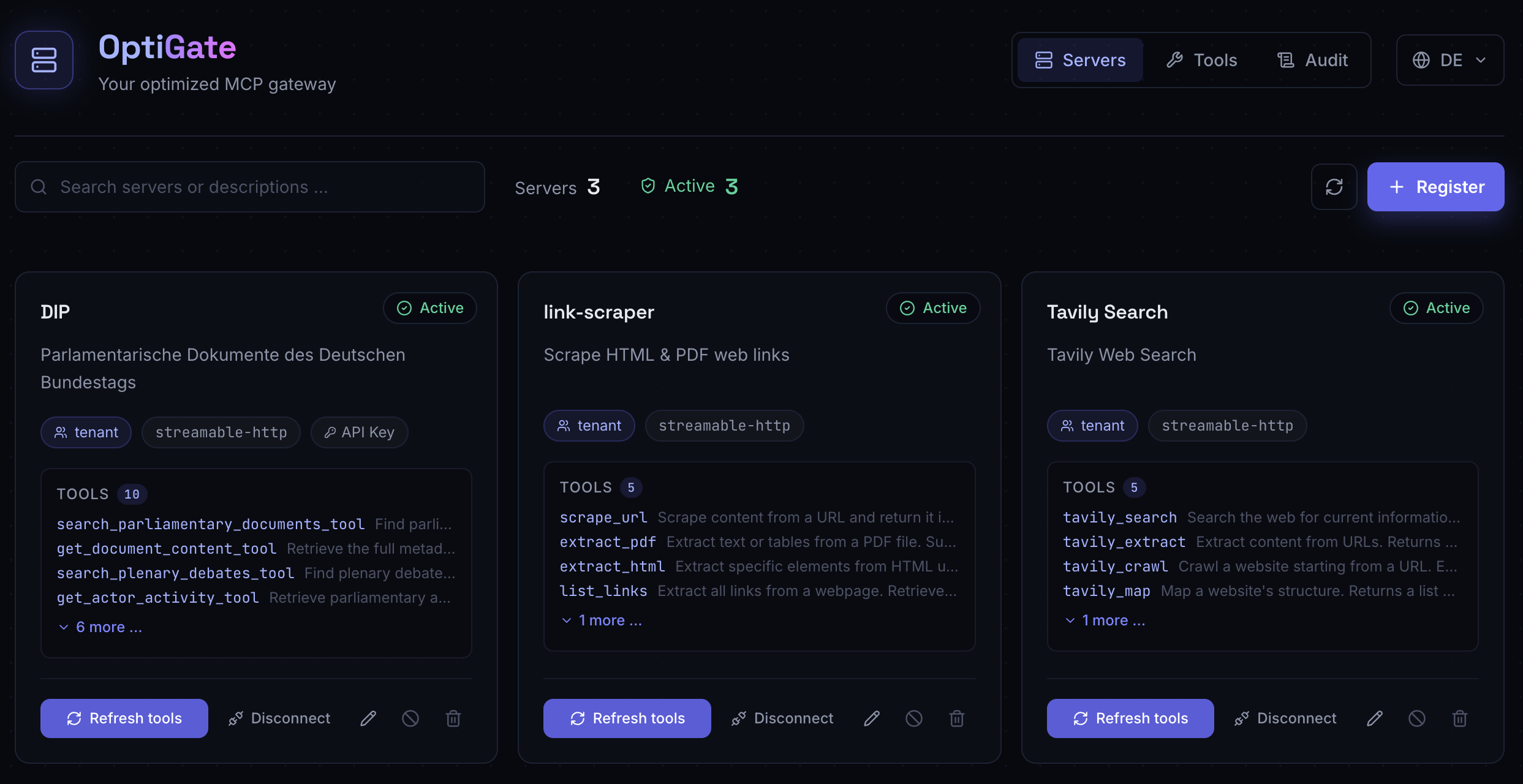
| Admin UI | Server cards with status badges, custom key/value headers, live tool search view, audit feed — DE/EN/FR |
The fastest way to run OptiGate is the bundled Compose stack — no local Node or Postgres required:
# Copy the example env and adjust
cp .env.example .env

# Development stack: Postgres + API (hot reload via tsx watch) + Web UI (Vite HMR)
docker compose -f docker-compose.dev.yml up

# UI   → http://localhost:3030
# API  → http://localhost:8100/health
# MCP  → http://localhost:8100/mcp
For production:
# Set these in your environment or .env:
#   AUTH_MODE=keycloak   KEYCLOAK_URL=...   KEYCLOAK_REALM=...
#   SECRET_ENCRYPTION_KEY=...   POSTGRES_PASSWORD=...
docker compose up --build -d

# UI  : http://localhost:8080  (nginx, /api proxied to the server)
# API : http://localhost:8100  (Keycloak JWT required)
Data lives in the pgdata volume; the schema is created idempotently on boot.
Both services are plain Node projects:
cd server && npm i && AUTH_MODE=dev npm run dev    # API on :8100
cd web    && npm i && npm run dev                  # UI on :5173 (proxies /api)
Without DATABASE_URL the server runs on an in‑memory repository — handy
for trying it out, but data is lost on restart.
Register OptiGate once in any MCP client:
{
  "mcpServers": {
    "optigate": {
      "type": "http",
      "url": "http://localhost:8100/mcp",
      "headers": { "x-dev-user": "alice" }
    }
  }
}
That's it — search_tools and execute_tool now give the client access to
every visible registry server.
For machine clients (agents, CI) without Keycloak, admins can issue
gateway API keys (POST /api/api-keys — admin: own tenant only,
superadmin: any tenant; also manageable in the UI's API-Keys view).
Keys are gateway-only (/mcp, never /api), bound to a
user/role/tenant, and shown in plaintext exactly once. Note: on the
gateway, visibility only distinguishes superadmin keys (platform-wide)
from the rest (tenant-scoped) — an admin key sees what a user key of the
same tenant sees:
{
  "mcpServers": {
    "optigate": {
      "type": "http",
      "url": "http://localhost:8100/mcp",
      "headers": { "x-api-key": "og_..." }
    }
  }
}
OptiGate's token-sparing retrieval keeps LLM context usage flat:
search_tools("chart", k=5) → lexically scored tool cards (name,
description, input schema) across all indexed servers.execute_tool(server_id, tool_name, args) → routed through the connection
pool; only healthy/degraded servers, scope‑checked for the caller, args
validated against the cached schema.Context cost stays constant no matter whether you manage 20 or 2,000 tools. The web UI has a Tool Search view that runs the exact same retrieval path, so you can inspect what agents would see.
mode="decision")Lexical search is fast but misses paraphrases ("download web page" vs. a tool
named http_fetch). Opt‑in per request, search_tools can hand its candidate
pool to a decision model that reranks semantically — and may honestly
report "no matching tool" instead of guessing:
// tools/call search_tools
{ "query": "download web page", "k": 5, "mode": "decision" }
Two backends are supported through one provider‑agnostic interface:
| Provider | Endpoint | Notes |
|---|---|---|
jev | TypeSafe AI System One (Choice primitive with per‑option probabilities + confidence) | Via OpenRouter (https://openrouter.ai/api/v1, model typesafe/jev-1.13) or first‑party (https://api.typesafe.ai) |
openai-compatible | Any chat‑completions endpoint (OpenAI, Ollama, OmniRoute, …) | Temperature 0, JSON output, strictly validated against the candidate set |
Behavioral guarantees:
decisionModel.candidatePool, default 20); the model only re‑orders it.none the response is empty plus a
confidence score, so agents can rephrase instead of calling the wrong tool.{used, provider, fallback, latencyMs, …}.execute_tool is unchanged).# .env — OpenRouter (key at https://openrouter.ai/settings/keys)
DECISION_MODEL_ENABLED=true
DECISION_MODEL_PROVIDER=jev
DECISION_MODEL_BASE_URL=https://openrouter.ai/api/v1
DECISION_MODEL_MODEL=typesafe/jev-1.13
DECISION_MODEL_API_KEY=<key>
DECISION_MODEL_TIMEOUT_MS=3000
DECISION_MODEL_CANDIDATE_POOL=20
The API key can also be stored at runtime in the UI's Settings view
(decisionModel.apiKey): it is AES‑256‑GCM encrypted at rest and never
returned in plaintext. Precedence for all decisionModel.* settings:
database value > environment variable > built‑in default.
Forcing reranking server-side: by default the LLM opts in per call via
mode="decision". Set decisionModel.forceWhenConfigured=true
(DECISION_MODEL_FORCE=true) and every search_tools call — gateway and
REST alike — is reranked once a model is configured, no matter which mode
was requested. Forced responses carry "forced": true in the decision
metadata, so callers can always tell what happened. Note the cost implication:
every search then pays model tokens + latency.
Every request carries an authenticated identity (AuthContext) consisting of
userId, role, and tenantId. This identity drives three policy checks:
1. Scope visibility (canView) — what may this user see?
| Server scope | Who sees it |
|---|---|
global | everyone |
tenant | users whose tenantId matches the server's tenant |
private | only the user who registered it (ownerId === userId) |
All list/search/execute endpoints filter through this rule, so tenants cannot see each others' servers and private servers stay invisible to everyone else.
2. Registration rights (canRegister) — who may register what?
global scope requires superadmin; tenant and private require at least
admin. The registering user's tenant/user id is stored on the server record
and later used for visibility and ownership checks.
3. Approvals (canApprove) — supply‑chain gate
New servers start as pending_approval when APPROVAL_REQUIRED=true; only
superadmins can approve them into healthy state (or re‑enable disabled
ones). Unapproved servers never appear in any index or search result.
4. Credential bindings — shared servers, per‑tenant credentials
Shared HTTP/SSE servers are visible platform‑wide, but each tenant can
bind its own credentials via the bindings API (PUT /api/servers/:id/bindings/:tenantId). The connection pool resolves the
caller's tenant scope and injects the correct auth headers on every request.
Bindings are persisted in Postgres (server_credential_bindings table).
In production the identity comes from a Keycloak JWT: userId from the
sub claim, roles from realm_access/resource_access, and tenantId from
the first organization claim.
AUTH_MODE=dev) and its headersDev mode skips token verification and derives the identity from optional request headers — so you can test multi‑user behavior locally without an IdP:
| Header | Default | Meaning |
|---|---|---|
x-dev-user | dev-user | Sets the userId (owner of private servers, audit actor) |
x-dev-role | superadmin | One of superadmin / admin / user — controls registration and approval rights |
x-dev-tenant | dev-tenant | Sets the tenantId — controls visibility of tenant-scoped servers |
Example — simulate a plain user of another tenant:
curl -H "x-dev-user: bob" -H "x-dev-role: user" -H "x-dev-tenant: other" \
  http://localhost:8100/api/servers
Without these headers every dev request acts as the default superadmin in
dev-tenant.
Warning: dev headers grant full identity control by design. Never run
AUTH_MODE=devon a network‑exposed instance; use Keycloak or local mode instead.
AUTH_MODE=local)Username/password login without any external IdP — for home labs and small
teams that don't run Keycloak. Passwords are stored as scrypt hashes
(local_users table in Postgres, in-memory otherwise); sessions are
self-signed HS256 JWTs.
# .env
AUTH_MODE=local
LOCAL_JWT_SECRET=<min-32-chars-secret>
LOCAL_BOOTSTRAP_ADMIN_USER=admin
LOCAL_BOOTSTRAP_ADMIN_PASSWORD=<min-10-chars>
On first boot with an empty user table, the bootstrap superadmin is created
once. Afterwards sign in via the UI login form (or POST /auth/login) and
manage the rest in the Benutzer view (GET/POST/PATCH/DELETE /api/users) — admins manage their own tenant only, superadmins manage all.
There is no self-signup. Deactivated users lose access immediately, including
already-issued tokens (checked against the user record on every request).
# Login from the shell
curl -X POST http://localhost:8100/auth/login \
  -H 'Content-Type: application/json' \
  -d '{"username":"admin","password":"..."}'
# → {"token":"...","expiresAt":"...","user":{...}}

curl http://localhost:8100/api/servers \
  -H "Authorization: Bearer <token>"
| Variable | Default | Purpose |
|---|---|---|
AUTH_MODE | keycloak | dev = header‑based identity, no token required · local = username/password login, no Keycloak · keycloak = RS256/JWKS bearer verification |
LOCAL_JWT_SECRET | – | Required in local mode — HS256 signing secret for session JWTs (min 32 chars) |
LOCAL_JWT_TTL | 12h | Local session lifetime (12h, 30m, 7d, 900s or ms) |
LOCAL_BOOTSTRAP_ADMIN_USER / LOCAL_BOOTSTRAP_ADMIN_PASSWORD | – | First superadmin, created once when the user table is empty (password min 10 chars) |
LOCAL_BOOTSTRAP_ADMIN_TENANT | – | Optional tenant for the bootstrap admin (empty = platform-wide) |
DATABASE_URL | – | Postgres connection; unset = in‑memory repository |
APPROVAL_REQUIRED | true | New servers start as pending_approval |
PORT | 8100 | API listen port |
SECRET_ENCRYPTION_KEY | – | AES‑256‑GCM key for direct secret entry (min 32 chars) |
KEYCLOAK_URL | – | Keycloak issuer URL |
KEYCLOAK_REALM | – | Keycloak realm name |
KEYCLOAK_AUDIENCE | realm value | Expected JWT audience |
SSRF_ALLOWED_HOSTS | – | Comma‑separated allowed hosts/globs for outgoing MCP connections; when set, only listed hosts connect; unset allows all routable targets except loopback/private/link‑local |
SSRF_ALLOW_PRIVATE_RANGES | false | Home‑lab escape hatch: also allow loopback/private/link‑local targets (also as ssrf.allowPrivateRanges setting) |
RATE_LIMIT_MAX | 200 | Global rate limit (requests/minute/IP, also as ratelimit.max setting) |
RECONCILE_INTERVAL_MS / RECONCILE_RETRY_MS / RECONCILE_MAX_STALE | 60000 / 5000 / 10 | Tool index refresh tuning (also as reconciler.* settings) |
SEARCH_DEFAULT_LIMIT / SEARCH_MAX_LIMIT | 5 / 20 | Tool retrieval top‑k bounds (also as search.* settings) |
AUDIT_LIMIT | 100 | Audit feed length (also as audit.limit setting) |
GATEWAY_DISPATCH_TIMEOUT_MS | 30000 | Per‑request timeout of the /mcp gateway (also as gateway.dispatchTimeoutMs setting) |
DECISION_MODEL_ENABLED | false | Opt‑in switch for search_tools mode="decision" (also as decisionModel.enabled setting) |
DECISION_MODEL_PROVIDER | openai-compatible | jev (TypeSafe System One) or openai-compatible chat‑completions endpoint |
DECISION_MODEL_BASE_URL | – | Provider base URL, e.g. https://openrouter.ai/api/v1 or https://api.typesafe.ai |
DECISION_MODEL_MODEL | – | Model id, e.g. typesafe/jev-1.13 (pinned; default jev-latest for the jev provider) |
DECISION_MODEL_API_KEY | – | Provider API key — store via Settings view to keep it AES‑256‑GCM encrypted at rest |
DECISION_MODEL_TIMEOUT_MS / DECISION_MODEL_CANDIDATE_POOL | 3000 / 20 | Model call timeout and lexical candidate pool size for reranking |
DECISION_MODEL_FORCE | false | Force reranking for every search_tools call once a model is configured (also as decisionModel.forceWhenConfigured setting) |
CORS_ORIGIN | all origins | Comma‑separated allowed CORS origins for the API |
MAX_CONNS_PER_SERVER | 20 | Max simultaneous connections per upstream MCP server (also as pool.maxConnsPerServer setting) |
All of the above (plus registry.approvalRequired) are runtime‑tunable by
admins in the UI's Settings view (GET/PUT/DELETE /api/settings) —
precedence: database value > environment variable > built‑in default.
Security‑sensitive keys (ssrf.*, registry.approvalRequired) require
superadmin; every change is audited as setting.changed.
| Measure | What it does |
|---|---|
| SSRF protection | SSRF_ALLOWED_HOSTS env blocks unlisted hosts; deny‑list for 169.254.169.254, loopback, link‑local |
| Args validation | Required fields and types checked against inputSchema before forwarding |
| Rate limiting | 200 req/min global via @fastify/rate‑limit |
| Audit scope | GET /api/audit filters by caller's tenant (superadmin sees all) |
| IDOR protection | Tool listings, server details & bindings checked against canView policy |
| Secrets at rest | AES‑256‑GCM (SECRET_ENCRYPTION_KEY); plaintext never in DB or responses |
| Dev‑mode guard | AUTH_MODE=dev only; Keycloak mode requires valid RS256 JWT |
cd server && npm test          # vitest (92+ tests)
cd server && npm run lint      # eslint
cd server && npm run typecheck # tsc --noEmit
cd server && npm run build     # tsc → dist/
cd web    && npm run build     # vite build
Node.js 24 · Fastify · TypeScript · official MCP SDK · Postgres 17 · React 18 · Vite · Tailwind CSS v4
MIT — free to use, modify, and distribute.
If this project saves you time or helps your agents work better, you can support it here:
MCP gateway · Model Context Protocol registry · token-sparing tool retrieval · self-hosted LLM tools · LLM tool router · AI agent tooling · reduce LLM context usage and token costs
Claim this server with your GitHub account to request manual ownership verification.
Link to the catalog listing for Self-hosted MCP gateway and registry exposing a search_tools and execute_tool facade from your README. This badge does not certify ownership, compatibility or security.
[](https://awesome-mcp.com/servers/optigate)Public repository statistics could not be verified. Check the configured source address; unavailable counts are not zero.
Separate sources, scopes and periods. Never combined or treated as installations, active users or security reviews.
No reviewed package or image identity; download statistics are not listed yet.
Alternative and complementary servers in the same category
A directory listing describing a cancellation-letter and mailing-address service. The configured public GitHub repository returned 404 during source verification.

A hosted MCP service for browsing and searching through Singapore mobile-network proxies.

A directory listing describing a Markdown-to-PDF service. The configured public GitHub repository returned 404 during source verification.