

pdf-it MCP server

pdf-it MCP server

pdf-it•bymrslbt

An MCP server that converts markdown into styled PDFs with cover pages, tables of contents and page-numbered footers.

License: MIT•Runtime: Awaiting documentation review•Category: file systems-docs

WHAT IT DOES

  • •Provides a generate_pdf tool that converts a markdown string into a PDF, with optional title, author, output path and template.
  • •Offers two templates: research-report with cover page and auto-generated table of contents, and plain for dense body content only.
  • •Exposes a list_templates tool returning available templates with descriptions.
  • •Ships fonts inside the package and renders with React-PDF for consistent output across machines.

BEST FOR

  • •Turning research summaries or design docs into client-ready PDF reports with cover pages and tables of contents.
  • •Quickly exporting short markdown notes as plain dense PDFs.

ABOUT PDF-IT

pdf-it MCP server is cataloged as an MCP server attributed to mrslbt. An MCP server that converts markdown into styled PDFs with cover pages, tables of contents and page-numbered footers. It is categorized under file systems-docs. See the capability inspector for recorded interfaces and their independent review status; consult upstream documentation for the current interface.

HOW TO INSTALL

Installation configuration is not reviewed. No executable setup is offered for this entry; inspect the source repository before proceeding.

LICENSE

Catalog license label: MIT. Check the source repository's current license and terms before using, modifying or distributing this software.

Capability inspector

Capability definitions are not reviewed. Unreviewed imports are not exposed as trusted interfaces.

Tools (0)

No reviewed records to display. This does not establish that upstream lacks this capability.

Resources (0)

No reviewed records to display. This does not establish that upstream lacks this capability.

Prompts (0)

No reviewed records to display. This does not establish that upstream lacks this capability.

NEWSLETTER - COMING LATER

Newsletter subscriptions are not open yet

Email delivery is not connected. This page does not collect email addresses or create subscriptions.

Browse the registry for current listings instead.

Community Reviews

Coming later

Reviews for pdf-it MCP server are not available yet

Review publishing and storage are not connected. This page does not collect or publish ratings or comments, including after sign-in.

FREQUENTLY ASKED QUESTIONS

Which templates does pdf-it offer?

Two templates: research-report with cover page and auto-generated TOC, and plain with dense body content only.

Where are generated PDFs saved?

By default to ~/Documents/pdf-it/{slug}-{timestamp}.pdf, overridable via the output_path parameter.

Upstream README

View this exact version on GitHub

README.md · 1d9eb430a22b · Fetched 2026-11-13 11:02:14 UTC

Original upstream text, without AI rewriting. Scripts, forms and unsafe links are filtered for safety.

Showing the last retrieved documentation snapshot; check the source for current changes.

pdf-it

pdf-it MCP server MCP Badge npm version npm downloads License: MIT

A Model Context Protocol (MCP) server and Claude Code skill that turns markdown into PDFs that look like they were made on purpose. Cover page, table of contents, code blocks that hold across page breaks, page-numbered footer. One command from your Claude session to a file you can send to a client.

Fonts ship inside the package, so every PDF looks the same on every machine. Nothing to install, nothing to configure.

pdf-it cover example

Why this exists

Every Claude Code research session ends the same way: a wall of useful markdown and no clean way to turn it into a PDF a person would actually want to read.

Chrome print: takes 30 seconds, output looks like a Word doc. Manual HTML conversion: 10 minutes per document. Pandoc: works but defaults look like a 2008 academic paper. None of it produces an artifact you would send to a client.

pdf-it is one command. The output is designed by default.
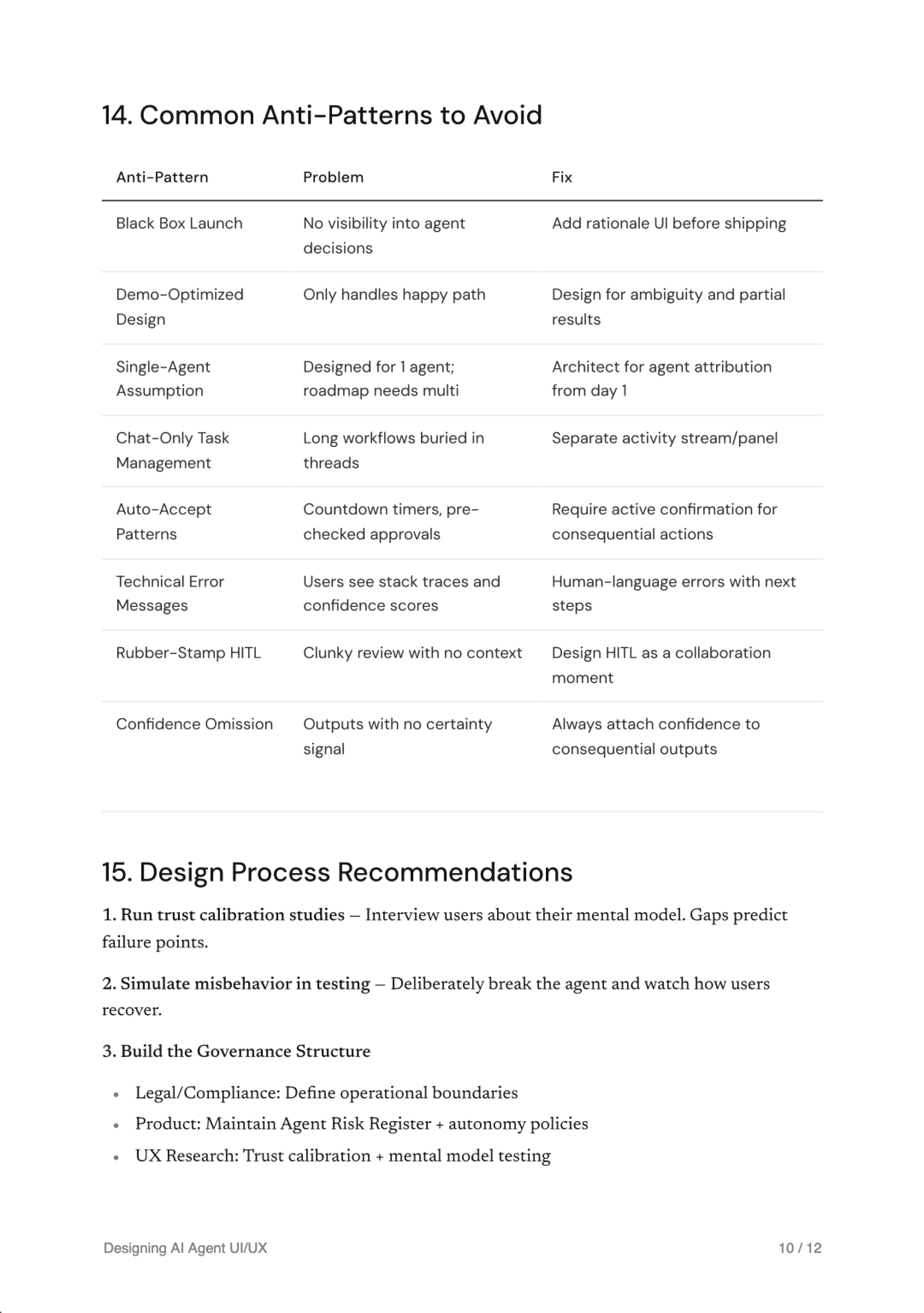
pdf-it body example

Install

npm install -g pdf-it-mcp

Or run on demand with npx pdf-it-mcp.

Requirements

  • Node.js 20 or newer
  • Nothing else to install. The renderer and fonts ship inside the package.

Configure

Claude Desktop

Edit claude_desktop_config.json:

{
  "mcpServers": {
    "pdf-it": {
      "command": "npx",
      "args": ["-y", "pdf-it-mcp"]
    }
  }
}

Claude Code

claude mcp add pdf-it -- npx -y pdf-it-mcp

Cursor

Add to ~/.cursor/mcp.json with the same shape as Claude Desktop.

Cline / Continue / Zed / Goose

Standard MCP config. Same npx -y pdf-it-mcp command.

Use

In any Claude session connected to the server, ask:

Save this as a PDF

Or any of these phrasings: export as PDF, make a PDF report from this, turn this into a PDF, /pdf. The skill picks up the request and routes it through pdf-it. The output lands in ~/Documents/pdf-it/ by default.

Tools

ToolDescription
generate_pdfConvert markdown into a PDF. Accepts a template (research-report or plain), optional title and author for the cover, and an optional output path.
list_templatesReturn the list of available templates with descriptions.

generate_pdf parameters

ParameterRequiredDescription
contentyesMarkdown string to convert
titlenoShown on the cover and in the page footer
authornoShown on the cover above the date
output_pathnoAbsolute path for the output. Defaults to ~/Documents/pdf-it/{slug}-{timestamp}.pdf
templatenoresearch-report (default) or plain

Templates

NameDescription
research-reportCover page with title, author, and date. Auto-generated table of contents from H1 and H2 headings. Body with proper hierarchy. Footer with title and page number. Best for research, summaries, design docs, reports.
plainNo cover, no TOC. Dense body content only. Best for short notes and quick exports.

Skill

This package ships with a Claude Code skill at SKILL.md. Trigger phrases the skill responds to:

  • save this as PDF
  • export as PDF
  • make a PDF report from this
  • turn this into a PDF
  • generate a PDF
  • /pdf

See SKILL.md for the full skill spec.

Output

By default PDFs are written to ~/Documents/pdf-it/{slug}-{timestamp}.pdf. Pass output_path to override.

Design

Three families ship inside the package:

  • Newsreader for the cover title (display 60, light) and body H1 (display 32). High-contrast serif that holds editorial weight at large sizes.
  • DM Sans for H2, H3, table type, and the TOC heading. Quieter sub-hierarchy.
  • JetBrains Mono for page numbers, metadata, code, and figure captions.

Pure white paper, near-black ink (#111113), secondary ink for date and table cells (#2B2B2E), muted gray for page numbers and date (#7A7A7E), hairline borders (#E6E6E6). No accent colors. Code blocks render without syntax highlighting on purpose: color choices in PDFs age badly.

Every value lives in src/templates/design-tokens.ts as the single source of truth. If you want a different design language, fork the components. They live in src/templates/components/ and are plain React-PDF components with a small surface area.

How it works

  1. Parse: remark converts your markdown into an AST.
  2. Compose: the AST becomes typed React components (Cover, TOC, and body primitives like H1/H2/H3, Paragraph, CodeBlock, Blockquote, Table, lists, and charts).
  3. Render: @react-pdf/renderer rasterizes the React tree into a deterministic PDF with embedded fonts and TOC anchors.
  4. Output: the PDF lands in ~/Documents/pdf-it/{slug}-{timestamp}.pdf with title/author metadata embedded.

Total time: typically sub-second for a 5-page document, 1-2 seconds for a 30-page document.

Recognition

Listed on npm, Glama, and LobeHub.

Disclaimer

This is an unofficial, community-built tool. It is not affiliated with, endorsed by, or sponsored by Anthropic PBC. Claude and Claude Code are trademarks of Anthropic PBC.

pdf-it runs locally and ships its own renderer (@react-pdf/renderer) and fonts. Use at your own risk. The author accepts no liability for issues arising from misuse, prompt injection, bugs, or rendering failures.

License

MIT. See LICENSE.

Install configuration

Are you the maintainer?

Claim this server with your GitHub account to request manual ownership verification.

README Embed Badge
Markdown

Link to the catalog listing for pdf-it MCP server from your README. This badge does not certify ownership, compatibility or security.

[![MCP catalog listing](https://img.shields.io/badge/MCP-awesome--mcp-orange?style=flat-square)](https://awesome-mcp.com/servers/pdf-it)

REPOSITORY STATS

GitHub StarsUnavailable
ForksUnavailable

Public repository statistics could not be verified. Check the configured source address; unavailable counts are not zero.

Downloads and pulls

Separate sources, scopes and periods. Never combined or treated as installations, active users or security reviews.

No reviewed package or image identity; download statistics are not listed yet.

Related file systems-docs MCP Servers

Alternative and complementary servers in the same category

View all in file systems-docs →

A Model Context Protocol server for global law with read-only tools to find and read provisions by date, trace the law behind each word, search text and changes, and check cases or briefs against law in force.

Repository stats unavailable
Files & Documentation
LoreKeeper MCP server
lorekeeper-rpg-lorekeeper-com•lore-keeper

Hosted MCP server for tabletop RPG worlds that organizes messy notes and documents into a private store and lets MCP apps search lore, read documents, find characters, and optionally generate character or world pictures.

Repository stats unavailable
Files & Documentation

An MCP server that gives AI assistants scoped file system operations inside a project directory, with read-only reference projects plus git and GitHub tools.

Repository stats unavailable
Files & Documentation