
An AI receptionist platform with an MCP server for accessing business calls, contacts and appointments from AI assistants.
52
Communication
A local-first social media planner that exposes AI agent capabilities as MCP tools, letting agents draft, lint, and schedule posts while a human approval gate controls what actually publishes.
pendpost: MCP-native social media planner with a human approval gate is cataloged as an MCP server attributed to pendpost. A local-first social media planner that exposes AI agent capabilities as MCP tools, letting agents draft, lint, and schedule posts while a human approval gate controls what actually publishes. It is categorized under communication social. See the capability inspector for recorded interfaces and their independent review status; consult upstream documentation for the current interface.
Installation configuration is not reviewed. No executable setup is offered for this entry; inspect the source repository before proceeding.
Catalog license label: MIT. Check the source repository's current license and terms before using, modifying or distributing this software.
Capability definitions are not reviewed. Unreviewed imports are not exposed as trusted interfaces.
No reviewed records to display. This does not establish that upstream lacks this capability.
No reviewed records to display. This does not establish that upstream lacks this capability.
No reviewed records to display. This does not establish that upstream lacks this capability.
Email delivery is not connected. This page does not collect email addresses or create subscriptions.
Browse the registry for current listings instead.
Reviews for pendpost: MCP-native social media planner with a human approval gate are not available yet
Review publishing and storage are not connected. This page does not collect or publish ratings or comments, including after sign-in.
Every post is fail-closed on approval: a post with no approval will not publish, plan_create_post always creates a draft, and only approve_post or reject_post can change it.
pendpost speaks MCP over native stdio so a client can launch it, and it also serves MCP over streamable-HTTP at /mcp when running.
Instagram, Facebook, LinkedIn, YouTube, X, Telegram, Discord, Mastodon, Nostr, WordPress, and Ghost are live, with several others in beta.
README.md · 614fdeeda7f6 · Fetched 2026-11-13 10:07:53 UTC
Original upstream text, without AI rewriting. Scripts, forms and unsafe links are filtered for safety.
Showing the last retrieved documentation snapshot; check the source for current changes.
Your AI agent drafts and schedules your social posts. Nothing publishes until you approve it.





Website · Docs · Quickstart · Cloud · Releases
npx -y pendpost # Node 22+, then open http://127.0.0.1:8090
If this is the approval step you were looking for, a star on the repo helps other people find it.
pendpost is a free, open-source (MIT), local-first social media planner where an AI agent drafts and schedules posts across Instagram, Facebook, LinkedIn, YouTube, X, Telegram, Discord, Mastodon, and Nostr, plus long-form blogs on WordPress and Ghost, with Reddit, Pinterest, TikTok, and Google Business Profile in beta, all behind a human approval gate you control. It is MCP-native: AI agents draft, lint, schedule, and queue your posts, but nothing goes live until a human approves it. It is built for developers, agencies, and technical solopreneurs who want agents to do the work without handing them the keys, and without getting accounts flagged.
Most "AI social" tools are schedulers with an agent bolted on. pendpost is the opposite. It is an operations layer designed around the agent-plus-human workflow, and these are the parts a scheduler does not give you:

draft, approved, rejected) and is fail-closed: a post with no approval will not publish. plan_create_post always creates a draft, and only approve_post or reject_post can flip it. Nothing publishes until it's approved. By default that's you; auto-approve is owner-only and revocable.rules.json. The humanizer layer flags English AI-writing tells. Errors block publish; warnings are advisory.publishAt, Mastodon, WordPress, Ghost), pendpost hands the post to the platform's own scheduler, so it goes out even when your computer is off. Instagram, Facebook, LinkedIn, and X go out at their time from pendpost itself: from the optional 24/7 cloud service when you turn it on, otherwise from your computer while pendpost runs, or from an always-on host. It stays honest about which cover/thumbnail mechanics actually apply per platform.de-CH, with proper umlauts and 24-hour Swiss dates); set the language in Settings. See the localization docs.One line, no account (needs Node 22 or newer):
npx -y pendpost
# then open http://127.0.0.1:8090
No account, no signup - pendpost runs locally and starts immediately. You can draft, approve, and schedule a full campaign right away. The planner starts empty; press New post or ask your agent for a first draft. Connect a platform in Setup when you are ready to publish - until then a lane is live-but-unauthenticated, so publishing simply waits for the connection rather than faking it.
Prefer git or docker?
# git
git clone https://github.com/pendpost/pendpost pendpost
cd pendpost
npm start            # or: node bin/pendpost.mjs (builds the dashboard on first run)
# then open http://127.0.0.1:8090
# docker
docker compose up
# then open http://127.0.0.1:8090
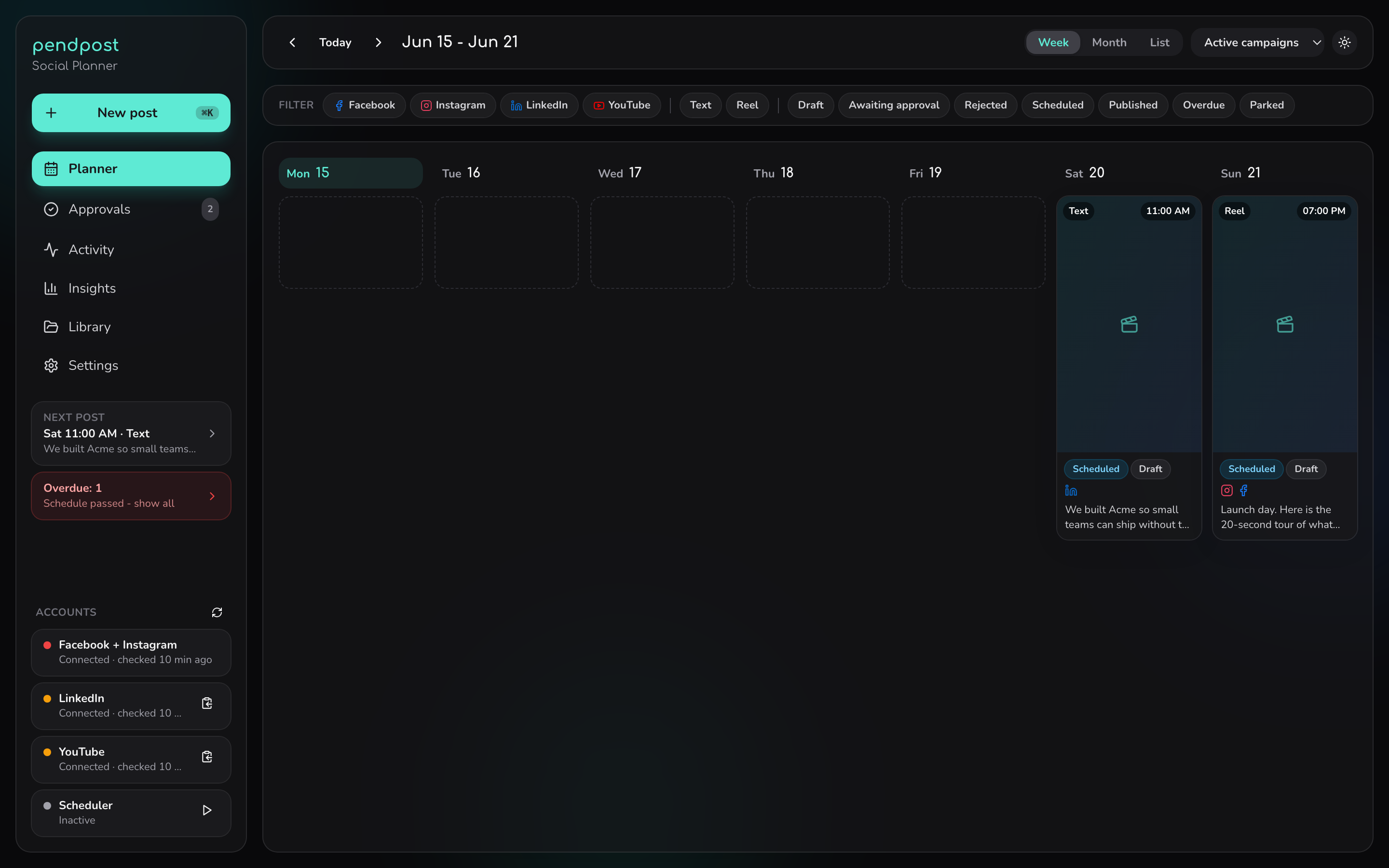
The planner and the approval queue are the two screens you live in: draft and schedule on the left, approve or reject on the right. Nothing on the right can approve itself.
| Planner | Approval queue |
|---|---|
 |  |
The easiest path self-boots: pendpost speaks MCP over native stdio, so the client launches the server for you - nothing to start first.
Claude Desktop (one-click): install the pendpost .mcpb bundle attached to each GitHub release. It self-boots npx -y pendpost --stdio and opens the approval dashboard in the same process.
Claude Code and Cursor plugins: the Claude plugin bundle lives in packaging/claude-plugin/ and the Cursor plugin manifest in .cursor-plugin/. The Cursor plugin launches the pinned npx pendpost@<version> --stdio server; the Claude plugin connects to a running pendpost at http://127.0.0.1:8090/mcp, so start npx pendpost first. Agents that install servers for you (for example Cline) can follow llms-install.md.
Any stdio MCP client:
{
  "mcpServers": {
    "pendpost": { "command": "npx", "args": ["-y", "pendpost", "--stdio"] }
  }
}
Advanced / dev (HTTP transport): pendpost also serves MCP over streamable-HTTP at /mcp. This needs the server already running via npx pendpost:
claude mcp add --transport http pendpost http://127.0.0.1:8090/mcp
Going live on a real platform means creating a developer app in each vendor's portal and running one OAuth ceremony. pendpost makes that agent-drivable: on each incomplete card in the dashboard's Setup page, a Copy AI prompt button copies a ready-to-paste, secret-safe prompt for Claude for Chrome that drives the portal for that one platform. You authenticate at every login/consent gate, and the credential is minted locally by the CLI - it never passes through the agent or the chat. The same setup contract is documented for any agent in AGENTS.md.
Every capability is an MCP tool, and the dashboard mirrors it. Read-only tools can never publish; write tools create drafts and are gated by the approval rules above. Grouped by what they do:
plan_list, plan_get, account_status, assets_list, activity_log, validate_media, platform_validate, pendpost_health, publish_preview, brand_lint, generate_digest, config_get, clients_overview.plan_create_post, plan_update_post, plan_delete_post, restore_post, campaign_create, campaign_set_active.approve_post, reject_post. Nothing publishes until it's approved; by default that's you.scheduler_set, publish_due_run, reschedule, unschedule, mark_posted, verify_post.set_cover, clear_cover, asset_upload, rename_asset, delete_asset.fetch_insights, token_refresh, pendpost_record_block, health_recheck, meta_lane_set.config_set, client_create, client_update, client_archive, client_list, client_set_active.The authoritative count and the read/write split are derived from lib/mcp.mjs and verified by test/parity-check.mjs (see the MCP docs). Each tool also carries readOnlyHint/destructiveHint/title annotations in tools/list.
When you are ready to publish, connect each platform in Setup (or copy .env.example to .env and fill in only the platforms you use). A platform publishes once its credential is present; until then it is live-but-unauthenticated and publishing waits for the connection. (PENDPOST_MODE=mock exists only as a test/demo fixture that routes every lane through the credential-free mock driver.)
Each platform has an interactive setup ceremony that writes to .env:
# Meta (Facebook + Instagram). A System User token is preferred for automation.
node scripts/meta-social.mjs setup-system-user \
  --system-user-token <T> --page-id <ID> --app-id <ID> --app-secret <S>
# (or `node scripts/meta-social.mjs setup` for a long-lived Page token)

# LinkedIn (after creating an OAuth app)
node scripts/linkedin-social.mjs auth

# YouTube (after creating an OAuth client)
node scripts/yt-social.mjs auth

# X (Twitter), OAuth 2.0 PKCE (browser). OAuth 1.0a needs no command - see below.
node scripts/x-social.mjs auth

# Static-credential lanes (no browser): paste the credential into .env (or use
# the dashboard Setup form), then validate with the engine's auth command.
node scripts/telegram-social.mjs auth   # TELEGRAM_BOT_TOKEN + TELEGRAM_CHANNEL_ID
node scripts/discord-social.mjs auth    # DISCORD_WEBHOOK_URL
node scripts/mastodon-social.mjs auth   # MASTODON_INSTANCE_URL + MASTODON_ACCESS_TOKEN
node scripts/wordpress-social.mjs auth  # WORDPRESS_SITE_URL + _USERNAME + _APP_PASSWORD
node scripts/ghost-social.mjs auth      # GHOST_SITE_URL + GHOST_ADMIN_API_KEY
node scripts/nostr-social.mjs keygen --save && node scripts/nostr-social.mjs auth  # + NOSTR_RELAYS
Running more than one client? Append --client <client-id> to any command above so the credential lands in that client's .env (single-client installs don't need it, and pendpost_health's connectAction already fills the flag in for you).
X (Twitter) supports two auth paths; OAuth 1.0a is recommended because it needs no browser and sidesteps the ERR_TOO_MANY_REDIRECTS that some apps hit on X's OAuth 2.0 consent screen.
.env as X_API_KEY, X_API_SECRET, X_ACCESS_TOKEN, X_ACCESS_TOKEN_SECRET. The lane goes live the moment X_ACCESS_TOKEN_SECRET is set - no auth command. Verify with node scripts/x-social.mjs probe (prints connected as @handle). Gotchas, in order:
401 "Could not authenticate you" (code 32), which masquerades as an access-token problem. Copy the values from the portal; do not hand-type them.http://localhost:8087/callback and scopes tweet.read tweet.write users.read media.write offline.access, then run node scripts/x-social.mjs auth. The access token lasts ~2h and the refresh token rotates; pendpost refreshes both automatically before each run.See .env.example for the full list of environment variables per platform.
Captions run through a brand-lint pass before they can publish. The rule set lives in rules.json, which you edit directly. Each rule is an object with an id, a severity (error blocks, warn is advisory), a matcher (a regex or a platform-aware built-in like captionLength, hashtagCount, allCaps, brokenLink), and a hint. The shipped default also includes humanizer rules that flag English AI-writing tells (AI vocabulary, em dashes, negative parallelism, reflexive rule-of-three padding, filler and hedging, promotional puffery). To disable a rule, delete its object; to add one, append an object. A rules.json at your workspace root overrides the shipped default. brand_lint is both an MCP tool and the dashboard composer's lint panel.
pendpost is one zero-dependency Node process (server.mjs) with four faces: a REST API at /api, an MCP server at /mcp (streamable-HTTP, JSON-RPC 2.0, 138 tools), a /media face that range-streams local files under data/, and /, which serves the built React dashboard from app/dist. Backend logic lives in lib/*.mjs. There are 14 publish engines in scripts/ - one per platform (meta-social.mjs handles Facebook and Instagram) - each spawned as a subprocess on a scheduler tick or on demand and each emitting a JSON envelope. Plans and state are local JSON. The workspace root holding .env, config.json, state.json, and data/ is overridable via PENDPOST_ROOT (default: the install dir).
Instagram, Facebook, LinkedIn, YouTube, X, Telegram, Discord, Mastodon, Nostr, WordPress, and Ghost are live. Reddit, Pinterest, TikTok, and Google Business Profile are in beta. Each engine handles its own auth, publishing, native scheduling, cover/thumbnail mechanics, and read-only insights. YouTube, Mastodon, WordPress, and Ghost schedule natively, so those posts fire even when pendpost is off. Instagram, Facebook, LinkedIn, X, Telegram, Discord, and Nostr are published by pendpost itself at their scheduled time: by the scheduler on your computer, or by the optional 24/7 cloud service.
pendpost binds 127.0.0.1 (loopback) by default, never phones home, and keeps secrets only in your own .env (which is gitignored). See SECURITY.md for the full posture and how to report a vulnerability.
pendpost runs on your own machine and sends nothing to us (Nomadik GmbH).
data/ folder, and your platform credentials live in your own .env.The full policy is at pendpost.com/privacy.
pendpost is built in the open and we want your feedback. There are three ways in, and none of them make the app phone home:
.env or any secret), post in Discussions, or use the feedback issue form.docs/rfcs/README.md.No account? A short feedback form on pendpost.com forwards into GitHub for you. See SUPPORT.md for where to get help and CONTRIBUTING.md for how feedback turns into issues and pull requests.
pendpost is maintained part-time by a small team and is early. Expect rough edges, and set your response-time expectations accordingly.
The full reference lives at docs.pendpost.com. Marketing, pricing, and every download option live at pendpost.com.
MIT, Copyright 2026 Nomadik GmbH. See LICENSE. Please also read DISCLAIMER.md for the responsible-use posture and CONTRIBUTING.md before opening a pull request.
Claim this server with your GitHub account to request manual ownership verification.
Link to the catalog listing for pendpost: MCP-native social media planner with a human approval gate from your README. This badge does not certify ownership, compatibility or security.
[](https://awesome-mcp.com/servers/pendpost)Public repository statistics could not be verified. Check the configured source address; unavailable counts are not zero.
Separate sources, scopes and periods. Never combined or treated as installations, active users or security reviews.
No reviewed package or image identity; download statistics are not listed yet.
Alternative and complementary servers in the same category
An AI receptionist platform with an MCP server for accessing business calls, contacts and appointments from AI assistants.
Pidgeon provides an MCP server and an email inbox API that gives AI agents their own addresses for sending, awaiting, and replying to email.

A Telegram CLI with background sync that can run an optional MCP server for a personal account using MTProto, not the bot API.
