
A Rust CAD application with an MCP server for creating, inspecting and rendering drawings, either headlessly or through a connection to the desktop app.
8K
Media & Design
An MCP server that bridges MCP clients to Adobe Photoshop, letting assistants and other clients control Photoshop programmatically on Windows.
Photoshop MCP Server is cataloged as an MCP server attributed to loonghao. An MCP server that bridges MCP clients to Adobe Photoshop, letting assistants and other clients control Photoshop programmatically on Windows. It is categorized under media design. See the capability inspector for recorded interfaces and their independent review status; consult upstream documentation for the current interface.
Installation configuration is not reviewed. No executable setup is offered for this entry; inspect the source repository before proceeding.
Catalog license label: MIT. Check the source repository's current license and terms before using, modifying or distributing this software.
Capability definitions are not reviewed. Unreviewed imports are not exposed as trusted interfaces.
No reviewed records to display. This does not establish that upstream lacks this capability.
No reviewed records to display. This does not establish that upstream lacks this capability.
No reviewed records to display. This does not establish that upstream lacks this capability.
Email delivery is not connected. This page does not collect email addresses or create subscriptions.
Browse the registry for current listings instead.
Reviews for Photoshop MCP Server are not available yet
Review publishing and storage are not connected. This page does not collect or publish ratings or comments, including after sign-in.
It works only on Windows, because it relies on Windows-specific COM interfaces to communicate with Photoshop.
It returns a success flag with either the script output or an error message; both a throwing script and an unreachable Photoshop instance report success as false.
README.md · 058c11ee6954 · Fetched 2026-11-13 09:35:29 UTC
Original upstream text, without AI rewriting. Scripts, forms and unsafe links are filtered for safety.
Showing the last retrieved documentation snapshot; check the source for current changes.


⚠️ WINDOWS ONLY: This server only works on Windows operating systems due to its dependency on Windows-specific COM interfaces.
A Model Context Protocol (MCP) server for Photoshop integration using photoshop-python-api.
English | 简体中文
This project provides a bridge between the Model Context Protocol (MCP) and Adobe Photoshop, allowing AI assistants and other MCP clients to control Photoshop programmatically.
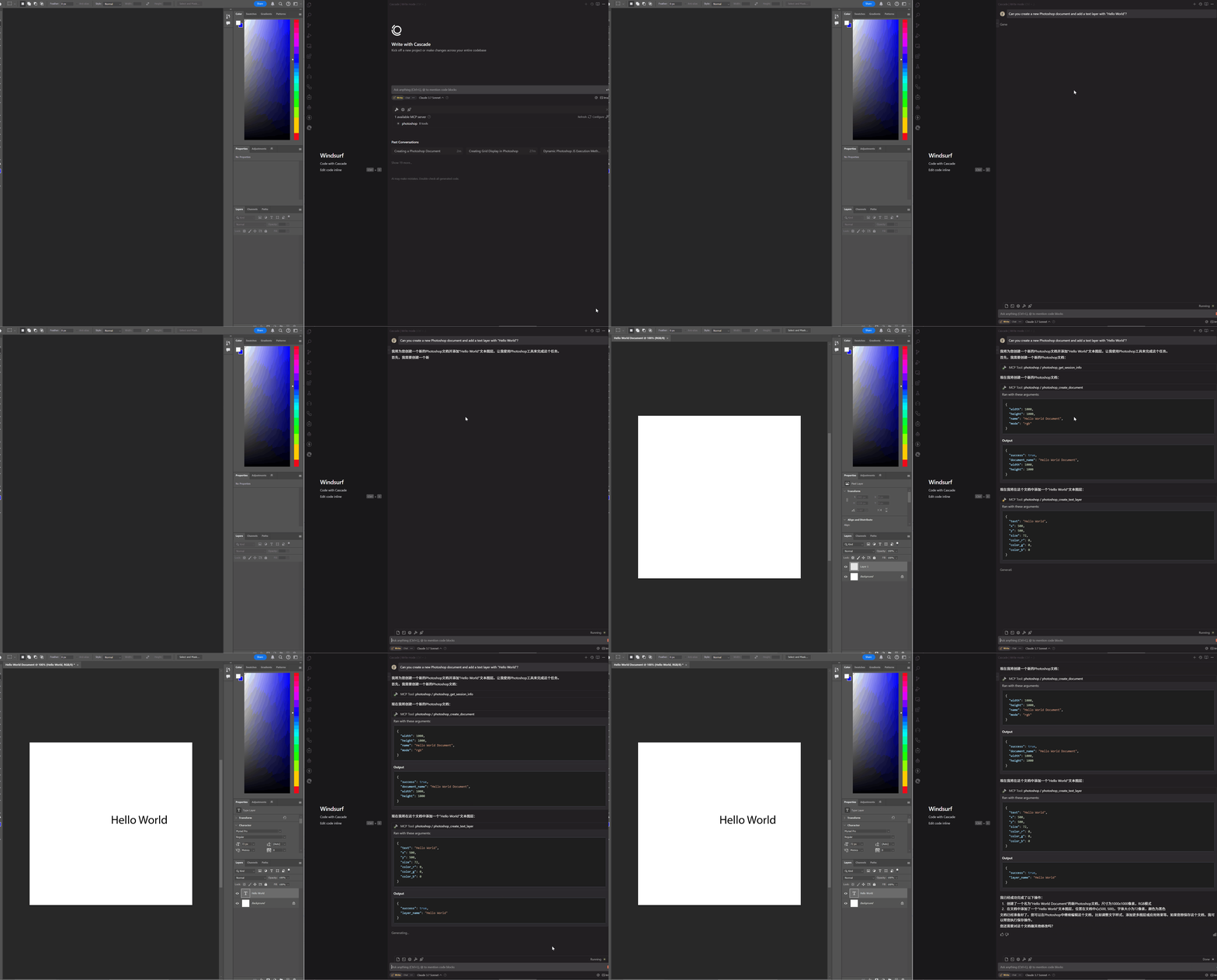
With this MCP server, AI assistants can:
Note: Remember that this package only works on Windows systems.
# Install using pip
pip install photoshop-mcp-server

# Or using uv
uv install photoshop-mcp-server
This server is designed to work with various MCP hosts. The PS_VERSION environment variable is used to specify which Photoshop version to connect to (e.g., "2024", "2023", "2022", etc.).
The recommended way to configure the server is using uvx as the command, which is the official standard format.
Add the following to your MCP host configuration (works with Claude Desktop, Windsurf, Cline, and other MCP hosts):
{
  "mcpServers": {
    "photoshop": {
      "command": "uvx",
      "args": ["--python", "3.10", "photoshop-mcp-server"],
      "env": {
        "PS_VERSION": "2024"
      }
    }
  }
}
uvx for the standard approach["photoshop-mcp-server"] to run the Photoshop MCP server
["--python", "3.10", "photoshop-mcp-server"] (any version from 3.10 to 3.14 is supported)photoshop://info - Get Photoshop application informationphotoshop://document/info - Get active document information (name, width, height, resolution, layers count). When Photoshop does not report the document dimensions, width/height are 0.0 and an extra dimensions_unavailable: true field marks them as unreadable rather than genuinely zero. photoshop_open_document reports the same signal.photoshop://document/layers - Get layers in the active documentThe server provides various tools for controlling Photoshop:
photoshop_execute_jsxphotoshop_execute_jsxA universal escape hatch: it runs any Photoshop JavaScript (ExtendScript/JSX) snippet, so you can reach parts of the Photoshop API that the dedicated tools above do not cover (channels, paths, history states, filters, custom automation, batch operations, ...).
var, no arrow functions, no
let/const). A JSON.stringify polyfill is injected automatically, so JSON.stringify(...) works
even though the engine has no native JSON object.return
statement, or leave the last expression as the result.{ "success": true, "result": <script output> } on success, and
{ "success": false, "error": <message> } on failure. A script that throws inside Photoshop and
a Photoshop instance that cannot be reached at all both report success: false, so callers never
have to inspect the payload to tell the two apart.Examples:
// Count art layers in the active document
app.activeDocument.artLayers.length;
// Get every layer name as JSON
var doc = app.activeDocument;
var names = [];
for (var i = 0; i < doc.artLayers.length; i++) {
    names.push(doc.artLayers[i].name);
}
JSON.stringify(names);
Note: The script runs with the same privileges as the Photoshop UI, so it can modify or destroy the active document. Save your work before running destructive automation.
Once configured in your MCP host, you can use the Photoshop MCP server in your AI assistant conversations. Here are some example prompts to get you started:
User: Can you create a new Photoshop document and add a text layer with "Hello World"?

AI Assistant: I'll create a new document and add the text layer for you.

[The AI uses the Photoshop MCP server to:
1. Create a new document using the `create_document` tool
2. Add a text layer using the `create_text_layer` tool with the text "Hello World"]

I've created a new Photoshop document and added a text layer with "Hello World".
User: Open my latest PSD file and tell me how many layers it has.

AI Assistant: I'll check your latest PSD file and count the layers.

[The AI uses the Photoshop MCP server to:
1. Get information about open documents
2. If no document is open, it can browse and open a PSD file
3. Retrieve and analyze the layer structure]

Your document has 12 layers, including 3 group folders and 2 adjustment layers.
User: Create a social media post with a gradient background and the text "Summer Sale" in a bold font.

AI Assistant: I'll create that social media post for you.

[The AI uses the Photoshop MCP server to:
1. Create a new document with appropriate dimensions for social media
2. Create a gradient fill layer with summer colors
3. Add a text layer with "Summer Sale" in a bold font
4. Position and style the text appropriately]

I've created your social media post with a gradient background and bold "Summer Sale" text.
MIT
Claim this server with your GitHub account to request manual ownership verification.
Link to the catalog listing for Photoshop MCP Server from your README. This badge does not certify ownership, compatibility or security.
[](https://awesome-mcp.com/servers/photoshop-python-api-mcp-server)Public repository statistics could not be verified. Check the configured source address; unavailable counts are not zero.
Separate sources, scopes and periods. Never combined or treated as installations, active users or security reviews.
No reviewed package or image identity; download statistics are not listed yet.
Alternative and complementary servers in the same category
A Rust CAD application with an MCP server for creating, inspecting and rendering drawings, either headlessly or through a connection to the desktop app.

Liquid Composer is a browser-based Liquid Glass icon design tool that offers a local MCP server for agent-driven icon workflows.

agent-media makes short drama series and other short vertical videos from Claude, ChatGPT or Codex through one MCP connection, with OAuth sign-in and no API keys.