
A directory listing describing a cancellation-letter and mailing-address service. The configured public GitHub repository returned 404 during source verification.
Repository stats unavailable
Developer Tools
An MCP server that gives AI assistants standardized tools and resources to securely access and manage PI Dashboard categories and charts.
PI Dashboard API MCP Server is cataloged as an MCP server attributed to mingzilla. An MCP server that gives AI assistants standardized tools and resources to securely access and manage PI Dashboard categories and charts. It is categorized under developer tools. See the capability inspector for recorded interfaces and their independent review status; consult upstream documentation for the current interface.
Installation configuration is not reviewed. No executable setup is offered for this entry; inspect the source repository before proceeding.
Catalog license label: MIT License. Check the source repository's current license and terms before using, modifying or distributing this software.
Capability definitions are not reviewed. Unreviewed imports are not exposed as trusted interfaces.
No reviewed records to display. This does not establish that upstream lacks this capability.
No reviewed records to display. This does not establish that upstream lacks this capability.
No reviewed records to display. This does not establish that upstream lacks this capability.
Email delivery is not connected. This page does not collect email addresses or create subscriptions.
Browse the registry for current listings instead.
Reviews for PI Dashboard API MCP Server are not available yet
Review publishing and storage are not connected. This page does not collect or publish ratings or comments, including after sign-in.
The server can prompt you to set the API URL using the set-api-url tool before executing operations.
The server supports token-based session refresh via keep-session-alive and authentication with username and password as a last resort.
Yes, the server includes prompts for analyzing charts and comparing data between two charts.
README.md · b455fde4e248 · Fetched 2026-11-13 10:24:21 UTC
Original upstream text, without AI rewriting. Scripts, forms and unsafe links are filtered for safety.
Showing the last retrieved documentation snapshot; check the source for current changes.
A Model Context Protocol (MCP) server that provides standardized tools and resources for interacting with the PI Dashboard API. This implementation enables Claude and other MCP-compatible AI assistants to securely access and manage PI Dashboard resources, including categories and charts.
The following demonstrates typical usage scenarios for this MCP Server after setup completion.
Initial Authentication:
Ensure the PI API MCP server is running
Set the API URL to http://localhost:8224/pi/api/v2
Use the authenticate tool for authentication guidance
Check the connection status to verify everything is working
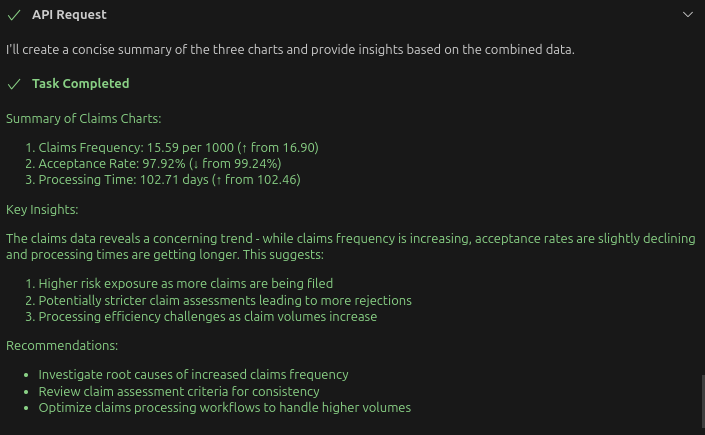
List two charts from the dashboard
Chart Analysis:
Retrieve the metadata from chart ID 450
Extract the chart JSON data from ID 450
Identify chart IDs associated with claims
Obtain JSON data for the identified charts
Analyze the data to generate actionable insights
Example Output:
To install pi-api-mcp-server for Claude Desktop automatically via Smithery:
npx -y @smithery/cli install @mingzilla/pi-api-mcp-server --client claude
{
  "mcpServers": {
    "pi-api": {
      "command": "docker",
      "args": [
        "run",
        "-i",
        "--rm",
        "-e",
        "API_URL=http://localhost:8224/pi/api/v2",
        "-e",
        "PI_API_KEY=XXXXXXXX",
        "mingzilla/pi-api-mcp-server"
      ],
      "disabled": false,
      "autoApprove": [
        "keep-session-alive",
        "check-connection",
        "authenticate",
        "list-categories",
        "get-category",
        "list-charts",
        "get-chart",
        "export-chart",
        "get-filterable-attributes",
        "export-chart"
      ]
    }
  }
}
Important Note: If the --api-url parameter is not provided at initialization, the server will prompt you to configure the API URL using the set-api-url tool before executing any operations. This design enables flexible configuration in environments where the URL is not predetermined at startup.
Access your Claude for Desktop application configuration at:
~/Library/Application Support/Claude/claude_desktop_config.json%APPDATA%\Claude\claude_desktop_config.jsonGet the filterable attributes for chart entities
Set the API URL to http://localhost:8224/pi/api/v2
Here are some example queries to use with Claude after connecting the server:
Please use the set-api-url tool to set the PI API URL to http://localhost:8224/pi/api/v2
Please help me authenticate to the PI API.
I have a token. Please use the keep-session-alive tool with my token: [YOUR_TOKEN_HERE]
Please check if my connection to the PI API is working properly.
List all categories in the dashboard.
Get details about category with ID 123.
List all the charts available in the dashboard.
Export chart with ID 456 as a PDF.
Get the filterable attributes for chart entities to understand what fields I can filter on.
List charts with description containing "revenue" using the filter option.
Analyze the categories in the dashboard.
Compare data between charts 123 and 456.
Show me how to use filters effectively with this API.
start.sh to run the dev server as well.# Clone the repository (SSH or HTTPS option)
git clone git@github.com:mingzilla/pi-api-mcp-server.git
cd pi-api-mcp-server
# Install dependencies
npm install
./dependencies.sh # Installs global dependencies to enable MCP client connection via "@mingzilla/pi-api-mcp-server"
# Build the project
npm run build
# Execute the server
npm start
# Global installation
npm install -g @mingzilla/pi-api-mcp-server

# Direct execution via npx
npx @mingzilla/pi-api-mcp-server --api-url "http://localhost:8224/pi/api/v2" --auth-token "XXXXXXXX"
Integration with Claude for Desktop:
./dependencies.sh has been executed to install required dependencies{
"mcpServers": {
"pi-api": {
"command": "npx",
"args": [
"-y",
"@mingzilla/pi-api-mcp-server",
"--api-url",
"http://localhost:8224/pi/api/v2",
"--auth-token",
"XXXXXXXX"
],
"autoApprove": [
"keep-session-alive",
"check-connection",
"authenticate",
"list-categories",
"get-category",
"list-charts",
"get-chart",
"export-chart",
"get-filterable-attributes",
"export-chart"
]
}
}
}
./start.shbuild/index.js file./start.sh
{
  "mcpServers": {
    "pi-api": {
      "command": "node",
      "args": [
        "/home/mingzilla/dev/tool-mcp-pi-api-server/build/index.js",
        "--api-url",
        "http://localhost:8224/pi/api/v2",
        "--auth-token",
        "XXXXXXXX"
      ],
      "autoApprove": [
        "keep-session-alive",
        "check-connection",
        "authenticate",
        "list-categories",
        "get-category",
        "list-charts",
        "get-chart",
        "export-chart",
        "get-filterable-attributes",
        "export-chart"
      ]
    }
  }
}
MIT License
Ming Huang (mingzilla)

Claim this server with your GitHub account to request manual ownership verification.
Link to the catalog listing for PI Dashboard API MCP Server from your README. This badge does not certify ownership, compatibility or security.
[](https://awesome-mcp.com/servers/pi-api-mcp-server)Public repository statistics could not be verified. Check the configured source address; unavailable counts are not zero.
Separate sources, scopes and periods. Never combined or treated as installations, active users or security reviews.
No reviewed package or image identity; download statistics are not listed yet.
Alternative and complementary servers in the same category
A directory listing describing a cancellation-letter and mailing-address service. The configured public GitHub repository returned 404 during source verification.

A hosted MCP service for browsing and searching through Singapore mobile-network proxies.

A directory listing describing a Markdown-to-PDF service. The configured public GitHub repository returned 404 during source verification.