

A Model Context Protocol (MCP) server for controlling Chrome with debugging capabilities, userscript injection, and extension support.
Repository stats unavailable
Browser & Scraping
An MCP server that provides native Playwright-backed browser sessions for AI agents, with snapshots, screenshots and browser interaction tools exposed via selectable profiles.
Pilot — browser automation MCP server is cataloged as an MCP server attributed to tacosyhorchata. An MCP server that provides native Playwright-backed browser sessions for AI agents, with snapshots, screenshots and browser interaction tools exposed via selectable profiles. It is categorized under browser automation. See the capability inspector for recorded interfaces and their independent review status; consult upstream documentation for the current interface.
Installation configuration is not reviewed. No executable setup is offered for this entry; inspect the source repository before proceeding.
Catalog license label: Not specified. Check the source repository's current license and terms before using, modifying or distributing this software.
Capability definitions are not reviewed. Unreviewed imports are not exposed as trusted interfaces.
No reviewed records to display. This does not establish that upstream lacks this capability.
No reviewed records to display. This does not establish that upstream lacks this capability.
No reviewed records to display. This does not establish that upstream lacks this capability.
Email delivery is not connected. This page does not collect email addresses or create subscriptions.
Browse the registry for current listings instead.
Reviews for Pilot — browser automation MCP server are not available yet
Review publishing and storage are not connected. This page does not collect or publish ratings or comments, including after sign-in.
No. Native mode is the default and does not require the extension; extension mode is legacy and opt-in.
Yes, through extension mode, which connects to your real Chrome profile when you need existing cookies and logged-in sessions.
The PILOT_PROFILE setting controls which tools are exposed among core, standard, and full profiles.
README.md · 5ed6794de1ec · Fetched 2026-11-13 12:14:20 UTC
Original upstream text, without AI rewriting. Scripts, forms and unsafe links are filtered for safety.
Showing the last retrieved documentation snapshot; check the source for current changes.


Native Playwright-backed browser sessions by default. No Chrome extension required for QA automation.
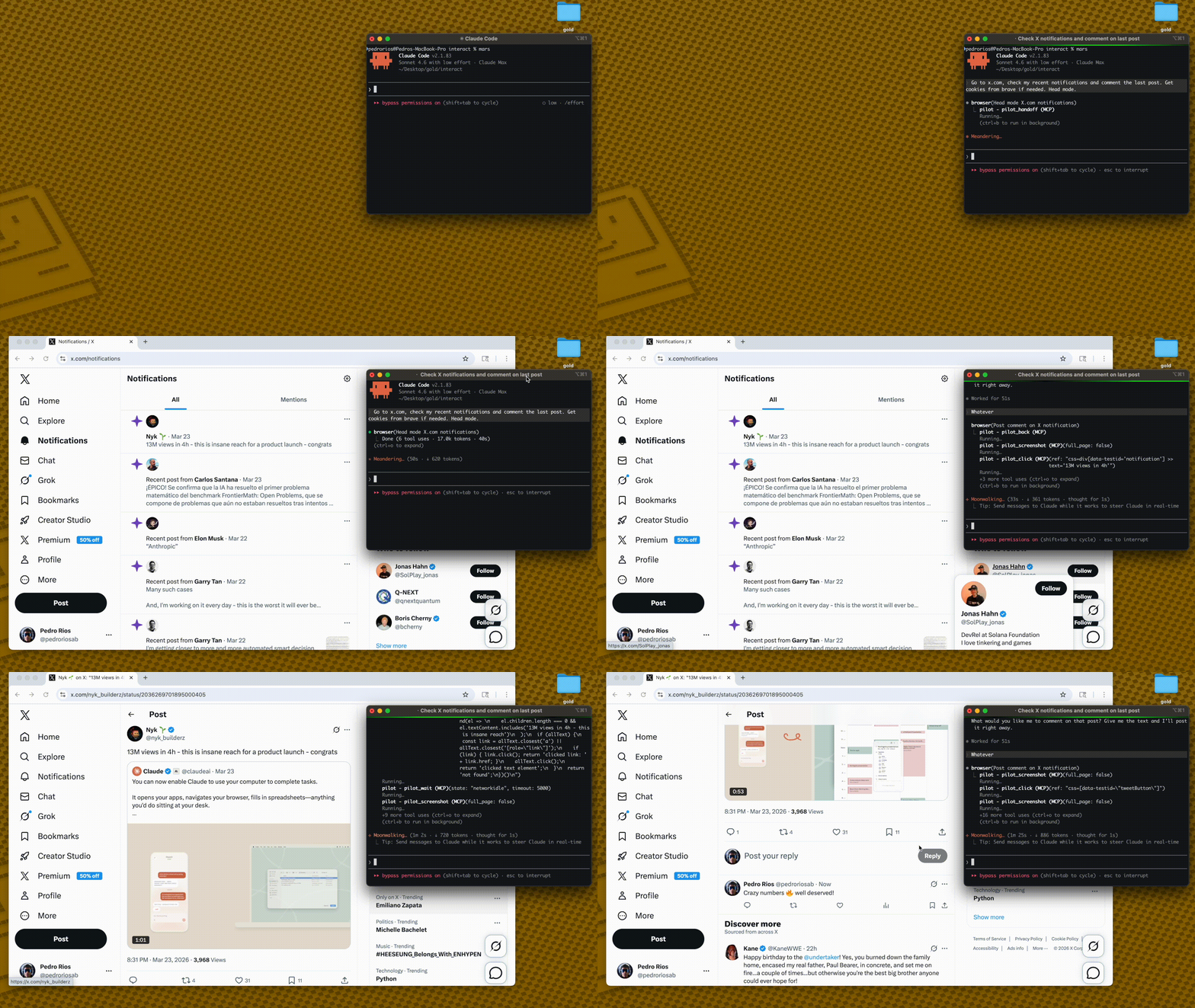
Pilot has two browser backends:
Native mode avoids chrome.tabs.captureVisibleTab() entirely, so screenshots do not depend on Chrome being foregrounded, a tab being visibly active, or the extension service worker being fresh.
AI Agent → MCP Server → Broker on 127.0.0.1:3131 → Native browser session
         (stdio)       (first process owns broker)  (Playwright context/page)
codex mcp add pilot \
  --env PILOT_BROWSER_MODE=native \
  --env PILOT_PROFILE=full \
  -- npx -y pilot-mcp
For a local checkout:
npm install
npm run build
codex mcp add pilot \
  --env PILOT_BROWSER_MODE=native \
  --env PILOT_PROFILE=full \
  -- node /absolute/path/to/pilot/dist/index.js
"Open https://example.com, take a screenshot, and summarize the page."
No extension install. No Chrome foreground requirement.
For full native-mode operations, stress commands, and cleanup checks, see docs/native-mode.md.
Other tools dump 50K+ chars per page into your context window. Pilot keeps things small:
Other tools:   navigate(58K) → navigate(58K) → answer        = 116K chars
Pilot:         navigate(2K)  → navigate(2K)  → snapshot(9K)  =  13K chars
snapshot_diff shows only what changed between actions — no redundant re-reads.
Less context = faster responses, cheaper API calls, fewer hallucinations.
| Pilot | @playwright/mcp | |
|---|---|---|
| Browser | Native Playwright context by default; real Chrome via legacy extension | New Chromium instance |
| Auth state | Native isolated by default; extension mode can use real Chrome cookies | Anonymous — manual setup |
| Bot detection | Native for automation; extension mode for real-profile handoff | Blocked by Cloudflare |
| Snapshot size | ~2K navigate, ~9K full | ~50-60K |
| Snapshot diff | pilot_snapshot_diff | ❌ |
| Cookie import | Chrome, Arc, Brave, Edge, Comet | Manual JSON |
| Iframes | ✅ | ❌ |
| Tool profiles | core (9) / standard (40) / full (69) | --caps groups |
| Transport | stdio | stdio, HTTP, SSE |
LLMs degrade as tool lists grow. Load only what you need:
| Profile | Tools | What's included |
|---|---|---|
core | 9 | navigate, snapshot, click, fill, type, press_key, wait, screenshot, snapshot_diff |
standard | 40 | Core + pilot_act, pilot_guide, evidence, doctor/reset, tabs, scroll, hover, drag, iframes, auth, block, find |
full | 69 | Standard + network intercept, assertions, clipboard, geolocation, CDP, evaluate, PDF, responsive, deep inspection |
{
  "mcpServers": {
    "pilot": {
      "command": "npx",
      "args": ["-y", "pilot-mcp"],
      "env": { "PILOT_PROFILE": "standard" }
    }
  }
}
Default: standard. Full tool reference →
Native mode is the default:
PILOT_BROWSER_MODE=native
Use it for QA automation, parallel MCP sessions, and screenshot evidence.
Verify it before QA runs:
PILOT_HEADLESS=1 npm run stress:screenshots
npm run stress:codex
Expected: both report 6/6 passed.
Extension mode is legacy and opt-in:
PILOT_BROWSER_MODE=extension
Use it only when you need a user's already-authenticated real Chrome profile.
Import cookies from your real browser: pilot_import_cookies({ browser: "chrome", domains: [".github.com"] })
Supports Chrome, Arc, Brave, Edge, Comet via macOS Keychain / Linux libsecret. For CAPTCHAs: pilot_handoff → you intervene → pilot_resume.
If Chromium is missing:
npx playwright install chromium
PILOT_OUTPUT_DIRPILOT_PROFILE controls which tools are exposed (core / standard / full)Core architecture — ref-based element selection, snapshot diffing, annotated screenshots — ported from gstack by Garry Tan. Built on Playwright and the MCP SDK.
If Pilot is useful, star the repo — it helps others find it.
Claim this server with your GitHub account to request manual ownership verification.
Link to the catalog listing for Pilot — browser automation MCP server from your README. This badge does not certify ownership, compatibility or security.
[](https://awesome-mcp.com/servers/pilot)Public repository statistics could not be verified. Check the configured source address; unavailable counts are not zero.
Separate sources, scopes and periods. Never combined or treated as installations, active users or security reviews.
No reviewed package or image identity; download statistics are not listed yet.
Alternative and complementary servers in the same category
A Model Context Protocol (MCP) server for controlling Chrome with debugging capabilities, userscript injection, and extension support.

An MCP server that lets AI assistants browse websites and extract content using optional CSS selectors.

An MCP server that reads pages, fills forms, takes screenshots, and hands the browser to a person for logins or CAPTCHAs.