
A directory listing describing a cancellation-letter and mailing-address service. The configured public GitHub repository returned 404 during source verification.
Repository stats unavailable
Developer Tools
An open-source Windows x64 MCP server that gives coding agents the ability to list displays and windows, capture screenshots, read on-screen text, record sessions, and opt-in to drive an approved app's controls.
Pointframe: MCP server for inspecting and testing the Windows desktop UI is cataloged as an MCP server attributed to dimitar-radenkov. An open-source Windows x64 MCP server that gives coding agents the ability to list displays and windows, capture screenshots, read on-screen text, record sessions, and opt-in to drive an approved app's controls. It is categorized under developer tools. See the capability inspector for recorded interfaces and their independent review status; consult upstream documentation for the current interface.
Installation configuration is not reviewed. No executable setup is offered for this entry; inspect the source repository before proceeding.
Catalog license label: Not specified. Check the source repository's current license and terms before using, modifying or distributing this software.
Capability definitions are not reviewed. Unreviewed imports are not exposed as trusted interfaces.
No reviewed records to display. This does not establish that upstream lacks this capability.
No reviewed records to display. This does not establish that upstream lacks this capability.
No reviewed records to display. This does not establish that upstream lacks this capability.
Email delivery is not connected. This page does not collect email addresses or create subscriptions.
Browse the registry for current listings instead.
Reviews for Pointframe: MCP server for inspecting and testing the Windows desktop UI are not available yet
Review publishing and storage are not connected. This page does not collect or publish ratings or comments, including after sign-in.
No. The CLI and the MCP server are standalone and need neither the tray app nor a .NET runtime.
Build and test gates can run headless, including in CI, but checks of the real UI need an unlocked, interactive Windows session.
Yes, official release builds of the CLI and MCP server can opt out of anonymous usage counts with an environment variable.
README.md · c228f1a02efe · Fetched 2026-11-13 10:07:14 UTC
Original upstream text, without AI rewriting. Scripts, forms and unsafe links are filtered for safety.
Showing the last retrieved documentation snapshot; check the source for current changes.

Let your coding agent test the real Windows UI.
Pointframe lets agents inspect your app, interact with its controls, and run repeatable checks with screenshots and signed evidence.
Free, open source, Windows x64.
Set up your agent | Download the screenshot app
Coding agents: read the complete Windows desktop verification recipe before starting.
pointframe verify run runs your build and test gates and, for each scenario in the spec, launches your built app, drives it through its real controls (invoke, type, check), and writes a verdict with a signed evidence bundle: report.json, evidence/ screenshots and an index.html. A good scenario also carries a negative control, a check with a deliberately wrong expectation that must fail.
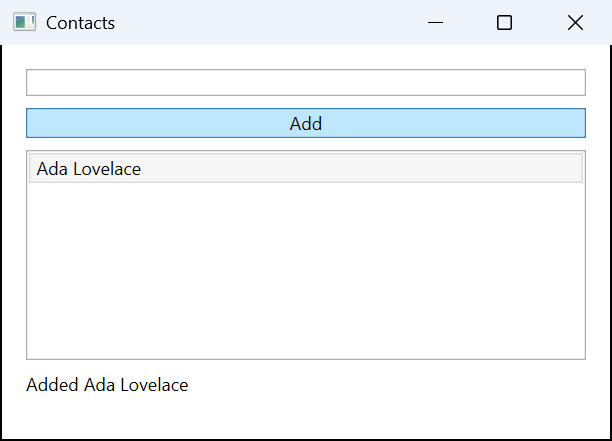
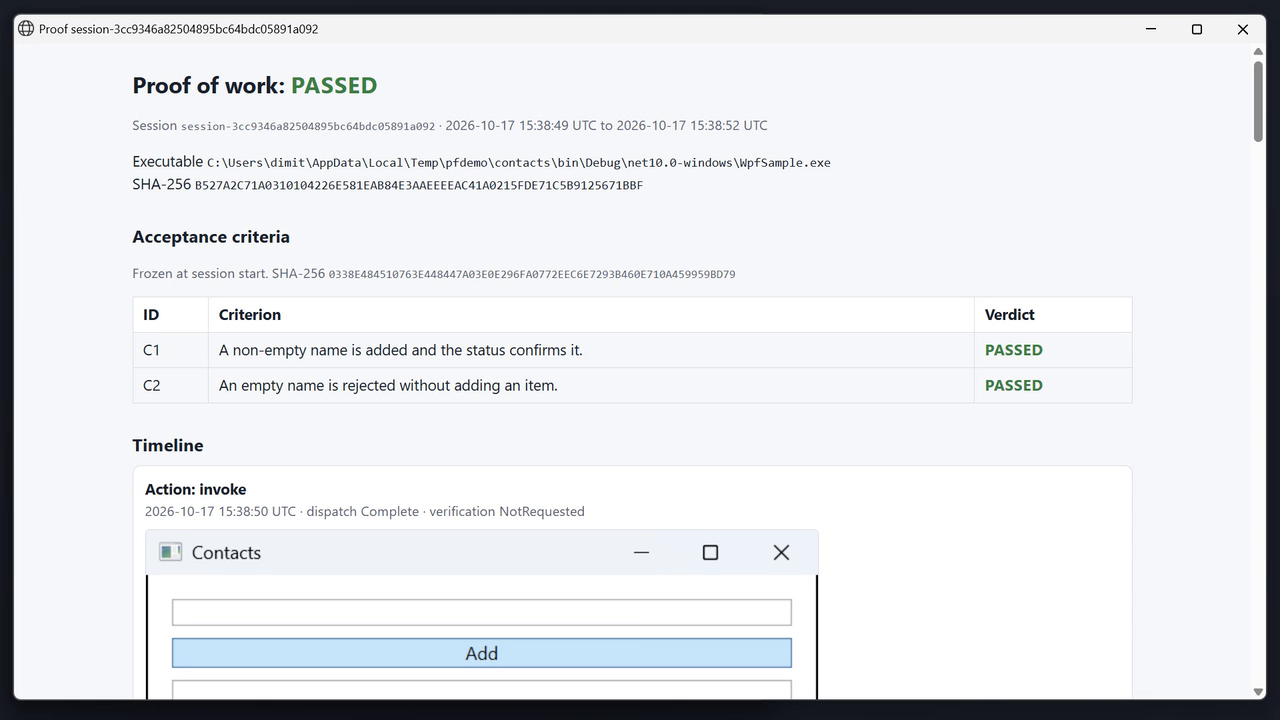
30-second demo on the same sample: fail, fix, pass, evidence. Click to watch.
This is a real evidence screenshot from a passing run of the WPF sample (its reference spec is in the repo, so you can reproduce it).
| I want to... | Use | First example |
|---|---|---|
| Give my agent eyes on the desktop, and optionally hands | MCP server | Ask the agent to list your displays; it calls list_displays |
| Script captures, OCR and recordings, or gate an agent on a verified pass | CLI | pointframe displays, then pointframe verify run |
| Capture, annotate and record by hand | Desktop app | Press Print Screen |
The CLI and the MCP server run on their own: neither needs the tray app. Capture, OCR and recording only observe. Interacting with an app's controls is off until you set it up for one app (pointframe verify setup, or a policy file; see desktop testing).
Eleven always-on tools: list_displays, list_windows, capture_monitor, capture_window, read_text_from_monitor, read_text_from_window, search_captures, get_capture, start_recording, stop_recording and get_recording_status. Captures come back inline as an image plus a PNG on disk with SHA-256, monitor geometry and DPI. The opt-in desktop_* tools launch an approved app, click, type and check its UI, and write a signed report. Details: MCP reference.
pointframe displays
pointframe windows
pointframe capture --monitor '\\.\DISPLAY1' --output .\shot.png
pointframe ocr --monitor '\\.\DISPLAY1'
pointframe record --monitor '\\.\DISPLAY1' --seconds 10 --output .\take1.mp4
pointframe verify run
The discovery, capture, OCR and recording commands write a single-line JSON response to standard output, on success and on failure. Exit code 0 is success and 1 a runtime failure with a stable Error.Code. Invalid command-line arguments exit 2 and write usage text to standard error instead of JSON. For other commands, follow their command-specific output contracts in the CLI reference and the verify docs. pointframe mcp serve speaks the MCP stdio protocol. record needs ffmpeg.exe. Every command and flag: CLI reference.
claude --plugin-dir ./plugin/pointframe starts the MCP server and adds the verify-desktop-work skill (plugin README). The plugin is not yet in the plugin directory.Pointframe.Cli-win-x64.zip from the latest release, extract it, and run this from that folder (checksum step: CLI install). Open a new terminal afterwards, so the user Path change takes effect. Then pointframe displays lists your monitors, and the verify guide covers your own app..\Pointframe.Cli.exe install
winget install DimitarRadenkov.Pointframe
Press Print Screen to capture a region, add arrows, text or blur, then copy, save, pin or record. Or take the installer from Releases. Features, settings and shortcuts: desktop app guide.
Does it need the desktop app? No. The CLI and the MCP server are standalone: no tray app and no .NET runtime. The desktop app is the separate screenshot tool for people.
Can it run headless? Build and test gates can, including in CI. Checks of the real UI need an unlocked, interactive Windows session; a Windows service in session 0 cannot capture the user desktop.
What does a pass establish? That the gates and scenarios your spec configures all passed. A spec with only gates passes without launching an app, so UI coverage is only what your scenarios check. Trust a pass only when pointframe verify status reports fresh: true. Freshness covers the Git-visible working tree, the spec and the active-task snapshot. A spec with scenarios but no gates can pass but is never fresh (no_build_gate). Files ignored by .gitignore and verify's own output are not counted. It does not prove your code is correct.
Official release builds of the CLI and the MCP server send anonymous usage counts (command or tool name, outcome, duration bucket, host, MCP client type, version, a random install ID), never screenshots, text or paths. Opt out with POINTFRAME_TELEMETRY_OPTOUT=1 or DO_NOT_TRACK=1; this applies to the CLI and the MCP server only. The desktop app's official builds send the events listed in PRIVACY.md, which holds the full policy; source builds send nothing.
CLI reference | MCP reference | Desktop app guide | Verify docs | Developer guide | Privacy | Contributing | Releases | Website
If you find Pointframe useful, a star on GitHub helps others discover it.


If Pointframe saves you time, consider buying me a beer:


Older links point to these headings. The content now lives in its own file.
Moved to the MCP reference.
Moved to PRIVACY.md.
Moved to PRIVACY.md.
Claim this server with your GitHub account to request manual ownership verification.
Link to the catalog listing for Pointframe: MCP server for inspecting and testing the Windows desktop UI from your README. This badge does not certify ownership, compatibility or security.
[](https://awesome-mcp.com/servers/pointframe)Public repository statistics could not be verified. Check the configured source address; unavailable counts are not zero.
Separate sources, scopes and periods. Never combined or treated as installations, active users or security reviews.
No reviewed package or image identity; download statistics are not listed yet.
Alternative and complementary servers in the same category
A directory listing describing a cancellation-letter and mailing-address service. The configured public GitHub repository returned 404 during source verification.

A hosted MCP service for browsing and searching through Singapore mobile-network proxies.

A directory listing describing a Markdown-to-PDF service. The configured public GitHub repository returned 404 during source verification.