
Store and retrieve entities, relations and observations in a persistent local knowledge graph.
create_entitiescreate_relationsadd_observations+6 more
92K
AI & Multi-Agent
An example MCP server demonstrating tools, resources, and prompts for a simple knowledgebase chatbot flow, paired with a simple CLI client.
Example MCP server for a knowledgebase RAG chatbot is cataloged as an MCP server attributed to alucek. An example MCP server demonstrating tools, resources, and prompts for a simple knowledgebase chatbot flow, paired with a simple CLI client. It is categorized under ai agents-models. See the capability inspector for recorded interfaces and their independent review status; consult upstream documentation for the current interface.
Installation configuration is not reviewed. No executable setup is offered for this entry; inspect the source repository before proceeding.
Catalog license label: Not specified. Check the source repository's current license and terms before using, modifying or distributing this software.
Capability definitions are not reviewed. Unreviewed imports are not exposed as trusted interfaces.
No reviewed records to display. This does not establish that upstream lacks this capability.
No reviewed records to display. This does not establish that upstream lacks this capability.
No reviewed records to display. This does not establish that upstream lacks this capability.
Email delivery is not connected. This page does not collect email addresses or create subscriptions.
Browse the registry for current listings instead.
Reviews for Example MCP server for a knowledgebase RAG chatbot are not available yet
Review publishing and storage are not connected. This page does not collect or publish ratings or comments, including after sign-in.
It highlights tools, resources, and prompts within a simple knowledgebase chatbot flow.
README.md · ad72982a60db · Fetched 2026-11-13 09:02:43 UTC
Original upstream text, without AI rewriting. Scripts, forms and unsafe links are filtered for safety.
Showing the last retrieved documentation snapshot; check the source for current changes.
Model Context Protocol, or MCP, is an open protocol that standardizes how applications provide context to LLMs. In other words it provides a unified framework for LLM based applications to connect to connect to data sources, get context, use tools, and execute standard prompts.
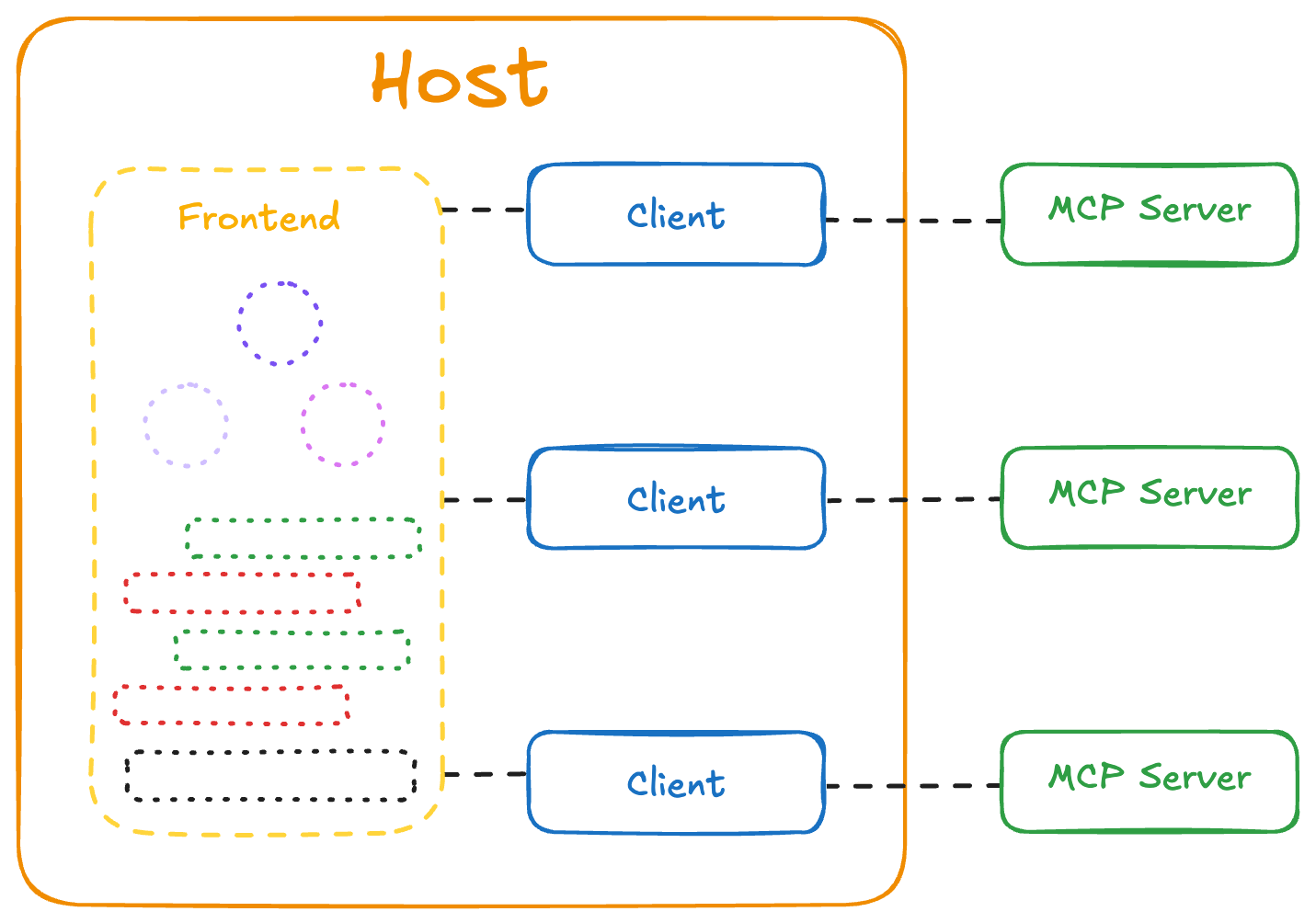
The MCP ecosystem outlines three specific components:
MCP Servers handle: tool availability (exposing what functions are available), tool execution (running those functions when requested), static content as resources (providing data that can be referenced), preset prompts (standardized templates for common tasks)
Clients manage: Connections to servers, LLM integration, message passing between components
Hosts provide: Frontend interfaces, surfacing of MCP functionality to users, integration points for the overall ecosystem
This architecture creates a modular system where different components can be developed independently while maintaining interoperability. This let's users make MCP servers for different LLM related functionalities then plug and play across a variety of supported applications. Commonly used to integrate services APIs and tools, or connect to local datasources on your own machine.
MCP servers form the foundation of the protocol by exposing standardized capabilities through well-defined interfaces. Hosts and clients can then connect to these servers using the protocol standard, but how these capabilities are presented to users remains flexible and open to developers. That means that the actual implementation and user experience is entirely up to the developer - whether through command line interfaces, graphical applications, or embedded within larger systems.
In this guide, we'll focus on building an example MCP server with core capabilities, along with a simple client implementation to demonstrate the interaction patterns. To start, let's go over the main components of an MCP Server:
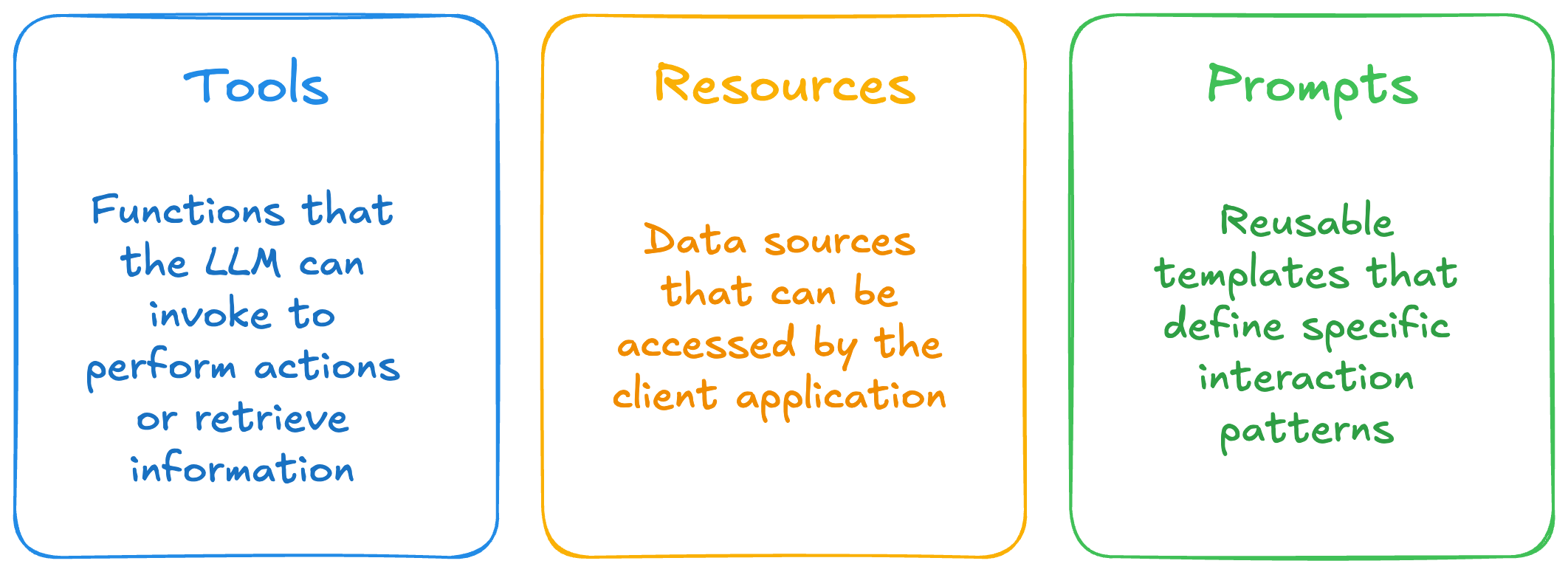
Tools are functions that the LLM can invoke to perform actions or retrieve information. Each tool is defined with:
{
  name: string;          // Unique identifier for the tool
  description?: string;  // Human-readable description
  inputSchema: {         // JSON Schema for the tool's parameters
    type: "object",
    properties: { ... }  // Tool-specific parameters
  }
}
Tools allow LLMs to interact with external systems, execute code, query databases, or perform calculations. They represent actions that have effects or compute new information.
Resources represent data sources that can be accessed by the client application. They are identified by URIs and can include:
{
  uri: string;           // Unique identifier for the resource
  name: string;          // Human-readable name
  description?: string;  // Optional description
  mimeType?: string;     // Optional MIME type
}
Resources can be static (like configuration files) or dynamic (like database records or API responses). They provide context to the LLM without requiring function calls.
Prompts are reusable templates that define specific interaction patterns. They allow servers to expose standardized conversation flows:
{
  name: string;              // Unique identifier for the prompt
  description?: string;      // Human-readable description
  arguments?: [              // Optional list of arguments
    {
      name: string;          // Argument identifier
      description?: string;  // Argument description
      required?: boolean;    // Whether argument is required
    }
  ]
}
Prompts help create consistent, purpose-built interactions for common tasks, allowing users to invoke them through UI elements like slash commands.
Note: While tools are designed specifically for LLM interaction (similar to function calling), prompts and resources serve different purposes in the MCP ecosystem. Prompts are typically user-controlled templates that can be invoked directly through UI elements like slash commands, and resources are application-controlled data sources that may be presented to users for selection before being included in the LLM context.
More details and additional functionality can be found in the MCP Official Documentation
Our MCP Server will highlight tools, resources, and prompts. The core concept is to create a simple knowledgebase chatbot flow that will be have the functionality to:
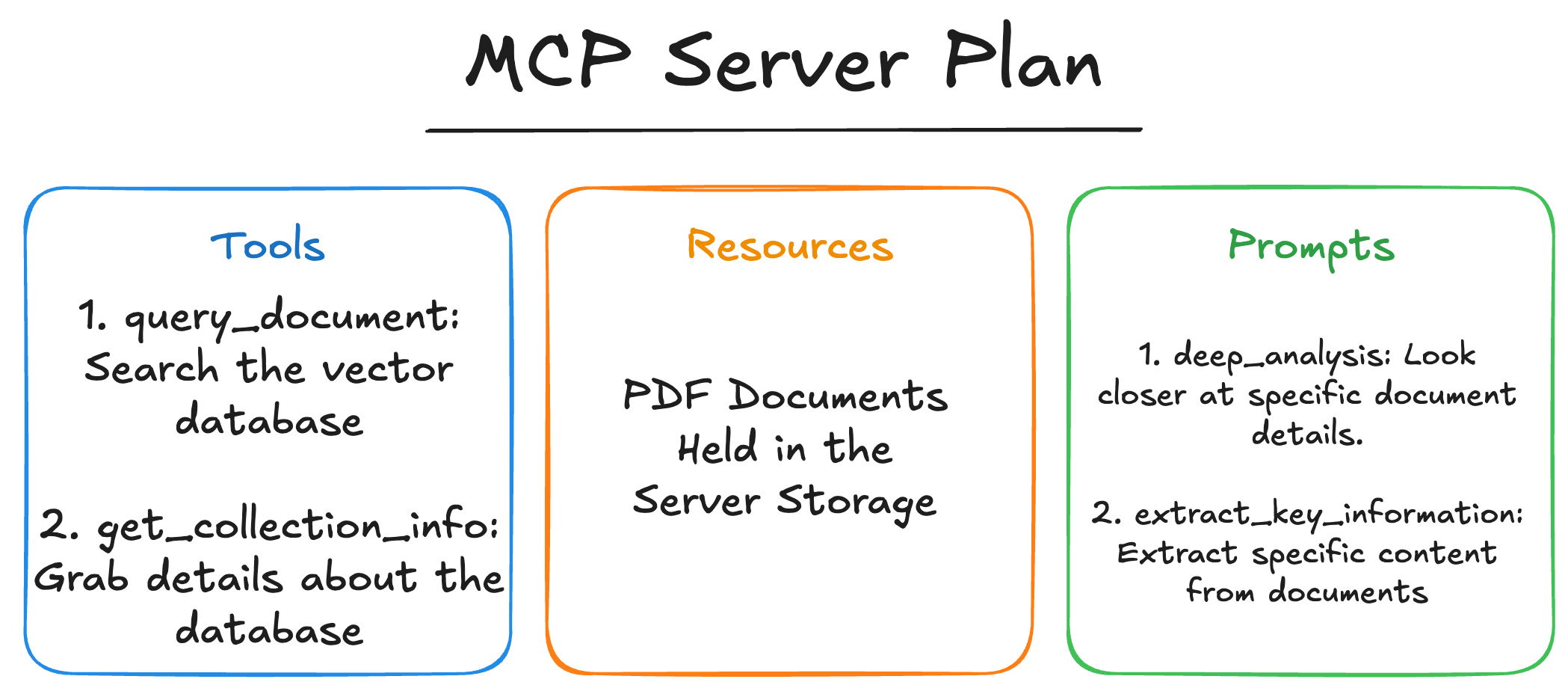
The above diagram is what's implemented in mcp_server.py with a corresponding simple CLI client in client.py.
As a useful resource, check out MCP's Server List for official integrations and community-made servers.
git clone https://github.com/ALucek/quick-mcp-example.git
cd quick-mcp-example
Follow the instructions in MCP_setup.ipynb to create the vector database and embed a pdf into it.
# Using uv (recommended)
uv venv
source .venv/bin/activate  # On macOS/Linux
# OR
.venv\Scripts\activate     # On Windows

# Install dependencies
uv sync
python client.py mcp_server.py
Claim this server with your GitHub account to request manual ownership verification.
Link to the catalog listing for Example MCP server for a knowledgebase RAG chatbot from your README. This badge does not certify ownership, compatibility or security.
[](https://awesome-mcp.com/servers/quick-mcp-example)Public repository statistics could not be verified. Check the configured source address; unavailable counts are not zero.
Separate sources, scopes and periods. Never combined or treated as installations, active users or security reviews.
No reviewed package or image identity; download statistics are not listed yet.
Alternative and complementary servers in the same category
Store and retrieve entities, relations and observations in a persistent local knowledge graph.
Organize problem solving into revisable, branching thought steps through an MCP tool.

Query-aware context compression with an MCP plugin for coding agents, plus Python and HTTP interfaces for reducing the context sent to a language model.