
This is a Model Context Protocol (MCP) server for interacting with AIStor object stores.
Repository stats unavailable
Databases & Storage
A Model Context Protocol server providing AI-driven SQL query and execution tools across SQLite, MySQL, PostgreSQL, MSSQL, DuckDB, and Turso databases.
RBDC MCP Database Server is cataloged as an MCP server attributed to rbatis. A Model Context Protocol server providing AI-driven SQL query and execution tools across SQLite, MySQL, PostgreSQL, MSSQL, DuckDB, and Turso databases. It is categorized under databases storage. See the capability inspector for recorded interfaces and their independent review status; consult upstream documentation for the current interface.
Installation configuration is not reviewed. No executable setup is offered for this entry; inspect the source repository before proceeding.
Catalog license label: Apache-2.0. Check the source repository's current license and terms before using, modifying or distributing this software.
Capability definitions are not reviewed. Unreviewed imports are not exposed as trusted interfaces.
No reviewed records to display. This does not establish that upstream lacks this capability.
No reviewed records to display. This does not establish that upstream lacks this capability.
No reviewed records to display. This does not establish that upstream lacks this capability.
Email delivery is not connected. This page does not collect email addresses or create subscriptions.
Browse the registry for current listings instead.
Reviews for RBDC MCP Database Server are not available yet
Review publishing and storage are not connected. This page does not collect or publish ratings or comments, including after sign-in.
It supports SQLite, MySQL, PostgreSQL, MSSQL, DuckDB, and Turso.
Yes, the AI can register additional databases at runtime through the add_database tool without restarting the server.
Read-only mode disables sql_exec and rejects queries containing write keywords or multiple statements.
readme.md · 424bbde819fa · Fetched 2026-11-13 11:14:57 UTC
Original upstream text, without AI rewriting. Scripts, forms and unsafe links are filtered for safety.
Showing the last retrieved documentation snapshot; check the source for current changes.
A database server based on Model Context Protocol (MCP), supporting SQLite, MySQL, PostgreSQL, MSSQL, DuckDB, and Turso databases.
🇨🇳 中文文档 / Chinese Documentation: readme_cn.md
Prerequisites: Install Rust first.
Choose the install command based on your needs:
# All drivers (default, ~10-15 minutes build)
cargo install --git https://github.com/rbatis/rbdc-mcp.git

# Minimal: SQLite only (fastest build, ~2-3 minutes)
cargo install --git https://github.com/rbatis/rbdc-mcp.git --no-default-features --features sqlite

# Single driver (e.g., MySQL):
cargo install --git https://github.com/rbatis/rbdc-mcp.git --no-default-features --features mysql

# Multiple drivers:
cargo install --git https://github.com/rbatis/rbdc-mcp.git --no-default-features --features "mysql postgres"
💡 Build speed tip: If you only need one database (e.g., SQLite), add --no-default-features --features sqlite to skip compiling unused drivers, cutting build time from ~15 minutes to ~2 minutes.
| Feature | Driver | Description |
|---|---|---|
sqlite | rbdc-sqlite | SQLite support |
mysql | rbdc-mysql | MySQL support |
postgres | rbdc-pg | PostgreSQL support |
mssql | rbdc-mssql | MSSQL/SQL Server support |
duckdb | rbdc-duckdb | DuckDB support |
turso | rbdc-turso | Turso/libsql support |
full | (all above) | Enable all database drivers |
Download the latest release for your platform from GitHub Releases:
| Platform | Download |
|---|---|
| Windows (x64) | rbdc-mcp-windows-x86_64.exe |
| macOS (Intel) | rbdc-mcp-macos-x86_64 |
| macOS (Apple Silicon) | rbdc-mcp-macos-aarch64 |
| Linux (x64) | rbdc-mcp-linux-x86_64 |
After downloading, rename the file to rbdc-mcp (or rbdc-mcp.exe on Windows) and add it to your system PATH.
Configure rbdc-mcp in your MCP-compatible client by adding it to the MCP server list.
Configuration File Location:
%APPDATA%\Claude\claude_desktop_config.json~/Library/Application Support/Claude/claude_desktop_config.jsonBasic Configuration:
{
  "mcpServers": {
    "rbdc-mcp": {
      "command": "rbdc-mcp",
      "args": []
    }
  }
}
With args: [], the server starts with no database pre-configured.
The AI registers databases at runtime using the add_database tool (see
Dynamic Multi-Database below).
To pre-configure a database at startup:
{
  "mcpServers": {
    "rbdc-mcp": {
      "command": "rbdc-mcp",
      "args": ["--database-url", "sqlite://./database.db"]
    }
  }
}
Database Examples:
One rbdc-mcp process can host many databases. The first --database-url is registered as the default alias; pair extra URLs with --alias to declare a fixed set the AI can see immediately at startup via list_databases (see Dynamic Multi-Database). The AI can also register more databases at runtime through the add_database MCP tool.
Start a single default database (AI registers the rest at runtime):
{
  "mcpServers": {
    "rbdc-mcp": {
      "command": "rbdc-mcp",
      "args": [
        "--database-url", "sqlite://./database.db"
      ]
    }
  }
}
Pre-declare several databases with explicit aliases (one process, multiple pools):
{
  "mcpServers": {
    "rbdc-mcp": {
      "command": "rbdc-mcp",
      "args": [
        "--database-url", "sqlite://./local.db",                    "--alias", "local",
        "--database-url", "mysql://user:password@db1:3306/orders",  "--alias", "orders",
        "--database-url", "postgres://user:password@db2:5432/bi",   "--alias", "bi",
        "--database-url", "duckdb://./warehouse.duckdb",             "--alias", "warehouse"
      ]
    }
  }
}
The first --alias value is ignored (the first URL always becomes default). The aliases must be unique, non-empty, and not equal to default for any URL after the first.
Legacy style — one process per database (still works, but no longer needed for multi-database access):
{
  "mcpServers": {
    "rbdc-mcp-sqlite": {
      "command": "rbdc-mcp",
      "args": ["--database-url", "sqlite://./database.db"]
    },
    "rbdc-mcp-mysql": {
      "command": "rbdc-mcp",
      "args": ["--database-url", "mysql://user:password@localhost:3306/database"]
    },
    "rbdc-mcp-postgres": {
      "command": "rbdc-mcp",
      "args": ["--database-url", "postgres://user:password@localhost:5432/database"]
    },
    "rbdc-mcp-mssql": {
      "command": "rbdc-mcp",
      "args": ["--database-url", "mssql://user:password@localhost:1433/database"]
    },
    "rbdc-mcp-duckdb": {
      "command": "rbdc-mcp",
      "args": ["--database-url", "duckdb://path/to/database.duckdb"]
    },
    "rbdc-mcp-turso": {
      "command": "rbdc-mcp",
      "args": ["--database-url", "turso://database-url?token=your-token"]
    }
  }
}
{
  "mcpServers": {
    "rbdc-mcp": {
      "command": "C:\\tools\\rbdc-mcp.exe",
      "args": ["--database-url", "sqlite://C:\\path\\to\\database.db"]
    }
  }
}
Restart: After saving, restart Claude Desktop to load the MCP server.
Test: In Claude Desktop, try asking:
Configuration File Location:
~/.codex/mcp.toml.codex/mcp.toml (place in your project root)Basic Configuration (.codex/mcp.toml or ~/.codex/mcp.toml):
[mcp_servers.rbdc-mcp]
command = "rbdc-mcp"
args = ["--database-url", "sqlite://./database.db"]
type = "stdio"
enabled = true
Database Examples (single process, multiple databases):
# Pre-declare several databases with explicit aliases
[mcp_servers.rbdc-mcp]
command = "rbdc-mcp"
args = [
  "--database-url", "sqlite://./local.db",                    "--alias", "local",
  "--database-url", "mysql://user:password@db1:3306/orders",  "--alias", "orders",
  "--database-url", "postgres://user:password@db2:5432/bi",   "--alias", "bi",
  "--database-url", "duckdb://./warehouse.duckdb",            "--alias", "warehouse",
]
type = "stdio"
enabled = true
The first URL becomes the default alias (its --alias, if any, is ignored). Additional URLs must be paired with --alias in declaration order. The AI can see every registered alias at startup through the list_databases MCP tool, and can also register more databases at runtime through add_database.
Restart: After saving the config file, restart Codex to load the MCP server. If Codex is already running, run codex reconnect to force a reload.
Test: In Codex chat, try asking:
| Database | Connection URL Format |
|---|---|
| SQLite | sqlite://path/to/database.db |
| MySQL | mysql://user:password@host:port/database |
| PostgreSQL | postgres://user:password@host:port/database |
| MSSQL | mssql://user:password@host:port/database |
| DuckDB | duckdb://path/to/database.duckdb |
| Turso | turso://database-url?token=your-token |
| Parameter | Description | Default |
|---|---|---|
--database-url, -d | Database connection URL. Omit to start empty (databases added at runtime via add_database). Repeat to pre-register multiple databases at startup. | None (optional) |
--alias | Alias for the corresponding --database-url (declaration order). The first is ignored; later aliases must be unique, non-empty, and not default. | auto (db2, db3, ...) |
--max-connections | Maximum connection pool size | 1 |
--timeout | Connection timeout (seconds) | 30 |
--log-level | Log level (error/warn/info/debug) | info |
--read-only | Disable sql_exec and enforce read-only SQL validation | false |
sql_query: Execute a single read-only SQL statement. Pass optional alias to target a non-default database; defaults to default.sql_exec: Execute INSERT/UPDATE/DELETE operations when the server is not in read-only mode. Pass optional alias to target a non-default database.db_status: Inspect connection pool state for a database. Pass optional alias.test_connection: Ping a registered database. Pass optional alias.list_databases: List all registered database aliases along with their URL and detected type.add_database: Register a new database connection under an alias and start a pool at runtime. Supported URL schemes: sqlite://, mysql://, pg:// / postgres://, mssql:// / sqlserver://, duckdb://, turso:// / libsql://.remove_database: Unregister a previously-added alias. The reserved default alias cannot be removed.rbdc-mcp is a multi-database server from a single process. You can start
it with no database URL at all (args: [] in your MCP client config) and
let the AI register databases on the fly through MCP tools. When a URL is
provided via --database-url, it becomes the default alias; the AI can then
register more databases at runtime and route queries to any of them by alias.
When the server starts with no --database-url, the list_databases tool
returns an empty list and any operation targeting the default alias will
suggest using add_database first. The AI can register the first (or any)
database under any alias it chooses:
add_database(alias="inventory", url="sqlite://./inventory.db") — register
a database.list_databases — confirm it is now registered.sql_query({ alias: "inventory", sql: "SELECT * FROM products" }) — query it.Tip: You can also register a database with
alias="default"if you prefer to omitaliasfrom subsequent queries.
Tool flow the AI follows:
list_databases — see all currently registered aliases.add_database(alias="orders_mysql", url="mysql://user:pass@host/orders") — register a new database and start a pool for it.sql_query({ alias: "orders_mysql", sql: "SELECT COUNT(*) FROM orders" }) — route a query to that database. Omit alias to use the default one.remove_database(alias="orders_mysql") — tear down the pool and unregister the alias when finished.Two ways to register databases
| Path | When | How |
|---|---|---|
| CLI pre-declared | Stable list, you want the AI to see every database at boot | Repeat --database-url and pair --alias (the first URL becomes default). |
Runtime add_database | Ad-hoc / exploratory / zero-URL startup | The AI calls the add_database MCP tool. |
Both paths write into the same in-memory alias → pool registry, so the result is identical from the AI's point of view: list_databases returns every alias regardless of where it was registered.
Why this matters
rbdc-mcp-mysql, rbdc-mcp-postgres, etc. for each database.list_databases, so the AI can dynamically pick the right target per query.--database-url is provided, the default alias is reserved for it and cannot be removed.Example prompt you can give the AI
"Connect to my MySQL orders database at
mysql://root:pwd@10.0.0.5/ordersand tell me the total revenue by month."
The AI will call add_database(...), then sql_query(...) against that alias
without restarting the MCP server — works the same whether you provided a
--database-url at startup or not.
--read-only disables the sql_exec tool, preventing any data modifications. Additionally, sql_query validates submitted SQL and rejects statements containing write keywords (INSERT, UPDATE, DELETE, etc.) or multi-statement input.
Step 1: Configuration
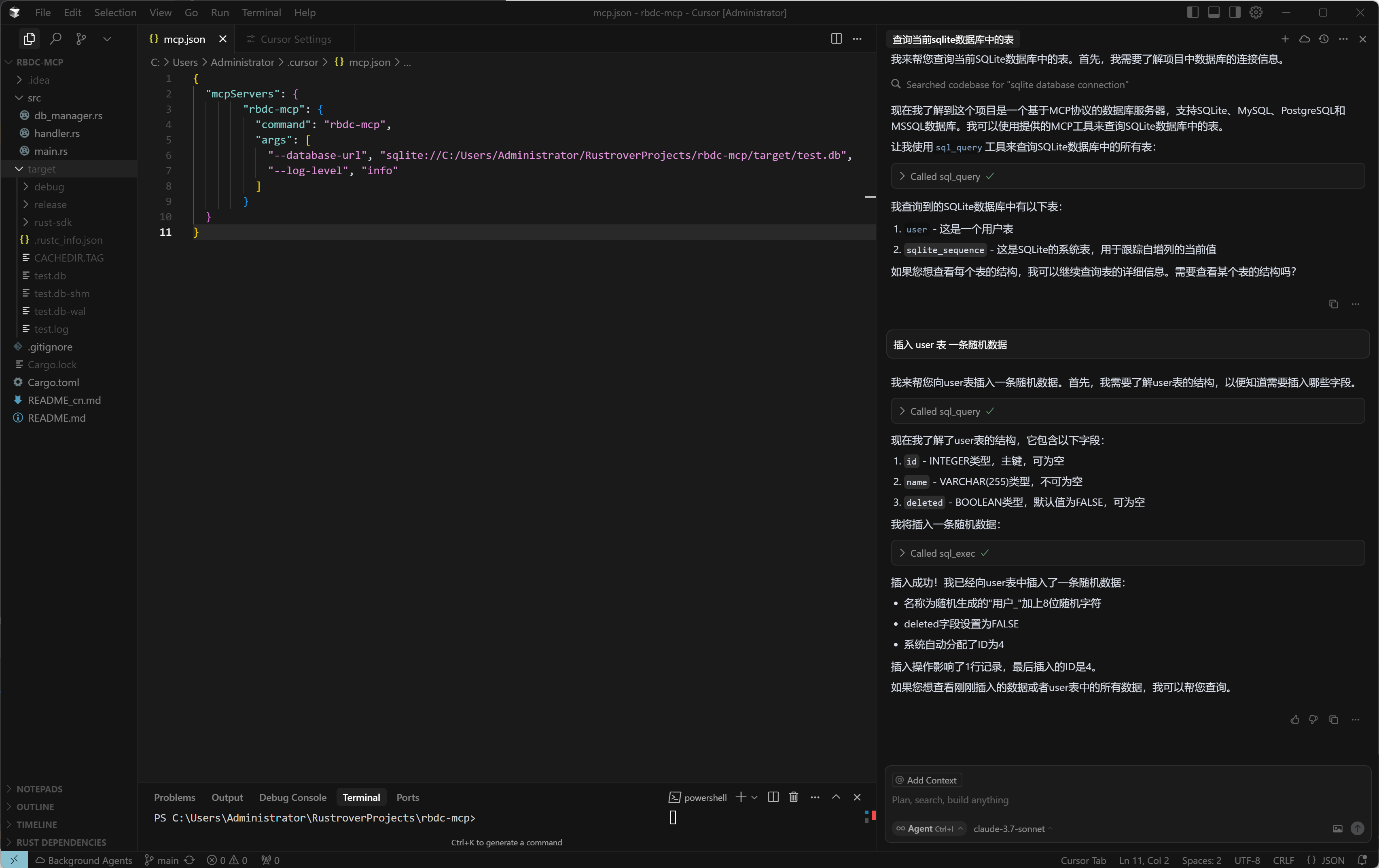
Step 2: Usage in Claude
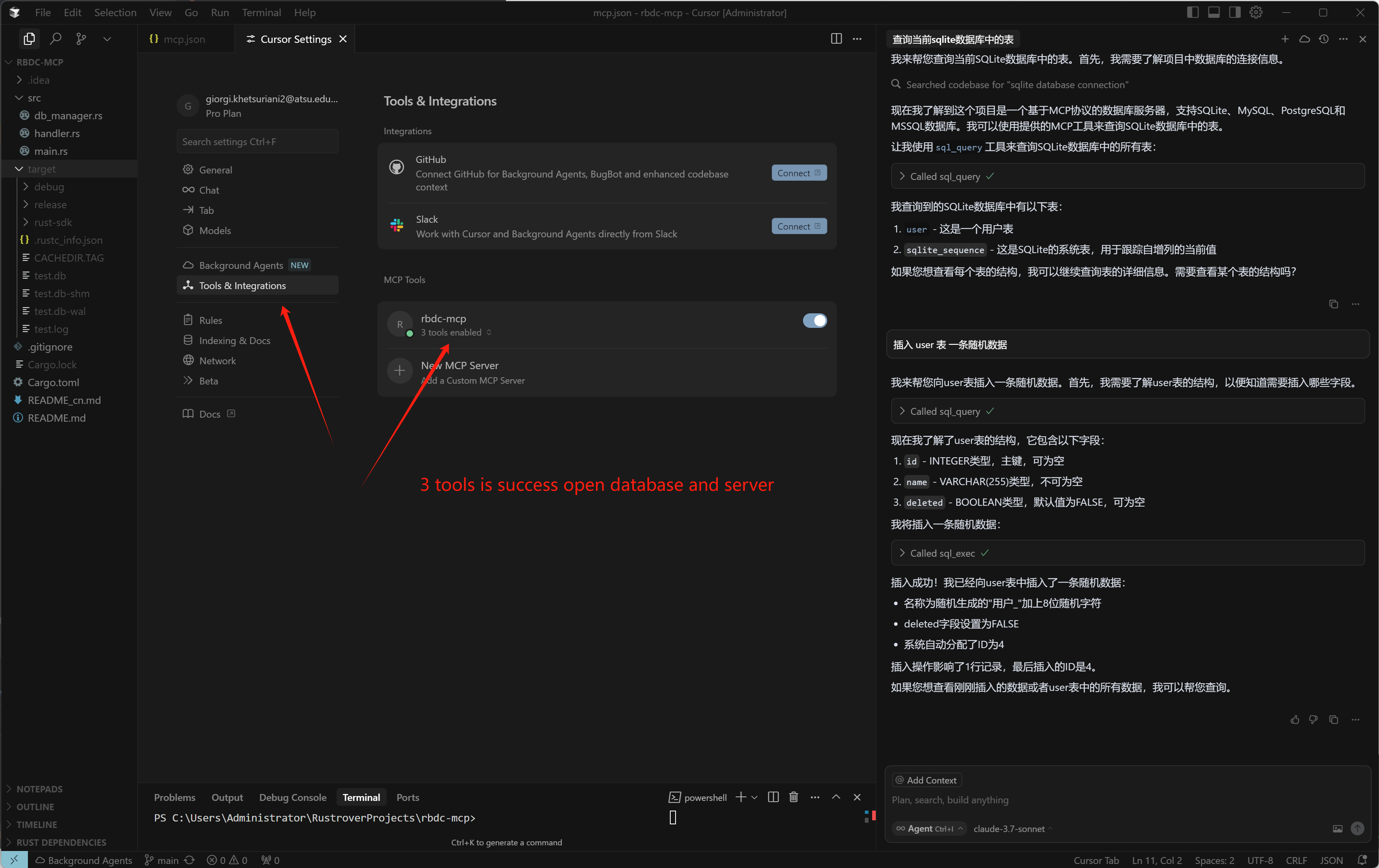
Apache-2.0
add_database tool and route queries to any registered database by its alias — no need to spawn extra MCP server processes
| --database-url, -d | Database connection URL. Omit to start empty (databases added at runtime via add_database). Repeat to pre-register multiple databases at startup. | None (optional) |Claim this server with your GitHub account to request manual ownership verification.
Link to the catalog listing for RBDC MCP Database Server from your README. This badge does not certify ownership, compatibility or security.
[](https://awesome-mcp.com/servers/rbdc-mcp)Public repository statistics could not be verified. Check the configured source address; unavailable counts are not zero.
Separate sources, scopes and periods. Never combined or treated as installations, active users or security reviews.
No reviewed package or image identity; download statistics are not listed yet.
Alternative and complementary servers in the same category
This is a Model Context Protocol (MCP) server for interacting with AIStor object stores.

A Model Context Protocol server that lets AI assistants run SQL queries against AWS Athena databases and retrieve results.

A Model Context Protocol (MCP) server that exposes access to an InfluxDB v2 instance using the InfluxDB OSS API v2.