
A Rust CAD application with an MCP server for creating, inspecting and rendering drawings, either headlessly or through a connection to the desktop app.
8K
Media & Design
A read-only MCP server that connects Reaper projects to MCP clients such as Claude Desktop for project questions and audio analysis for mixing feedback.
Reaper MCP Server is cataloged as an MCP server attributed to dschuler36. A read-only MCP server that connects Reaper projects to MCP clients such as Claude Desktop for project questions and audio analysis for mixing feedback. It is categorized under media design. See the capability inspector for recorded interfaces and their independent review status; consult upstream documentation for the current interface.
Installation configuration is not reviewed. No executable setup is offered for this entry; inspect the source repository before proceeding.
Catalog license label: Not specified. Check the source repository's current license and terms before using, modifying or distributing this software.
Capability definitions are not reviewed. Unreviewed imports are not exposed as trusted interfaces.
No reviewed records to display. This does not establish that upstream lacks this capability.
No reviewed records to display. This does not establish that upstream lacks this capability.
No reviewed records to display. This does not establish that upstream lacks this capability.
Email delivery is not connected. This page does not collect email addresses or create subscriptions.
Browse the registry for current listings instead.
Reviews for Reaper MCP Server are not available yet
Review publishing and storage are not connected. This page does not collect or publish ratings or comments, including after sign-in.
No; the server is read-only by design and exposes no tools that let AI modify a project.
No; analysis reads source files from disk, so it is pre-FX and reflects neither the track's FX chain nor its fader.
It reads Reaper's plugin cache files, so newly installed plugins must be scanned in Reaper before they appear.
README.md · 9f24f1076cc6 · Fetched 2026-11-13 09:30:25 UTC
Original upstream text, without AI rewriting. Scripts, forms and unsafe links are filtered for safety.
Showing the last retrieved documentation snapshot; check the source for current changes.
This is an MCP server that connects Reaper projects to an MCP client like Claude Desktop, enabling you to ask questions about your projects and get comprehensive audio analysis for mixing feedback.
This server is read-only by design. It exposes no tools that lets AI modify your project. What it's good for is understanding what you've already made and learning how to improve it. Let AI suggest some ideas and you can try tweaking the knobs and understand how it affects your music by doing.
find_reaper_projects: Finds all Reaper projects in the directory you specified in the config.
parse_reaper_project: Parses a Reaper project file (.RPP) and returns detailed information including tempo, tracks, FX chains, and audio items.
Each track carries its position and identity (track_number matching Reaper's display order, guid), its routing (is_folder/folder_depth, main_send, receives, num_channels, midi_hardware_out), and its mixer state (volume, pan, mute, solo). Each item carries position, length, start_offset, playrate, mute, fades, and every take — with the active take marked, since that is the one that plays.
receives entries name the source track by index and by name, which is what distinguishes a live signal path from a leftover track: a track with main_send: false does not reach the master, and its audio is only audible through whatever receives from it.
These tools work in tandem. When you ask Claude a question about a specific Reaper project, it will use the find_reaper_projects tool to find the project, then use the parse_reaper_project tool to parse the project and answer your question.
list_installed_fx(plugin_type=None, search_query=None): Lists all installed FX/plugins available in Reaper.
Parameters:
plugin_type (optional): Filter by plugin type (VST2, VST3, AU, JS, CLAP)search_query (optional): Search plugins by name, manufacturer, or typeReturns: List of installed plugins including:
Example Questions:
Note: This tool scans your Reaper plugin cache files. If you recently installed new plugins and haven't scanned them in Reaper yet, they won't appear in the results. Make sure to open Reaper and let it scan for new plugins first.
analyze_audio_files(project_path, track_filter=None, whole_file=False): Analyzes the audio in a Reaper project for mixing feedback.
Parameters:
project_path (required): Path to the .RPP project file. Must be inside --reaper-projects-dir.track_filter (optional): Filter tracks by name (e.g., "Vocal" to analyze only vocal tracks)whole_file (optional): Analyze entire source files instead of only the region each item plays. Off by default.Returns: Comprehensive audio analysis including:
Example Questions:
What is measured: By default each item is analyzed over exactly the region it plays — its source start offset, length, and playrate — not its whole source file. Distinct regions are analyzed once and reused, so an item repeated across the arrangement costs one measurement. MIDI items have no audio source and are listed under skipped rather than reported as errors.
Frequency figures are relative. Each band is reported as a share of that region's total spectral power (and the same share in dB). Absolute band energy scales with clip length, which makes a long file look tens of dB "hotter" than a short one of identical material and makes cross-file comparison meaningless.
These numbers are pre-FX. Analysis reads the source files from disk, so it reflects neither the track's FX chain nor its fader. On a track running an amp sim or heavy EQ, the analysis describes the raw DI, not what you hear. Every response is labelled signal_stage: pre-fx.
Warning Thresholds:
Loudness is reported as null rather than a stand-in value when it cannot be measured (regions shorter than 400 ms), and regions under 50 ms are measured but not warned about.
To see all data structures parsed from projects, check out the src/reaper_mcp_server/reaper_dataclasses.py file.
You need uv installed. You do not need to clone this repo or create a virtualenv — uvx fetches, builds, and runs the server for you, and it manages its own Python.
Follow the instructions to configure Claude Desktop for a custom MCP server, then use the sample in setup/claude_desktop_config.json:
{
    "mcpServers": {
        "reaper": {
            "command": "/path/to/your/uv-installation/uvx",
            "args": [
                "--from",
                "git+https://github.com/dschuler36/reaper-mcp-server",
                "reaper-mcp-server",
                "--reaper-projects-dir",
                "/path/to/your/reaper/projects"
            ]
        }
    }
}
Two paths to fill in:
uvx — use the absolute path, not bare uvx. Claude Desktop does not inherit your shell's PATH, so a bare command name will fail to launch. Run which uvx to find it (typically ~/.local/bin/uvx).--reaper-projects-dir — the directory holding your Reaper projects. The server only opens .RPP files inside it.To pick up new commits later, run uvx --refresh --from git+https://github.com/dschuler36/reaper-mcp-server reaper-mcp-server --help once, or restart Claude Desktop after clearing the uv cache.
claude mcp add reaper -- \
  uvx --from git+https://github.com/dschuler36/reaper-mcp-server \
  reaper-mcp-server --reaper-projects-dir /path/to/your/reaper/projects
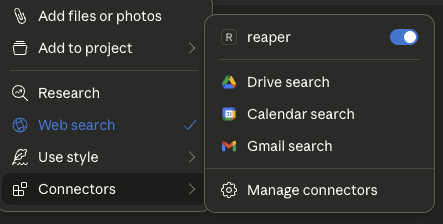
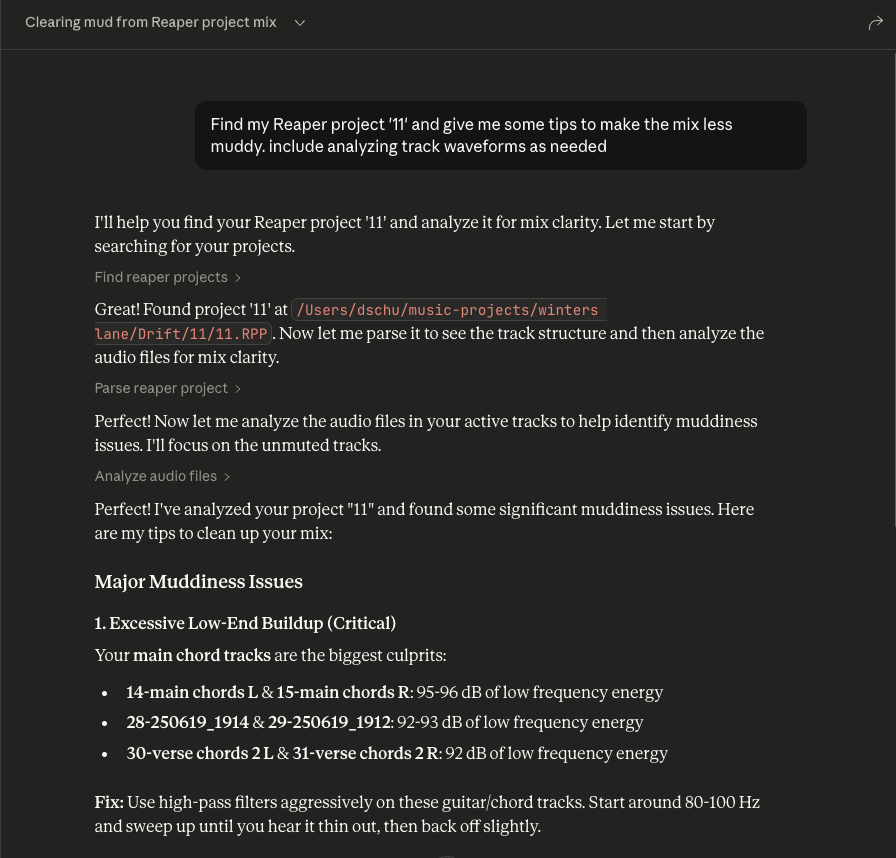
If you want to modify the server, clone it and point Claude at your working copy. uv run syncs the locked dependencies on every launch, so there is no separate install step:
git clone https://github.com/dschuler36/reaper-mcp-server
cd reaper-mcp-server
uv sync                       # optional — only needed for running tests
uv run --group dev pytest
Then use setup/claude_desktop_config_local.json, which runs the server out of your clone:
{
    "mcpServers": {
        "reaper": {
            "command": "/path/to/your/uv-installation/uv",
            "args": [
                "--directory",
                "/path/to/this/repo/reaper-mcp-server/",
                "run",
                "reaper-mcp-server",
                "--reaper-projects-dir",
                "/path/to/your/reaper/projects"
            ]
        }
    }
}
Claim this server with your GitHub account to request manual ownership verification.
Link to the catalog listing for Reaper MCP Server from your README. This badge does not certify ownership, compatibility or security.
[](https://awesome-mcp.com/servers/reaper-mcp-server)Public repository statistics could not be verified. Check the configured source address; unavailable counts are not zero.
Separate sources, scopes and periods. Never combined or treated as installations, active users or security reviews.
No reviewed package or image identity; download statistics are not listed yet.
Alternative and complementary servers in the same category
A Rust CAD application with an MCP server for creating, inspecting and rendering drawings, either headlessly or through a connection to the desktop app.

Liquid Composer is a browser-based Liquid Glass icon design tool that offers a local MCP server for agent-driven icon workflows.

agent-media makes short drama series and other short vertical videos from Claude, ChatGPT or Codex through one MCP connection, with OAuth sign-in and no API keys.