
This is a Model Context Protocol (MCP) server for interacting with AIStor object stores.
Repository stats unavailable
Databases & Storage
A server for interacting with Rememberizer's document and knowledge management API.
MCP Server Rememberizer is cataloged as an MCP server attributed to skydeckai. A server for interacting with Rememberizer's document and knowledge management API. It is categorized under databases storage. See the capability inspector for recorded interfaces and their independent review status; consult upstream documentation for the current interface.
Installation configuration is not reviewed. No executable setup is offered for this entry; inspect the source repository before proceeding.
Catalog license label: Apache License 2.0. Check the source repository's current license and terms before using, modifying or distributing this software.
Capability definitions are not reviewed. Unreviewed imports are not exposed as trusted interfaces.
No reviewed records to display. This does not establish that upstream lacks this capability.
No reviewed records to display. This does not establish that upstream lacks this capability.
No reviewed records to display. This does not establish that upstream lacks this capability.
Email delivery is not connected. This page does not collect email addresses or create subscriptions.
Browse the registry for current listings instead.
Reviews for MCP Server Rememberizer are not available yet
Review publishing and storage are not connected. This page does not collect or publish ratings or comments, including after sign-in.
The search may include sources such as Slack discussions, Gmail, Dropbox documents, Google Drive documents, and uploaded files.
The server can save a piece of text information in the Rememberizer.ai knowledge system so that it may be recalled in future through tools retrieve_semantically_similar_internal_knowledge or smart_search_internal_knowledge.
README.md · 29cd3ea87015 · Fetched 2026-11-13 08:21:52 UTC
Original upstream text, without AI rewriting. Scripts, forms and unsafe links are filtered for safety.
Showing the last retrieved documentation snapshot; check the source for current changes.


A Model Context Protocol server for interacting with Rememberizer's document and knowledge management API. This server enables Large Language Models to search, retrieve, and manage documents and integrations through Rememberizer.
Please note that mcp-server-rememberizer is currently in development and the functionality may be subject to change.
The server provides access to two types of resources: Documents or Slack discussions
retrieve_semantically_similar_internal_knowledge
match_this (string): Up to a 400-word sentence for which you wish to find semantically similar chunks of knowledgen_results (integer, optional): Number of semantically similar chunks of text to return. Use 'n_results=3' for up to 5, and 'n_results=10' for more informationfrom_datetime_ISO8601 (string, optional): Start date in ISO 8601 format with timezone (e.g., 2023-01-01T00:00:00Z). Use this to filter results from a specific dateto_datetime_ISO8601 (string, optional): End date in ISO 8601 format with timezone (e.g., 2024-01-01T00:00:00Z). Use this to filter results until a specific datesmart_search_internal_knowledge
query (string): Up to a 400-word sentence for which you wish to find semantically similar chunks of knowledgeuser_context (string, optional): The additional context for the query. You might need to summarize the conversation up to this point for better context-awared resultsn_results (integer, optional): Number of semantically similar chunks of text to return. Use 'n_results=3' for up to 5, and 'n_results=10' for more informationfrom_datetime_ISO8601 (string, optional): Start date in ISO 8601 format with timezone (e.g., 2023-01-01T00:00:00Z). Use this to filter results from a specific dateto_datetime_ISO8601 (string, optional): End date in ISO 8601 format with timezone (e.g., 2024-01-01T00:00:00Z). Use this to filter results until a specific datelist_internal_knowledge_systems
rememberizer_account_information
list_personal_team_knowledge_documents
page (integer, optional): Page number for pagination, starts at 1 (default: 1)page_size (integer, optional): Number of documents per page, range 1-1000 (default: 100)remember_this
name (string): Name of the information. This is used to identify the information in the futurecontent (string): The information you wish to memorizeuvx mcp-server-rememberizer
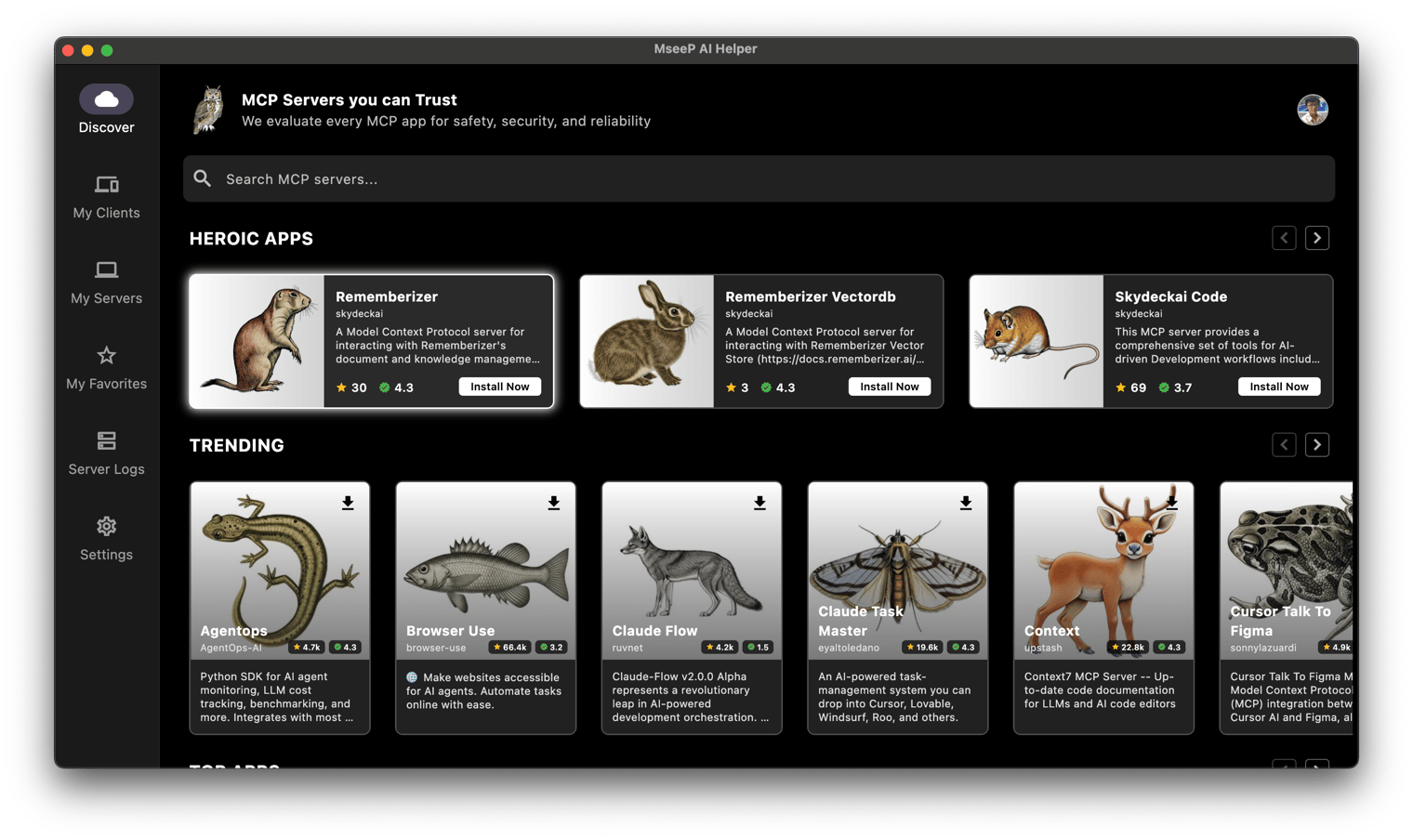
If you have MseeP AI Helper app installed, you can search for "Rememberizer" and install the mcp-server-rememberizer.
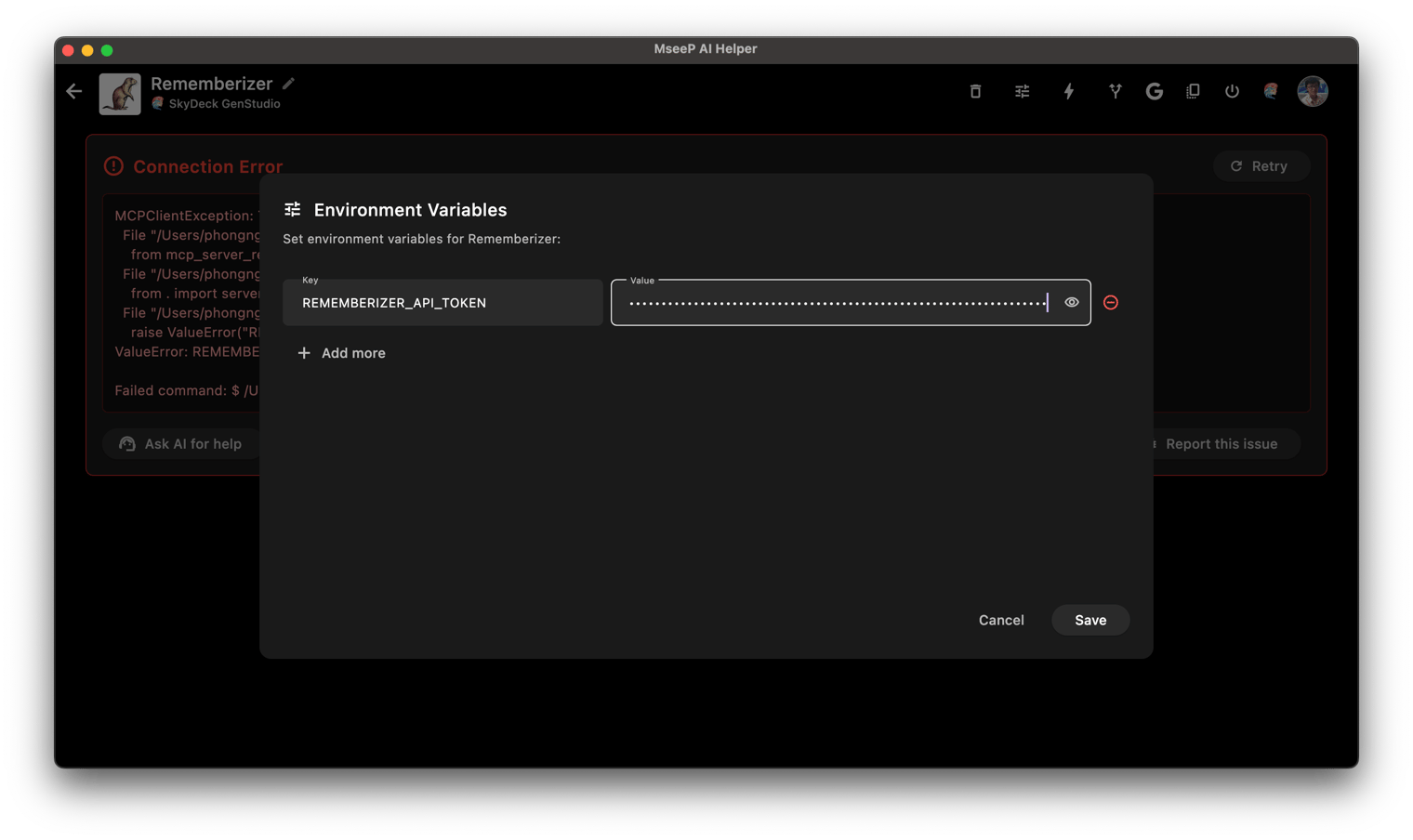
The following environment variables are required:
REMEMBERIZER_API_TOKEN: Your Rememberizer API tokenYou can register an API key by creating your own Common Knowledge in Rememberizer.
Add this to your claude_desktop_config.json:
"mcpServers": {
  "rememberizer": {
      "command": "uvx",
      "args": ["mcp-server-rememberizer"],
      "env": {
        "REMEMBERIZER_API_TOKEN": "your_rememberizer_api_token"
      }
    },
}
Add the env REMEMBERIZER_API_TOKEN to mcp-server-rememberizer.
With support from the Rememberizer MCP server, you can now ask the following questions in your Claude Desktop app or SkyDeck AI GenStudio
What is my Rememberizer account?
List all documents that I have there.
Give me a quick summary about "..."
and so on...
To learn more about Rememberizer MCP Server: https://docs.rememberizer.ai/personal-use/integrations/rememberizer-mcp-servers
This project is licensed under the Apache License 2.0 - see the LICENSE file for details.
Claim this server with your GitHub account to request manual ownership verification.
Link to the catalog listing for MCP Server Rememberizer from your README. This badge does not certify ownership, compatibility or security.
[](https://awesome-mcp.com/servers/rememberizer)Public repository statistics could not be verified. Check the configured source address; unavailable counts are not zero.
Separate sources, scopes and periods. Never combined or treated as installations, active users or security reviews.
No reviewed package or image identity; download statistics are not listed yet.
Alternative and complementary servers in the same category
This is a Model Context Protocol (MCP) server for interacting with AIStor object stores.

A Model Context Protocol server that lets AI assistants run SQL queries against AWS Athena databases and retrieve results.

A Model Context Protocol (MCP) server that exposes access to an InfluxDB v2 instance using the InfluxDB OSS API v2.