Secure Remote MCP Servers using Azure API Management (Experimental)
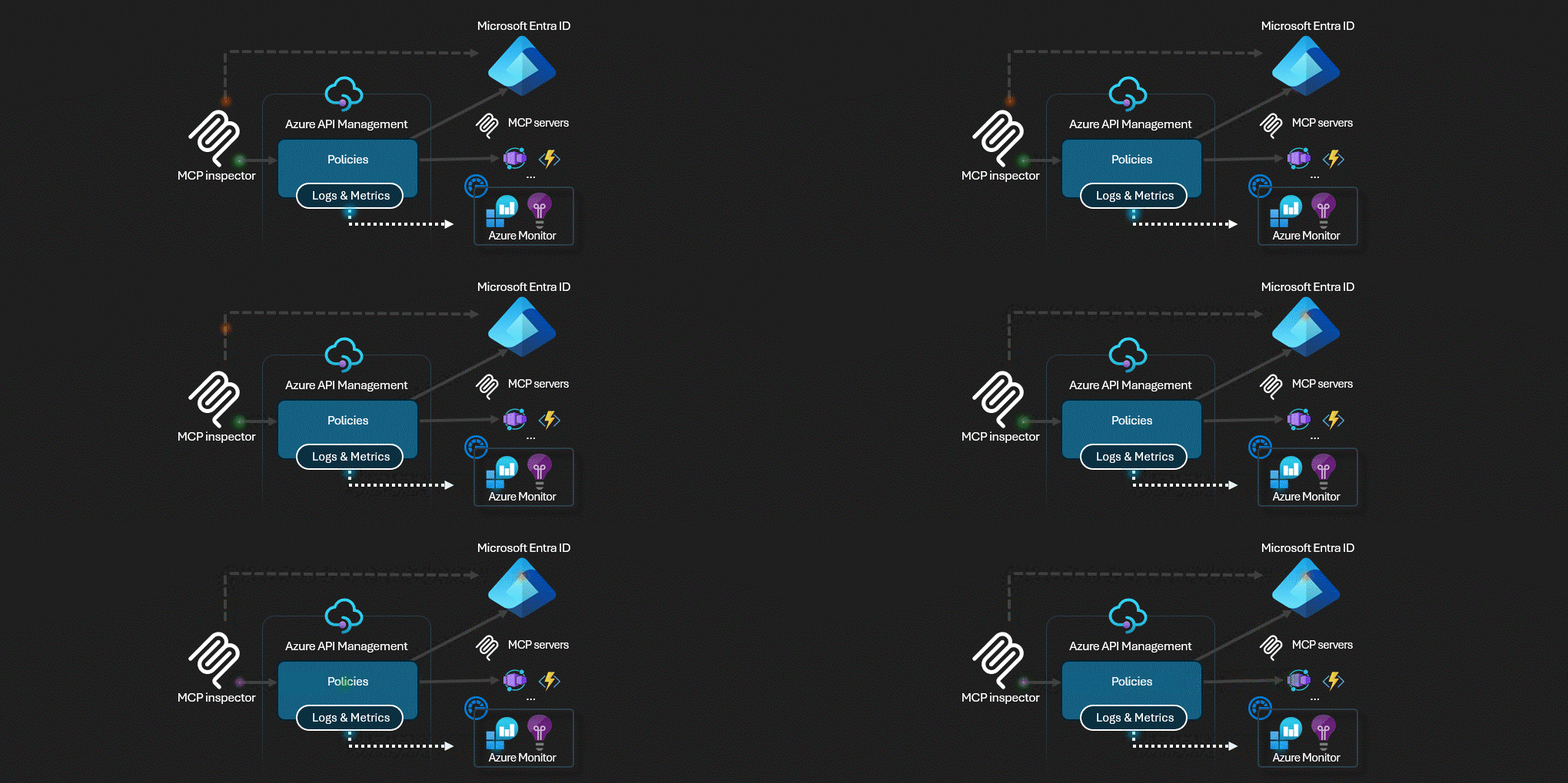
Azure API Management acts as the AI Gateway for MCP servers.
This sample implements the latest MCP Authorization specification
This is a sequence diagram to understand the flow.
Deploy Remote MCP Server to Azure
-
Register Microsoft.App resource provider.
- If you are using Azure CLI, run
az provider register --namespace Microsoft.App --wait.
- If you are using Azure PowerShell, run
Register-AzResourceProvider -ProviderNamespace Microsoft.App. Then run (Get-AzResourceProvider -ProviderNamespace Microsoft.App).RegistrationState after some time to check if the registration is complete.
-
Run this azd command to provision the api management service, function app(with code) and all other required Azure resources
azd up
Test with MCP Inspector
-
In a new terminal window, install and run MCP Inspector
npx @modelcontextprotocol/inspector
-
CTRL click to load the MCP Inspector web app from the URL displayed by the app (e.g. http://127.0.0.1:6274/#resources)
-
Set the transport type to SSE
-
Set the URL to your running API Management SSE endpoint displayed after azd up and Connect:
https://<apim-servicename-from-azd-output>.azure-api.net/mcp/sse
-
List Tools. Click on a tool and Run Tool.
Technical Architecture Overview
This solution deploys a secure MCP (Model Context Protocol) server infrastructure on Azure. The architecture implements a multi-layered security model with Azure API Management serving as an intelligent gateway that handles authentication, authorization, and request routing.
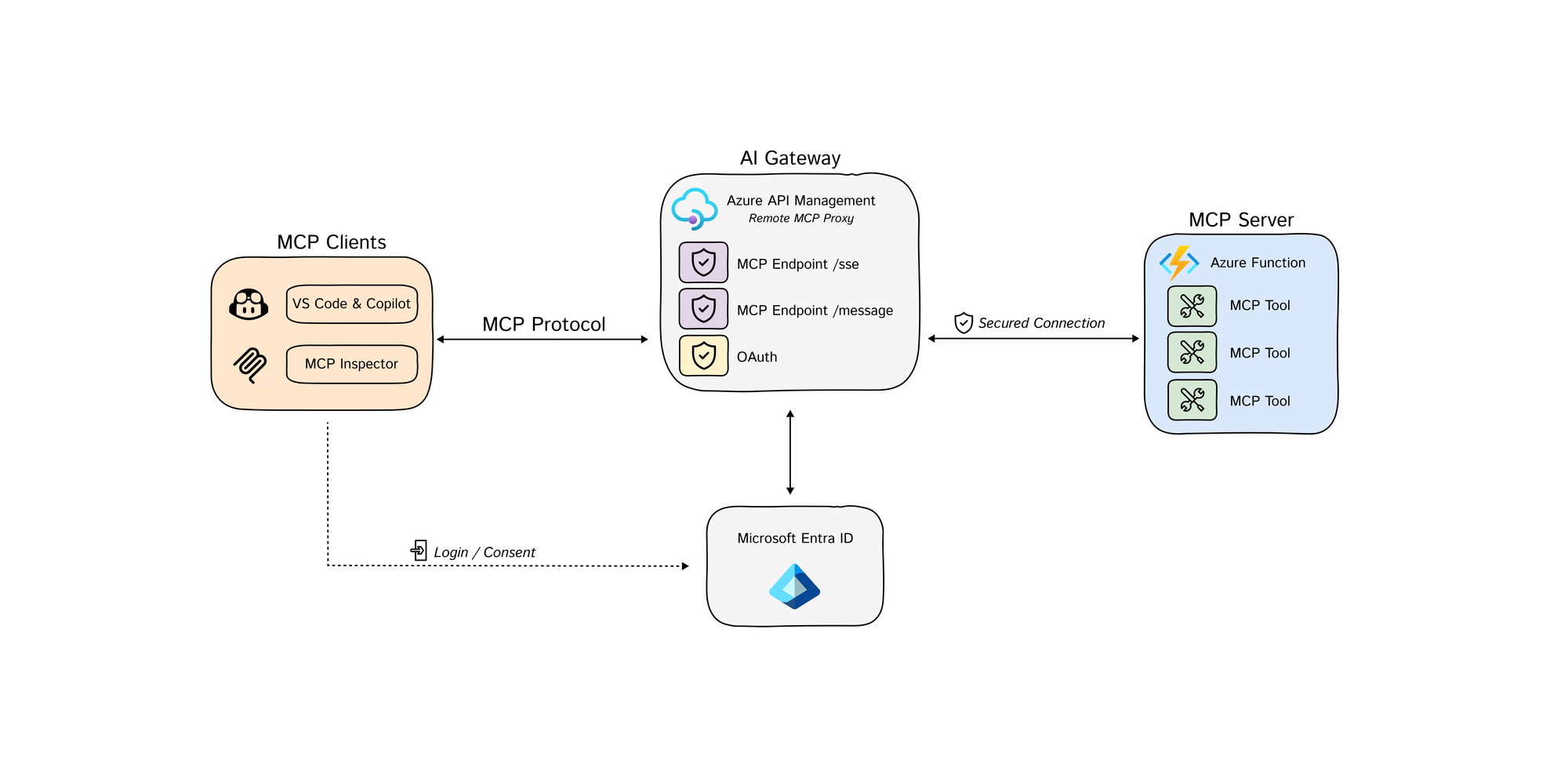
Deployed Azure Resources
The infrastructure provisions the following Azure resources:
Core Gateway Infrastructure
- Azure API Management (APIM) - The central security gateway that exposes both OAuth and MCP APIs
- SKU: BasicV2 (configurable)
- Identity: System-assigned and user-assigned managed identities
- Purpose: Handles authentication flows, request validation, and secure proxying to backend services
Backend Compute
- Azure Function App - Hosts the MCP server implementation
- Runtime: Python 3.11 on Flex Consumption plan
- Authentication: Function-level authentication with managed identity integration
- Purpose: Executes MCP tools and operations (snippet management in this example)
Storage and Data
- Azure Storage Account - Provides multiple storage functions
- Function hosting: Stores function app deployment packages
- Application data: Blob container for snippet storage
- Security: Configured with managed identity access and optional private endpoints
Security and Identity
Monitoring and Observability
- Application Insights - Provides telemetry and monitoring
- Log Analytics Workspace - Centralized logging and analytics
Optional Network Security
- Virtual Network (VNet) - When
vnetEnabled is true
- Private Endpoints: Secure connectivity to Storage Account
- Network Isolation: Functions and storage communicate over private network
Why These Resources?
Azure API Management serves as the security perimeter, implementing:
- OAuth 2.0/PKCE authentication flows per MCP specification
- Session key encryption/decryption for secure API access
- Request validation and header injection
- Rate limiting and throttling capabilities
- Centralized policy management
Azure Functions provides:
- Serverless, pay-per-use compute model
- Native integration with Azure services
- Automatic scaling based on demand
- Built-in monitoring and diagnostics
Managed Identities eliminate the need for:
- Service credentials management
- Secret rotation processes
- Credential exposure risks
Azure API Management Configuration Details
The APIM instance is configured with two primary APIs that work together to implement the MCP authorization specification:
OAuth API (/oauth/*)
This API implements the complete OAuth 2.0 authorization server functionality required by the MCP specification:
Endpoints and Operations
Authorization Endpoint (GET /authorize)
- Purpose: Initiates the OAuth 2.0/PKCE flow
- Policy Logic:
- Extracts PKCE parameters from MCP client request
- Checks for existing user consent (via cookies)
- Redirects to consent page if consent not granted
- Generates new PKCE parameters for Entra ID communication
- Stores authentication state in APIM cache
- Redirects user to Entra ID for authentication
Consent Management (GET/POST /consent)
- Purpose: Handles user consent for MCP client access
- Features: Consent persistence via secure cookies
OAuth Metadata Endpoint (GET /.well-known/oauth-authorization-server)
- Purpose: Publishes OAuth server configuration per RFC 8414
- Returns: JSON metadata about supported endpoints, flows, and capabilities
Client Registration (POST /register)
- Purpose: Supports dynamic client registration per MCP specification
Token Endpoint (POST /token)
- Purpose: Exchanges authorization codes for access tokens
- Policy Logic:
- Validates authorization code and PKCE verifier from MCP client
- Exchanges Entra ID authorization code for access tokens
- Generates encrypted session key for MCP API access
- Caches the access token with session key mapping
- Returns encrypted session key to MCP client
Named Values and Configuration
The OAuth API uses several APIM Named Values for configuration:
McpClientId - The registered Entra ID application client IDEntraIDFicClientId - Service identity client ID for token exchangeAPIMGatewayURL - Base URL for callback and metadata endpointsOAuthScopes - Requested OAuth scopes (openid + Microsoft Graph)EncryptionKey / EncryptionIV - For session key encryption
MCP API (/mcp/*)
This API provides the actual MCP protocol endpoints with security enforcement:
Endpoints and Operations
Server-Sent Events Endpoint (GET /sse)
- Purpose: Establishes real-time communication channel for MCP protocol
- Security: Requires valid encrypted session token
Message Endpoint (POST /message)
- Purpose: Handles MCP protocol messages and tool invocations
- Security: Requires valid encrypted session token
Security Policy Implementation
The MCP API applies a comprehensive security policy to all operations:
-
Authorization Header Validation
<check-header name="Authorization" failed-check-httpcode="401"
              failed-check-error-message="Not authorized" ignore-case="false" />
-
Session Key Decryption
- Extracts encrypted session key from Authorization header
- Decrypts using AES with stored key and IV
- Validates token format and structure
-
Token Cache Lookup
<cache-lookup-value key="@($"EntraToken-{context.Variables.GetValueOrDefault("decryptedSessionKey")}")"
                    variable-name="accessToken" />
-
Access Token Validation
- Verifies cached access token exists and is valid
- Returns 401 with proper WWW-Authenticate header if invalid
-
Backend Authentication
<set-header name="x-functions-key" exists-action="override">
    <value>{{function-host-key}}</value>
</set-header>
Security Model
The solution implements a sophisticated multi-layer security model:
Layer 1: OAuth 2.0/PKCE Authentication
- MCP clients must complete full OAuth flow with Entra ID
- PKCE prevents authorization code interception attacks
- User consent management with persistent preferences
Layer 2: Session Key Encryption
- Access tokens are never exposed to MCP clients
- Encrypted session keys provide time-bounded access
- AES encryption with secure key management in APIM
Layer 3: Function-Level Security
- Function host keys protect direct access to Azure Functions
- Managed identity ensures secure service-to-service communication
- Network isolation available via VNet integration
Layer 4: Azure Platform Security
- All traffic encrypted in transit (TLS)
- Storage access via managed identities
- Audit logging through Application Insights
This layered approach ensures that even if one security boundary is compromised, multiple additional protections remain in place.


