
A directory listing describing a cancellation-letter and mailing-address service. The configured public GitHub repository returned 404 during source verification.
Repository stats unavailable
Developer Tools
A .NET 9 solution combining an AI chat application with a Model Context Protocol server that provides backend integration with the ReportServer BI platform.
MCP Server and AI Chat application for ReportServer is cataloged as an MCP server attributed to diplinfmarkodrews. A .NET 9 solution combining an AI chat application with a Model Context Protocol server that provides backend integration with the ReportServer BI platform. It is categorized under developer tools. See the capability inspector for recorded interfaces and their independent review status; consult upstream documentation for the current interface.
Installation configuration is not reviewed. No executable setup is offered for this entry; inspect the source repository before proceeding.
Catalog license label: Not specified. Check the source repository's current license and terms before using, modifying or distributing this software.
Capability definitions are not reviewed. Unreviewed imports are not exposed as trusted interfaces.
No reviewed records to display. This does not establish that upstream lacks this capability.
No reviewed records to display. This does not establish that upstream lacks this capability.
No reviewed records to display. This does not establish that upstream lacks this capability.
Email delivery is not connected. This page does not collect email addresses or create subscriptions.
Browse the registry for current listings instead.
Reviews for MCP Server and AI Chat application for ReportServer are not available yet
Review publishing and storage are not connected. This page does not collect or publish ratings or comments, including after sign-in.
It supports HTTP and SSE transport protocols.
It uses a Playwright browser tool for frontend visual UI automation while the MCP server provides backend RPC integration, and agents can combine both approaches.
README.md · 13941c5c063f · Fetched 2026-11-13 13:41:49 UTC
Original upstream text, without AI rewriting. Scripts, forms and unsafe links are filtered for safety.
Showing the last retrieved documentation snapshot; check the source for current changes.
--Experimental--
An AI Chat application plus a sophisticated Model Context Protocol (MCP) Server for enterprise ReportServer (Java-based BI platform). Built on .NET 9, the solution leverages Microsoft’s latest AI application development stack — Microsoft.Extensions.AI (Extensions.AI) and Semantic Kernel — to deliver tool-based automation, semantic search (RAG), and end-to-end integration across ReportServer’s UI and backend.
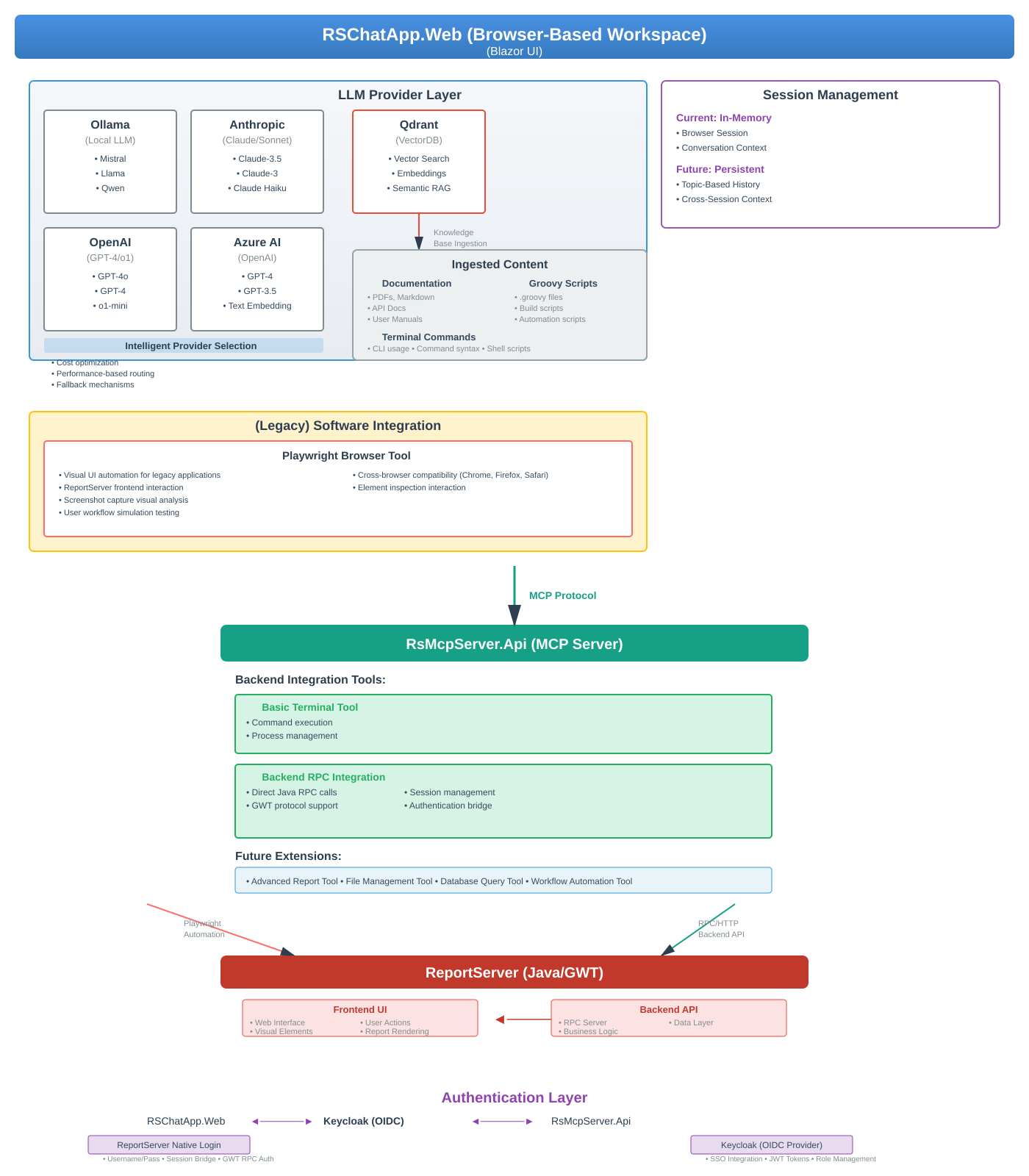
The RSChatApp operates as a browser-based workspace that provides an intelligent chat interface powered by AI and enhanced with semantic search capabilities and Mcp server for front and backend functionalities of the Reportserver:
🌐 Browser-Based Workspace (RSChatApp.Web)
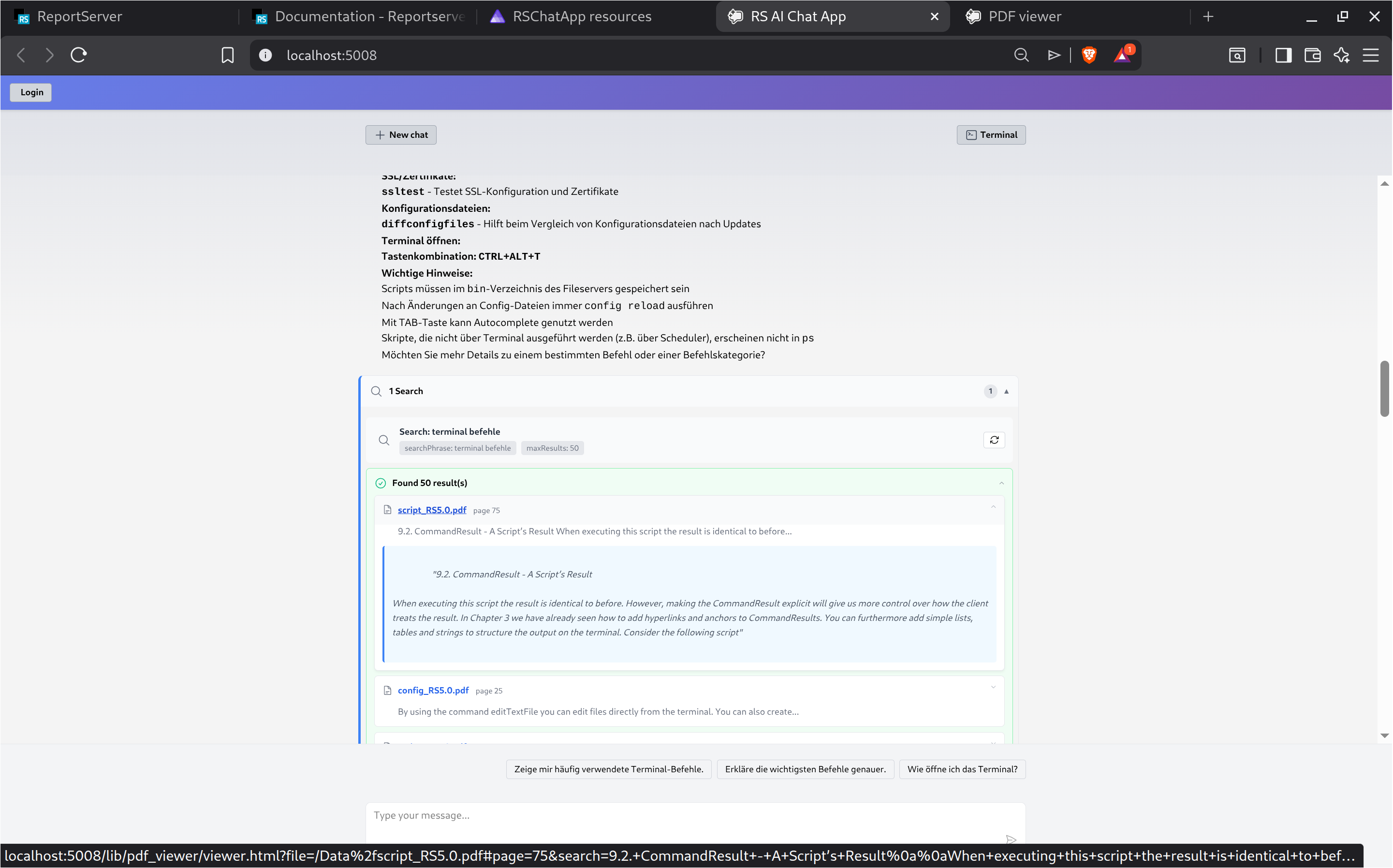
🧠 Knowledge Base Integration The system ingests diverse content types into Qdrant vector database for intelligent retrieval:
🤖 Multi-Provider AI Intelligence
Flexible LLM Provider Layer: Support for multiple AI providers, in future with intelligent routing and fallback
Ollama: Local deployment for privacy-sensitive workloads and offline operation
Anthropic Claude: High-quality reasoning and code analysis with Claude-3.5 Sonnet
OpenAI GPT: Versatile models including GPT-4o and o1-mini for different use cases
Azure OpenAI: Enterprise-grade hosted OpenAI models with additional security
Ollama/Qdrant: Powerful local embedding Model, provides vector search, embeddings, and semantic RAG capabilities for context-aware responses
🤖 AI Chat Application with Legacy Software Integration (RSChatApp.Web) The chat application provides an innovative AI interface for legacy software integration:
🔧 MCP Server Backend Integration (RsMcpServer.Web) The MCP server provides backend integration capabilities for ReportServer:
⚙️ Backend Integration (RPC Client):
🔄 Dual Integration Strategy: AI agents can leverage both frontend and backend approaches:
🔐 Dual Authentication Support The system supports both modern and legacy authentication methods:
Start the entire application stack with one command:
# Navigate to the Aspire host directory
cd src/RSChatApp.AppHost/RSChatApp.AppHost

# Start all services (Ollama with auto-downloaded models, Qdrant, MCP Server, Web App)
dotnet run
💡 Windows Users Note: If you're using Windows with Docker Desktop, you may need to set up a PowerShell alias for Docker Compose. The Aspire orchestration API uses the legacy docker-compose syntax. Run this command in PowerShell as Administrator:
Set-Alias -Name docker-compose -Value 'docker compose'
This will automatically:
Access Points:
http://localhost:5123 (or as shown in Aspire dashboard)http://localhost:15986 (or as shown on console)http://localhost:5002http://localhost:6333/dashboardNote: The first run may take a few minutes as Docker images are downloaded and AI models are pulled automatically. To use commercial LLM providers (Anthropic, OpenAI, Azure), configure your API keys as Env variables and configure its name in appsettings.json file.
RSChatApp.AppHost/: .NET Aspire app host that orchestrates all components
RsMcpServerSDK.Web/: Modern MCP server implementation
RSChatApp.Web/: Interactive chat web application
ReportServerRPCClient/: Direct RPC client for Java ReportServer
ReportServer.Abstraction/: Interface definitions for Report Server communication
Note: Ollama, Qdrant, and AI models are automatically managed by the .NET Aspire AppHost via Docker containers - no manual installation required!
Ensure you have Docker running on your system
Navigate to the RSChatApp.AppHost directory:
cd src/RSChatApp.AppHost/RSChatApp.AppHost
dotnet run
This will start all required services in the correct order:
Open the Aspire dashboard at the provided URL (typically http://localhost:15986) to monitor all services
Access the chat web interface at the URL shown in the dashboard (typically http://localhost:5123)
Its important to set Reportserver url in AI Chatapp and RsMcpServer. The LLM provider in RSChatApp.Web needs to be configured or if you want to use a local LLM. Wheter you want to use local or a providers model, provide only the model you want to use
Configures infrastructure, mainly ollama warning: if ollama doesnt support your GPU, it will crash the apphost Configure the ollama hosted models here
{
  "Logging": {
    "LogLevel": {
      "Default": "Information",
      "Microsoft.AspNetCore": "Warning"
    }
  },
  "Ollama": {
    "Gpu": true,
    "Model": "",
    "EmbeddingModel": "snowflake-arctic-embed2:latest"
  }
}
The chat app loads prompts from plain text/Markdown files (so prompts can be multi-line and nicely formatted without JSON escaping).
Startup behavior:
Reload behavior:
.md file changes, prompts are automatically reloaded.Customization notes:
SystemPrompt and SuggestionPrompt.{
"Logging": {
"LogLevel": {
"Default": "Information",
"Microsoft.AspNetCore": "Warning",
"Microsoft.Extensions.AI": "Information",
}
},
"DetailedErrors": true,
"OpenAISettings": { // LLM connection settings, any provider can be used
"Model": "claude-3-7-sonnet-20250219",
"Url": "https://api.anthropic.com/v1/",
"ApiKey": "ANTHROPIC_KEY" // this is the name of env variable, which holds API key
// Store your providers API Key in a local Env variable and insert its name here!!
},
"OpenAIPromptExecutionSettings": { // LLM Prompt execution setting
"MaxTokens": 4096,
"Temperature": 0.7,
"TopP": 1.0,
"FrequencyPenalty": 0.0,
"PresencePenalty": 0.0,
"AllowMultipleToolCalls": true
},
"ReportServer": { // Url for reportserver
"Url": "http://localhost:8080/reportserver",
"SessionTimeout": "01:00:00",
"CookieDomain": "localhost",
"EnableSessionBridge": false
},
"RsMcpServer": { // Url of RsMcpServer, will be filled by aspire
"Url": "http://localhost:5002"
},
"McpClientSettings": { // disabled for now, can be used to integrate various Mcp Servers
"Clients": [
]
},
"AllowedCorsOrigins": [
"http://localhost:5008",
"https://localhost:5008",
"http://localhost:8090",
"https://reportserver.net"
],
"Keycloak": { // can be ignored for now
"Authority": "http://localhost:8090/realms/reportserver",
"ClientId": "rs-chat-app",
"ClientSecret": "",
"Realm": "reportserver",
"Scopes": [
"openid",
"profile",
"email",
"roles",
"offline_access"
],
"RequireHttpsMetadata": false,
"TokenRefreshThreshold": "00:05:00",
"UsePkce": true,
"UsePar": false
}
}
{
  "Logging": {
    "LogLevel": {
      "Default": "Information",
      "Microsoft": "Warning",
      "Microsoft.Hosting.Lifetime": "Information",
      "RSChatApp.ServiceDefaults.Authentication": "Information"
    }
  },
  "Keycloak": {
    "Authority": "http://localhost:8081/realms/reportserver",
    "Audience": "",
    "RequireHttpsMetadata": false
  },
  "ReportServer": {
    "Url": "http://localhost:8080/reportserver/"
  }
}
Keycloak:Authority is the realm URL used to validate JWT bearer tokens; Audience is optional
(empty = audience is not validated); RequireHttpsMetadata must be false for plain-http Keycloak.
Legacy ReportServer sessions (Bearer GUID from /api/auth/v1/login or cookie) need no Keycloak settings.
Keycloak Settings:
Authority: Keycloak realm URLClientId: Client identifier in KeycloakClientSecret: Client secret (get from Keycloak admin console)Realm: Keycloak realm nameScopes: OpenID Connect scopes to requestRequireHttpsMetadata: Set to false for development, true for productionTokenRefreshThreshold: Time before token expiry to refreshReportServer Settings:
Url: ReportServer base URLSessionTimeout: Session timeout durationCookieDomain: Domain for session cookiesEnableSessionBridge: Enable session bridging between Keycloak and ReportServerOllama Settings:
Url: Ollama server URL, coan be configured, but uses its own instanceModel: Chat completion model (e.g., "mistral-nemo:12b", "llama3.2:3b")EmbeddingModel: Text embedding modelEnabled: Whether this provider is availableOpenAI Settings:
Url: Url of LLM providerApiKey: Name of env variable holdings providers ApiKeyModel: GPT model variant ("gpt-4o", "gpt-4", "o1-mini")Qdrant Settings:
Url: Qdrant vector database URLDevelopment Environment:
{
  "Keycloak": {
    "RequireHttpsMetadata": false,
    "Authority": "http://localhost:8080/realms/reportserver"
  },
  "ReportServer": {
    "Url": "http://localhost:8081"
  }
}
6. Start Chat Application
cd src/RSChatApp.Web/RSChatApp.Web
dotnet run
Note: Manual setup requires you to configure all the networking and dependencies yourself. The Aspire approach handles all of this automatically with proper service discovery and health checks.
Claim this server with your GitHub account to request manual ownership verification.
Link to the catalog listing for MCP Server and AI Chat application for ReportServer from your README. This badge does not certify ownership, compatibility or security.
[](https://awesome-mcp.com/servers/rs-mcp-agent)Public repository statistics could not be verified. Check the configured source address; unavailable counts are not zero.
Separate sources, scopes and periods. Never combined or treated as installations, active users or security reviews.
No reviewed package or image identity; download statistics are not listed yet.
Alternative and complementary servers in the same category
A directory listing describing a cancellation-letter and mailing-address service. The configured public GitHub repository returned 404 during source verification.

A hosted MCP service for browsing and searching through Singapore mobile-network proxies.

A directory listing describing a Markdown-to-PDF service. The configured public GitHub repository returned 404 during source verification.