
A Model Context Protocol (MCP) server for controlling Chrome with debugging capabilities, userscript injection, and extension support.
Repository stats unavailable
Browser & Scraping
A local Chrome runtime that offers an MCP server letting agents browse, fill forms, read pages and handle supported login and verification flows.
Ruin Everything is cataloged as an MCP server attributed to yuki4266. A local Chrome runtime that offers an MCP server letting agents browse, fill forms, read pages and handle supported login and verification flows. It is categorized under browser automation. See the capability inspector for recorded interfaces and their independent review status; consult upstream documentation for the current interface.
Installation configuration is not reviewed. No executable setup is offered for this entry; inspect the source repository before proceeding.
Catalog license label: MIT. Check the source repository's current license and terms before using, modifying or distributing this software.
Capability definitions are not reviewed. Unreviewed imports are not exposed as trusted interfaces.
No reviewed records to display. This does not establish that upstream lacks this capability.
No reviewed records to display. This does not establish that upstream lacks this capability.
No reviewed records to display. This does not establish that upstream lacks this capability.
Email delivery is not connected. This page does not collect email addresses or create subscriptions.
Browse the registry for current listings instead.
Reviews for Ruin Everything are not available yet
Review publishing and storage are not connected. This page does not collect or publish ratings or comments, including after sign-in.
No; Ruin's MCP server requires no API key and your agent uses its own model connection.
Six tools that operate on one shared browser.
Browser execution and credential handling run locally, with the automatic login vault storing passwords in a local owner-only file.
README.md · 33d07ddb232f · Fetched 2026-11-13 14:08:58 UTC
Original upstream text, without AI rewriting. Scripts, forms and unsafe links are filtered for safety.
Showing the last retrieved documentation snapshot; check the source for current changes.
English · 简体中文 · 日本語 · Español
Your agent clicks. Ruin keeps the work moving.
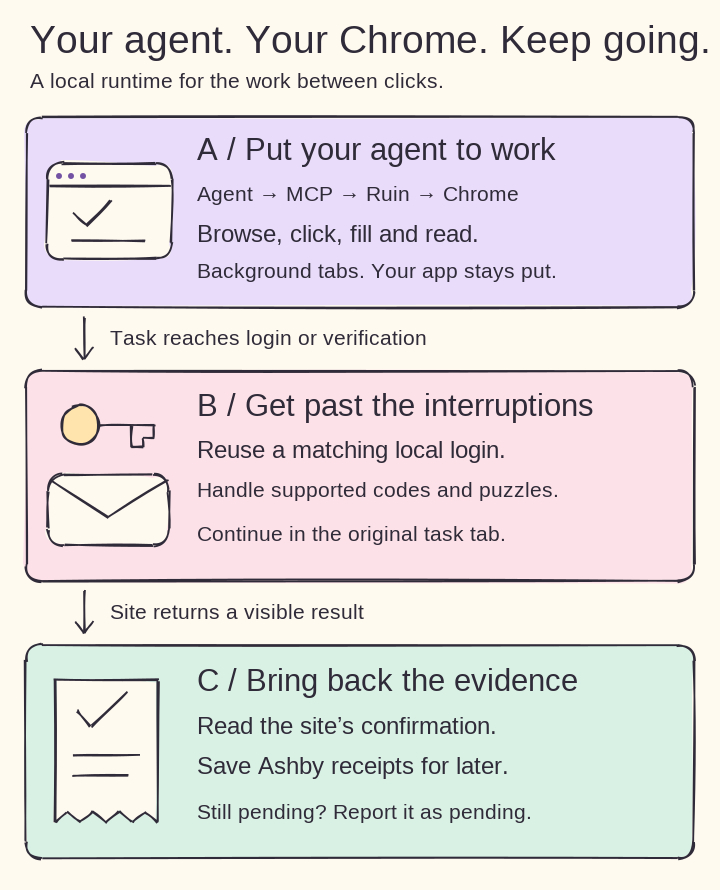
Ruin Everything is a local Chrome runtime for browser agents. It lets your agent use the sessions, cookies and extensions already in your shared Chrome profile, work in background tabs, and continue through supported login and verification steps. Browse websites, fill forms, read pages and come back with evidence of what happened.



Get started · Core features · Real workflows · What's verified · Technical reference
The agent reaches a login page. A code lands in your inbox. A challenge appears after Submit. Then the conversation ends and nobody knows whether the application went through.
Ruin handles the browser work that keeps interrupting the task. Figure A shows the shared browser; B covers login and verification; C brings the result back to something you can check.
| Core feature | What you get |
|---|---|
| Your Chrome, ready to work | Navigate, click, type, select and extract text across websites. Keep using the same profile, cookies and extensions between agent sessions. |
| An agent that stays out of your way | Task tabs open in the background. Ruin keeps them interactive without switching your foreground app, and preserves unrelated tabs. |
| Log in once. Reuse it when you can. | The local vault captures manual password logins and can fill a matching login later. Cookie and Web Storage snapshots help restore state after Chrome restarts. Sites still control expiry. |
| Keep moving through verification | Supported flows handle fresh email codes, SMS codes and visual puzzles in the original task tab. Unresolved challenges return a pending state. |
| Less repeated account setup | A local identity profile fills supported signup and contact forms. Optional Workday/iCIMS recovery handles recognized account errors and password-reset requests. |
| Proof you can come back to | The Ashby watcher saves the site's submission confirmation by job URL. Look it up later—even after Chrome closes. |
General browsing works through ruin_browser; the named sites below are examples of extra automation. The agent plans the task; Ruin runs its browser actions.
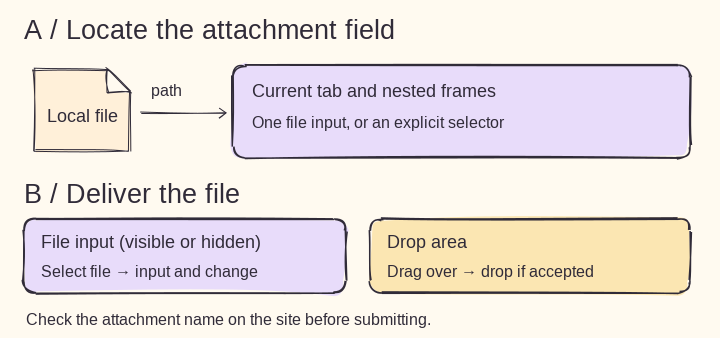
Pass the exact tab URL as site and an absolute file_path to ruin_browser(operation="upload") or its alias set_files. As panel A shows, you can omit selector when exactly one file input exists across the page and its frames. For a form with multiple fields, select the intended input. Panel B shows the explicit drop-area route. Browser tests verify both paths, including a hidden input in a nested frame.
You need Python 3.11+, Google Chrome and uv. This quickstart uses the current GitHub code so it includes the features described here.
uvx --from 'ruin-everything @ git+https://github.com/yuki4266/ruin-everything.git@main' ruin browser
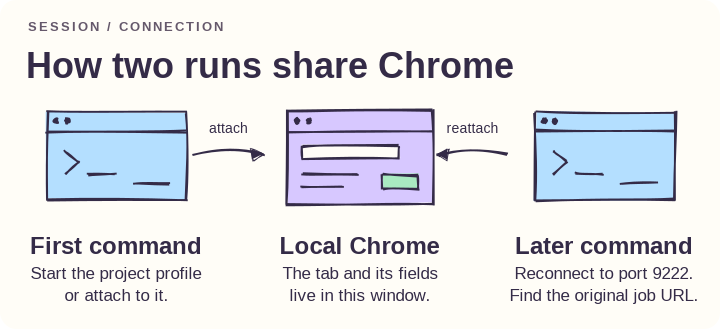
Ruin starts or reconnects to Chrome on 127.0.0.1:9222. Its persistent profile is ~/.ruin-everything/canvas-browser. Sign in to the sites you need in that profile; this does not import another Chrome profile's logins. Chrome and task tabs stay open when the command exits.
Add this to your MCP client's server configuration, then restart the connection. The client must be able to run uvx.
{
  "mcpServers": {
    "ruin-everything": {
      "command": "uvx",
      "args": [
        "--isolated", "--refresh", "--from",
        "ruin-everything @ git+https://github.com/yuki4266/ruin-everything.git@main",
        "ruin-mcp"
      ],
      "env": { "RUIN_AUTO_UPDATE": "0" }
    }
  }
}
Prefer the published package? Replace the Git source with ruin-everything. Git updates arrive on the next server launch; PyPI features depend on the published version. Installation and update details.
Use Ruin to open https://example.org and tell me the page title and visible links.
The entry point is ruin_browser(operation="navigate", url="https://example.org"). Follow-up calls use the returned current URL. No API key is required for Ruin's MCP server; your agent uses its own model connection. The optional standalone model-driven CLI needs the agent extras and OPENAI_API_KEY.
For account and signup helpers, install a persistent checkout and run ruin identity. Select the background editor tab to add your details and choose whether to enable automatic signup. ruin ats-setup separately opts into ATS password recovery. Setup and configuration.
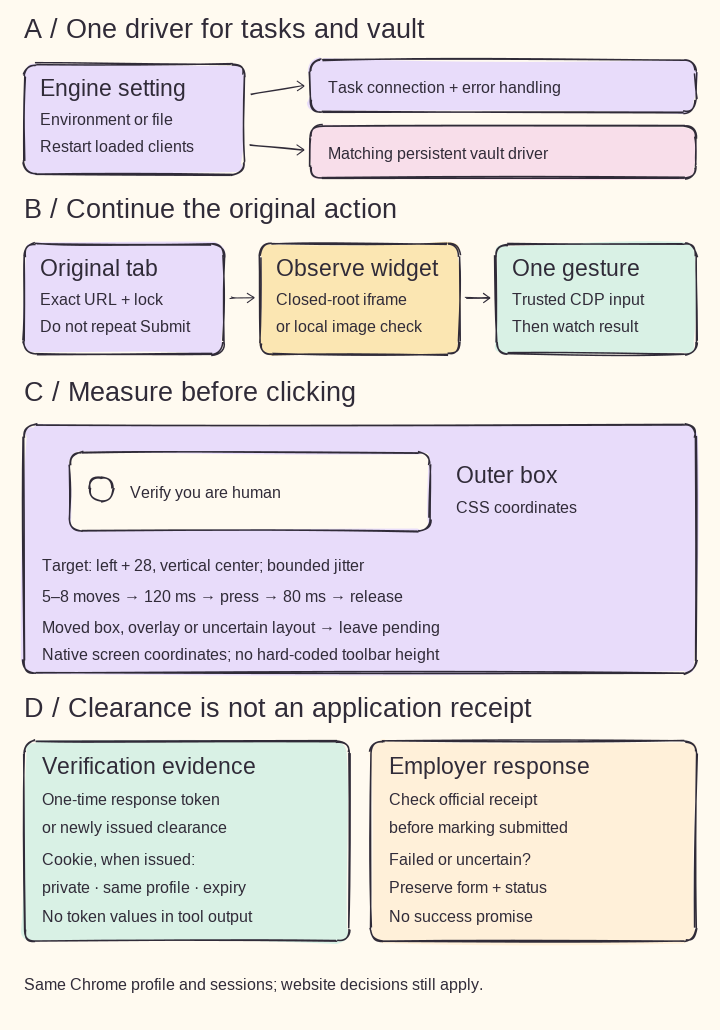
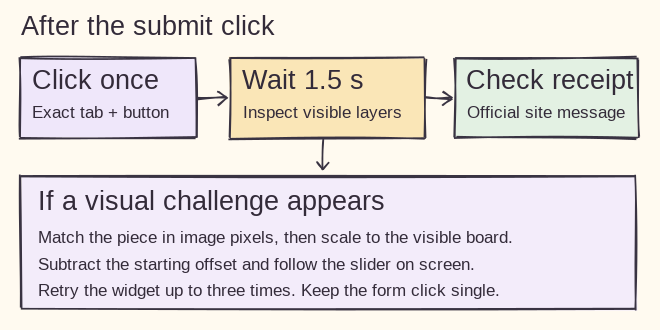
Ruin locates the outer iframe through closed shadow roots, checks its visible state, and sends one bounded CDP mouse gesture. Ambiguous layouts, covering overlays and failed verification stay pending without replaying Submit. Screenshot fallback uses the local vision model. The existing Chrome profile is preserved; new launches include AutomationControlled suppression, with idempotent compatibility initialization on selected tabs and no fixed screen-coordinate offset.
Only genuine, unexpired cf_clearance cookies are backed up in the private ~/.ruin/cookies_snapshot.json namespace and restored for the same profile and browser user agent. Ordinary Turnstile often issues only a single-use token; token values are neither logged nor saved. A cleared widget is not an application receipt. See implementation, sources and live verification.
Optional Patchright support selects the same API and exception types for tasks and the persistent vault service. Install from this checkout with pip install -e ".[patchright]"; set RUIN_BROWSER_ENGINE=patchright, or save {"engine":"patchright"} to ~/.ruin-everything/browser-engine.json. Restart existing runtime clients and the vault when changing engines. Patchright owns initialization; Ruin skips its extra prototype patches. Connections have a bounded initialization timeout. Browser restarts remain explicit, preserving the original profile. See panel A below.
| You're trying to… | Ruin's extra help | Verification so far |
|---|---|---|
| Get through a recruiting site's puzzle | Handle the supported ZhongAn/Moka jigsaw or Feishu Jobs rotation slider. | Live SMS countdowns observed on both; ZhongAn also returned its success page and application-history entry. |
| Finish a Greenhouse email check | Match a fresh Outlook message to the employer and request, then enter its code in the job tab. | Browser fixtures; live employer/Outlook compatibility remains unverified. |
| Recover a Workday or iCIMS account | Use local identity details, supported signup/activation and optional bounded password recovery. | Browser fixtures; live Workday dialog inspection. Production layouts vary. |
| Find out whether an Ashby application went through | Watch for the official confirmation and save a receipt for the exact job. | Local receipt and browser integration tests. A missing record means the outcome is unknown. |
| Get to a paper through Duke | Follow supported institutional access on IEEE, ACM and Springer; continue filled Duke login and Duo device-trust screens. | Live IEEE lookup, Duke redirect and PDF access; ACM/Springer covered by fixtures. |
These are specific supported flows. Puzzle handling can require a local Ollama vision model; SMS reading requires macOS Messages access; mail flows need Outlook Web signed in. Phone approvals and unsupported checks can still need you. Workflow requirements and commands.
For authorized form submissions, use ruin_action with the exact current URL and visible button label. It checks for verification after the click. A cleared challenge is a step forward; the site's receipt is the evidence of submission.
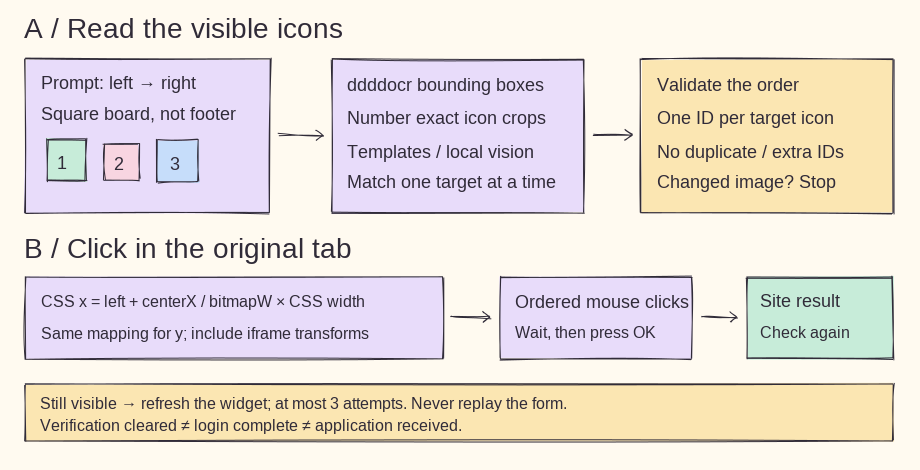
Ruin detects the visible icon panel, uses ddddocr to locate candidate boxes, and asks the local Ollama vision model to match numbered crops to the prompt from left to right. It maps bitmap centers to CSS viewport coordinates, clicks in order, and presses OK automatically. Failed attempts refresh only the widget, with at most three attempts total. The Bilibili icon challenge was cleared live in one attempt; login and application submission are separate checks. Strong rotated-template matches cross-check the order; otherwise each target symbol is matched separately. Browser tests cover DPR, iframe scaling, stale images and bounded retries.
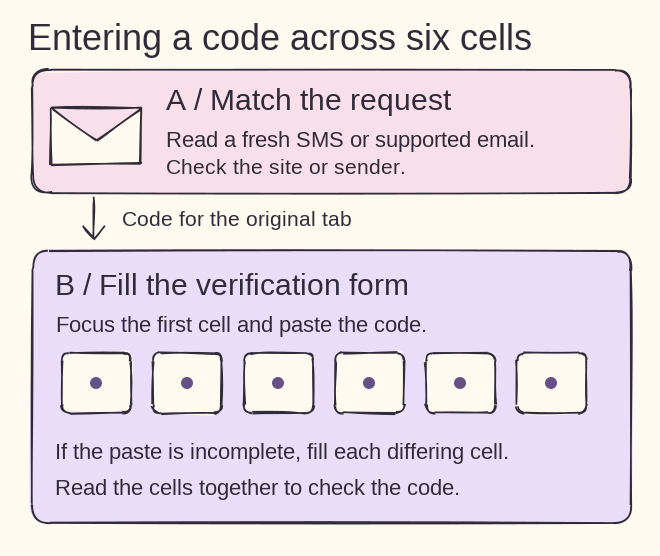
Panel A shows how Ruin matches an incoming SMS or supported Outlook message. Panel B shows how it pastes the code into a split form and fills any remaining cells. The Ctrip phone check was verified live. Both input paths were tested with react-otp-input 3.1.1. Single code fields can also be identified by their visible placeholder or accessible name; ambiguous fields are left untouched. Bilibili SMS messages are matched to the exact login host and request time.
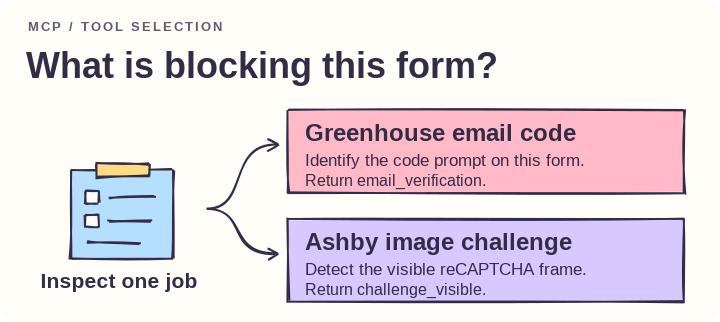
| Tool | Use it for |
|---|---|
ruin_browser | List tabs, navigate, inspect, read, click, fill, press keys and select options. |
ruin_action | Submit an authorized form and handle supported follow-up verification; omit the button to resume. |
ruin_auto_register | Continue supported signup, account or SMS-login steps using the local identity profile. |
inspect_application_challenge | Identify a Greenhouse/Ashby challenge or locate the supported application tab. |
get_ashby_receipt | Look up saved submission evidence without opening Chrome. |
watch_ashby_receipt | Watch the original Ashby tab for confirmation and save it. |
Agent routing instructions · CLI and detailed behavior · Trusted-login configuration
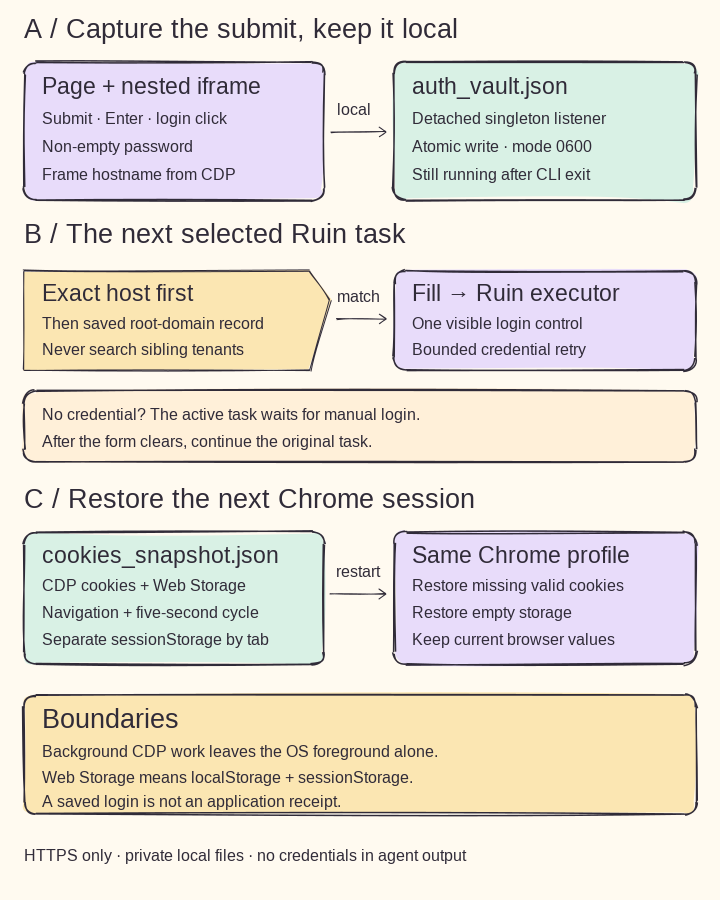
Browser execution and credential handling run locally. The automatic login vault stores plaintext passwords in ~/.ruin/auth_vault.json with owner-only permissions (0600); they stay out of agent tool results. Cookies and Web Storage are also backed up locally. Set RUIN_LOCAL_AUTH_VAULT=0 to disable automatic listener startup for that client. Vault behavior and storage limits.
Your connected agent may send page text to its model provider. Site sessions still expire, and some verification still needs human input. Ruin preserves browser state and resumes supported steps; it cannot promise permanent login or success on every site.
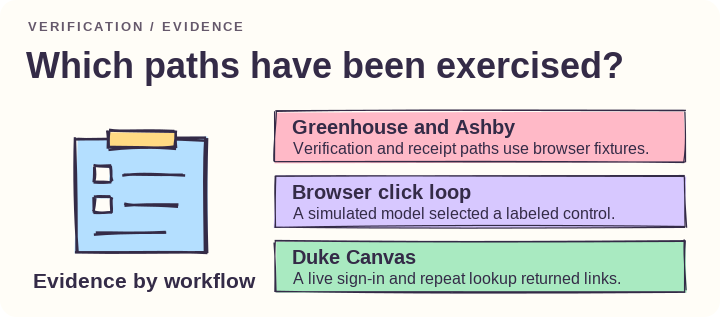
Current check: Turnstile continuation and optional Patchright support are now consolidated on main (Turnstile figure, panels A–D). All 133 regression tests passed in one run with the Playwright engine; source/wheel builds and strict Twine metadata checks also passed. The checks figure above distinguishes local fixtures from live site evidence. Prior live observations and their limits remain in the runtime reference.
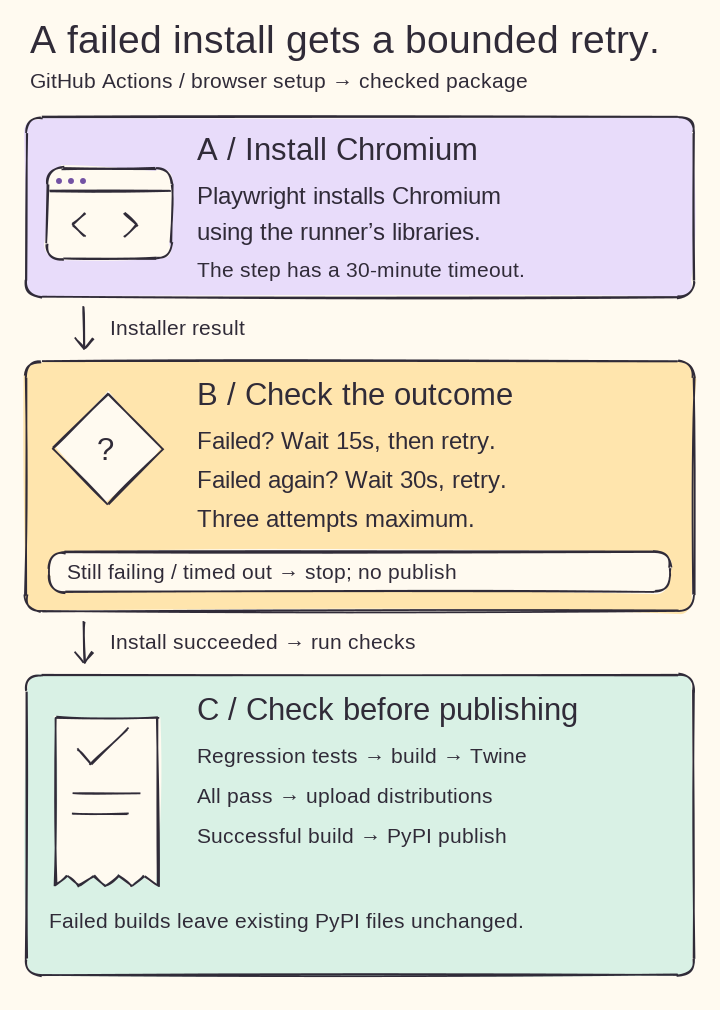
The failed CI run stopped on Ubuntu mirror DNS errors while fetching extra font packages. Hosted Ubuntu already supplied the Chromium shared libraries. CI now installs Chromium directly and validates the runner through the browser regression suite (figure A–C). Browser downloads get at most three attempts, with 15s and 30s waits and a 30-minute step timeout. Successful tests and packaging checks enable PyPI publishing. CI results.
Local tests cover shared sessions, background tabs, login capture and restoration, tenant boundaries, verification routing and receipt storage. The table above distinguishes live observations from simulated browser tests. See the reference for the conditions and limits of each check.
To run the regression suite from a development checkout:
python -m pip install -e '.[agent]'
python -m playwright install chromium
RUIN_AUTO_UPDATE=0 RUIN_RULE_UPDATES=0 python -m unittest discover -s tests -v
The illustrations are original, editable SVGs built with Rough.js and Kalam. Figure sources · Contributing · Development plan · MIT license
Report a bug · Share a workflow · Suggest a feature
If Ruin saved you another round of browser babysitting, give it a star.
Claim this server with your GitHub account to request manual ownership verification.
Link to the catalog listing for Ruin Everything from your README. This badge does not certify ownership, compatibility or security.
[](https://awesome-mcp.com/servers/ruin-everything)Public repository statistics could not be verified. Check the configured source address; unavailable counts are not zero.
Separate sources, scopes and periods. Never combined or treated as installations, active users or security reviews.
No reviewed package or image identity; download statistics are not listed yet.
Alternative and complementary servers in the same category
A Model Context Protocol (MCP) server for controlling Chrome with debugging capabilities, userscript injection, and extension support.

An MCP server that lets AI assistants browse websites and extract content using optional CSS selectors.

An MCP server that reads pages, fills forms, takes screenshots, and hands the browser to a person for logins or CAPTCHAs.