
A directory listing describing a cancellation-letter and mailing-address service. The configured public GitHub repository returned 404 during source verification.
Repository stats unavailable
Developer Tools
A toolkit of Model Context Protocol servers that generate project and feature boilerplate, provide file-level design patterns and rule-based review, and expose design-system discovery tools for frontend work.
AI Code Toolkit MCP servers for scaffolding, code review, and design discovery is cataloged as an MCP server attributed to agiflow. A toolkit of Model Context Protocol servers that generate project and feature boilerplate, provide file-level design patterns and rule-based review, and expose design-system discovery tools for frontend work. It is categorized under developer tools. See the capability inspector for recorded interfaces and their independent review status; consult upstream documentation for the current interface.
Installation configuration is not reviewed. No executable setup is offered for this entry; inspect the source repository before proceeding.
Catalog license label: AGPL-3.0. Check the source repository's current license and terms before using, modifying or distributing this software.
Capability definitions are not reviewed. Unreviewed imports are not exposed as trusted interfaces.
No reviewed records to display. This does not establish that upstream lacks this capability.
No reviewed records to display. This does not establish that upstream lacks this capability.
No reviewed records to display. This does not establish that upstream lacks this capability.
Email delivery is not connected. This page does not collect email addresses or create subscriptions.
Browse the registry for current listings instead.
Reviews for AI Code Toolkit MCP servers for scaffolding, code review, and design discovery are not available yet
Review publishing and storage are not connected. This page does not collect or publish ratings or comments, including after sign-in.
It moves conventions from docs like CLAUDE.md, AGENTS.md, and style guides into reusable template configs (scaffold.yaml, architect.yaml, RULES.yaml).
Built-in templates include nextjs-drizzle for Next.js 15, typescript-lib for TypeScript libraries, and typescript-mcp-package for MCP servers.
README.md · d8debed235cc · Fetched 2026-11-13 08:23:18 UTC
Original upstream text, without AI rewriting. Scripts, forms and unsafe links are filtered for safety.
Showing the last retrieved documentation snapshot; check the source for current changes.


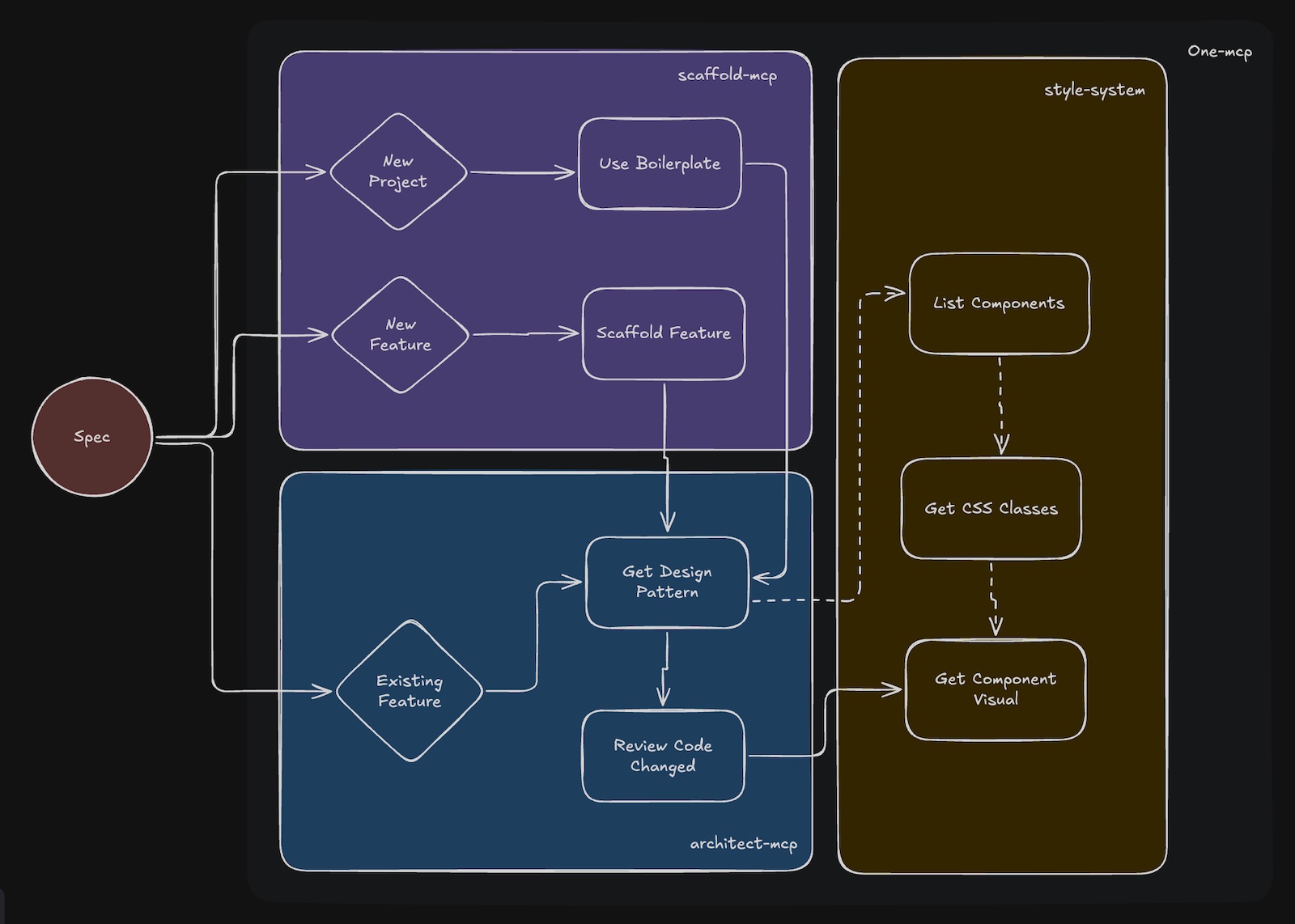
This repo provides:
As projects scale, conventions in docs like CLAUDE.md, AGENTS.md, and style guides become hard to keep concise and consistently applied by AI agents. This toolkit moves those conventions into reusable template configs (scaffold.yaml, architect.yaml, RULES.yaml) so agents can discover only the relevant guidance when needed.
For toolkit users who prefer an agent plugin, install only the workflows you need: aicode-bootstrap (project creation), aicode-develop (features and patterns), aicode-review (rules-based review), aicode-admin (authoring reusable configuration), or aicode-design (frontend discovery). Self-contained plugin roots are under plugins/ and work with the Claude Code/Cowork marketplace, Codex marketplace, and local Gemini extension installation; Cursor/Grok and Cowork's local stdio runtime still need client acceptance tests. Read the installation and compatibility guide before use. These bundles group workflows rather than restrict tool access.
Initialize the consumer project before starting a scaffold-backed plugin with interactive npx -y @agiflowai/aicode-toolkit@2.0.0 init --skip-mcp; plugin installation does not supply templates. Keep MCP server cwd in the consumer workspace. Published style-system 0.2.0 currently ignores some discovery filters until the dispatch fix is released. See compatibility.
Requirements:
# Existing project
npx @agiflowai/aicode-toolkit init

# New project
npx @agiflowai/aicode-toolkit init --name my-app --project-type monolith
This creates templates/ and .toolkit/settings.yaml. Projects reference templates through sourceTemplate in project.json or .toolkit/settings.yaml.
init can configure MCP automatically. For manual setup, add the servers you need to your agent config.
Example for Claude Code:
{
  "mcpServers": {
    "scaffold-mcp": {
      "command": "npx",
      "args": ["-y", "@agiflowai/scaffold-mcp", "mcp-serve", "--admin-enable"]
    },
    "architect-mcp": {
      "command": "npx",
      "args": [
        "-y",
        "@agiflowai/architect-mcp",
        "mcp-serve",
        "--admin-enable",
        "--design-pattern-tool",
        "codex",
        "--review-tool",
        "gemini-cli"
      ]
    },
    "style-system": {
      "command": "npx",
      "args": ["-y", "@agiflowai/style-system", "mcp-serve"]
    }
  }
}
Useful flags:
--admin-enable: enable admin/template-authoring tools--design-pattern-tool <tool>: use an LLM to filter design patterns--review-tool <tool>: use an LLM for review outputAsk the agent:
What boilerplates are available?
It should call list-boilerplates. If not, restart the agent.
AI agent
  ├─ scaffold-mcp
  ├─ architect-mcp
  ├─ style-system
  └─ one-mcp
        ↓
     templates/
       ├─ scaffold.yaml
       ├─ architect.yaml
       └─ RULES.yaml
Generates projects and feature boilerplate from templates.
Core tools:
list-boilerplatesuse-boilerplatelist-scaffolding-methodsuse-scaffold-methodAdmin tools:
generate-boilerplategenerate-feature-scaffoldgenerate-boilerplate-fileProvides file-specific patterns before edits and reviews changes against RULES.yaml.
Core tools:
get-file-design-patternreview-code-changeAdmin tools:
add-design-patternadd-ruleProvides theme, CSS class, and component discovery tools.
Core tools:
list_themesget_css_classesget_component_visuallist_shared_componentslist_app_componentsProvides progressive tool discovery to reduce MCP prompt overhead.
User: "Create a Next.js app called dashboard"

Agent:
1. list-boilerplates
2. use-boilerplate
3. Project is generated
User: "Add a products API route"

Agent:
1. list-scaffolding-methods
2. use-scaffold-method
3. Feature files are generated
User: "Add a products page"

Agent:
1. get-file-design-pattern
2. edit the file using the returned patterns and rules
3. review-code-change
4. fix any violations
User: "Style the button with our theme colors"

Agent:
1. get_css_classes
2. list_shared_components
3. update the component
4. get_component_visual
templates/
└── nextjs-15/
    ├── scaffold.yaml
    ├── architect.yaml
    ├── RULES.yaml
    └── boilerplate/
scaffold.yamlDefines boilerplates and feature scaffolds.
boilerplates:
  - name: nextjs-15-app
    description: 'Next.js 15 with App Router'
    targetFolder: apps
    includes:
      - boilerplate/**/*

features:
  - name: add-route
    description: 'Add route with page and layout'
    variables_schema:
      name: { type: string, required: true }
    includes:
      - features/route/**/*
architect.yamlDefines file-level patterns that should be shown before edits.
patterns:
  - name: server-component
    description: 'Default for page components'
    file_patterns:
      - '**/app/**/page.tsx'
    description: |
      - Use async/await for data fetching
      - Keep components focused on rendering
      - Move business logic to server actions
RULES.yamlDefines review rules. Rules can be inherited from a global templates/RULES.yaml.
version: '1.0'
template: typescript-lib
rules:
  - pattern: src/services/**/*.ts
    description: Service Layer Implementation Standards
    must_do:
      - rule: Create class-based services with single responsibility
        codeExample: |-
          export class DataProcessorService {
            async processData(input: string): Promise<ProcessedData> {
              // Implementation
            }
          }
      - rule: Use dependency injection for composability
    must_not_do:
      - rule: Create static-only utility classes - use functions
        codeExample: |-
          // ❌ BAD
          export class Utils {
            static format(s: string) {}
          }

          // ✅ GOOD
          export function format(s: string): string {}
Each project references its template in project.json.
my-workspace/
├── apps/
│   └── web-app/
│       └── project.json
├── packages/
│   └── shared-lib/
│       └── project.json
└── templates/
Monoliths use .toolkit/settings.yaml.
version: '1.0'
projectType: monolith
sourceTemplate: nextjs-15
Included templates:
| Template | Stack | Includes |
|---|---|---|
nextjs-drizzle | Next.js 15, App Router | TypeScript, Tailwind 4, Drizzle, Storybook |
typescript-lib | TypeScript Library | ESM/CJS, Vitest, TSDoc |
typescript-mcp-package | MCP Server | Commander, MCP SDK |
For template authoring, start from an existing repo or template and use the admin prompts:
/generate-boilerplate
/generate-feature-scaffold
For design/rule authoring, use:
add-design-patternadd-rule| Agent | Config Location | Status |
|---|---|---|
| Claude Code | .mcp.json | Supported |
| Cursor | .cursor/mcp.json | Supported |
| Gemini CLI | .gemini/settings.json | Supported |
| Codex CLI | .codex/config.json | Supported |
| GitHub Copilot | VS Code settings | Supported |
| Windsurf | - | Planned |
| Package | Description |
|---|---|
| @agiflowai/aicode-toolkit | CLI for init and config sync |
| @agiflowai/scaffold-mcp | Scaffolding server |
| @agiflowai/architect-mcp | Pattern and review server |
| @agiflowai/style-system | Design-system server |
| @agiflowai/one-mcp | MCP proxy for progressive discovery |
See CONTRIBUTING.md.
Claim this server with your GitHub account to request manual ownership verification.
Link to the catalog listing for AI Code Toolkit MCP servers for scaffolding, code review, and design discovery from your README. This badge does not certify ownership, compatibility or security.
[](https://awesome-mcp.com/servers/scaffold-generator)Public repository statistics could not be verified. Check the configured source address; unavailable counts are not zero.
Separate sources, scopes and periods. Never combined or treated as installations, active users or security reviews.
No reviewed package or image identity; download statistics are not listed yet.
Alternative and complementary servers in the same category
A directory listing describing a cancellation-letter and mailing-address service. The configured public GitHub repository returned 404 during source verification.

A hosted MCP service for browsing and searching through Singapore mobile-network proxies.

A directory listing describing a Markdown-to-PDF service. The configured public GitHub repository returned 404 during source verification.