
ScrAPI MCP Server





ScrAPI MCP Server lets MCP-compatible clients scrape web pages through ScrAPI.
ScrAPI is useful when a page needs a real browser session, CAPTCHA solving, residential proxy access, cookie banner handling, JavaScript rendering, geolocation-aware fetching, or pre-scrape browser actions such as clicking and scrolling.
Contents
Features
- Scrape any valid
https:// or http:// URL through ScrAPI.
- Return either raw HTML or readable Markdown.
- Run browser commands before scraping.
- Use stdio transport for desktop MCP clients.
- Use Streamable HTTP transport for remote MCP clients and local testing.
- Run with
npx, Docker, Smithery, or from source.
scrape_url_html
Scrapes a URL and returns the result as HTML.
Use this when you need the page structure, links, tables, embedded metadata, or custom downstream parsing.
Inputs:
Returns:
text/html content from the requested page.isError: true with the ScrAPI error body when the upstream request fails.
scrape_url_markdown
Scrapes a URL and returns the result as Markdown.
Use this when the text content matters more than the HTML structure, for example article extraction, product copy, search result summaries, or LLM-friendly page analysis.
Inputs:
Returns:
text/markdown content from the requested page.isError: true with the ScrAPI error body when the upstream request fails.
Prerequisites
Choose one of the following runtime options:
- Node.js 18 or newer for
npx or local development.
- Docker for container-based usage.
- An MCP-compatible client such as Claude Desktop, MCP Inspector, or another client that supports stdio or Streamable HTTP MCP servers.
API Key
Set SCRAPI_API_KEY to use your ScrAPI account:
export SCRAPI_API_KEY="your-scrapi-api-key"
PowerShell:
$env:SCRAPI_API_KEY = "your-scrapi-api-key"
An API key is required. Without one, ScrAPI currently allows limited free usage on certain domain with lower concurrency and queueing priority.
Quick Start
Run with NPX
The default transport is stdio, which is the transport most desktop MCP clients use when they launch a local server process.
npx -y @deventerprisesoftware/scrapi-mcp
With an API key:
SCRAPI_API_KEY="your-scrapi-api-key" npx -y @deventerprisesoftware/scrapi-mcp
PowerShell:
$env:SCRAPI_API_KEY = "your-scrapi-api-key"
npx -y @deventerprisesoftware/scrapi-mcp
Run with Docker
The published Docker image starts in HTTP mode by default and listens on port 5000.
docker run --rm -p 5000:5000 -e SCRAPI_API_KEY="your-scrapi-api-key" deventerprisesoftware/scrapi-mcp
MCP endpoint:
http://localhost:5000/mcp
To run the container as a stdio server for a local MCP client:
docker run -i --rm -e TRANSPORT=stdio -e SCRAPI_API_KEY="your-scrapi-api-key" deventerprisesoftware/scrapi-mcp
MCP Client Setup
Most local coding assistants use one of these two configuration shapes:
- Stdio: the client starts this package with
npx or Docker and communicates over stdin/stdout.
- Streamable HTTP: you start this server yourself with
TRANSPORT=http, then point the client at http://localhost:5000/mcp or your deployed URL.
When a client has a tool timeout setting, use a value close to 300000 milliseconds or 300 seconds. ScrAPI can take several minutes for pages that require CAPTCHA solving, browser rendering, or multiple browser commands.
Claude Desktop with NPX
Add this to your claude_desktop_config.json:
{
  "mcpServers": {
    "ScrAPI": {
      "command": "npx",
      "args": ["-y", "@deventerprisesoftware/scrapi-mcp"],
      "env": {
        "SCRAPI_API_KEY": "your-scrapi-api-key"
      }
    }
  }
}
Claude Desktop with Docker
{
  "mcpServers": {
    "ScrAPI": {
      "command": "docker",
      "args": [
        "run",
        "-i",
        "--rm",
        "-e",
        "SCRAPI_API_KEY",
        "deventerprisesoftware/scrapi-mcp"
      ],
      "env": {
        "SCRAPI_API_KEY": "your-scrapi-api-key"
      }
    }
  }
}
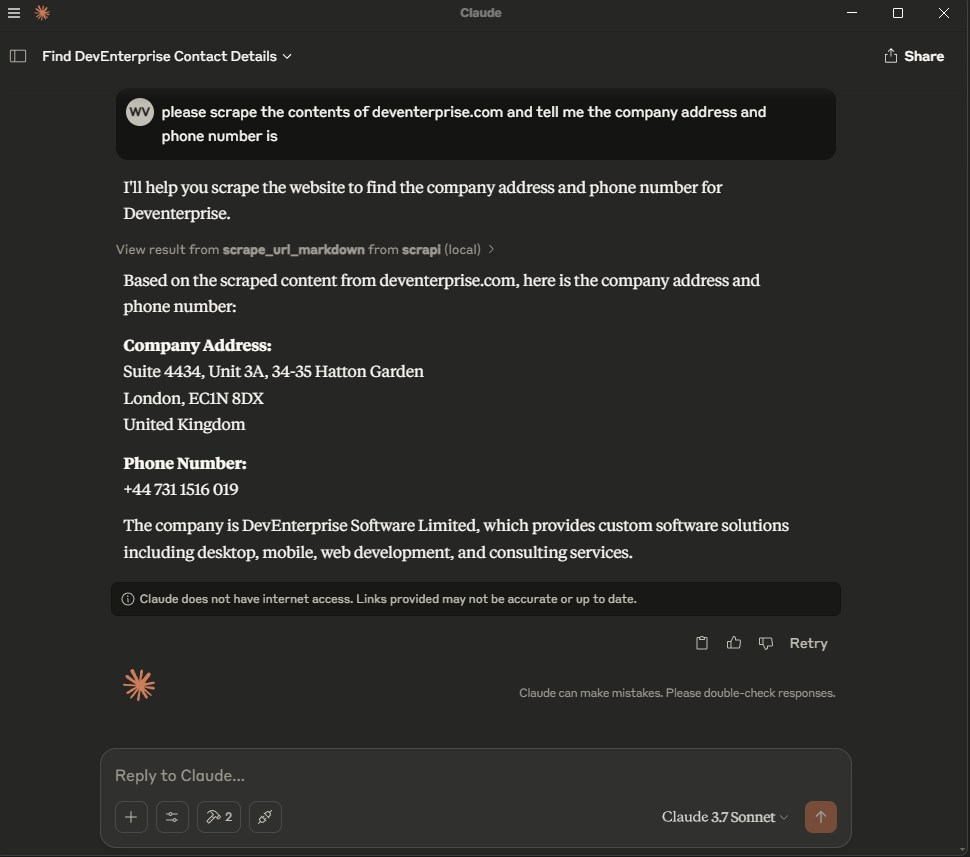
After changing the config, restart Claude Desktop. You should see the two ScrAPI tools available in the MCP tools list.
Cursor
Cursor supports project configuration at .cursor/mcp.json and global configuration at ~/.cursor/mcp.json. See the Cursor MCP documentation.
Stdio configuration:
{
  "mcpServers": {
    "scrapi": {
      "command": "npx",
      "args": ["-y", "@deventerprisesoftware/scrapi-mcp"],
      "env": {
        "SCRAPI_API_KEY": "${env:SCRAPI_API_KEY}"
      }
    }
  }
}
HTTP configuration:
{
  "mcpServers": {
    "scrapi": {
      "url": "http://localhost:5000/mcp"
    }
  }
}
For HTTP, start the server first:
TRANSPORT=http PORT=5000 SCRAPI_API_KEY="your-scrapi-api-key" npx -y @deventerprisesoftware/scrapi-mcp
Windsurf
Windsurf Cascade stores MCP servers in ~/.codeium/windsurf/mcp_config.json. You can also add servers from Windsurf Settings > Cascade > MCP Servers. See the Windsurf MCP documentation.
Stdio configuration:
{
  "mcpServers": {
    "scrapi": {
      "command": "npx",
      "args": ["-y", "@deventerprisesoftware/scrapi-mcp"],
      "env": {
        "SCRAPI_API_KEY": "${env:SCRAPI_API_KEY}"
      }
    }
  }
}
HTTP configuration:
{
  "mcpServers": {
    "scrapi": {
      "serverUrl": "http://localhost:5000/mcp"
    }
  }
}
Windsurf supports serverUrl or url for remote HTTP MCP servers. If your team uses enterprise MCP controls, the server ID in the admin whitelist must match the key name, for example scrapi.
Kilo Code
Kilo Code stores MCP configuration in the main Kilo config file. Use ~/.config/kilo/kilo.jsonc for global configuration, kilo.jsonc in the project root, or .kilo/kilo.jsonc for project-specific configuration. See the Kilo Code MCP documentation.
Local stdio configuration:
{
  "mcp": {
    "scrapi": {
      "type": "local",
      "command": ["npx", "-y", "@deventerprisesoftware/scrapi-mcp"],
      "environment": {
        "SCRAPI_API_KEY": "your-scrapi-api-key"
      },
      "enabled": true,
      "timeout": 300000
    }
  }
}
Remote HTTP configuration:
{
  "mcp": {
    "scrapi": {
      "type": "remote",
      "url": "http://localhost:5000/mcp",
      "enabled": true,
      "timeout": 300000
    }
  }
}
On Windows, if npx is not found from the Kilo Code UI, use cmd as the command and pass /c, npx, -y, and @deventerprisesoftware/scrapi-mcp as arguments.
Codex
Codex supports MCP servers in the CLI and IDE extension. Both use the same MCP configuration. By default, Codex stores it in ~/.codex/config.toml; trusted projects can also use .codex/config.toml. See the Codex MCP documentation.
Add a stdio server with the Codex CLI:
codex mcp add scrapi --env SCRAPI_API_KEY="your-scrapi-api-key" -- npx -y @deventerprisesoftware/scrapi-mcp
codex mcp list
Equivalent config.toml stdio configuration:
[mcp_servers.scrapi]
command = "npx"
args = ["-y", "@deventerprisesoftware/scrapi-mcp"]
startup_timeout_sec = 20
tool_timeout_sec = 300

[mcp_servers.scrapi.env]
SCRAPI_API_KEY = "your-scrapi-api-key"
HTTP configuration:
[mcp_servers.scrapi]
url = "http://localhost:5000/mcp"
tool_timeout_sec = 300
In the Codex terminal UI, run /mcp to confirm the server is connected.
VS Code
VS Code stores MCP configuration in .vscode/mcp.json for a workspace or in your user profile. The top-level key is servers, not mcpServers. See the VS Code MCP configuration reference.
Stdio configuration:
{
  "inputs": [
    {
      "type": "promptString",
      "id": "scrapi-api-key",
      "description": "ScrAPI API key",
      "password": true
    }
  ],
  "servers": {
    "scrapi": {
      "type": "stdio",
      "command": "npx",
      "args": ["-y", "@deventerprisesoftware/scrapi-mcp"],
      "env": {
        "SCRAPI_API_KEY": "${input:scrapi-api-key}"
      }
    }
  }
}
HTTP configuration:
{
  "servers": {
    "scrapi": {
      "type": "http",
      "url": "http://localhost:5000/mcp"
    }
  }
}
Use the Command Palette commands MCP: Add Server, MCP: List Servers, and MCP: Reset Cached Tools to add, inspect, and refresh MCP servers.
Claude Code
Claude Code supports MCP servers through the claude mcp CLI and the /mcp command inside Claude Code. See the Claude Code MCP documentation.
Add a stdio server:
claude mcp add --transport stdio --env SCRAPI_API_KEY="your-scrapi-api-key" scrapi -- npx -y @deventerprisesoftware/scrapi-mcp
claude mcp list
Add an HTTP server:
claude mcp add --transport http scrapi http://localhost:5000/mcp
claude mcp list
To make the server available across all Claude Code projects, add --scope user before the server name:
claude mcp add --transport stdio --scope user --env SCRAPI_API_KEY="your-scrapi-api-key" scrapi -- npx -y @deventerprisesoftware/scrapi-mcp
Inside Claude Code, run /mcp to confirm the server is connected.
Generic Stdio MCP Client
Use this shape for clients that accept a command, arguments, and environment variables:
{
  "name": "ScrAPI",
  "command": "npx",
  "args": ["-y", "@deventerprisesoftware/scrapi-mcp"],
  "env": {
    "SCRAPI_API_KEY": "your-scrapi-api-key"
  }
}
HTTP Transport
Set TRANSPORT=http to run the server over Streamable HTTP.
TRANSPORT=http PORT=5000 SCRAPI_API_KEY="your-scrapi-api-key" npx -y @deventerprisesoftware/scrapi-mcp
PowerShell:
$env:TRANSPORT = "http"
$env:PORT = "5000"
$env:SCRAPI_API_KEY = "your-scrapi-api-key"
npx -y @deventerprisesoftware/scrapi-mcp
The MCP endpoint is:
http://localhost:5000/mcp
Environment variables:
Test with MCP Inspector
Stdio mode:
npx @modelcontextprotocol/inspector npx -y @deventerprisesoftware/scrapi-mcp
HTTP mode:
TRANSPORT=http PORT=5000 CORS_ALLOWED_ORIGINS=http://localhost:6274 npx -y @deventerprisesoftware/scrapi-mcp
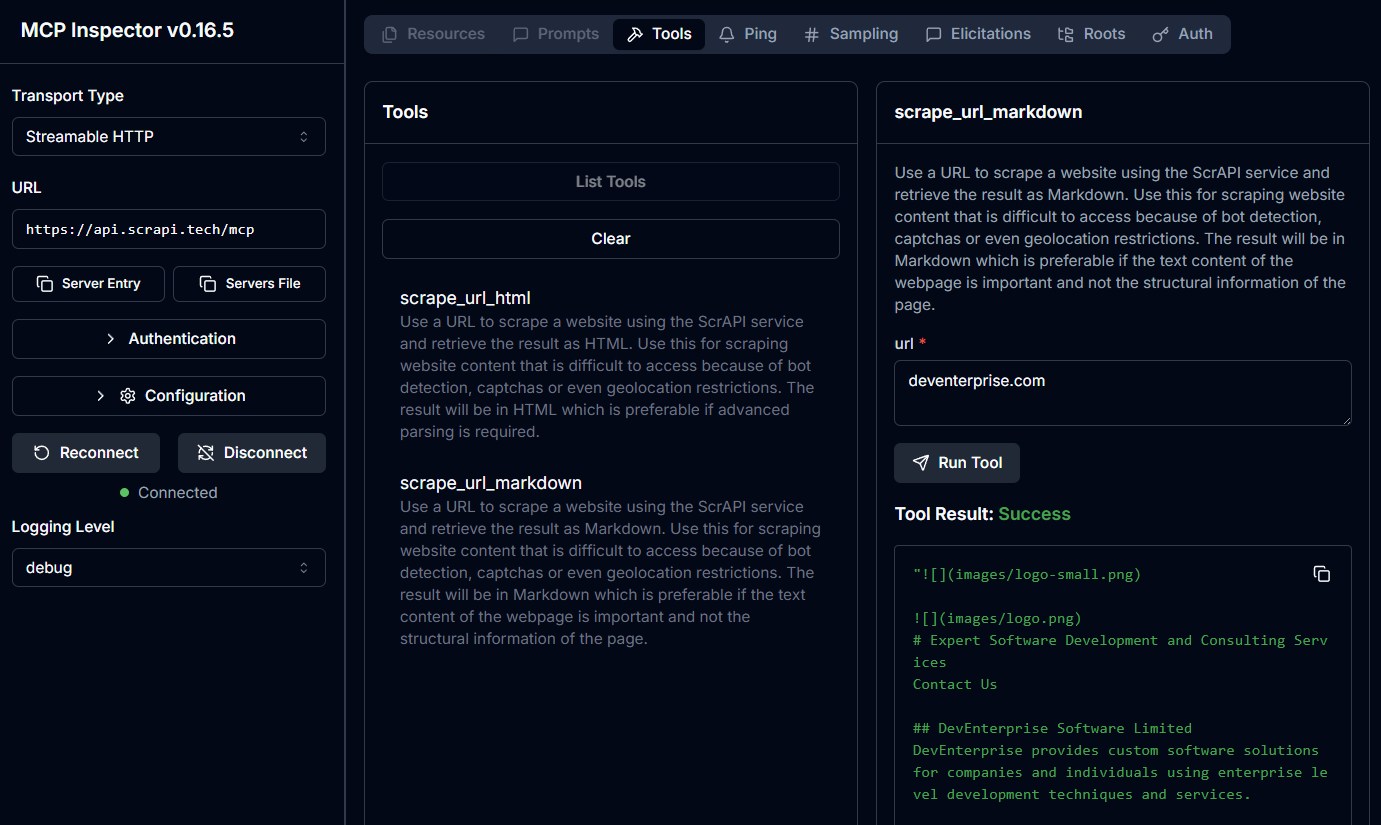
Then open MCP Inspector and connect to:
http://localhost:5000/mcp
Cloud-Hosted Server
ScrAPI also provides hosted MCP endpoints:
Streamable HTTP: https://api.scrapi.tech/mcp
Cloud MCP servers are not yet supported by every MCP client. They are most useful for custom clients, MCP Inspector, or platforms that support remote MCP servers.
To authenticate with your ScrAPI API key, pass it as a query parameter or request header:
- Query parameter:
https://api.scrapi.tech/mcp?apiKey=<YOUR_API_KEY>
- Request header:
X-API-KEY: <YOUR_API_KEY>
Usage Examples
The exact interaction depends on your MCP client. In most clients, you can either ask the model to use the ScrAPI tool or call the tool directly from a tool inspector.
Scrape a Page as Markdown
Tool:
scrape_url_markdown
Arguments:
{
  "url": "https://example.com"
}
Example prompt:
Use ScrAPI to scrape https://example.com as Markdown and summarize the page.
Scrape a Page as HTML
Tool:
scrape_url_html
Arguments:
{
  "url": "https://example.com"
}
Example prompt:
Use ScrAPI to scrape https://example.com as HTML and extract every link.
Accept Cookies Before Scraping
The browserCommands value must be a string containing a JSON array.
{
  "url": "https://example.com",
  "browserCommands": "[{\"click\":\"#accept-cookies\"},{\"wait\":1000}]"
}
Search a Site Before Scraping Results
{
  "url": "https://example.com/search",
  "browserCommands": "[{\"input\":{\"input[name='q']\":\"web scraping\"}},{\"click\":\"button[type='submit']\"},{\"waitfor\":\"#results\"}]"
}
Load More Content
{
  "url": "https://example.com/products",
  "browserCommands": "[{\"scroll\":1200},{\"wait\":1000},{\"click\":\"button.load-more\"},{\"waitfor\":\".product-card:nth-child(25)\"}]"
}
Browser Commands
Both tools support optional browser commands that interact with the page before ScrAPI captures the final result.
Commands are provided as a JSON array string. They are executed with human-like behavior such as random mouse movement and variable typing speed.
Readable command array:
[
  { "click": "#accept-cookies" },
  { "wait": 2000 },
  { "input": { "input[name='search']": "web scraping" } },
  { "click": "button[type='submit']" },
  { "waitfor": "#results" },
  { "scroll": 500 }
]
Escaped as an MCP tool argument:
{
  "url": "https://example.com",
  "browserCommands": "[{\"click\":\"#accept-cookies\"},{\"wait\":2000},{\"input\":{\"input[name='search']\":\"web scraping\"}},{\"click\":\"button[type='submit']\"},{\"waitfor\":\"#results\"},{\"scroll\":500}]"
}
Need help finding CSS selectors? Try the Rayrun browser extension to select elements and generate selectors.
For more details, see the Browser Commands documentation.
Troubleshooting
The MCP client cannot find the server
- Confirm Node.js 18 or newer is installed if using
npx.
- Confirm Docker Desktop is running if using Docker.
- Restart the MCP client after editing its config file.
- Check that the configured command works in a terminal.
- Confirm
SCRAPI_API_KEY is set correctly.
- Try the same URL without
browserCommands.
- Make sure
browserCommands is a JSON array string, not a raw JSON array.
- Use
scrape_url_html if Markdown extraction omits structure you need.
- Long-running pages, CAPTCHA flows, and heavy JavaScript pages can take several minutes.
Browser commands are ignored
The server only sends browser commands when browserCommands parses as a JSON array. This is valid:
{
  "browserCommands": "[{\"click\":\"#accept-cookies\"}]"
}
This is not valid for this MCP tool schema because it is an object array, not a string:
{
  "browserCommands": [{ "click": "#accept-cookies" }]
}
HTTP endpoint does not respond
- Confirm the server was started with
TRANSPORT=http.
- Confirm the client connects to
/mcp, not /.
- Confirm the port matches
PORT.
Development
Install dependencies:
npm install
Run tests:
npm test
Build:
npm run build
Run from source in stdio mode:
npm run build
node dist/index.js
Run from source in HTTP mode:
TRANSPORT=http PORT=5000 node dist/index.js
Build the Docker image:
docker build -t deventerprisesoftware/scrapi-mcp -f Dockerfile .
Or use the package script:
npm run docker:build
License
This MCP server is licensed under the MIT License. You are free to use, modify, and distribute the software subject to the terms of the MIT License. See LICENSE for details.



