Secured remote MCP server on AWS

Secured remote MCP server on AWS

secured-remote-mcp-server-on-aws•bykomination

An MCP server hosted in a private VPC Lambda and published securely through an OAuth-protected API Gateway with Terraform infrastructure.

License: Not specified•Runtime: Awaiting documentation review•Category: cloud devops

WHAT IT DOES

  • •Runs an MCP server (FastMCP, Streamable HTTP) inside a private Lambda in a VPC.
  • •Protects the API Gateway entry point with Cognito as the authorizer for client authentication.
  • •Manages the environment declaratively with Terraform and automates deployment via GitHub Actions and HCP Terraform.
  • •Buffers full responses and returns them as JSON because API Gateway does not support SSE or HTTP streaming.

BEST FOR

  • •Developers deploying an MCP server with AWS infrastructure and access protection.
  • •Users who want to connect an MCP client to a deployed endpoint using an OAuth bearer token.

ABOUT SECURED-REMOTE-MCP-SERVER-ON-AWS

Secured remote MCP server on AWS is cataloged as an MCP server attributed to komination. An MCP server hosted in a private VPC Lambda and published securely through an OAuth-protected API Gateway with Terraform infrastructure. It is categorized under cloud devops. See the capability inspector for recorded interfaces and their independent review status; consult upstream documentation for the current interface.

HOW TO INSTALL

Installation configuration is not reviewed. No executable setup is offered for this entry; inspect the source repository before proceeding.

LICENSE

Catalog license label: Not specified. Check the source repository's current license and terms before using, modifying or distributing this software.

Capability inspector

Capability definitions are not reviewed. Unreviewed imports are not exposed as trusted interfaces.

Tools (0)

No reviewed records to display. This does not establish that upstream lacks this capability.

Resources (0)

No reviewed records to display. This does not establish that upstream lacks this capability.

Prompts (0)

No reviewed records to display. This does not establish that upstream lacks this capability.

NEWSLETTER - COMING LATER

Newsletter subscriptions are not open yet

Email delivery is not connected. This page does not collect email addresses or create subscriptions.

Browse the registry for current listings instead.

Community Reviews

Coming later

Reviews for Secured remote MCP server on AWS are not available yet

Review publishing and storage are not connected. This page does not collect or publish ratings or comments, including after sign-in.

FREQUENTLY ASKED QUESTIONS

How is the MCP server protected when exposed publicly?

The entry-point API Gateway is protected by Cognito used as an authorizer for client authentication.

Does the server support streaming responses?

No; because API Gateway does not support SSE or HTTP streaming, results are fully buffered and returned at once, requiring json_response.

Upstream README

View this exact version on GitHub

README.md · f046d55494a9 · Fetched 2026-11-13 11:14:40 UTC

Original upstream text, without AI rewriting. Scripts, forms and unsafe links are filtered for safety.

Showing the last retrieved documentation snapshot; check the source for current changes.

secured-remote-mcp-server-on-aws

VPC内のプライベートなLambdaに配置されたMCP Serverを、OAuth認証付きAPI Gateway経由でセキュアに公開するリポジトリです

特徴:

  • MCP Server (Streamble HTTP)をアクセス保護しながらパブリックにデプロイ可能
  • エントリポイントとなるAPI Gatewayは、CognitoをAuthorizerとしてクライアント認証で保護
  • Terraformによる宣言的な環境管理
  • GitHub ActionsとHCP Terraformを活用した自動デプロイ
  • Devcontainerによる統一された開発環境の共有
  • Claude CodeとGithub Copilotの利用、AWS公式MCP Serverを利用した最新情報の追従

開発動機:

TerraformやMCPのキャッチアップを目的にポートフォリオとして開発を進めています

CloudTrailやWAFなどコストが高くなるリソースは一旦対象外としています
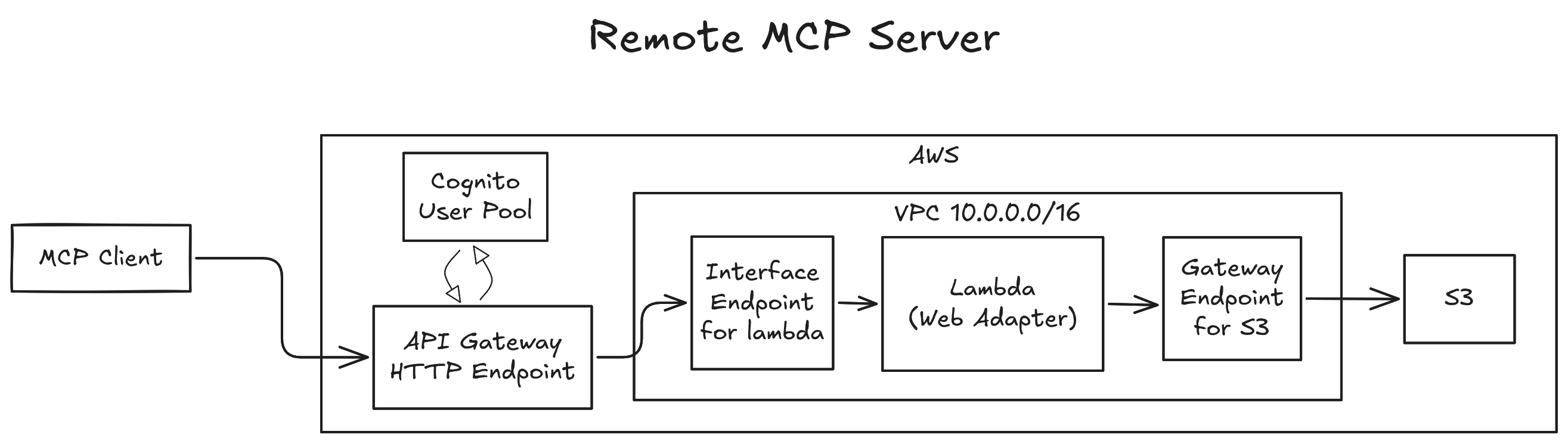
アーキテクチャ図

ディレクトリ構成

├── /.devcontainer                     # VS Code Dev Container設定
│   ├── api_connectivity_test.sh       # API接続テストスクリプト
│   ├── devcontainer.json              
│   ├── dockerfile.devcontainer        
│   ├── github_deployments_delete.sh   # GitHubデプロイメント削除スクリプト
│   └── init.sh                        # Devcontainer内AWS SSO Profile用意スクリプト
├── /.github
│   ├── /workflows
│   │   ├── pr-closed-deploy-develop.yml             # developブランチへのPRクローズ時デプロイ
│   │   ├── reusable-build-and-push.yml              
│   │   ├── reusable-plan-and-deploy-with-tfc.yml    # HCP Terraform run
│   │   ├── reusable-update-lambda.yml                # Lambda更新処理
│   │   └── reusable-validate-environment-secrets.yml # 環境変数検証
│   └── copilot-instructions.md       # GitHub Copilotカスタム指示
├── /.vscode
│   ├── mcp.json                       # MCP Server接続設定
│   └── settings.json                  
├── /terraform
│   ├── /env                           # 環境別設定
│   │   ├── /dev                       # 開発環境
│   │   │   ├── /dummy                 # Lambda初期デプロイ時のダミー
│   │   │   ├── main.tf                # リソース定義
│   │   │   ├── dummy.tf               # ダミーZip作成用
│   │   │   ├── outputs.tf             # HCP Terraform上で出力
│   │   │   ├── terraform.tf           # バックエンド設定(HCP Terraform)
│   │   │   └── variables.tf           # 変数定義
│   │   └── /prod                      # 本番環境(同構成)
│   └── /modules                       # 再利用可能モジュール
│       ├── /api_gateway               
│       ├── /cognito                   
│       ├── /lambda                    
│       ├── /lambda_layer              
│       ├── /s3                        
│       ├── /vpc                       
│       ├── /vpc_endpoint_lambda       
│       └── /vpc_endpoint_s3           
├── /sam                               # AWS SAM実装(比較検証用)
│   ├── samconfig.toml
│   └── template.yaml
├── /src                               # MCP Serverアプリケーション
│   ├── main.py                        # FastMCP実装
│   ├── pyproject.toml                 # Python プロジェクト設定
│   ├── requirements.txt               # pip依存関係
│   ├── run.sh                         # 起動スクリプト
│   └── uv.lock                        
├── .auto.tfvars.sample                # HCP Terraform変数
├── .env.sample                        # 環境変数サンプル
├── .gitignore
├── .pre-commit-config.yaml            
├── .terraform-version                 # Terraformバージョン(1.12.1)
├── architecture.png                   # アーキテクチャ図
├── bootstrap.tf                       # HCP Terraform & OIDC 初期設定
├── CLAUDE.md                          # Claude Code用プロジェクト指示
├── compose.yml                        # Devcontainer用Docker Compose設定
├── justfile                           # タスクランナー定義
└── README.md

環境構築

前提条件:

  • Devcontainer実行可能環境(VSCode推奨)
  • HCP Terraformアカウント(GitHubアカウント連携済み)
  • AWS IAM Identity Centerユーザー

.env作成:

cp .env.sample .env
cp .auto.tfvars.sample .auto.tfvars

HCP Terraform bootstrap:

  1. 「TFE_TOKEN」は「https://app.terraform.io/app/settings/tokens」で発行
  2. 「TFE_ORGANIZATION」は「https://app.terraform.io/app/organizations/new」で作成
  3. HCP Terraformワークスペースの作成
# devcontainerに入って以下のコマンドを実行
/app$ terraform init
/app$ terraform plan
/app$ terraform apply

# 🛠️ bootstrap.tf`を使用してHCP Terraformに以下の構造が作成されます
YOUR_ORGANIZATION/
├── projects/
    └── secured-remote-mcp-server-on-aws/
        └── workspaces/
            ├── dev-secured-remote-mcp-server-on-aws
            └── prod-secured-remote-mcp-server-on-aws

使用方法

1. OAuthアクセストークンの取得

API Gatewayへのアクセスに必要なOAuthアクセストークンを取得します:

# devcontainer内

# トークンのみ取得(AWS Secrets Managerから認証情報を取得して生成)
# 特定のAWSプロファイルを使用してトークン取得
just get-token "my-api-secret" "profile-name"

# API接続テスト(トークン取得からAPI呼び出しまでの全体テスト)
just test-api "my-api-secret" "https://{apiエンドポイント名}.execute-api.ap-northeast-1.amazonaws.com/mcp/"

2. MCP Clientからの利用

取得したトークンを使用してMCP Clientを設定します。

例: VSCode拡張機能のGitHub Copilot Agentの設定例(mcp.json)

{
    "servers": {
        "aws-private-lambda-for-mcp": {
            "type": "http",
            "url":  "https://{apiエンドポイント名}.execute-api.ap-northeast-1.amazonaws.com/mcp/",
            "headers": {
                "Authorization": "Bearer {上記で取得したトークン}",
                "Accept": "application/json"
            }
        }
    }
}

特筆点

  • API GatewayはServer-Sent Events (SSE) やHTTPストリーミングレスポンスに対応していないため、全結果をバッファリングして一括返却する必要がある
from fastmcp import FastMCP

mcp = FastMCP(
    "remote-mcp-server",
    stateless_http=True,
    json_response=True # 完全なJSONレスポンスを一度に返すために必須
)

Install configuration

Are you the maintainer?

Claim this server with your GitHub account to request manual ownership verification.

README Embed Badge
Markdown

Link to the catalog listing for Secured remote MCP server on AWS from your README. This badge does not certify ownership, compatibility or security.

[![MCP catalog listing](https://img.shields.io/badge/MCP-awesome--mcp-orange?style=flat-square)](https://awesome-mcp.com/servers/secured-remote-mcp-server-on-aws)

REPOSITORY STATS

GitHub StarsUnavailable
ForksUnavailable

Public repository statistics could not be verified. Check the configured source address; unavailable counts are not zero.

Downloads and pulls

Separate sources, scopes and periods. Never combined or treated as installations, active users or security reviews.

No reviewed package or image identity; download statistics are not listed yet.

Related cloud devops MCP Servers

Alternative and complementary servers in the same category

View all in cloud devops →
Huawei MCP Server
mcp-server-huaweiclouddeveloper•huaweiclouddeveloper

A Model Context Protocol server built on Huawei Cloud services that enables AI assistants to operate Huawei Cloud resources within conversational workflows, supporting ECS, OBS, GaussDB, and other cloud products.

Repository stats unavailable
Cloud & DevOps
Coolify MCP Server
coolify-mcp-server•wrediam

An MCP server that exposes the Coolify v4.3.1 REST API so AI clients can manage applications, databases, services, servers, deployments, and more.

Repository stats unavailable
Cloud & DevOps

A deprecated Model Context Protocol server for interacting with Kong Konnect APIs, enabling AI assistants to query and analyze Kong Gateway configurations, traffic, and analytics.

Repository stats unavailable
Cloud & DevOps