

A directory listing describing a cancellation-letter and mailing-address service. The configured public GitHub repository returned 404 during source verification.
Repository stats unavailable
Developer Tools
A Model Context Protocol server that uses Semgrep to scan code for security vulnerabilities.
Semgrep MCP Server is cataloged as an MCP server attributed to semgrep. A Model Context Protocol server that uses Semgrep to scan code for security vulnerabilities. It is categorized under developer tools. See the capability inspector for recorded interfaces and their independent review status; consult upstream documentation for the current interface.
Installation configuration is not reviewed. No executable setup is offered for this entry; inspect the source repository before proceeding.
Catalog license label: Not specified. Check the source repository's current license and terms before using, modifying or distributing this software.
Capability definitions are not reviewed. Unreviewed imports are not exposed as trusted interfaces.
No reviewed records to display. This does not establish that upstream lacks this capability.
No reviewed records to display. This does not establish that upstream lacks this capability.
No reviewed records to display. This does not establish that upstream lacks this capability.
Email delivery is not connected. This page does not collect email addresses or create subscriptions.
Browse the registry for current listings instead.
Reviews for Semgrep MCP Server are not available yet
Review publishing and storage are not connected. This page does not collect or publish ratings or comments, including after sign-in.
The server supports stdio, Streamable HTTP, and SSE transports.
A login and Semgrep token are only required for the Cloud Platform tools that fetch Semgrep findings.
README.md · cade782501e6 · Fetched 2026-11-13 09:26:54 UTC
Original upstream text, without AI rewriting. Scripts, forms and unsafe links are filtered for safety.
Showing the last retrieved documentation snapshot; check the source for current changes.
semgrep repository! ⚠️This repository has been deprecated, and further updates to the Semgrep MCP server will be made via the official semgrep binary.












A Model Context Protocol (MCP) server for using Semgrep to scan code for security vulnerabilities. Secure your vibe coding! 😅
Model Context Protocol (MCP) is a standardized API for LLMs, Agents, and IDEs like Cursor, VS Code, Windsurf, or anything that supports MCP, to get specialized help, get context, and harness the power of tools. Semgrep is a fast, deterministic static analysis tool that semantically understands many languages and comes with over 5,000 rules. 🛠️
[!NOTE] This beta project is under active development. We would love your feedback, bug reports, feature requests, and code. Join the
#mcpcommunity Slack channel!
Run the Python package as a CLI command using uv:
uvx semgrep-mcp # see --help for more options
Or, run as a Docker container:
docker run -i --rm ghcr.io/semgrep/mcp -t stdio
Example mcp.json
{
  "mcpServers": {
    "semgrep": {
      "command": "uvx",
      "args": ["semgrep-mcp"],
      "env": {
        "SEMGREP_APP_TOKEN": "<token>"
      }
    }
  }
}
Add an instruction to your .cursor/rules to use automatically:
Always scan code generated using Semgrep for security vulnerabilities
Semgrephttps://mcp.semgrep.ai/sseNo authenticationSee more details at the official docs.
[!WARNING] mcp.semgrep.ai is an experimental server that may break unexpectedly. It will rapidly gain new functionality.🚀
{
  "mcpServers": {
    "semgrep": {
      "type": "streamable-http",
      "url": "https://mcp.semgrep.ai/mcp"
    }
  }
}

Enable LLMs to perform actions, make deterministic computations, and interact with external services.
security_check: Scan code for security vulnerabilitiessemgrep_scan: Scan code files for security vulnerabilities with a given config stringsemgrep_scan_with_custom_rule: Scan code files using a custom Semgrep ruleget_abstract_syntax_tree: Output the Abstract Syntax Tree (AST) of codesemgrep_findings: Fetch Semgrep findings from the Semgrep AppSec Platform APIsupported_languages: Return the list of languages Semgrep supportssemgrep_rule_schema: Fetches the latest semgrep rule JSON SchemaReusable prompts to standardize common LLM interactions.
write_custom_semgrep_rule: Return a prompt to help write a Semgrep ruleExpose data and content to LLMs
semgrep://rule/schema: Specification of the Semgrep rule YAML syntax using JSON schemasemgrep://rule/{rule_id}/yaml: Full Semgrep rule in YAML format from the Semgrep registryThis Python package is published to PyPI as semgrep-mcp and can be installed and run with pip, pipx, uv, poetry, or any Python package manager.
$ pipx install semgrep-mcp
$ semgrep-mcp --help

Usage: semgrep-mcp [OPTIONS]

  Entry point for the MCP server

  Supports both stdio and sse transports. For stdio, it will read from stdin
  and write to stdout. For sse, it will start an HTTP server on port 8000.

Options:
  -v, --version                Show version and exit.
  -t, --transport [stdio|sse]  Transport protocol to use (stdio or sse)
  -h, --help                   Show this message and exit.
The stdio transport enables communication through standard input and output streams. This is particularly useful for local integrations and command-line tools. See the spec for more details.
semgrep-mcp
By default, the Python package will run in stdio mode. Because it's using the standard input and output streams, it will look like the tool is hanging without any output, but this is expected.
This server is published to Github's Container Registry (ghcr.io/semgrep/mcp)
docker run -i --rm ghcr.io/semgrep/mcp -t stdio
By default, the Docker container is in SSE mode, so you will have to include -t stdio after the image name and run with -i to run in interactive mode.
Streamable HTTP enables streaming responses over JSON RPC via HTTP POST requests. See the spec for more details.
By default, the server listens on 127.0.0.1:8000/mcp for client connections. To change any of this, set FASTMCP_* environment variables. The server must be running for clients to connect to it.
semgrep-mcp -t streamable-http
By default, the Python package will run in stdio mode, so you will have to include -t streamable-http.
docker run -p 8000:0000 ghcr.io/semgrep/mcp
[!WARNING] The MCP communiity considers this a legacy transport portcol and is really intended for backwards compatibility. Streamable HTTP is the recommended replacement.
SSE transport enables server-to-client streaming with Server-Send Events for client-to-server and server-to-client communication. See the spec for more details.
By default, the server listens on 127.0.0.1:8000/sse for client connections. To change any of this, set FASTMCP_* environment variables. The server must be running for clients to connect to it.
semgrep-mcp -t sse
By default, the Python package will run in stdio mode, so you will have to include -t sse.
docker run -p 8000:0000 ghcr.io/semgrep/mcp -t sse
Optionally, to connect to Semgrep AppSec Platform:
CLI (export SEMGREP_APP_TOKEN=<token>)
Docker (docker run -e SEMGREP_APP_TOKEN=<token>)
MCP config JSON
    "env": {
      "SEMGREP_APP_TOKEN": "<token>"
    }
[!TIP] Please reach out for support if needed. ☎️
Add the following JSON block to your ~/.cursor/mcp.json global or .cursor/mcp.json project-specific configuration file:
{
  "mcpServers": {
    "semgrep": {
      "command": "uvx",
      "args": ["semgrep-mcp"]
    }
  }
}
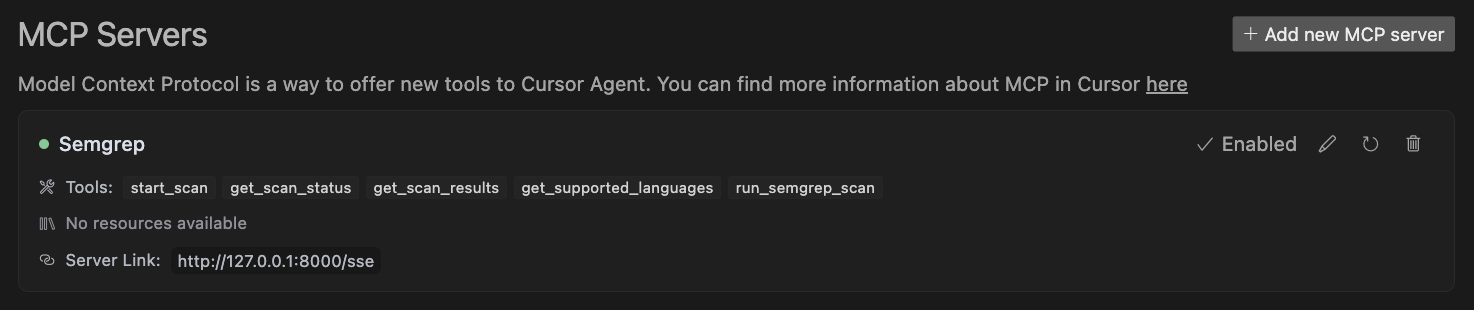
See cursor docs for more info.
Click the install buttons at the top of this README for the quickest installation.
Add the following JSON block to your User Settings (JSON) file in VS Code. You can do this by pressing Ctrl + Shift + P and typing Preferences: Open User Settings (JSON).
{
  "mcp": {
    "servers": {
      "semgrep": {
        "command": "uvx",
        "args": ["semgrep-mcp"]
      }
    }
  }
}
Optionally, you can add it to a file called .vscode/mcp.json in your workspace:
{
  "servers": {
    "semgrep": {
      "command": "uvx",
        "args": ["semgrep-mcp"]
    }
  }
}
{
  "mcp": {
    "servers": {
      "semgrep": {
        "command": "docker",
        "args": [
          "run",
          "-i",
          "--rm",
          "ghcr.io/semgrep/mcp",
          "-t",
          "stdio"
        ]
      }
    }
  }
}
See VS Code docs for more info.
Add the following JSON block to your ~/.codeium/windsurf/mcp_config.json file:
{
  "mcpServers": {
    "semgrep": {
      "command": "uvx",
      "args": ["semgrep-mcp"]
    }
  }
}
See Windsurf docs for more info.
Here is a short video showing Claude Desktop using this server to write a custom rule.
Add the following JSON block to your claude_desktop_config.json file:
{
  "mcpServers": {
    "semgrep": {
      "command": "uvx",
      "args": ["semgrep-mcp"]
    }
  }
}
See Anthropic docs for more info.
claude mcp add semgrep uvx semgrep-mcp
See Claude Code docs for more info.
See the offical docs:
async with MCPServerStdio(
    params={
        "command": "uvx",
        "args": ["semgrep-mcp"],
    }
) as server:
    tools = await server.list_tools()
See OpenAI Agents SDK docs for more info.
See a full example in examples/sse_client.py
from mcp.client.session import ClientSession
from mcp.client.sse import sse_client


async def main():
    async with sse_client("http://localhost:8000/sse") as (read_stream, write_stream):
        async with ClientSession(read_stream, write_stream) as session:
            await session.initialize()
            results = await session.call_tool(
                "semgrep_scan",
                {
                    "code_files": [
                        {
                            "path": "hello_world.py",
                            "content": "def hello(): print('Hello, World!')",
                        }
                    ]
                },
            )
            print(results)
[!TIP] Some client libraries want the
URL: http://localhost:8000/sse and others only want theHOST:localhost:8000. Try out theURLin a web browser to confirm the server is running, and there are no network issues.
See official SDK docs for more info.
[!NOTE] We love your feedback, bug reports, feature requests, and code. Join the
#mcpcommunity Slack channel!
See CONTRIBUTING.md for more info and details on how to run from the MCP server from source code.
Made with ❤️ by the Semgrep Team
Claim this server with your GitHub account to request manual ownership verification.
Link to the catalog listing for Semgrep MCP Server from your README. This badge does not certify ownership, compatibility or security.
[](https://awesome-mcp.com/servers/semgrep)Public repository statistics could not be verified. Check the configured source address; unavailable counts are not zero.
Separate sources, scopes and periods. Never combined or treated as installations, active users or security reviews.
No reviewed package or image identity; download statistics are not listed yet.
Alternative and complementary servers in the same category
A directory listing describing a cancellation-letter and mailing-address service. The configured public GitHub repository returned 404 during source verification.

A hosted MCP service for browsing and searching through Singapore mobile-network proxies.

A directory listing describing a Markdown-to-PDF service. The configured public GitHub repository returned 404 during source verification.