
A directory listing describing a cancellation-letter and mailing-address service. The configured public GitHub repository returned 404 during source verification.
Repository stats unavailable
Developer Tools
ShipSwift pairs an open-source SwiftUI component library with a hosted MCP server that lets AI assistants fetch skills and component source on demand.
ShipSwift is cataloged as an MCP server attributed to signerlabs. ShipSwift pairs an open-source SwiftUI component library with a hosted MCP server that lets AI assistants fetch skills and component source on demand. It is categorized under developer tools. See the capability inspector for recorded interfaces and their independent review status; consult upstream documentation for the current interface.
Installation configuration is not reviewed. No executable setup is offered for this entry; inspect the source repository before proceeding.
Catalog license label: MIT. Check the source repository's current license and terms before using, modifying or distributing this software.
Capability definitions are not reviewed. Unreviewed imports are not exposed as trusted interfaces.
No reviewed records to display. This does not establish that upstream lacks this capability.
No reviewed records to display. This does not establish that upstream lacks this capability.
No reviewed records to display. This does not establish that upstream lacks this capability.
Email delivery is not connected. This page does not collect email addresses or create subscriptions.
Browse the registry for current listings instead.
Reviews for ShipSwift are not available yet
Review publishing and storage are not connected. This page does not collect or publish ratings or comments, including after sign-in.
No. Skills can be installed locally to read source files directly from the repository and work offline without a server.
Pro skills add backend implementation, integration guides, compliance templates, and known pitfalls, while all iOS client code is open-source under the MIT license.
README.md · d05d75e74ee5 · Fetched 2026-11-13 09:42:40 UTC
Original upstream text, without AI rewriting. Scripts, forms and unsafe links are filtered for safety.
Showing the last retrieved documentation snapshot; check the source for current changes.
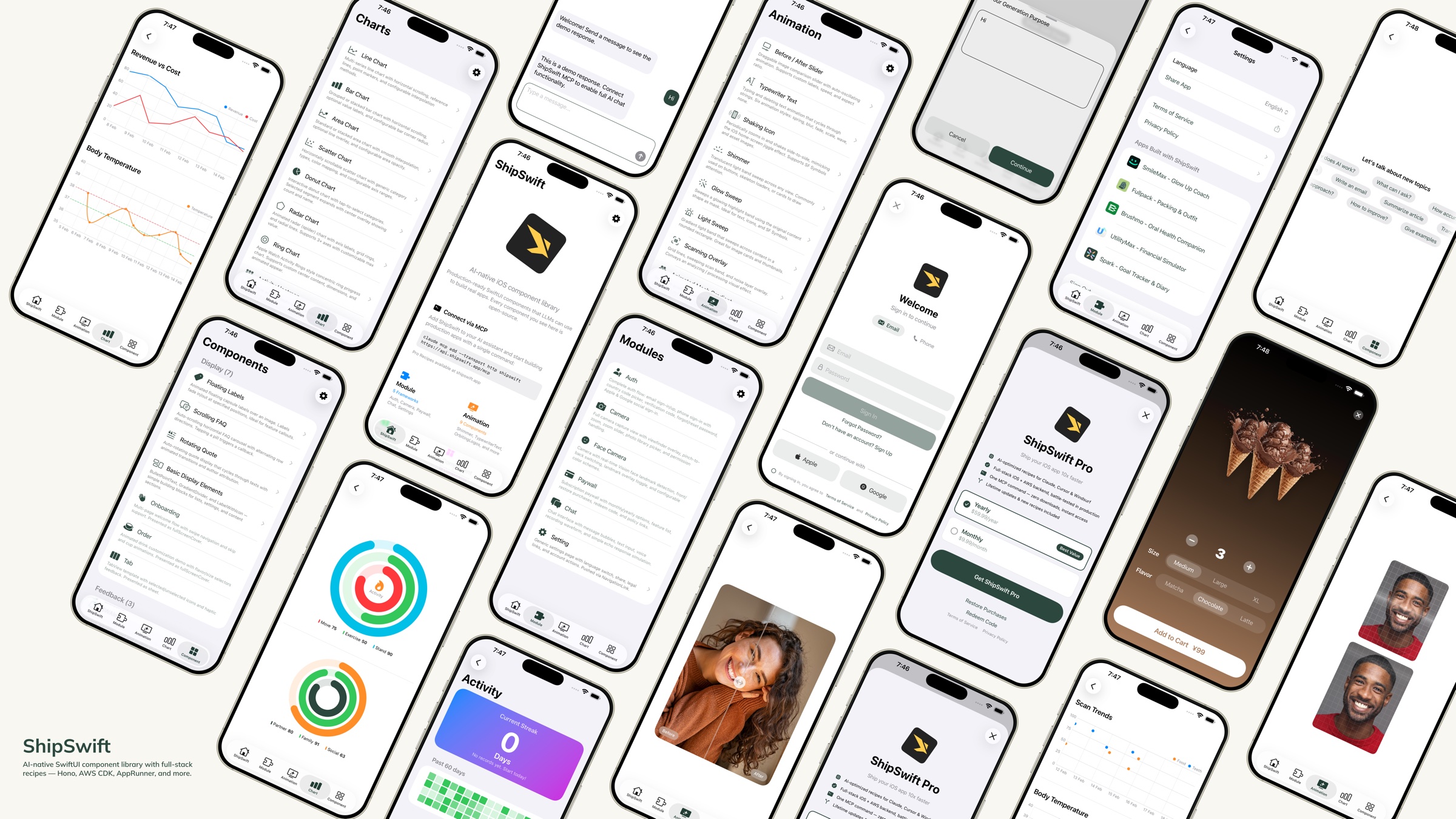
AI-native SwiftUI component library — production-ready code that LLMs can use to build real apps.





Quick Start · Components · Custom Dev — $5K, 4 weeks · Skills
One command gives your AI everything it needs — production-ready SwiftUI components, full-stack skills, and the context to build real apps without guessing.
Browse every skill live at shipswift.app/skills — searchable catalog, copy-paste source, live previews.
Download the Showcase App to preview every component on your device.
ShipSwift gets your AI 80% of the way. If you need the last 20% — your unique features, your brand, your backend — wired up by the people who wrote the skills, we ship it for you.
| ⚡ 48-hour demo | Working prototype on your TestFlight within 2 days of brief |
| 🚀 4-week delivery | Production-ready iOS app, App Store-submission ready |
| 💵 From $5,000 | Fixed price, milestone-billed, no hourly surprises |
Built on the same component library you see in this repo, so you keep ownership and can extend forever.
Get a quote: wei@signerlabs.com · shipswift.app
Step 1 — Install ShipSwift Skills:
npx skills add signerlabs/shipswift-skills
Step 2 — Connect the MCP server so your AI can fetch skills:
# Claude Code
claude mcp add --transport http shipswift https://api.shipswift.app/mcp

# Gemini CLI
gemini mcp add --transport http shipswift https://api.shipswift.app/mcp
For Cursor, VS Code Copilot, Windsurf, and other tools, see the Skills repo for MCP setup.
Step 3 — Ask your AI:
Install skills that read source files directly from this repo — works offline, no server needed:
npx skills add signerlabs/ShipSwift
Your AI can then browse the component catalog and read source code locally. Try:
Tip: If you also connect the MCP server (Option 1), your AI gets access to additional Pro skills (backend guides, compliance templates, pitfall docs).
ShipSwift/SWPackage/ into your Xcode projectSWAnimation/, SWChart/, and SWComponent/ is self-contained — just copy the file and SWUtil/ if neededgit clone https://github.com/signerlabs/ShipSwift.git
cd ShipSwift
open ShipSwift.xcodeproj
Select a simulator or device, then press Cmd+R to build and run.
SwiftUI animations: Shimmer · TypewriterText · ShakingIcon · GlowSweep · LightSweep · ScanningOverlay · AnimatedMeshGradient · BeforeAfterSlider · OrbitingLogos · FullScreenButton · ChangeEffect · Confetti · Transition · ParticleTransition
Canvas-rendered 3D: DotSphere · CharSphere
Metal-shader procedural backgrounds: Dots · Starfield · FractalClouds · InkSmoke · LiquidChrome · Plasma · AnimatedLoop
Metal-shader backgrounds: Metaballs · Halftone · Water · LiquidMetal · NeuroNoise · DotOrbit · Voronoi · SimplexNoise · ColorPanels · SmokeRing · Swirl · StarNest · GrainGradient
Metal-shader effects on any view: Foil · Glitter · IntenseBling · PolishedAluminum · ChromaticGlass · Glass · GlassOrb · GlassLogo
44 animation components total — see the Showcase App for live previews.
LineChart · BarChart · AreaChart · DonutChart · RingChart · RadarChart · ScatterChart · ActivityHeatmap · NetworkGraph
Display: FloatingLabels · ScrollingFAQ · RotatingQuote · BulletPointText · GradientDivider · Label · MarkdownText · OnboardingView · OrderView · RootTabView · VideoPlayer · CachedImage · ImageThumbnail · KPICard · StatusBadge · Wallet Feedback: Alert · Loading · ThinkingIndicator Input: TabButton · Stepper · AddSheet · SearchBar
DebugLog · String/Date/View extensions · LocationManager
ShipSwift/
├── SWPackage/
│   ├── SWAnimation/          # Animation components
│   ├── SWChart/              # Chart components
│   ├── SWComponent/          # UI components
│   │   ├── Display/          #   Display components
│   │   ├── Feedback/         #   Feedback components
│   │   └── Input/            #   Input components
│   ├── SWModule/             # Multi-file frameworks
│   │   ├── SWAuth/           #   Authentication
│   │   ├── SWCamera/         #   Camera + face detection
│   │   ├── SWPaywall/        #   Subscription paywall
│   │   ├── SWChat/           #   Chat + voice input
│   │   ├── SWSetting/        #   Settings page
│   │   ├── SWSubjectLifting/ #   Background removal
│   │   └── SWTikTokTracking/ #   TikTok attribution
│   └── SWUtil/               # Shared utilities
├── View/                     # Showcase app views
├── Service/                  # App services
└── Component/                # Shared app components
All types use the SW prefix (e.g., SWAlertManager, SWStoreManager).
View modifiers use .sw lowercase prefix (e.g., .swAlert(), .swPageLoading(), .swPrimary).
SWUtil        ← no dependencies on other SWPackage directories
SWAnimation   ← may depend on SWUtil only
SWChart       ← may depend on SWUtil only
SWComponent   ← may depend on SWUtil only
SWModule      ← may depend on SWUtil and SWComponent
ShipSwift provides free and Pro skills — each skill includes complete SwiftUI source code, implementation steps, and best practices. Your AI assistant can retrieve any skill on demand.
| Category | Examples |
|---|---|
| Animation | Shimmer, Typewriter, Orbiting Logos |
| Chart | Line, Bar, Donut, Radar, Heatmap |
| Component | Alert, Onboarding, Stepper, FAQ |
| Module | Auth, Camera, Chat, Setting, Infra CDK, Subscription*, TikTok Tracking*, Export & Share* |
* Pro skills — include full backend, compliance templates, and pitfall guides. Coming soon: Push Notifications, Analytics Dashboard.
Three tools are available: listSkills, getSkill, searchSkills.
Learn more at shipswift.app · Skills repo: signerlabs/shipswift-skills
All iOS client code is open-source under the MIT license. Pro skills add everything you need to go from prototype to production.
| Free (Open Source) | Pro Skill | |
|---|---|---|
| iOS client code | Full source | Enhanced version |
| Backend implementation | — | Hono routes, DB schema, webhooks |
| Integration guides | — | End-to-end setup checklists |
| Compliance templates | — | Privacy manifest, App Store labels |
| Known pitfalls | — | 10+ battle-tested tips per skill |
See pricing for details.
Contributions are welcome! Please follow these steps:
git checkout -b feature/amazing-feature)git commit -m 'Add amazing feature')git push origin feature/amazing-feature)This project is licensed under the MIT License — see the LICENSE file for details.
Claim this server with your GitHub account to request manual ownership verification.
Link to the catalog listing for ShipSwift from your README. This badge does not certify ownership, compatibility or security.
[](https://awesome-mcp.com/servers/shipswift)Public repository statistics could not be verified. Check the configured source address; unavailable counts are not zero.
Separate sources, scopes and periods. Never combined or treated as installations, active users or security reviews.
No reviewed package or image identity; download statistics are not listed yet.
Alternative and complementary servers in the same category
A directory listing describing a cancellation-letter and mailing-address service. The configured public GitHub repository returned 404 during source verification.

A hosted MCP service for browsing and searching through Singapore mobile-network proxies.

A directory listing describing a Markdown-to-PDF service. The configured public GitHub repository returned 404 during source verification.