
A directory listing describing a cancellation-letter and mailing-address service. The configured public GitHub repository returned 404 during source verification.
Repository stats unavailable
Developer Tools
A local stdio Model Context Protocol server that proxies the Shopify Storefront API, defaulting to mock.shop for safe development without real store credentials.
Shopify Storefront API MCP server with mock.shop sandbox support is cataloged as an MCP server attributed to ramakay. A local stdio Model Context Protocol server that proxies the Shopify Storefront API, defaulting to mock.shop for safe development without real store credentials. It is categorized under developer tools. See the capability inspector for recorded interfaces and their independent review status; consult upstream documentation for the current interface.
Installation configuration is not reviewed. No executable setup is offered for this entry; inspect the source repository before proceeding.
Catalog license label: MIT License. Check the source repository's current license and terms before using, modifying or distributing this software.
Capability definitions are not reviewed. Unreviewed imports are not exposed as trusted interfaces.
No reviewed records to display. This does not establish that upstream lacks this capability.
No reviewed records to display. This does not establish that upstream lacks this capability.
No reviewed records to display. This does not establish that upstream lacks this capability.
Email delivery is not connected. This page does not collect email addresses or create subscriptions.
Browse the registry for current listings instead.
Reviews for Shopify Storefront API MCP server with mock.shop sandbox support are not available yet
Review publishing and storage are not connected. This page does not collect or publish ratings or comments, including after sign-in.
No, mock.shop is the default when SHOPIFY_STORE is not set and requires no environment variables.
Not currently; Admin API functionality is disabled and planned for future updates.
README.md · 90170bced3ce · Fetched 2026-11-13 10:09:13 UTC
Original upstream text, without AI rewriting. Scripts, forms and unsafe links are filtered for safety.
Showing the last retrieved documentation snapshot; check the source for current changes.
This project implements a Model Context Protocol (MCP) server that acts as an intelligent bridge and proxy to Shopify's Storefront API. It uniquely supports mock.shop for safe development and testing without requiring real store credentials.
The server communicates via Standard Input/Output (stdio), making it suitable for local integration with clients like Claude Desktop and Cursor.
Generic AI developer tools and off-the-shelf MCP servers often promise much but can lack the transparency, safety mechanisms (like explicit ToolAnnotations), stability, or specific features needed for controlled development and testing, especially against rapidly evolving APIs like Shopify's.
This project was born from the need for a reliable, open-source Shopify MCP server that:
mock.shop to provide a crucial sandbox for risk-free development and accurate testing without impacting live stores.ToolAnnotations like readonly, destructive, etc.).The goal is to enable developers to confidently leverage AI assistance for Shopify tasks, knowing they have a tool built with intentional guardrails and clear operational context.
The ShopifyMCPMockShop server follows a layered architecture that provides clean separation between MCP protocol handling and Shopify API integration:

This sequence diagram illustrates how a typical request flows through the system, from user interaction to API response:
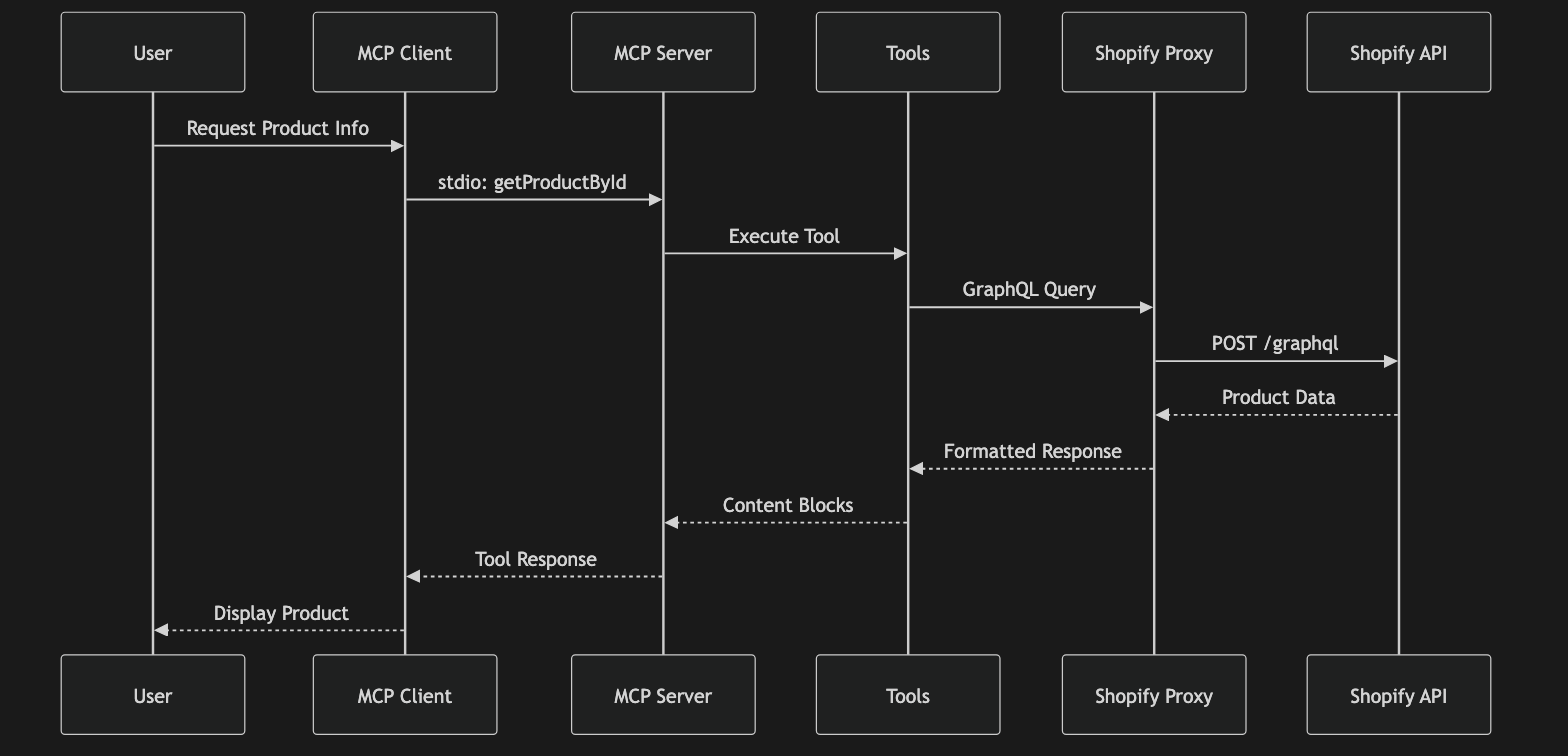
The MCP server exposes a comprehensive set of tools organized by Shopify resource type:

This server is a standalone Node.js script.
Clone the repository:
git clone https://github.com/ramakay/ShopifyMockMCP.git
cd ShopifyMCPMockShop
Install dependencies:
npm install
Build the server:
npm run build
This compiles the TypeScript code into JavaScript in the dist directory (dist/server.js).
Configure Environment (Optional - for Real Store):
mock.shop, set the following environment variables before running the server (e.g., via export or a .env file loaded by your client):
SHOPIFY_STORE: Your store domain (e.g., your-store.myshopify.com). Required for real store usage.SHOPIFY_ACCESS_TOKEN: Your Storefront API access token. Required for real store usage.SHOPIFY_VERSION: Optional specific Storefront API version (e.g., 2025-04). Defaults to latest stable.mock.shop (default when SHOPIFY_STORE is not set) requires no environment variables.USE_ADMIN_API, ADMIN_ACCESS_TOKEN, ADMIN_VERSION) are not currently used.Running: The server is intended to be launched automatically by MCP clients (like Claude Desktop or Cursor) using the stdio configuration. You do not need to run npm run start manually. See the "Usage" section below.
Configure your MCP client (Cursor, Claude Desktop) to launch this server via stdio. Add an entry like the following to the respective configuration file:
~/Library/Application Support/Claude/claude_desktop_config.json~/.cursor/mcp.json (or similar){
"mcpServers": {
// ... other servers ...
"shopify-mcp": {
"command": "node",
"args": [
"/full/path/to/ShopifyMCPMockShop/dist/server.js"
],
"env": {
// Only needed if connecting to a REAL store:
// "SHOPIFY_STORE": "your-store.myshopify.com",
// "SHOPIFY_ACCESS_TOKEN": "your-storefront-token",
// "SHOPIFY_VERSION": "2025-04"
},
"disabled": false,
"alwaysAllow": []
}
// ... other servers ...
}
}
Important:
/full/path/to/ShopifyMCPMockShop with the absolute path to where you cloned the repository.env variables if you are connecting to a real store.This MCP server currently provides tools for interacting with the Shopify Storefront API.
| Tool Name | Description | API |
|---|---|---|
getShopInfo | Fetches basic shop details (name, description, currency). | Storefront |
getProductById | Fetches a specific product by ID. If includeImages is true, returns JSON details and the first image (75px) as a base64 ImageContentBlock. | Storefront |
findProducts | Searches/filters products with pagination/sorting. | Storefront |
getCollectionById | Fetches a specific collection by ID, optionally including products. | Storefront |
findCollections | Searches/filters collections with pagination/sorting. | Storefront |
cartCreate | Creates a new shopping cart. | Storefront |
cartLinesAdd | Adds line items to an existing shopping cart. | Storefront |
cartLinesUpdate | Updates line items (e.g., quantity) in an existing shopping cart. | Storefront |
cartLinesRemove | Removes line items from an existing shopping cart. | Storefront |
getCart | Fetches the details of an existing shopping cart by ID. | Storefront |
(Note: Admin API tools like getCustomerById and createProduct are planned for future updates and are currently disabled.)
To verify the server is built correctly and see the exact capabilities it advertises to MCP clients, you can use the inspect script defined in package.json:
# Ensure you have run 'npm install' and 'npm run build' first
# Run this from the project root directory
npm run inspect
This command executes the compiled server (node dist/server.js) and sends the standard mcp/capabilities request via its standard input. The server processes this request and prints its capabilities (including available tools, resource templates, and server information) as a JSON response to its standard output, which you will see in your terminal. This is useful for debugging and confirming the server's advertised functionality.
ImageContentBlocks (used by getProductById when includeImages is true) in a separate UI block below the main text response, rather than inline. Attempts to use Markdown or HTML image tags within text blocks also failed to render inline in these clients.getCustomerById, createProduct, etc.).USE_ADMIN_API, ADMIN_ACCESS_TOKEN, ADMIN_VERSION).MIT License
Claim this server with your GitHub account to request manual ownership verification.
Link to the catalog listing for Shopify Storefront API MCP server with mock.shop sandbox support from your README. This badge does not certify ownership, compatibility or security.
[](https://awesome-mcp.com/servers/shopifymockmcp)Public repository statistics could not be verified. Check the configured source address; unavailable counts are not zero.
Separate sources, scopes and periods. Never combined or treated as installations, active users or security reviews.
No reviewed package or image identity; download statistics are not listed yet.
Alternative and complementary servers in the same category
A directory listing describing a cancellation-letter and mailing-address service. The configured public GitHub repository returned 404 during source verification.

A hosted MCP service for browsing and searching through Singapore mobile-network proxies.

A directory listing describing a Markdown-to-PDF service. The configured public GitHub repository returned 404 during source verification.