
A Model Context Protocol (MCP) server for controlling Chrome with debugging capabilities, userscript injection, and extension support.
Repository stats unavailable
Browser & Scraping
A local, always-on Node process that stores browser captures on disk and serves them to MCP-capable LLM clients over Streamable HTTP or stdio.
SnapStack MCP server for stacked browser screenshots is cataloged as an MCP server attributed to bgaze. A local, always-on Node process that stores browser captures on disk and serves them to MCP-capable LLM clients over Streamable HTTP or stdio. It is categorized under browser automation. See the capability inspector for recorded interfaces and their independent review status; consult upstream documentation for the current interface.
Installation configuration is not reviewed. No executable setup is offered for this entry; inspect the source repository before proceeding.
Catalog license label: MIT. Check the source repository's current license and terms before using, modifying or distributing this software.
Capability definitions are not reviewed. Unreviewed imports are not exposed as trusted interfaces.
No reviewed records to display. This does not establish that upstream lacks this capability.
No reviewed records to display. This does not establish that upstream lacks this capability.
No reviewed records to display. This does not establish that upstream lacks this capability.
Email delivery is not connected. This page does not collect email addresses or create subscriptions.
Browse the registry for current listings instead.
Reviews for SnapStack MCP server for stacked browser screenshots are not available yet
Review publishing and storage are not connected. This page does not collect or publish ratings or comments, including after sign-in.
No. Retrieval never deletes; get_screenshots and count_screenshots are read-only, and deletion is a separate clear_screenshots step.
No. get_screenshots returns a JSON manifest with paths and metadata, and the client reads only the files it needs by path.
README.md · fa9a83e0c010 · Fetched 2026-11-13 13:16:43 UTC
Original upstream text, without AI rewriting. Scripts, forms and unsafe links are filtered for safety.
Showing the last retrieved documentation snapshot; check the source for current changes.








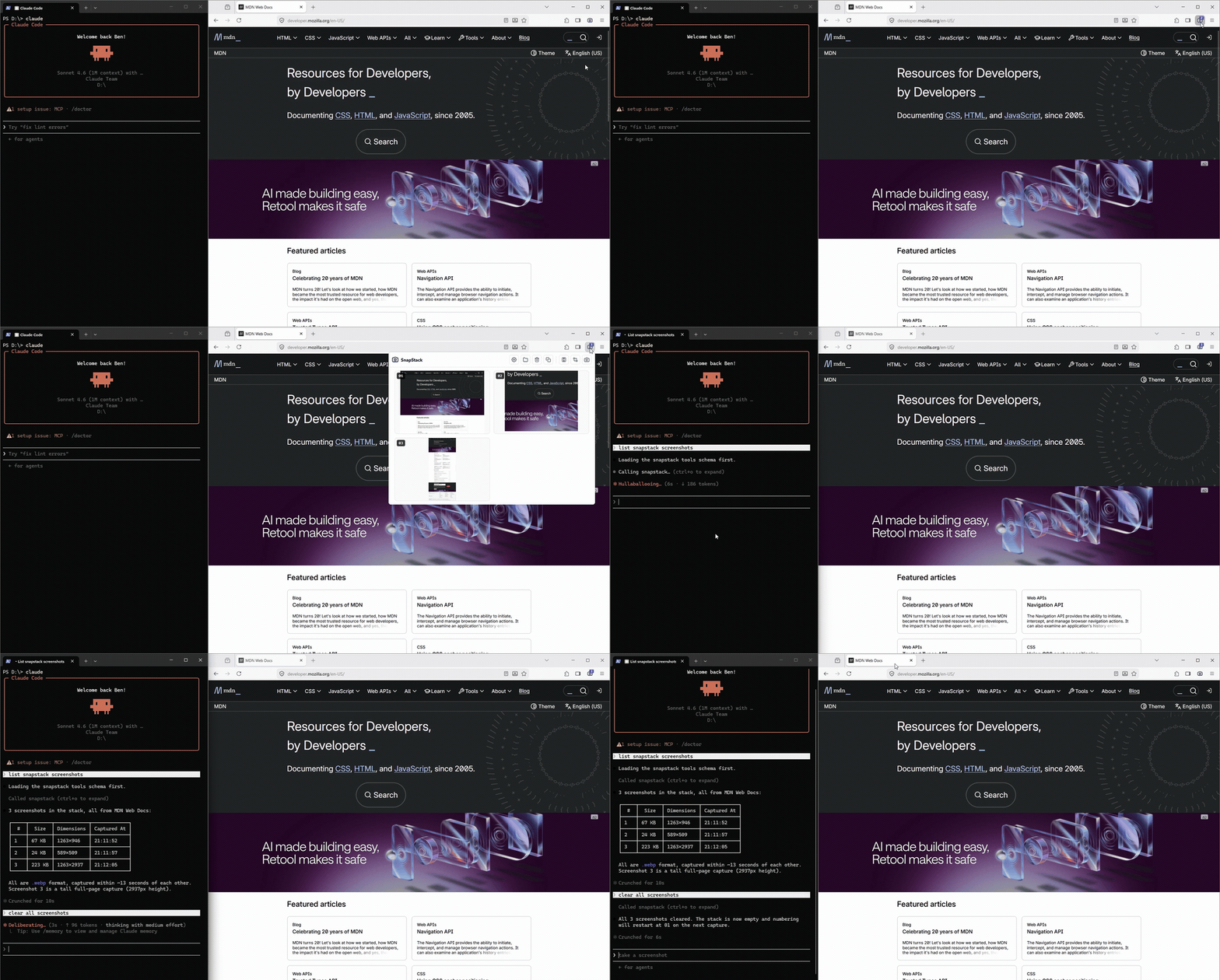
The SnapStack server is a single always-on Node process: it receives browser captures from the
extension, stacks them on disk, and serves them to any
MCP-capable LLM client over Streamable HTTP. It listens only on 127.0.0.1 — nothing ever leaves your machine.
New here? The full install + usage guide lives in the extension README: snapstack-extension. This page is the technical reference.
One always-on process serves both the extension (capture) and your MCP client, decoupled by a folder on disk.
[MV3 extension]  --POST /push (bytes) ┐
                                      ▼
                              [SnapStack server - 127.0.0.1:4123]
                                 ├─ writes           →  stack on disk
                                 └─ MCP /mcp (HTTP)  ←  MCP client
.webp/.png) plus a twin .json (url, title, timestamp, dimensions) per capture,
named NN <timestamp>: a stable two-digit number (assigned in capture order, restarts at 01 when the stack
empties) plus a timestamp, under ~/.snapstack/.get_screenshots returns a JSON manifest (number, absolute path, dimensions, metadata —
no image bytes); the client reads only the files it needs, by path. Deletion is a separate, explicit
clear_screenshots step. Retrieval never deletes.On Windows, use an Administrator terminal, otherwise the global npm install and the scheduled-task registration may get rejected.
The server ships on npm and installation is straightforward on macOS, Linux and Windows:
npm i -g snapstack-serversnapstack enableSnapStack auto-starts on login, restarts on crash, and updates itself on each launch.
To check its status or if an update is available, simply run snapstack in your terminal.
Available commands:
snapstack                            # status report: service + server health, update check
snapstack start | stop | restart     # control the running service (this session)
snapstack update                     # update the CLI (npm i -g) + restart the server on the latest
snapstack run                        # run the daemon in the foreground (no auto-start)
The daemon self-updates on each (re)start/login; the global CLI (the snapstack command) does not.
Run snapstack update to bring both to the latest in one go.
The full end-to-end walkthrough (idiomatic install paths, MCP client registration, the extension) is in the extension README.
SnapStack speaks two MCP transports over the same on-disk stack — pick whichever your client supports:
// HTTP (server already running) — register http://127.0.0.1:4123/mcp; copy deploy/mcp.json
{ "type": "http", "url": "http://127.0.0.1:4123/mcp" }
// stdio (the client spawns the process)
{ "command": "npx", "args": ["-y", "-p", "snapstack-server", "snapstack", "mcp"] }
The HTTP /mcp endpoint is stateless (a fresh server + transport per request); the stdio front-end
(snapstack mcp) is spawned on demand and reads the same ~/.snapstack stack.
Capture intake (/push) always stays in the running server, independent of either MCP front-end.
| Tool | Description |
|---|---|
get_screenshots | Lists pending captures as a JSON manifest (stable number, absolute path, dimensions, metadata) — no image bytes, no deletion. Pass numbers (e.g. [1,3]) to list only those. |
clear_screenshots | Deletes captures. Pass numbers to delete specific ones; omit to clear the whole stack. Numbering restarts at 01 once empty. |
count_screenshots | Number of pending captures, without retrieving them. |
get_screenshots and count_screenshots are read-only; only clear_screenshots is destructive.
| Variable | Default | Purpose |
|---|---|---|
SNAPSTACK_DIR | ~/.snapstack | Stack folder. |
SNAPSTACK_PORT | 4123 | Listening port (always on 127.0.0.1). |
The encoding/capture settings are owned by the server and stored in ~/.snapstack/config.json, so a single
edit applies to every browser running the extension. They are edited from the extension's options page — not
an environment variable — and fetched by the extension before each capture.
| Key | Default | Meaning |
|---|---|---|
format | webp | Image format: webp, png or jpg. |
quality | 0.85 | Lossy quality (0–1; the extension UI shows it as a percentage). |
maxWidth | 1568 | Downscale captures wider than this to this width in px (0 = no resize). |
maxSlices | 50 | Full-page capture: hard cap on stitched slices. |
Two endpoints back it: GET /config returns the effective policy; POST /config validates and replaces it (host- +
CORS-guarded like every capture route). The file is a non-image, so a stack clear never touches it; deleting it just
restores the defaults above.
snapstack start (or snapstack run in the foreground),
or check the auto-start with snapstack. Test: curl http://127.0.0.1:4123/health.EADDRINUSE): set SNAPSTACK_PORT to another value.snapstack: command not found after switching Node version (nvm, fnm, volta, Laravel Herd, nvm-windows): npm i -g
drops the snapstack command in the global bin of the Node version that was active at install time only, so switching
versions hides it. This is how npm globals work, not a SnapStack bug — the background service is unaffected and keeps
capturing; only the CLI command disappears. Fix: re-run npm i -g snapstack-server under the current Node version (or
switch back to the one used at install).type: "http", correct URL). Direct test: curl http://127.0.0.1:4123/count.ls ~/.snapstack (image files + human-readable .json).MIT — see LICENSE.
Claim this server with your GitHub account to request manual ownership verification.
Link to the catalog listing for SnapStack MCP server for stacked browser screenshots from your README. This badge does not certify ownership, compatibility or security.
[](https://awesome-mcp.com/servers/snapstack-server)Public repository statistics could not be verified. Check the configured source address; unavailable counts are not zero.
Separate sources, scopes and periods. Never combined or treated as installations, active users or security reviews.
No reviewed package or image identity; download statistics are not listed yet.
Alternative and complementary servers in the same category
A Model Context Protocol (MCP) server for controlling Chrome with debugging capabilities, userscript injection, and extension support.

An MCP server that lets AI assistants browse websites and extract content using optional CSS selectors.

An MCP server that reads pages, fills forms, takes screenshots, and hands the browser to a person for logins or CAPTCHAs.