

A directory listing describing a cancellation-letter and mailing-address service. The configured public GitHub repository returned 404 during source verification.
Repository stats unavailable
Developer Tools
A serverless code snippet management service built on Azure Functions that serves as both traditional APIs and MCP-compatible tools AI assistants can discover and use.
Azure Functions reference app exposing MCP tools for AI assistants is cataloged as an MCP server attributed to azure-samples. A serverless code snippet management service built on Azure Functions that serves as both traditional APIs and MCP-compatible tools AI assistants can discover and use. It is categorized under developer tools. See the capability inspector for recorded interfaces and their independent review status; consult upstream documentation for the current interface.
Installation configuration is not reviewed. No executable setup is offered for this entry; inspect the source repository before proceeding.
Catalog license label: Not specified. Check the source repository's current license and terms before using, modifying or distributing this software.
Capability definitions are not reviewed. Unreviewed imports are not exposed as trusted interfaces.
No reviewed records to display. This does not establish that upstream lacks this capability.
No reviewed records to display. This does not establish that upstream lacks this capability.
No reviewed records to display. This does not establish that upstream lacks this capability.
Email delivery is not connected. This page does not collect email addresses or create subscriptions.
Browse the registry for current listings instead.
Reviews for Azure Functions reference app exposing MCP tools for AI assistants are not available yet
Review publishing and storage are not connected. This page does not collect or publish ratings or comments, including after sign-in.
It exposes tools such as save_snippet, get_snippet, code_style, deep_wiki, and generate_comprehensive_documentation.
Semantic search uses Azure OpenAI embeddings with low-latency vector indexing on Cosmos DB DiskANN.
README.md · fc7a17ac23e3 · Fetched 2026-11-13 09:30:35 UTC
Original upstream text, without AI rewriting. Scripts, forms and unsafe links are filtered for safety.
Showing the last retrieved documentation snapshot; check the source for current changes.

Snippy is an Azure Functions-based reference application that demonstrates how to build MCP (Model Context Protocol) tools that integrate with AI assistants like GitHub Copilot. It showcases a modern serverless AI application architecture where Azure Functions serve as both traditional APIs and MCP-compatible tools that AI assistants can discover and use.
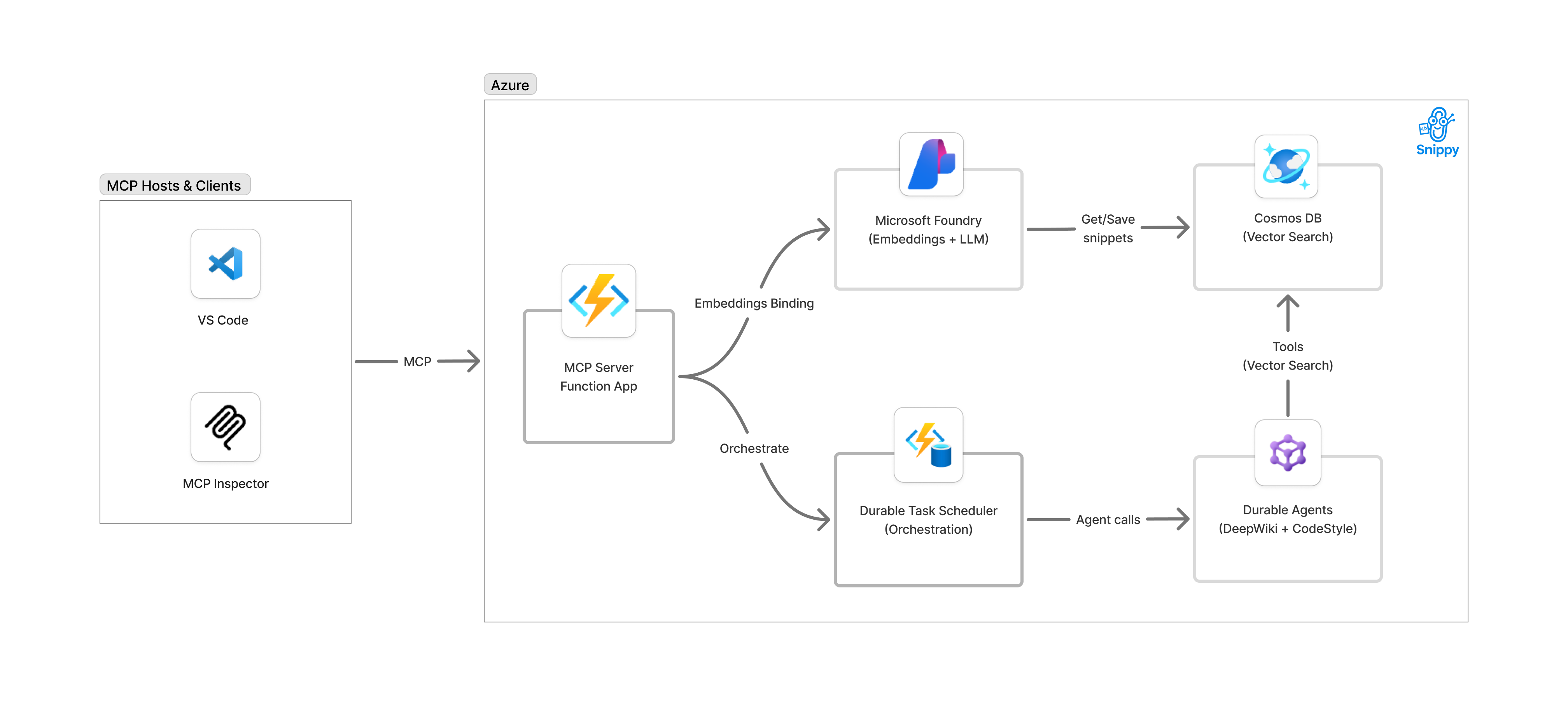
The system uses Durable Task Scheduler to orchestrate multi-agent workflows, Cosmos DB with vector indexing for semantic code search, and Azure OpenAI for embeddings and LLM capabilities. The project ships with reproducible azd infrastructure—azd up deploys the entire stack and works with both local Docker-based emulators and Azure cloud services.
Important Security Notice This repository is intended for learning and demonstration purposes. Do not deploy it to production without a thorough security review. At a minimum you should:
- Swap connection strings for Managed Identity + Azure Key Vault
- Restrict network access to Azure services via Private Endpoints or service‑tags
- Enable GitHub secret‑scanning and CI security tools
Features • Lab Tutorial • Getting Started • Guidance
ChatAgent with automatic conversation history managementazd up provisions and deploys complete infrastructure including Functions, Cosmos DB, Azure OpenAI, and DTS| Tool Name | Purpose |
|---|---|
save_snippet | Save code snippets with vector embeddings for semantic search |
get_snippet | Retrieve previously saved code snippets by their unique name |
code_style | Generate language-specific code style guides from saved snippets |
deep_wiki | Create comprehensive wiki documentation by analyzing code snippets |
generate_comprehensive_documentation | Orchestrate multi-agent workflow to produce deep wiki and style guide |
New to Snippy? Start with our comprehensive hands-on lab tutorial that guides you through building the entire application from scratch:
📚 Snippy Tutorial: Building an AI-Enhanced Code Snippet Manager
The tutorial covers:
Additional Resources:
Using GitHub Codespaces:
Click the "Open in GitHub Codespaces" badge above, then run:
azd auth login --use-device-code
azd up
Using Dev Containers or Local Environment:
azd init --template Azure-Samples/snippy
azd auth login
azd up
The azd up command will:
When complete, the Function App URL and MCP endpoint will be displayed. See the tutorial for detailed instructions on local development, testing with emulators, and monitoring orchestrations.
Azure OpenAI model support varies by region. Verify availability here and choose the same region for all Azure resources. eastus and swedencentral are good default choices.
Snippy uses User-Assigned Managed Identity for secure service-to-service authentication. The infrastructure is configured with:
For production deployments, we recommend:
Standard fork → branch → PR workflow. Use Conventional Commits (feat:, fix:) in commit messages.
MIT © Microsoft Corporation
Claim this server with your GitHub account to request manual ownership verification.
Link to the catalog listing for Azure Functions reference app exposing MCP tools for AI assistants from your README. This badge does not certify ownership, compatibility or security.
[](https://awesome-mcp.com/servers/snippy)Public repository statistics could not be verified. Check the configured source address; unavailable counts are not zero.
Separate sources, scopes and periods. Never combined or treated as installations, active users or security reviews.
No reviewed package or image identity; download statistics are not listed yet.
Alternative and complementary servers in the same category
A directory listing describing a cancellation-letter and mailing-address service. The configured public GitHub repository returned 404 during source verification.

A hosted MCP service for browsing and searching through Singapore mobile-network proxies.

A directory listing describing a Markdown-to-PDF service. The configured public GitHub repository returned 404 during source verification.