
This is a Model Context Protocol (MCP) server for interacting with AIStor object stores.
Repository stats unavailable
Databases & Storage
An MCP server that connects to Snowflake databases and lets MCP-compatible clients execute SQL queries and export results to CSV.
Snowflake MCP server for SQL query execution is cataloged as an MCP server attributed to davidamom. An MCP server that connects to Snowflake databases and lets MCP-compatible clients execute SQL queries and export results to CSV. It is categorized under databases storage. See the capability inspector for recorded interfaces and their independent review status; consult upstream documentation for the current interface.
Installation configuration is not reviewed. No executable setup is offered for this entry; inspect the source repository before proceeding.
Catalog license label: MIT License. Check the source repository's current license and terms before using, modifying or distributing this software.
Capability definitions are not reviewed. Unreviewed imports are not exposed as trusted interfaces.
No reviewed records to display. This does not establish that upstream lacks this capability.
No reviewed records to display. This does not establish that upstream lacks this capability.
No reviewed records to display. This does not establish that upstream lacks this capability.
Email delivery is not connected. This page does not collect email addresses or create subscriptions.
Browse the registry for current listings instead.
Reviews for Snowflake MCP server for SQL query execution are not available yet
Review publishing and storage are not connected. This page does not collect or publish ratings or comments, including after sign-in.
It supports password authentication and key pair authentication; if both are configured, key pair authentication is prioritized.
The server exposes execute_query for running SQL queries and export_to_csv for exporting query results to a CSV file.
README.md · fa3ee6889427 · Fetched 2026-11-13 10:33:28 UTC
Original upstream text, without AI rewriting. Scripts, forms and unsafe links are filtered for safety.
Showing the last retrieved documentation snapshot; check the source for current changes.
A Model Context Protocol (MCP) server that provides access to Snowflake databases for any MCP-compatible client.


This server implements the Model Context Protocol to allow any MCP client to:
MCP is a standard protocol that allows applications to communicate with AI models and external services. It enables AI models to access tools and data sources beyond their training data, expanding their capabilities through a standardized communication interface. Key features include:
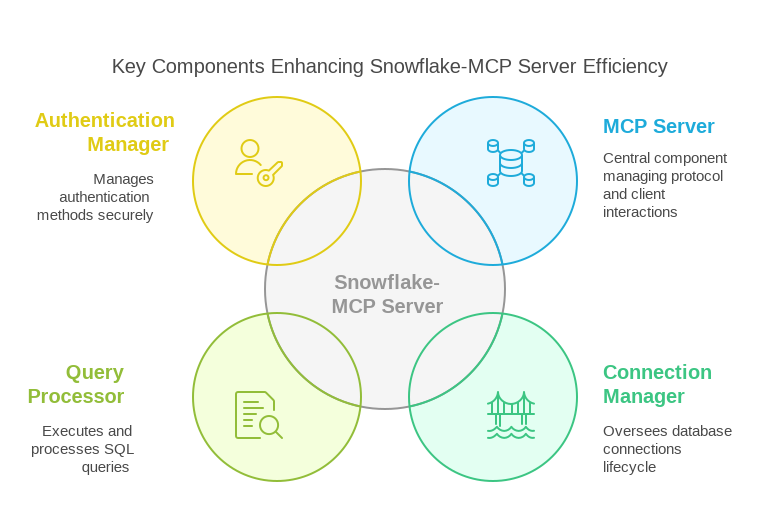
The Snowflake-MCP server consists of several key components:
The system works through the following communication flow:
.env file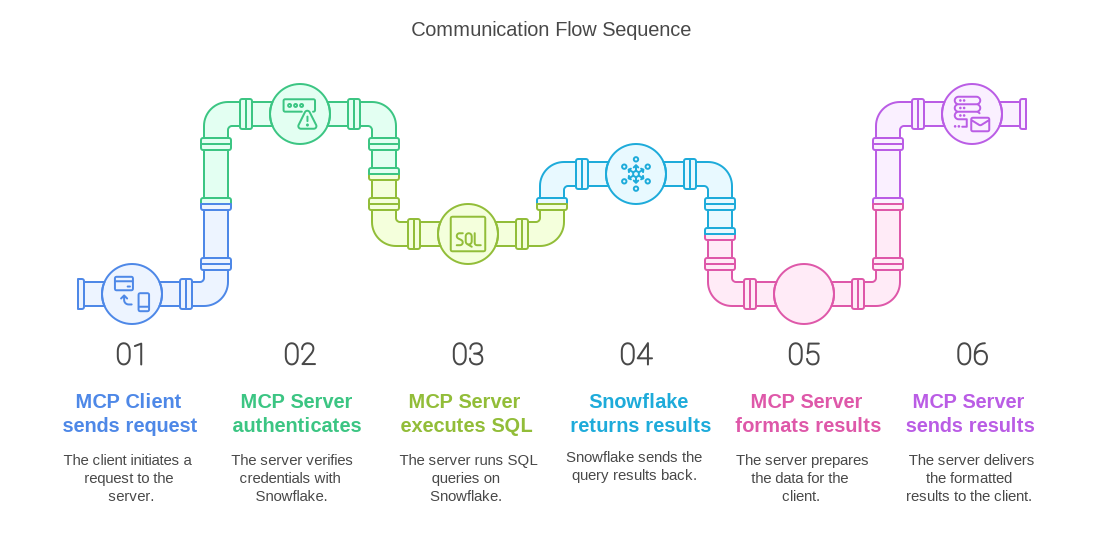
This architecture allows for seamless integration between AI applications and Snowflake databases while maintaining security and efficient connection management.
git clone https://github.com/davidamom/snowflake-mcp.git
pip install -r requirements.txt
Below is an example configuration for Claude Desktop, but this server works with any MCP-compatible client. Each client may have its own configuration method:
{
  "mcpServers": {
    "snowflake": {
      "command": "C:\\Users\\YourUsername\\path\\to\\python.exe",
      "args": ["C:\\path\\to\\snowflake-mcp\\server.py"]
    }
  }
}
Configuration parameters:
command: Full path to your Python interpreter. Please modify this according to your Python installation location.args: Full path to the server script. Please modify this according to where you cloned the repository.Example paths for different operating systems:
Windows:
{
  "mcpServers": {
    "snowflake": {
      "command": "C:\\Users\\YourUsername\\anaconda3\\python.exe",
      "args": ["C:\\Path\\To\\snowflake-mcp\\server.py"]
    }
  }
}
MacOS/Linux:
{
  "mcpServers": {
    "snowflake": {
      "command": "/usr/bin/python3",
      "args": ["/path/to/snowflake-mcp/server.py"]
    }
  }
}
Create a .env file in the project root directory and add the following configuration:
# Snowflake Configuration - Basic Info
SNOWFLAKE_USER=your_username          # Your Snowflake username
SNOWFLAKE_ACCOUNT=YourAccount.Region  # Example: MyOrg.US-WEST-2
SNOWFLAKE_DATABASE=your_database      # Your database
SNOWFLAKE_WAREHOUSE=your_warehouse    # Your warehouse
SNOWFLAKE_ROLE=your_role              # Your role

# Authentication - Choose one method
This MCP server supports two authentication methods:
Password Authentication
SNOWFLAKE_PASSWORD=your_password # Your Snowflake password
Key Pair Authentication
SNOWFLAKE_PRIVATE_KEY_FILE=/path/to/rsa_key.p8     # Path to private key file
SNOWFLAKE_PRIVATE_KEY_PASSPHRASE=your_passphrase   # Optional: passphrase if key is encrypted
For key pair authentication, you must first set up key pair authentication with Snowflake:
For instructions on setting up key pair authentication, refer to Snowflake documentation on key pair authentication.
If both authentication methods are configured, the server will prioritize key pair authentication.
The server provides automatic connection management features:
Automatic connection initialization
Connection maintenance
Connection cleanup
The server will start automatically when configured with your MCP client. No manual startup is required in normal operation. Once the server is running, your MCP client will be able to execute Snowflake queries.
For development testing, you can start the server manually using:
python server.py
Note: Manual server startup is not needed for normal use. The MCP client will typically manage server startup and shutdown based on the configuration.
You can also run the server using Docker. This method is recommended for production environments and ensures consistent execution across different platforms.
docker build -t snowflake-mcp .
{
  "mcpServers": {
    "snowflake-docker": {
      "command": "docker",
      "args": [
        "run",
        "-i",
        "snowflake-mcp"
      ],
      "env": {
        "SNOWFLAKE_USER": "your_username",
        "SNOWFLAKE_ACCOUNT": "your_account",
        "SNOWFLAKE_DATABASE": "your_database",
        "SNOWFLAKE_WAREHOUSE": "your_warehouse",
        "SNOWFLAKE_PASSWORD": "your_password",
        "SNOWFLAKE_ROLE": "your_role"

      }
    }
  }
}
Note: The Docker implementation uses stdio for communication, so no ports need to be exposed.
If using key pair authentication with Docker, you'll need to mount your private key file:
docker run -i -v /path/to/your/key.p8:/app/rsa_key.p8:ro snowflake-mcp
And update your configuration accordingly:
{
  "mcpServers": {
    "Snowflake-Docker": {
      "command": "docker",
      "args": [
        "run",
        "-i",
        "-v",
        "/path/to/your/key.p8:/app/rsa_key.p8:ro",
        //optional
        "-v",
        "/path/to/export/dir/:/export/"
        "snowflake-mcp"
      ],
      "env": {
        "SNOWFLAKE_USER": "your_username",
        "SNOWFLAKE_ACCOUNT": "your_account",
        "SNOWFLAKE_DATABASE": "your_database",
        "SNOWFLAKE_WAREHOUSE": "your_warehouse",
        "SNOWFLAKE_ROLE": "your_role",
        "SNOWFLAKE_PRIVATE_KEY_FILE": "path_for_your_private_key",
        "SNOWFLAKE_PRIVATE_KEY_PASSPHRASE": "your_password_for_private_key"
      }
    }
  }
}
The implementation consists of several key classes and modules:
The connection lifecycle is carefully managed to ensure reliability:
The server exposes the following tool to MCP clients:
execute_query - Executes a SQL query on Snowflake and returns the results
export_to_csv - Executes a SQL query on Snowflake and returns the results
This implementation follows best practices for both MCP protocol implementation and Snowflake database interaction.
This project is licensed under the MIT License. See the LICENSE file for details.
Copyright (c) 2025 David Amom
Claim this server with your GitHub account to request manual ownership verification.
Link to the catalog listing for Snowflake MCP server for SQL query execution from your README. This badge does not certify ownership, compatibility or security.
[](https://awesome-mcp.com/servers/snowflake-mcp)Public repository statistics could not be verified. Check the configured source address; unavailable counts are not zero.
Separate sources, scopes and periods. Never combined or treated as installations, active users or security reviews.
No reviewed package or image identity; download statistics are not listed yet.
Alternative and complementary servers in the same category
This is a Model Context Protocol (MCP) server for interacting with AIStor object stores.

A Model Context Protocol server that lets AI assistants run SQL queries against AWS Athena databases and retrieve results.

A Model Context Protocol (MCP) server that exposes access to an InfluxDB v2 instance using the InfluxDB OSS API v2.