
A directory listing describing a cancellation-letter and mailing-address service. The configured public GitHub repository returned 404 during source verification.
Repository stats unavailable
Developer Tools
An MCP server that parses JavaScript stack traces against source maps to recover original source code locations and context.
Source Map Parser MCP Server is cataloged as an MCP server attributed to masonchow. An MCP server that parses JavaScript stack traces against source maps to recover original source code locations and context. It is categorized under developer tools. See the capability inspector for recorded interfaces and their independent review status; consult upstream documentation for the current interface.
Installation configuration is not reviewed. No executable setup is offered for this entry; inspect the source repository before proceeding.
Catalog license label: MIT License. Check the source repository's current license and terms before using, modifying or distributing this software.
Capability definitions are not reviewed. Unreviewed imports are not exposed as trusted interfaces.
No reviewed records to display. This does not establish that upstream lacks this capability.
No reviewed records to display. This does not establish that upstream lacks this capability.
No reviewed records to display. This does not establish that upstream lacks this capability.
Email delivery is not connected. This page does not collect email addresses or create subscriptions.
Browse the registry for current listings instead.
Reviews for Source Map Parser MCP Server are not available yet
Review publishing and storage are not connected. This page does not collect or publish ratings or comments, including after sign-in.
The contextLines parameter defaults to 5 and is optional, and the environment variable SOURCE_MAP_PARSER_CONTEXT_OFFSET_LINE defines the number of context code lines to display, defaulting to 1 line.
Node.js 20 or higher is required; the README notes the integration requires Node.js 20+ support.
README.md · 2c21e0b87486 · Fetched 2026-11-13 08:22:44 UTC
Original upstream text, without AI rewriting. Scripts, forms and unsafe links are filtered for safety.
Showing the last retrieved documentation snapshot; check the source for current changes.





This project implements a WebAssembly-based Source Map parser that can map JavaScript error stack traces back to source code and extract relevant context information. Developers can easily map JavaScript error stack traces back to source code for quick problem identification and resolution. This documentation aims to help developers better understand and use this tool.
Note: Requires Node.js 20+ support
Option 1: Run directly with NPX
npx -y source-map-parser-mcp@latest
Option 2: Download the build artifacts
Download the corresponding version of the build artifacts from the GitHub Release page, then run:
node dist/main.es.js
You can embed the tools into your own MCP server process and customize behavior.
Install:
npm install source-map-parser-mcp
Minimal server (TypeScript):
import { McpServer } from '@modelcontextprotocol/sdk/server/mcp.js';
import { StdioServerTransport } from '@modelcontextprotocol/sdk/server/stdio.js';
import {
  registerTools,
  Parser,
  type ToolsRegistryOptions,
} from 'source-map-parser-mcp';

const server = new McpServer(
  { name: 'your-org.source-map-parser', version: '0.0.1' },
  { capabilities: { tools: {} } }
);

// Optional: control context lines via env
const options: ToolsRegistryOptions = {
  contextOffsetLine:
    Number(process.env.SOURCE_MAP_PARSER_CONTEXT_OFFSET_LINE) || 1,
};

registerTools(server, options);

// Start as stdio server
const transport = new StdioServerTransport();
await server.connect(transport);

// If you need programmatic parsing without MCP:
const parser = new Parser({ contextOffsetLine: 1 });
// await parser.parseStack({ line: 10, column: 5, sourceMapUrl: 'https://...' });
// await parser.batchParseStack([{ line, column, sourceMapUrl }]);
This project ships both ESM and CJS builds and a single bundled TypeScript declaration file.
dist/index.es.jsdist/index.cjs.jsdist/main.es.jsdist/index.d.ts (single bundled d.ts)Quick build locally:
npm install
npm run build
Using types in your project:
import {
  Parser,
  registerTools,
  type ToolsRegistryOptions,
} from 'source-map-parser-mcp';
System runtime parameters can be flexibly configured through environment variables to meet the needs of different scenarios
SOURCE_MAP_PARSER_RESOURCE_CACHE_MAX_SIZE: Sets the maximum memory space occupied by resource cache, default is 200MB. Adjusting this value appropriately can balance performance and memory usage.SOURCE_MAP_PARSER_CONTEXT_OFFSET_LINE: Defines the number of context code lines to display around the error location, default is 1 line. Increasing this value provides more context information, facilitating problem diagnosis.Example:
# Set 500MB cache and display 3 lines of context
export SOURCE_MAP_PARSER_RESOURCE_CACHE_MAX_SIZE=500
export SOURCE_MAP_PARSER_CONTEXT_OFFSET_LINE=3
npx -y source-map-parser-mcp@latest
operating_guideGet usage instructions for the MCP service. Provides information on how to use the MCP service through chat interaction.
parse_stackParse stack information by providing stack traces and Source Map addresses.
{
  "stacks": [
    {
      "line": 10,
      "column": 5,
      "sourceMapUrl": "https://example.com/source.map"
    }
  ]
}
{
  "content": [
    {
      "type": "text",
      "text": "[{\"success\":true,\"token\":{\"line\":10,\"column\":5,\"sourceCode\":[{\"line\":8,\"isStackLine\":false,\"raw\":\"function foo() {\"},{\"line\":9,\"isStackLine\":false,\"raw\":\"  console.log('bar');\"},{\"line\":10,\"isStackLine\":true,\"raw\":\"  throw new Error('test');\"},{\"line\":11,\"isStackLine\":false,\"raw\":\"}\"}],\"src\":\"index.js\"}}]"
    }
  ]
}
lookup_contextLook up original source code context for a specific line and column position in compiled/minified code.
{
  "line": 42,
  "column": 15,
  "sourceMapUrl": "https://example.com/app.js.map",
  "contextLines": 5
}
{
  "content": [
    {
      "type": "text",
      "text": "{\"filePath\":\"src/utils.js\",\"targetLine\":25,\"contextLines\":[{\"lineNumber\":23,\"content\":\"function calculateSum(a, b) {\"},{\"lineNumber\":24,\"content\":\"  if (a < 0 || b < 0) {\"},{\"lineNumber\":25,\"content\":\"    throw new Error('Negative numbers not allowed');\"},{\"lineNumber\":26,\"content\":\"  }\"},{\"lineNumber\":27,\"content\":\"  return a + b;\"}]}"
    }
  ]
}
unpack_sourcesExtract all source files and their content from a source map.
{
  "sourceMapUrl": "https://example.com/bundle.js.map"
}
{
  "content": [
    {
      "type": "text",
      "text": "{\"sources\":{\"src/index.js\":\"import { utils } from './utils.js';\\nconsole.log('Hello World!');\",\"src/utils.js\":\"export const utils = { add: (a, b) => a + b };\"},\"sourceRoot\":\"/\",\"file\":\"bundle.js\",\"totalSources\":2}"
    }
  ]
}
success: Indicates whether the parsing was successful.token: The Token object returned when parsing is successful, containing source code line number, column number, context code, and other information.error: Error information returned when parsing fails.According to actual needs, you can use system prompts to guide the model on how to parse stack information. For security or performance reasons, some teams may not want to expose Source Maps directly to the browser for parsing, but instead process the upload path of the Source Map. For example, converting the path bar-special.js to special/bar.js.map. In this case, you can instruct the model to perform path conversion through prompt rules.
Here is an example:
# Error Stack Trace Parsing Rules

When performing source map parsing, please follow these rules:

1. If the URL contains `special`, the file should be parsed into the `special/` directory, while removing `-special` from the filename.
2. All source map files are stored in the following CDN directory:
   `https://cdn.jsdelivr.net/gh/MasonChow/source-map-parser-mcp@main/example/`

## Examples

- Source map address for `bar-special.js`:
  `https://cdn.jsdelivr.net/gh/MasonChow/source-map-parser-mcp@main/example/special/bar.js.map`
Error Stack
Uncaught Error: This is a error
    at foo-special.js:49:34832
    at ka (foo-special.js:48:83322)
    at Vs (foo-special.js:48:98013)
    at Et (foo-special.js:48:97897)
    at Vs (foo-special.js:48:98749)
    at Et (foo-special.js:48:97897)
    at Vs (foo-special.js:48:98059)
    at sv (foo-special.js:48:110550)
    at foo-special.js:48:107925
    at MessagePort.Ot (foo-special.js:25:1635)
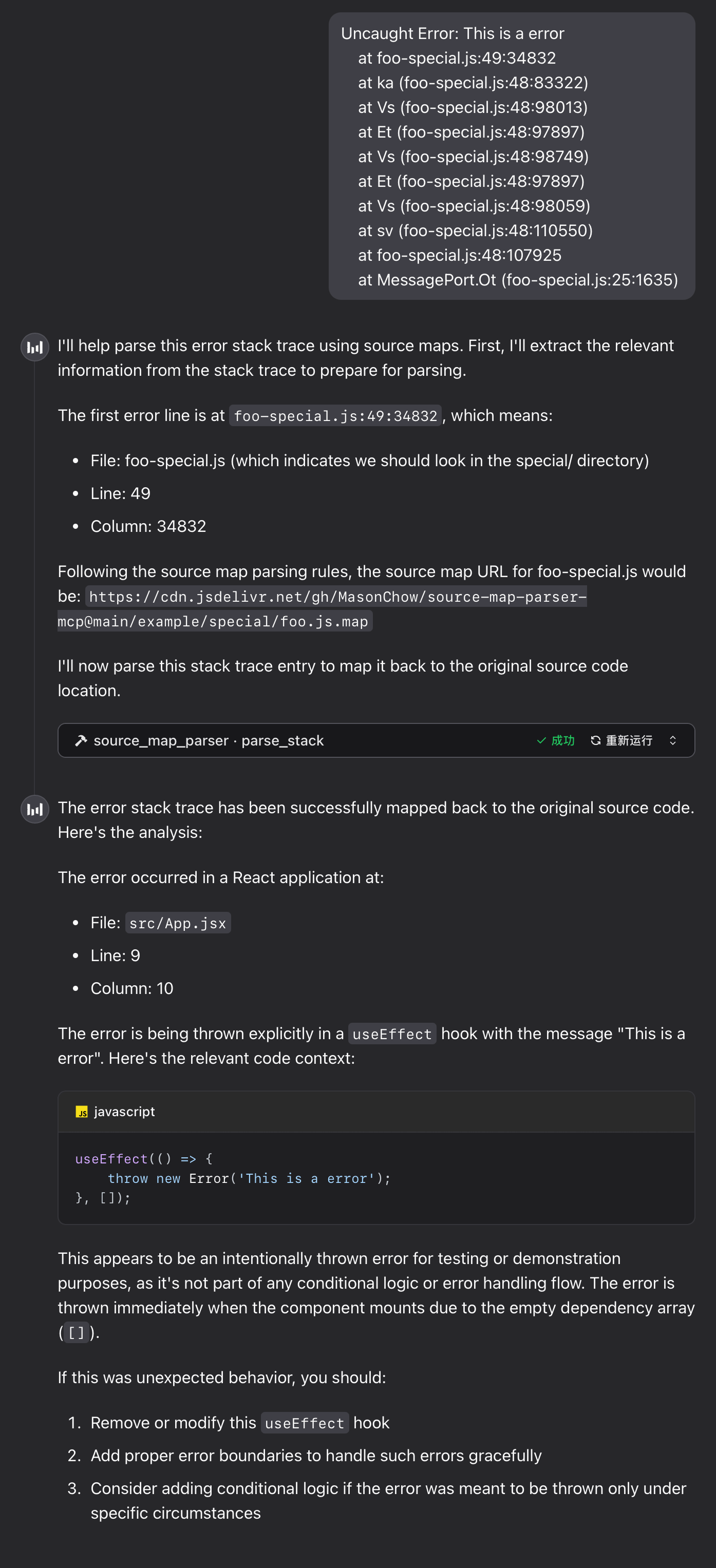
If the tool returns the following error message, please troubleshoot as follows:
parser init error: WebAssembly.instantiate(): invalid value type 'externref', enable with --experimental-wasm-reftypes @+86
npx --node-arg=--experimental-wasm-reftypes -y source-map-parser-mcp@latest
Ensure Node.js and npm are installed, then run the following command to install project dependencies:
npm install
Run the following command to start the MCP server:
npx tsx src/main.ts
stack_parser_js_sdk.js: JavaScript wrapper for the WebAssembly module, providing core stack parsing functionality.parser.ts: Main implementation of the parser, responsible for initializing the WebAssembly module, retrieving Source Map content, and parsing stack information.server.ts: Implementation of the MCP server, providing the parse_stack tool interface for external calls.To modify the parsing logic, edit the getSourceToken method in the parser.ts file.
In the server.ts file, new tool interfaces can be added using the server.tool method.
Contributions via Issues and Pull Requests are welcome to improve this project.
This project is licensed under the MIT License. See the LICENSE file for details.
Claim this server with your GitHub account to request manual ownership verification.
Link to the catalog listing for Source Map Parser MCP Server from your README. This badge does not certify ownership, compatibility or security.
[](https://awesome-mcp.com/servers/source-map-parser)Public repository statistics could not be verified. Check the configured source address; unavailable counts are not zero.
Separate sources, scopes and periods. Never combined or treated as installations, active users or security reviews.
No reviewed package or image identity; download statistics are not listed yet.
Alternative and complementary servers in the same category
A directory listing describing a cancellation-letter and mailing-address service. The configured public GitHub repository returned 404 during source verification.

A hosted MCP service for browsing and searching through Singapore mobile-network proxies.

A directory listing describing a Markdown-to-PDF service. The configured public GitHub repository returned 404 during source verification.