
A directory listing describing a cancellation-letter and mailing-address service. The configured public GitHub repository returned 404 during source verification.
Repository stats unavailable
Developer Tools
A Model Context Protocol server for structured spec-driven development, with a real-time dashboard and VSCode extension.
Spec Workflow MCP is cataloged as an MCP server attributed to pimzino. A Model Context Protocol server for structured spec-driven development, with a real-time dashboard and VSCode extension. It is categorized under developer tools. See the capability inspector for recorded interfaces and their independent review status; consult upstream documentation for the current interface.
Installation configuration is not reviewed. No executable setup is offered for this entry; inspect the source repository before proceeding.
Catalog license label: GPL-3.0. Check the source repository's current license and terms before using, modifying or distributing this software.
Capability definitions are not reviewed. Unreviewed imports are not exposed as trusted interfaces.
No reviewed records to display. This does not establish that upstream lacks this capability.
No reviewed records to display. This does not establish that upstream lacks this capability.
No reviewed records to display. This does not establish that upstream lacks this capability.
Email delivery is not connected. This page does not collect email addresses or create subscriptions.
Browse the registry for current listings instead.
Reviews for Spec Workflow MCP are not available yet
Review publishing and storage are not connected. This page does not collect or publish ratings or comments, including after sign-in.
Yes, it provides a VSCode extension with an integrated sidebar dashboard.
Yes, it is available in 11 languages.
README.md · d38e82eaa8a6 · Fetched 2026-11-13 09:28:39 UTC
Original upstream text, without AI rewriting. Scripts, forms and unsafe links are filtered for safety.
Showing the last retrieved documentation snapshot; check the source for current changes.
I HAVE TAKEN A SMALL BREAK FROM THIS REPO FOR PERSONAL REASONS BUT I WILL BE BACK WITH SOME UPDATES IN THE NEAR FUTURE THANK YOU FOR YOUR UNDERSTANDING


A Model Context Protocol (MCP) server for structured spec-driven development with real-time dashboard and VSCode extension.

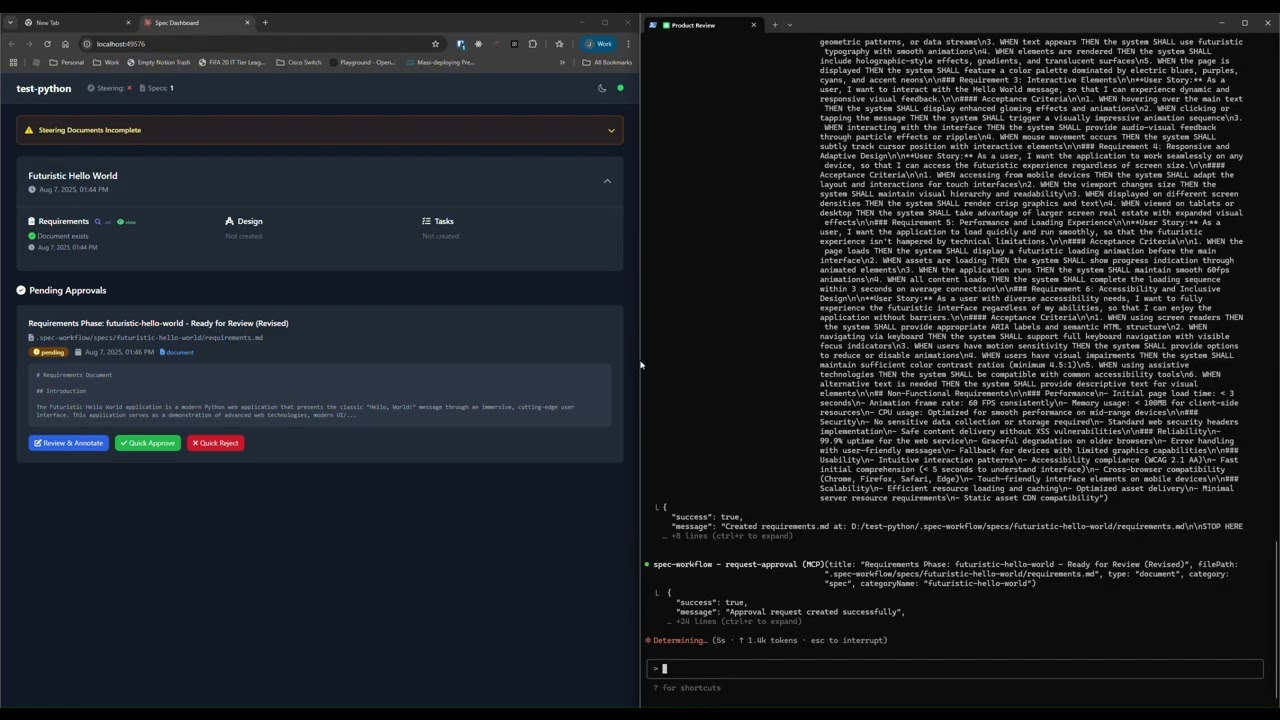
See how the approval system works: create documents, request approval through the dashboard, provide feedback, and track revisions.
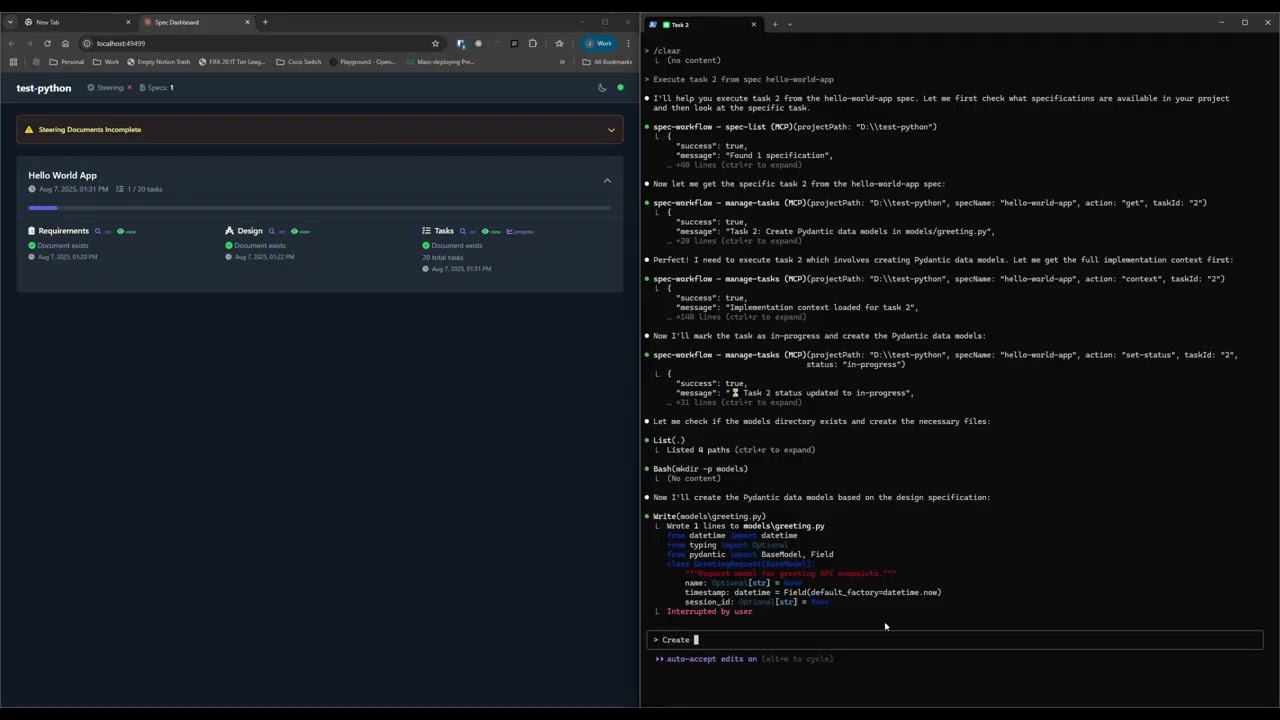
Explore the real-time dashboard: view specs, track progress, navigate documents, and monitor your development workflow.
🇺🇸 English • 🇯🇵 日本語 • 🇨🇳 中文 • 🇪🇸 Español • 🇧🇷 Português • 🇩🇪 Deutsch • 🇫🇷 Français • 🇷🇺 Русский • 🇮🇹 Italiano • 🇰🇷 한국어 • 🇸🇦 العربية
📖 Documentation in your language:
English | 日本語 | 中文 | Español | Português | Deutsch | Français | Русский | Italiano | 한국어 | العربية
Add to your MCP configuration (see client-specific setup below):
{
  "mcpServers": {
    "spec-workflow": {
      "command": "npx",
      "args": ["-y", "@pimzino/spec-workflow-mcp@latest", "/path/to/your/project"]
    }
  }
}
Option A: Web Dashboard (Required for CLI users) Start the dashboard (runs on port 5000 by default):
npx -y @pimzino/spec-workflow-mcp@latest --dashboard
The dashboard will be accessible at: http://localhost:5000
Note: Only one dashboard instance is needed. All your projects will connect to the same dashboard.
Option B: VSCode Extension (Recommended for VSCode users)
Install Spec Workflow MCP Extension from the VSCode marketplace.
Simply mention spec-workflow in your conversation:
Configure in your Augment settings:
{
  "mcpServers": {
    "spec-workflow": {
      "command": "npx",
      "args": ["-y", "@pimzino/spec-workflow-mcp@latest", "/path/to/your/project"]
    }
  }
}
Add to your MCP configuration:
claude mcp add spec-workflow npx @pimzino/spec-workflow-mcp@latest -- /path/to/your/project
Important Notes:
-y flag bypasses npm prompts for smoother installation-- separator ensures the path is passed to the spec-workflow script, not to npx/path/to/your/project with your actual project directory pathAlternative for Windows (if the above doesn't work):
claude mcp add spec-workflow cmd.exe /c "npx @pimzino/spec-workflow-mcp@latest /path/to/your/project"
Add to claude_desktop_config.json:
{
  "mcpServers": {
    "spec-workflow": {
      "command": "npx",
      "args": ["-y", "@pimzino/spec-workflow-mcp@latest", "/path/to/your/project"]
    }
  }
}
Important: Run the dashboard separately with
--dashboardbefore starting the MCP server.
Add to your MCP server configuration:
{
  "mcpServers": {
    "spec-workflow": {
      "command": "npx",
      "args": ["-y", "@pimzino/spec-workflow-mcp@latest", "/path/to/your/project"]
    }
  }
}
Add to your Continue configuration:
{
  "mcpServers": {
    "spec-workflow": {
      "command": "npx",
      "args": ["-y", "@pimzino/spec-workflow-mcp@latest", "/path/to/your/project"]
    }
  }
}
Add to your Cursor settings (settings.json):
{
  "mcpServers": {
    "spec-workflow": {
      "command": "npx",
      "args": ["-y", "@pimzino/spec-workflow-mcp@latest", "/path/to/your/project"]
    }
  }
}
Add to your opencode.json configuration file:
{
  "$schema": "https://opencode.ai/config.json",
  "mcp": {
    "spec-workflow": {
      "type": "local",
      "command": ["npx", "-y", "@pimzino/spec-workflow-mcp@latest", "/path/to/your/project"],
      "enabled": true
    }
  }
}
Add to your ~/.codeium/windsurf/mcp_config.json configuration file:
{
  "mcpServers": {
    "spec-workflow": {
      "command": "npx",
      "args": ["-y", "@pimzino/spec-workflow-mcp@latest", "/path/to/your/project"]
    }
  }
}
Add to your ~/.codex/config.toml configuration file:
[mcp_servers.spec-workflow]
command = "npx"
args = ["-y", "@pimzino/spec-workflow-mcp@latest", "/path/to/your/project"]
Run the dashboard in a Docker container for isolated deployment:
# Using Docker Compose (recommended)
cd containers
docker-compose up --build

# Or using Docker CLI
docker build -f containers/Dockerfile -t spec-workflow-mcp .
docker run -p 5000:5000 -v "./workspace/.spec-workflow:/workspace/.spec-workflow:rw" spec-workflow-mcp
The dashboard will be available at: http://localhost:5000
Spec-Workflow MCP includes enterprise-grade security features suitable for corporate environments:
| Feature | Description |
|---|---|
| Localhost Binding | Binds to 127.0.0.1 by default, preventing network exposure |
| Rate Limiting | 120 requests/minute per client with automatic cleanup |
| Audit Logging | Structured JSON logs with timestamp, actor, action, and result |
| Security Headers | X-Content-Type-Options, X-Frame-Options, X-XSS-Protection, CSP, Referrer-Policy |
| CORS Protection | Restricted to localhost origins by default |
| Docker Hardening | Non-root user, read-only filesystem, dropped capabilities, resource limits |
| Feature | Workaround |
|---|---|
| HTTPS/TLS | Use a reverse proxy (nginx, Apache) with TLS certificates |
| User Authentication | Use a reverse proxy with Basic Auth or OAuth2 Proxy for SSO |
If you need to expose the dashboard beyond localhost, we recommend:
127.0.0.1)# Example nginx reverse proxy with auth
server {
listen 443 ssl;
server_name dashboard.example.com;
ssl_certificate /path/to/cert.pem;
ssl_certificate_key /path/to/key.pem;
auth_basic "Dashboard Access";
auth_basic_user_file /etc/nginx/.htpasswd;
location / {
proxy_pass http://127.0.0.1:5000;
proxy_http_version 1.1;
proxy_set_header Upgrade $http_upgrade;
proxy_set_header Connection "upgrade";
}
}
For sandboxed environments (e.g., Codex CLI with sandbox_mode=workspace-write) where $HOME is read-only, use the SPEC_WORKFLOW_HOME environment variable to redirect global state files to a writable location:
SPEC_WORKFLOW_HOME=/workspace/.spec-workflow-mcp npx -y @pimzino/spec-workflow-mcp@latest /workspace
your-project/
  .spec-workflow/
    approvals/
    archive/
    specs/
    steering/
    templates/
    user-templates/
    config.example.toml
# Install dependencies
npm install

# Build the project
npm run build

# Run in development mode
npm run dev
GPL-3.0
Claim this server with your GitHub account to request manual ownership verification.
Link to the catalog listing for Spec Workflow MCP from your README. This badge does not certify ownership, compatibility or security.
[](https://awesome-mcp.com/servers/spec-workflow-mcp)Public repository statistics could not be verified. Check the configured source address; unavailable counts are not zero.
Separate sources, scopes and periods. Never combined or treated as installations, active users or security reviews.
No reviewed package or image identity; download statistics are not listed yet.
Alternative and complementary servers in the same category
A directory listing describing a cancellation-letter and mailing-address service. The configured public GitHub repository returned 404 during source verification.

A hosted MCP service for browsing and searching through Singapore mobile-network proxies.

A directory listing describing a Markdown-to-PDF service. The configured public GitHub repository returned 404 during source verification.