
A directory listing describing a cancellation-letter and mailing-address service. The configured public GitHub repository returned 404 during source verification.
Repository stats unavailable
Developer Tools
An MCP server module, launched as spinqit_mcp_tools.qasm_submitter, that lets AI large models invoke SpinQ's quantum computing resources and submit QASM circuits to the SpinQ cloud platform.
spinqit_mcp_tools quantum computing MCP server is cataloged as an MCP server attributed to eeeeeeeason. An MCP server module, launched as spinqit_mcp_tools.qasm_submitter, that lets AI large models invoke SpinQ's quantum computing resources and submit QASM circuits to the SpinQ cloud platform. It is categorized under developer tools. See the capability inspector for recorded interfaces and their independent review status; consult upstream documentation for the current interface.
Installation configuration is not reviewed. No executable setup is offered for this entry; inspect the source repository before proceeding.
Catalog license label: MIT License. Check the source repository's current license and terms before using, modifying or distributing this software.
Capability definitions are not reviewed. Unreviewed imports are not exposed as trusted interfaces.
No reviewed records to display. This does not establish that upstream lacks this capability.
No reviewed records to display. This does not establish that upstream lacks this capability.
No reviewed records to display. This does not establish that upstream lacks this capability.
Email delivery is not connected. This page does not collect email addresses or create subscriptions.
Browse the registry for current listings instead.
Reviews for spinqit_mcp_tools quantum computing MCP server are not available yet
Review publishing and storage are not connected. This page does not collect or publish ratings or comments, including after sign-in.
It requires Python 3.10 or higher.
If Conda is available, the script creates a Conda environment named mcp-server-py310 using Python 3.10; otherwise it prompts you to install Python 3.10 or Conda and rerun the script.
README.md · d48a3c11c4f1 · Fetched 2026-11-13 13:29:17 UTC
Original upstream text, without AI rewriting. Scripts, forms and unsafe links are filtered for safety.
Showing the last retrieved documentation snapshot; check the source for current changes.
This project provides one-click installation scripts for spinqit_mcp_tools on Windows and macOS. These scripts automatically check the Python environment (requires Python 3.10 or higher) and install the required spinqit_mcp_tools dependency package. If no suitable Python environment is found, the scripts will attempt to create one using Conda or guide users to manually install Python.
Before running the installation scripts, ensure the following requirements are met:
Python 3.10 or higher: spinqit_mcp_tools requires Python 3.10 or later.
Conda (optional): If Python 3.10 is not installed, the scripts can use Anaconda to create an environment. Download it from Anaconda.
Internet connection: Required for downloading the spinqit_mcp_tools package via pip.
macOS terminal permissions: Ensure the terminal supports bash.
If you prefer not to use the script for installation, you can manually install spinqit_mcp_tools. Follow the steps below. The only difference is that the script installation will display your Python path and the full command to launch the program at the end, which is helpful for beginners to configure:
Install Python 3.10 or later:
Install spinqit_mcp_tools:
pip install spinqit_mcp_tools
Verify successful installation:
python -m spinqit_mcp_tools.qasm_submitter
Download the Script
Download the mcpenv-installer-win-x86_64.bat script from the following link:
Run the Script
mcpenv-installer-win-x86_64.bat to execute the installation.Script Behavior
If Python 3.10 or higher is already installed: The script will directly install the spinqit_mcp_tools package and output the Python environment path and the mcp-server execution command.
If Python 3.10 is not installed but Conda is available: The script will create a Conda environment named mcp-server-py310 (using Python 3.10), install the dependencies, and output the environment path and execution command.
If neither Python 3.10 nor Conda is installed: The script will prompt you to download and install Python 3.10 or Conda from Python's official website or Anaconda's official website. After installation, rerun the script.
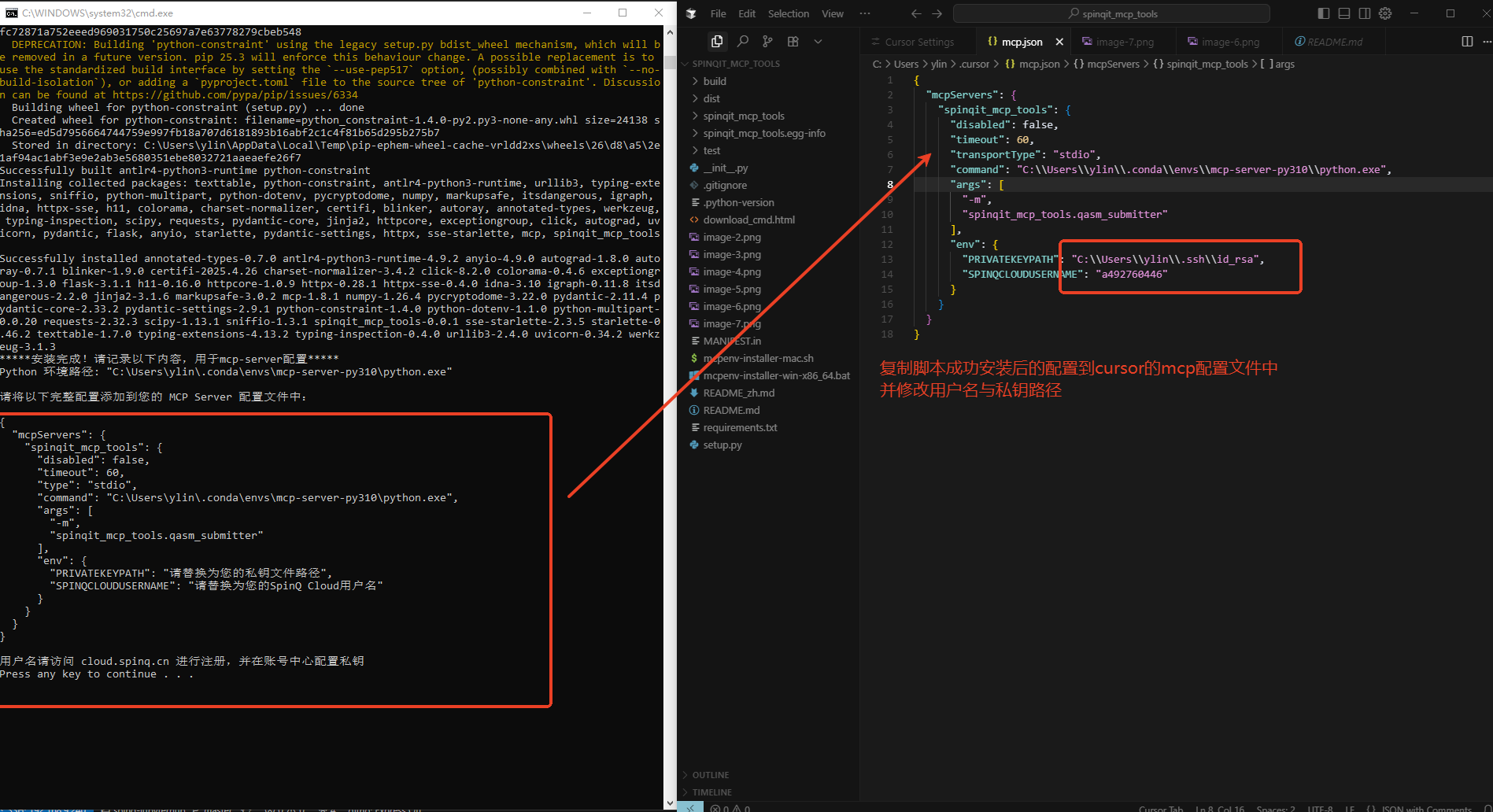
Successful Installation

Note the execution command (e.g., C:\ProgramData\Anaconda3\envs\mcp-server-py310\python.exe -m spinqit_mcp_tools.qasm_submitter in this example) and register an account at cloud.spinq.cn to configure your public key.
input the execution command, PRIVATEKEYPATH , SPINQCLOUDUSERNAME to your mcp server setting
Download the Script
Download the mcpenv-installer-mac.sh script from the following link:
Run the Script
Execute the script with:
sudo bash ./mcpenv-installer-mac.sh
Script Behavior
Similar to the Windows script, the macOS script will:
Check for Python 3.10 or higher. If found, it will install spinqit_mcp_tools.
If Python 3.10 is not found, it will check for Conda and create a mcp-server-py310 environment.
If neither Python 3.10 nor Conda is installed, it will prompt you to install Python 3.10 or Conda and then rerun the script.
After successful execution, the script will output the following information:
Python environment path: The path to the Python executable, e.g.:
Windows: C:\path\to\conda\envs\mcp-server-py310\python.exe
macOS: /path/to/conda/envs/mcp-server-py310/bin/python
mcp-server execution command: The command to run mcp-server, e.g.:
Windows: C:\path\to\conda\envs\mcp-server-py310\python.exe -m spinqit_mcp_tools.qasm_submitter
macOS: /path/to/conda/envs/mcp-server-py310/bin/python -m spinqit_mcp_tools.qasm_submitter
Save this information for configuring and running spinqit_mcp_tools.
Python not found or version below 3.10:
Download and install Python 3.10 from Python's official website, ensuring it is added to PATH.
Rerun the script after installation.
Conda not recognized:
pip installation failure:
Conda environment creation failure:
Use the Python installation directory to run:
/pathtopython/python -m spinqit_mcp_tools.qasm_submitterCursor
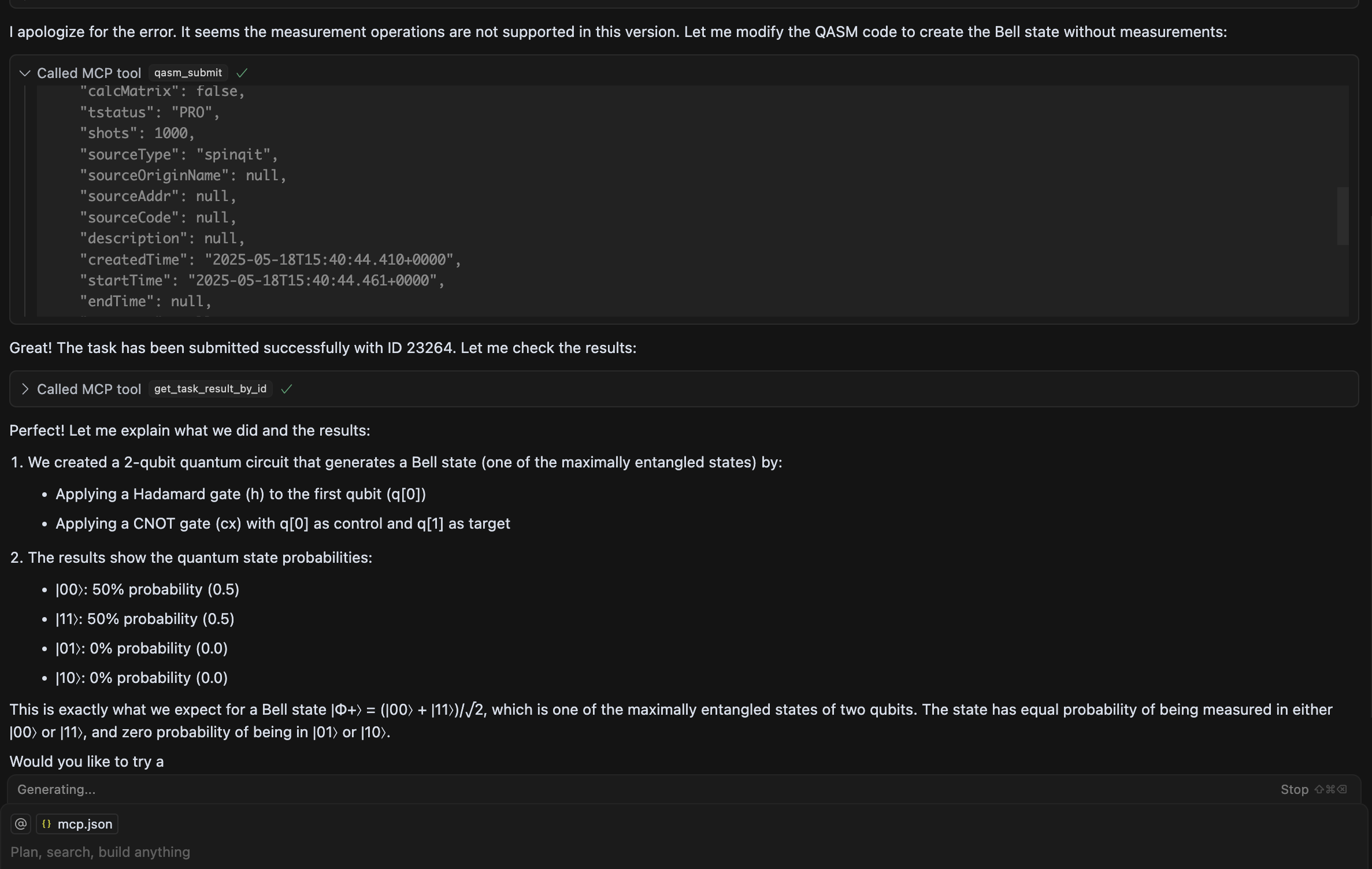
Configuration settings
{
  "mcpServers": {
    "qasm-submitter": {
      "type": "stdio",
      "command": "cmd",
      "args": [
        "/C",
        "C:\\Users\\ylin\\.conda\\envs\\mcp-server-py310\\python.exe",
        "-m",
        "spinqit_mcp_tools.qasm_submitter"
      ],
      "env": {
        "PRIVATEKEYPATH":"<Your Privatekey Path>",
        "SPINQCLOUDUSERNAME":"<Your SpinQ Cloud Username>"
      }
    }
  }
}
VSCode Client Plugin
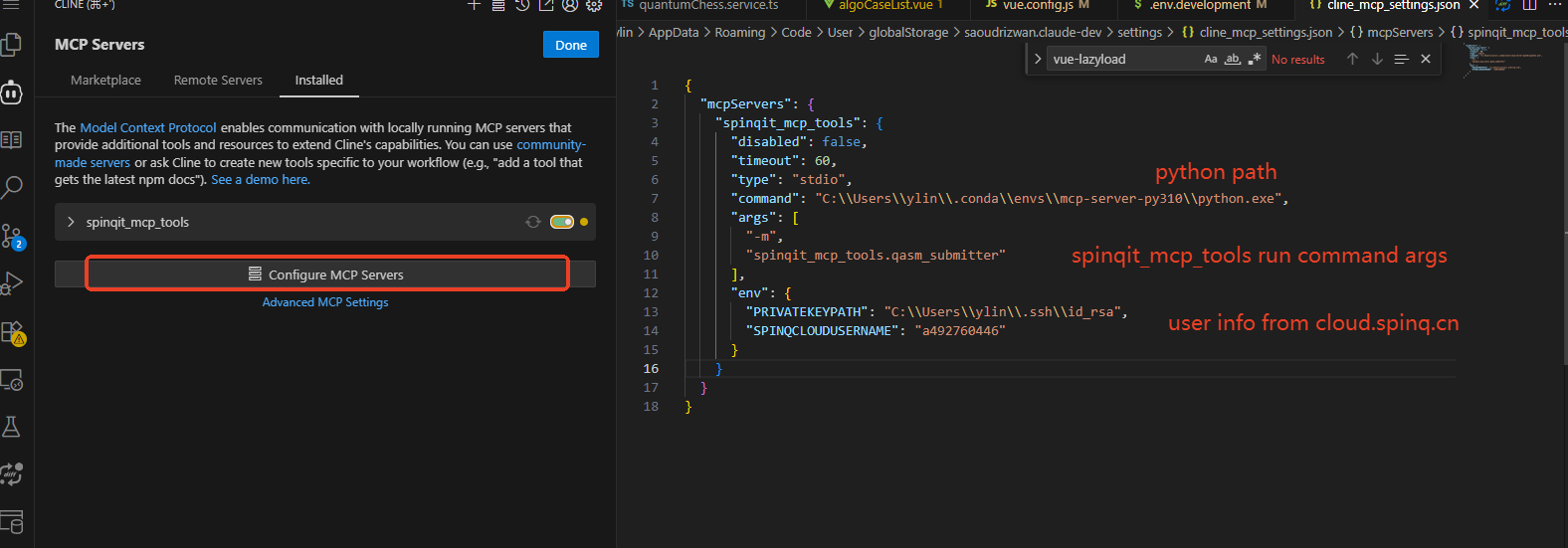
Configuration settings:
{
  "mcpServers": {
    "qasm-submitter": {
      "disabled": false,
      "timeout": 60,
      "transportType": "stdio",
      "command": "cmd",
      "args": [
        "/C",
        "C:\\Users\\ylin\\.conda\\envs\\mcp-server-py310\\python.exe",
        "-m",
        "spinqit_mcp_tools.qasm_submitter"
      ],
      "env": {
        "PRIVATEKEYPATH": "<Your Privatekey Path>",
        "SPINQCLOUDUSERNAME": "<Your SpinQ Cloud Username>"
      }
    }
  }
}
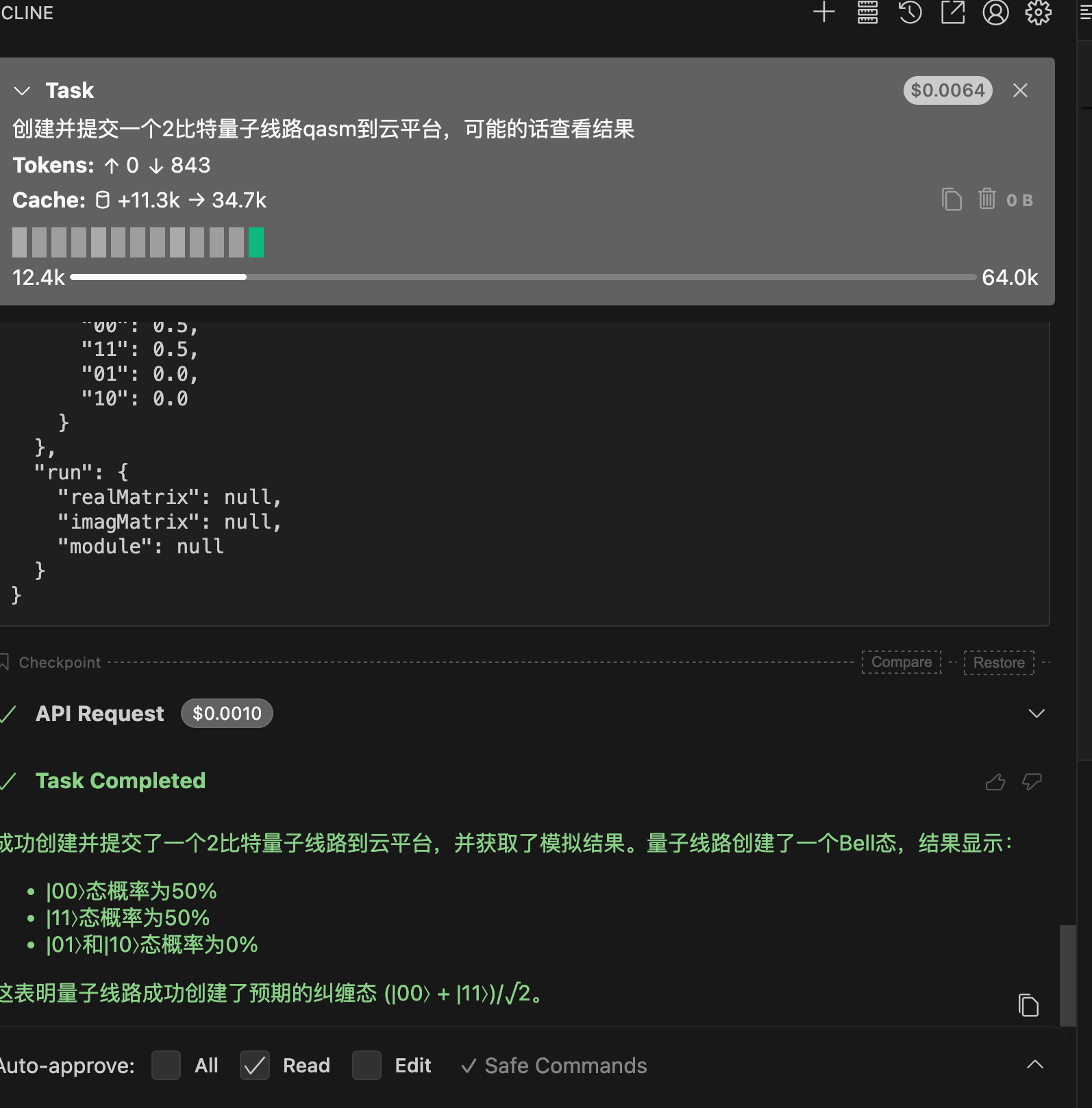
Configuration method
This project is licensed under the MIT License. See the LICENSE file for details.
Claim this server with your GitHub account to request manual ownership verification.
Link to the catalog listing for spinqit_mcp_tools quantum computing MCP server from your README. This badge does not certify ownership, compatibility or security.
[](https://awesome-mcp.com/servers/spinqit_task_manager)Public repository statistics could not be verified. Check the configured source address; unavailable counts are not zero.
Separate sources, scopes and periods. Never combined or treated as installations, active users or security reviews.
No reviewed package or image identity; download statistics are not listed yet.
Alternative and complementary servers in the same category
A directory listing describing a cancellation-letter and mailing-address service. The configured public GitHub repository returned 404 during source verification.

A hosted MCP service for browsing and searching through Singapore mobile-network proxies.

A directory listing describing a Markdown-to-PDF service. The configured public GitHub repository returned 404 during source verification.