
SpreshApp MCP server for Facebook ad intelligence

SpreshApp MCP server for Facebook ad intelligence

spresh-mcp•byprashantbtkl

An MCP server that lets Claude research Facebook ads, analyze creative strategy, track brands, and search a saved ad library through SpreshApp.

License: UNLICENSED — proprietary software•Runtime: Awaiting documentation review•Category: search web

WHAT IT DOES

  • •Searches Facebook ads by keyword, niche, or industry and fetches full ad details.
  • •Runs AI analysis on individual or multiple ads and retrieves saved analyses.
  • •Provides brand profiles, tracking status, ad history, and currently running ads.
  • •Searches a saved ad library and its folders, tags, and saved pages.

BEST FOR

  • •Competitive research on a brand's current Facebook ad strategy and themes.
  • •Finding high-performing ads in a niche and summarizing their creative angles.
  • •Tracking a brand's ad history over a period of time.

ABOUT SPRESH-MCP

SpreshApp MCP server for Facebook ad intelligence is cataloged as an MCP server attributed to prashantbtkl. An MCP server that lets Claude research Facebook ads, analyze creative strategy, track brands, and search a saved ad library through SpreshApp. It is categorized under search web. See the capability inspector for recorded interfaces and their independent review status; consult upstream documentation for the current interface.

HOW TO INSTALL

Installation configuration is not reviewed. No executable setup is offered for this entry; inspect the source repository before proceeding.

LICENSE

Catalog license label: UNLICENSED — proprietary software. Check the source repository's current license and terms before using, modifying or distributing this software.

Capability inspector

Capability definitions are not reviewed. Unreviewed imports are not exposed as trusted interfaces.

Tools (0)

No reviewed records to display. This does not establish that upstream lacks this capability.

Resources (0)

No reviewed records to display. This does not establish that upstream lacks this capability.

Prompts (0)

No reviewed records to display. This does not establish that upstream lacks this capability.

NEWSLETTER - COMING LATER

Newsletter subscriptions are not open yet

Email delivery is not connected. This page does not collect email addresses or create subscriptions.

Browse the registry for current listings instead.

Community Reviews

Coming later

Reviews for SpreshApp MCP server for Facebook ad intelligence are not available yet

Review publishing and storage are not connected. This page does not collect or publish ratings or comments, including after sign-in.

FREQUENTLY ASKED QUESTIONS

How does authentication work for the SpreshApp MCP server?

Users authenticate once via browser OAuth 2.0 with PKCE; credentials are saved to a credentials file with mode 600 and refreshed before each session. Headless environments can use a SpreshApp API key instead.

What accounts or plans are needed to use the tools?

A SpreshApp account is required, and some tools depend on the user's plan, returning a feature-not-available message if the current plan does not include the tool.

Upstream README

View this exact version on GitHub

README.md · bb186a9a1ede · Fetched 2026-11-13 10:56:08 UTC

Original upstream text, without AI rewriting. Scripts, forms and unsafe links are filtered for safety.

Showing the last retrieved documentation snapshot; check the source for current changes.

SpreshApp logo

spreshapp-mcp

MCP server that connects Claude to SpreshApp's Facebook ad intelligence platform.
npm version Node 20+ MCP compatible


Ask Claude to research competitors, decode winning ad angles, track brand ad history, and analyze your saved ad library, all directly from your Claude Desktop or Claude Code session.
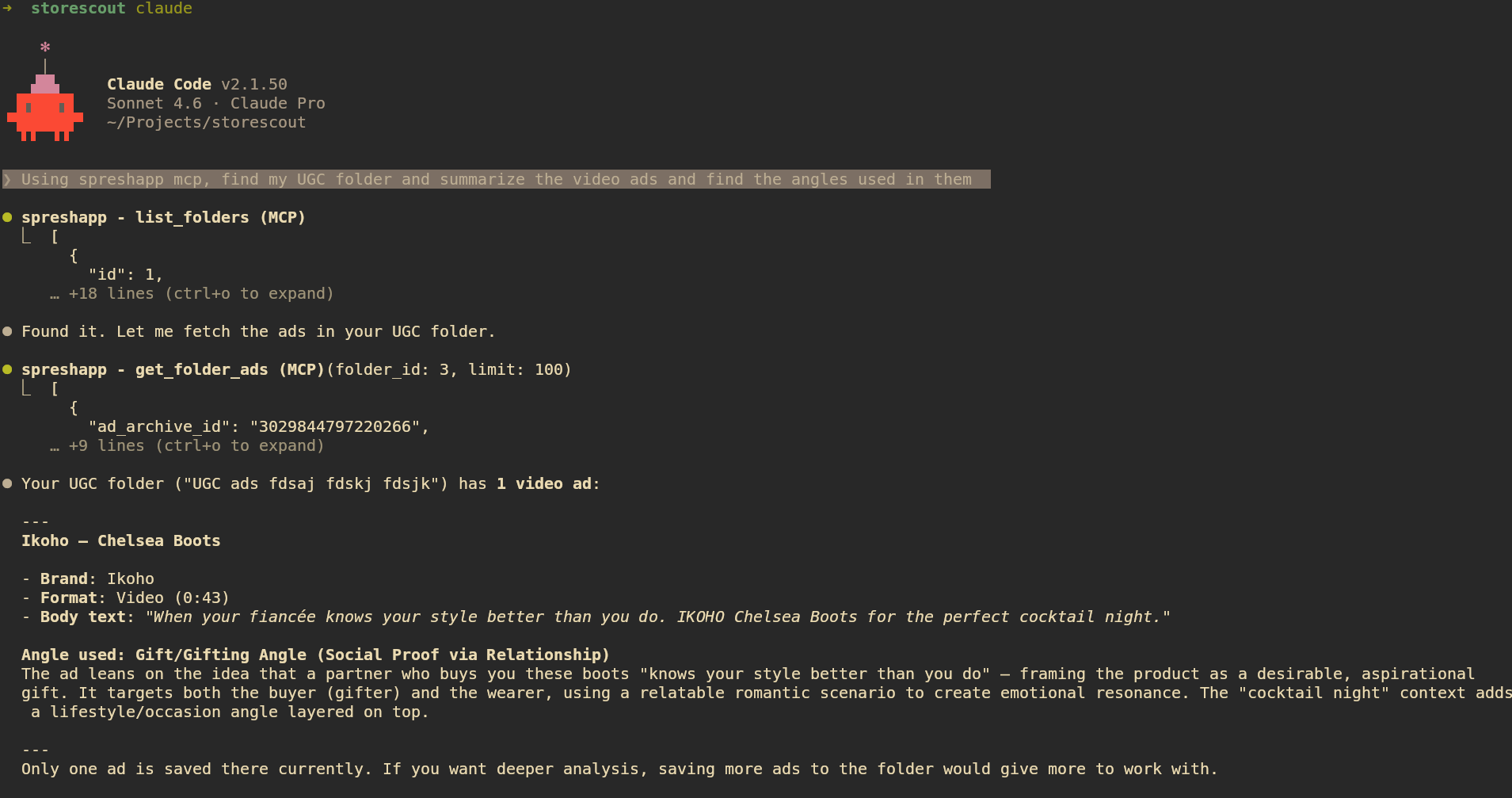
SpreshApp MCP in Claude Code

Requirements

Setup

Claude Desktop

Add this to your claude_desktop_config.json (macOS: ~/Library/Application Support/Claude/claude_desktop_config.json):

{
  "mcpServers": {
    "spreshapp": {
      "command": "npx",
      "args": ["-y", "spreshapp-mcp"]
    }
  }
}

Restart Claude Desktop after saving.

Claude Code

claude mcp add spreshapp -- npx -y spreshapp-mcp

VS Code (with MCP extension)

{
  "mcp": {
    "servers": {
      "spreshapp": {
        "command": "npx",
        "args": ["-y", "spreshapp-mcp"]
      }
    }
  }
}

Authentication

Authenticate once before starting the MCP server:

npx -y spreshapp-mcp login

This opens your browser to log in with your SpreshApp account (OAuth 2.0 with PKCE). After login, credentials are saved to ~/.spreshapp/credentials.json (file mode 600) and refreshed automatically before each session.

For headless or remote agent environments, use a SpreshApp API key from the dashboard instead of browser OAuth:

npx -y spreshapp-mcp login --no-browser

This prints setup instructions for the user and agent. The user can create or copy a key at spreshapp.com/app/api-access. Keys start with sk_sprs_.

Set the key in the MCP server environment:

SPRESHAPP_API_KEY=sk_sprs_... npx -y spreshapp-mcp

OAuth token variables are still supported for advanced setups: SPRESHAPP_ACCESS_TOKEN, SPRESHAPP_REFRESH_TOKEN, SPRESHAPP_CLIENT_ID, and SPRESHAPP_TOKEN_EXPIRES_AT.

Check auth status:

npx -y spreshapp-mcp status

To log in again:

npx -y spreshapp-mcp logout
npx -y spreshapp-mcp login

Available Tools

Ad tools

ToolDescription
ad_searchSearch Facebook ads by keyword, niche, or industry
ad_search_expand_queryExpand a search query to surface more relevant ads
ad_getFetch full details for a specific ad
ad_get_analysisRetrieve saved AI analysis for an ad
ad_analyzeRun AI analysis on any ad
ad_analyze_batchAnalyze multiple ads in one call
ad_chatChat with Claude about an ad's creative strategy

Brand tools

ToolDescription
brand_searchSearch for brands in SpreshApp
brand_get_overviewGet a brand's full profile and stats
brand_get_statusGet the current tracking status for a brand
brand_get_ad_historyGet historical ad volume data for a brand
brand_list_active_adsList all ads a brand is currently running
brand_followStart tracking a brand

Library tools

ToolDescription
search_adsSearch your saved ad library
get_folder_adsGet ads from a specific folder
list_foldersList all your saved folders
get_tagsList tags used across your library
get_pagesList saved Facebook pages

Example prompts

Find 10 high-performing Facebook video ads in the fitness niche and summarize the angles used.
Research Nike's current Facebook ad strategy, how many ads are they running and what are the themes?
Open my "Inspiration" folder and identify the top 3 creative hooks.
Track the brand glossier.com and show me their ad history over the last 30 days.

Troubleshooting

SymptomFix
Browser did not openCopy the URL printed to the terminal and open it manually
"Authentication expired" errorDelete ~/.spreshapp/credentials.json and re-run
"Not subscribed to any plan"Visit spreshapp.com/pricing
"Daily limit reached"Quota resets at midnight UTC, or upgrade your plan
"Feature not available"Your current plan does not include this tool, upgrade at spreshapp.com/pricing

License

UNLICENSED — proprietary software. See spreshapp.com for terms.

Install configuration

Are you the maintainer?

Claim this server with your GitHub account to request manual ownership verification.

README Embed Badge
Markdown

Link to the catalog listing for SpreshApp MCP server for Facebook ad intelligence from your README. This badge does not certify ownership, compatibility or security.

[![MCP catalog listing](https://img.shields.io/badge/MCP-awesome--mcp-orange?style=flat-square)](https://awesome-mcp.com/servers/spresh-mcp)

REPOSITORY STATS

GitHub StarsUnavailable
ForksUnavailable

Public repository statistics could not be verified. Check the configured source address; unavailable counts are not zero.

Downloads and pulls

Separate sources, scopes and periods. Never combined or treated as installations, active users or security reviews.

No reviewed package or image identity; download statistics are not listed yet.

Related search web MCP Servers

Alternative and complementary servers in the same category

View all in search web →

An MCP server that merges Google Search Console history with a live first-party crawl of your site to produce a prioritised, evidence-backed technical SEO audit inside Claude, complete with paste-ready fixes.

Repository stats unavailable
Search & Web Research

An MCP server that offers intelligent web search using OpenAI reasoning models, with support for fast iterations and deep research.

94
Search & Web Research


