
A directory listing describing a cancellation-letter and mailing-address service. The configured public GitHub repository returned 404 during source verification.
Repository stats unavailable
Developer Tools
A Spring Boot project that builds MCP servers for geocoding and timezone lookup and pairs them with an MCP Host console client that interacts with an LLM.
Spring AI MCP geocoder and timezone servers demo is cataloged as an MCP server attributed to oalles. A Spring Boot project that builds MCP servers for geocoding and timezone lookup and pairs them with an MCP Host console client that interacts with an LLM. It is categorized under developer tools. See the capability inspector for recorded interfaces and their independent review status; consult upstream documentation for the current interface.
Installation configuration is not reviewed. No executable setup is offered for this entry; inspect the source repository before proceeding.
Catalog license label: Not specified. Check the source repository's current license and terms before using, modifying or distributing this software.
Capability definitions are not reviewed. Unreviewed imports are not exposed as trusted interfaces.
No reviewed records to display. This does not establish that upstream lacks this capability.
No reviewed records to display. This does not establish that upstream lacks this capability.
No reviewed records to display. This does not establish that upstream lacks this capability.
Email delivery is not connected. This page does not collect email addresses or create subscriptions.
Browse the registry for current listings instead.
Reviews for Spring AI MCP geocoder and timezone servers demo are not available yet
Review publishing and storage are not connected. This page does not collect or publish ratings or comments, including after sign-in.
Yes, a model supporting TOOLS is required; the project uses Llama3.2 via Ollama.
README.md · 938e9e2f6210 · Fetched 2026-11-13 10:44:41 UTC
Original upstream text, without AI rewriting. Scripts, forms and unsafe links are filtered for safety.
Showing the last retrieved documentation snapshot; check the source for current changes.
This project showcases how to integrate Spring AI's support for MCP (Model Context Protocol) within Spring Boot applications, covering both server-side and client-side implementations.
MCP is a standard that streamlines the management of contextual interactions in AI models, enabling consistent integration with external data sources and tools.
Spring AI MCP extends the MCP Java SDK and provides dedicated Spring Boot starters for both clients and servers.
The MCP client handles communication and connection management with MCP servers.
In this project, we leverage Spring AI to build MCP servers, making their capabilities available to LLMs.
Note that the use of a model supporting TOOLS is required; we are using Llama3.2 via Ollama.
This project consists of three main modules:
public interface Geocoder {
    GeoCodeResult geocode(String city) throws Exception;
}

public record GeoCodeResult(double latitude, double longitude) {}
public interface TimeZoneService {
    Optional<TimeZone> getTimeZoneFromLocation(double latitude, double longitude) throws Exception;
}
public record TimeZone(
        String id,
        String name,
        int rawOffset,
        int dstSavings
) {}
@Bean
CommandLineRunner runner(final ChatClient.Builder chatClientBuilder, List<ToolCallback> toolCallbacks) {

   final ChatClient agent = chatClientBuilder.build();

   return args -> {
      try (Scanner scanner = new Scanner(System.in)) {
         while (true) {
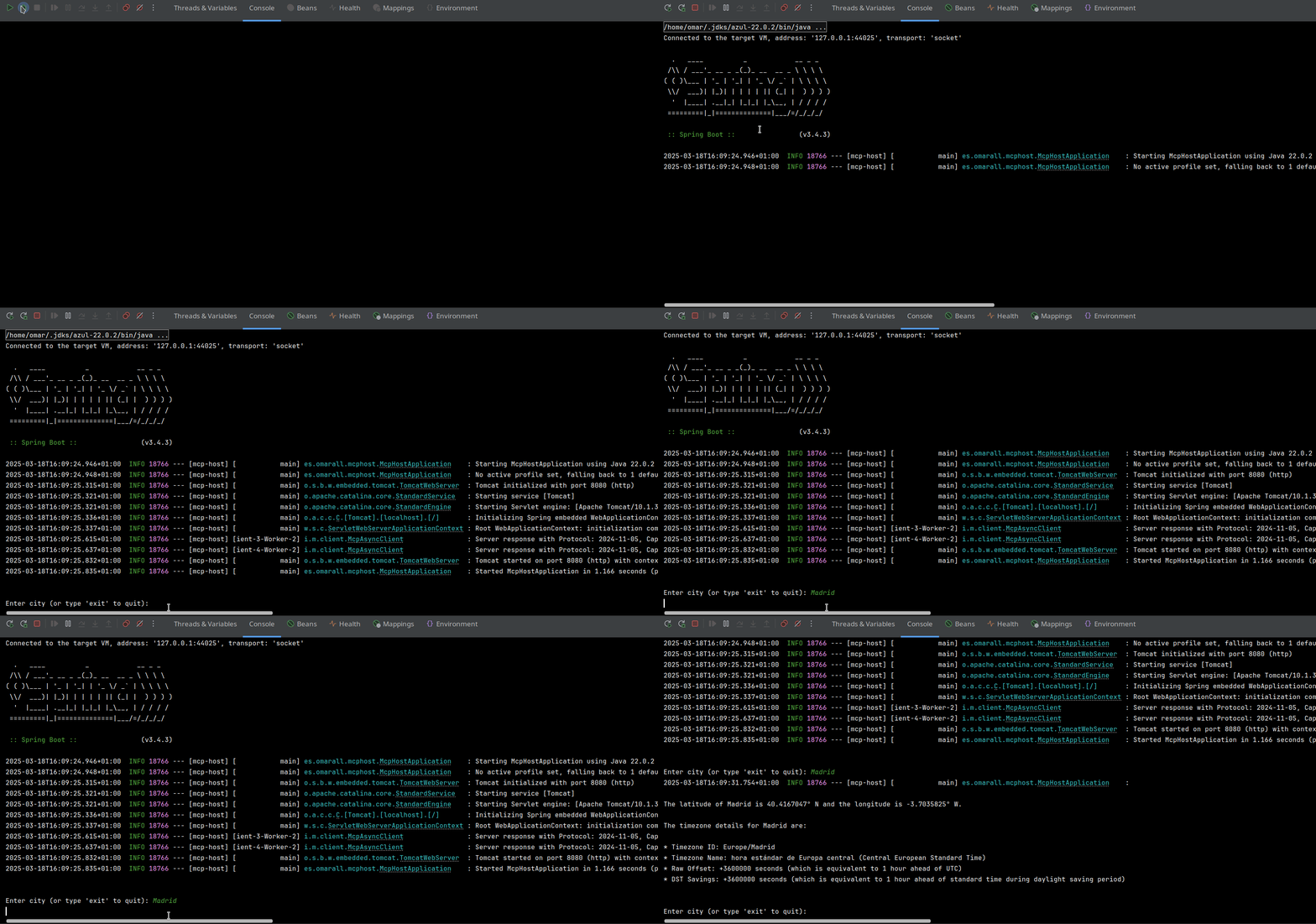
            System.out.print("\n\nEnter city (or type 'exit' to quit): ");
            String city = scanner.nextLine();
            if ("exit".equalsIgnoreCase(city)) {
               break;
            }

            String queryTemplate = """
                    Please use the available tools to find the latitude and longitude for the city `{city}`. Once you have this information,
                    use the tools to determine and provide all the timezone details for that location in the same language.
                    """;

            String systemTemplate = """
                    You are an AI assistant specialized in providing geographical information. Your task is to use the provided tools to gather and deliver accurate data.
                    """;

            String llmResponse = agent
                    .prompt()
                    .advisors(new SimpleLoggerAdvisor())
                    .system(systemSpec -> systemSpec.text(systemTemplate))
                    .user(userSpec -> userSpec.text(queryTemplate).param("city", city))
                    .tools(toolCallbacks)
                    .call()
                    .content();

            log.info("\n\n{}", llmResponse);
         }
      }
   };
}
Start Geocoder Service:
cd geocoder
mvn spring-boot:run
Start Timezone Service:
cd timezone
mvn spring-boot:run
Start MCP Host:
cd mcp-host
mvn spring-boot:run
Insertamos image
Claim this server with your GitHub account to request manual ownership verification.
Link to the catalog listing for Spring AI MCP geocoder and timezone servers demo from your README. This badge does not certify ownership, compatibility or security.
[](https://awesome-mcp.com/servers/spring-ai-mcp-test)Public repository statistics could not be verified. Check the configured source address; unavailable counts are not zero.
Separate sources, scopes and periods. Never combined or treated as installations, active users or security reviews.
No reviewed package or image identity; download statistics are not listed yet.
Alternative and complementary servers in the same category
A directory listing describing a cancellation-letter and mailing-address service. The configured public GitHub repository returned 404 during source verification.

A hosted MCP service for browsing and searching through Singapore mobile-network proxies.

A directory listing describing a Markdown-to-PDF service. The configured public GitHub repository returned 404 during source verification.