
A directory listing describing a cancellation-letter and mailing-address service. The configured public GitHub repository returned 404 during source verification.
Repository stats unavailable
Developer Tools
A reference implementation of a Model Context Protocol server that lets AI clients control and inspect Roblox Studio through a Studio plugin.
Roblox Studio MCP Server is cataloged as an MCP server attributed to roblox. A reference implementation of a Model Context Protocol server that lets AI clients control and inspect Roblox Studio through a Studio plugin. It is categorized under developer tools. See the capability inspector for recorded interfaces and their independent review status; consult upstream documentation for the current interface.
Installation configuration is not reviewed. No executable setup is offered for this entry; inspect the source repository before proceeding.
Catalog license label: Not specified. Check the source repository's current license and terms before using, modifying or distributing this software.
Capability definitions are not reviewed. Unreviewed imports are not exposed as trusted interfaces.
No reviewed records to display. This does not establish that upstream lacks this capability.
No reviewed records to display. This does not establish that upstream lacks this capability.
No reviewed records to display. This does not establish that upstream lacks this capability.
Email delivery is not connected. This page does not collect email addresses or create subscriptions.
Browse the registry for current listings instead.
Reviews for Roblox Studio MCP Server are not available yet
Review publishing and storage are not connected. This page does not collect or publish ratings or comments, including after sign-in.
No, the README states this MCP Server is no longer being actively developed, with engineering investment shifted to the built-in MCP Server included with Roblox Studio.
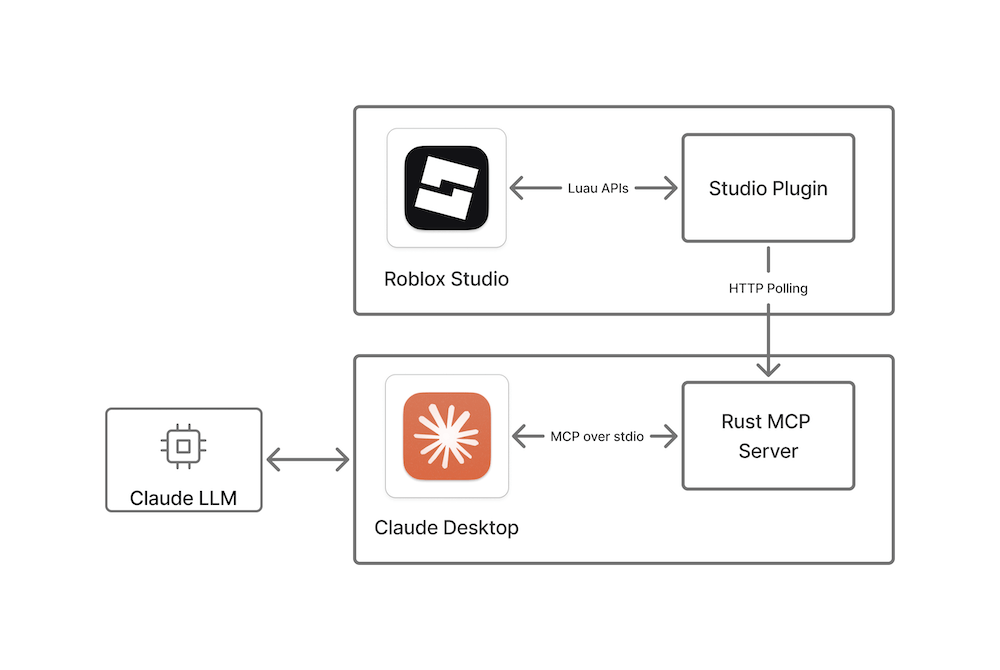
The server consists of a web server that the Studio plugin long polls and a stdio MCP server that talks to the AI client, communicating through internal shared objects.
README.md · b0b6474f55eb · Fetched 2026-11-13 11:54:18 UTC
Original upstream text, without AI rewriting. Scripts, forms and unsafe links are filtered for safety.
Showing the last retrieved documentation snapshot; check the source for current changes.
[!WARNING]
This MCP Server is no longer being actively developed
We’ve shifted ongoing engineering investment to the built-in MCP Server included with Roblox Studio, which we recommend as the best way to connect external AI tools going forward.
This server’s source code and previous releases will remain available here for reference and existing workflows.
This repository contains a reference implementation of the Model Context Protocol (MCP) that enables communication between Roblox Studio via a plugin and Claude Desktop or Cursor. It consists of the following Rust-based components, which communicate through internal shared objects.
axum that a Studio plugin long polls.rmcp server that talks to Claude via stdio transport.When LLM requests to run a tool, the plugin will get a request through the long polling and post a response. It will cause responses to be sent to the Claude app.
Please note that this MCP server will be accessed by third-party tools, allowing them to modify and read the contents of your opened place. Third-party data handling and privacy practices are subject to their respective terms and conditions.
The setup process also contains a small plugin installation and Claude Desktop configuration script.
start_play, run_server, or stop).This MCP Server supports pretty much any MCP Client but will automatically set up only Claude Desktop and Cursor if found.
To set up automatically:
To set up manually add following to your MCP Client config:
{
  "mcpServers": {
    "Roblox_Studio": {
      "args": [
        "--stdio"
      ],
      "command": "Path-to-downloaded\\rbx-studio-mcp.exe"
    }
  }
}
On macOS the path would be something like "/Applications/RobloxStudioMCP.app/Contents/MacOS/rbx-studio-mcp" if you move the app to the Applications directory.
For Claude Desktop, go to Settings > Developer > Edit Config. This opens location of the claude_desktop_config.json.
Some clients require user to setup the mcp server manually for each project. For example, Claude Code command would look like this:
claude mcp add --transport stdio Roblox_Studio -- '/Applications/RobloxStudioMCP.app/Contents/MacOS/rbx-studio-mcp' --stdio
To build and install the MCP reference implementation from this repository's source code:
cargo run
After the command completes, the Studio MCP Server is installed and ready for your prompts from Claude Desktop.
To make sure everything is set up correctly, follow these steps:
The MCP Studio plugin is ready for prompts. appears in the output.
Clicking on the plugin's icon toggles MCP communication with Claude Desktop on and off,
which you can also verify in the console output.insert_model and run_code).Note: You can fix common issues with setup by restarting Studio and Claude Desktop. Claude sometimes is hidden in the system tray, so ensure you've exited it completely.
Claim this server with your GitHub account to request manual ownership verification.
Link to the catalog listing for Roblox Studio MCP Server from your README. This badge does not certify ownership, compatibility or security.
[](https://awesome-mcp.com/servers/studio-rust-mcp-server)Public repository statistics could not be verified. Check the configured source address; unavailable counts are not zero.
Separate sources, scopes and periods. Never combined or treated as installations, active users or security reviews.
No reviewed package or image identity; download statistics are not listed yet.
Alternative and complementary servers in the same category
A directory listing describing a cancellation-letter and mailing-address service. The configured public GitHub repository returned 404 during source verification.

A hosted MCP service for browsing and searching through Singapore mobile-network proxies.

A directory listing describing a Markdown-to-PDF service. The configured public GitHub repository returned 404 during source verification.