
A directory listing describing a cancellation-letter and mailing-address service. The configured public GitHub repository returned 404 during source verification.
Repository stats unavailable
Developer Tools
An MCP server that offers intelligent summarization and context-window management for AI agents and workflows.
Summarization Functions is cataloged as an MCP server attributed to braffolk. An MCP server that offers intelligent summarization and context-window management for AI agents and workflows. It is categorized under developer tools. See the capability inspector for recorded interfaces and their independent review status; consult upstream documentation for the current interface.
Installation configuration is not reviewed. No executable setup is offered for this entry; inspect the source repository before proceeding.
Catalog license label: MIT. Check the source repository's current license and terms before using, modifying or distributing this software.
Capability definitions are not reviewed. Unreviewed imports are not exposed as trusted interfaces.
No reviewed records to display. This does not establish that upstream lacks this capability.
No reviewed records to display. This does not establish that upstream lacks this capability.
No reviewed records to display. This does not establish that upstream lacks this capability.
Email delivery is not connected. This page does not collect email addresses or create subscriptions.
Browse the registry for current listings instead.
Reviews for Summarization Functions are not available yet
Review publishing and storage are not connected. This page does not collect or publish ratings or comments, including after sign-in.
Use the summary ID with the get_full_content tool to retrieve the stored full content.
Yes, tools accept a hint for focus areas including security analysis, API surface, error handling, dependencies, and type definitions.
Tools support text, JSON, Markdown, and outline output formats, with text as the default.
README.md · bc02da0f4323 · Fetched 2026-11-13 08:20:06 UTC
Original upstream text, without AI rewriting. Scripts, forms and unsafe links are filtered for safety.
Showing the last retrieved documentation snapshot; check the source for current changes.
Features • AI Agent Integration • Installation • Usage

A powerful MCP server that provides intelligent summarization capabilities through a clean, extensible architecture. Built with modern TypeScript and designed for seamless integration with AI workflows.
To install Summarization Functions for Claude Desktop automatically via Smithery:
npx -y @smithery/cli install mcp-summarization-functions --client claude
npm i mcp-summarization-functions
This MCP server was primarily developed to enhance the performance and reliability of AI agents like Roo Cline and Cline. It addresses a critical challenge in AI agent operations: context window management.
AI agents frequently encounter situations where their context window gets rapidly filled with large outputs from:
This server helps maintain efficient context usage by:
When integrating with AI agents, include the following in your agent's instructions:
# CONTEXT MANAGEMENT

You have access to summarization functions through the MCP server. These functions are NOT optional - you MUST use them for ALL potentially large outputs to prevent context overflow:

MANDATORY SUMMARIZATION:
- You MUST ALWAYS use summarization functions for:
    - ANY first time file reading operations (unless you are CERTAIN its small and you are going to edit it)
    - ALL command execution outputs
    - EVERY directory analysis
    - ANY API responses or error logs
    - ANY output that could be large

NEVER attempt to process raw output directly - ALWAYS use the appropriate summarization function:
• For commands: summarize_command
• For files: summarize_files
• For directories: summarize_directory
• For other text: summarize_text

ALWAYS utilize available features:
• Specify hints for focused analysis
• Choose appropriate output formats
• Use content IDs to access full details only when absolutely necessary

There is NO NEED to process perfect or complete output. Summarized content is ALWAYS preferred over raw data. When in doubt, use summarization.
Summarization in action on the Ollama repository (Gemini 2.0 Flash summarization, Claude 3.5 agent)
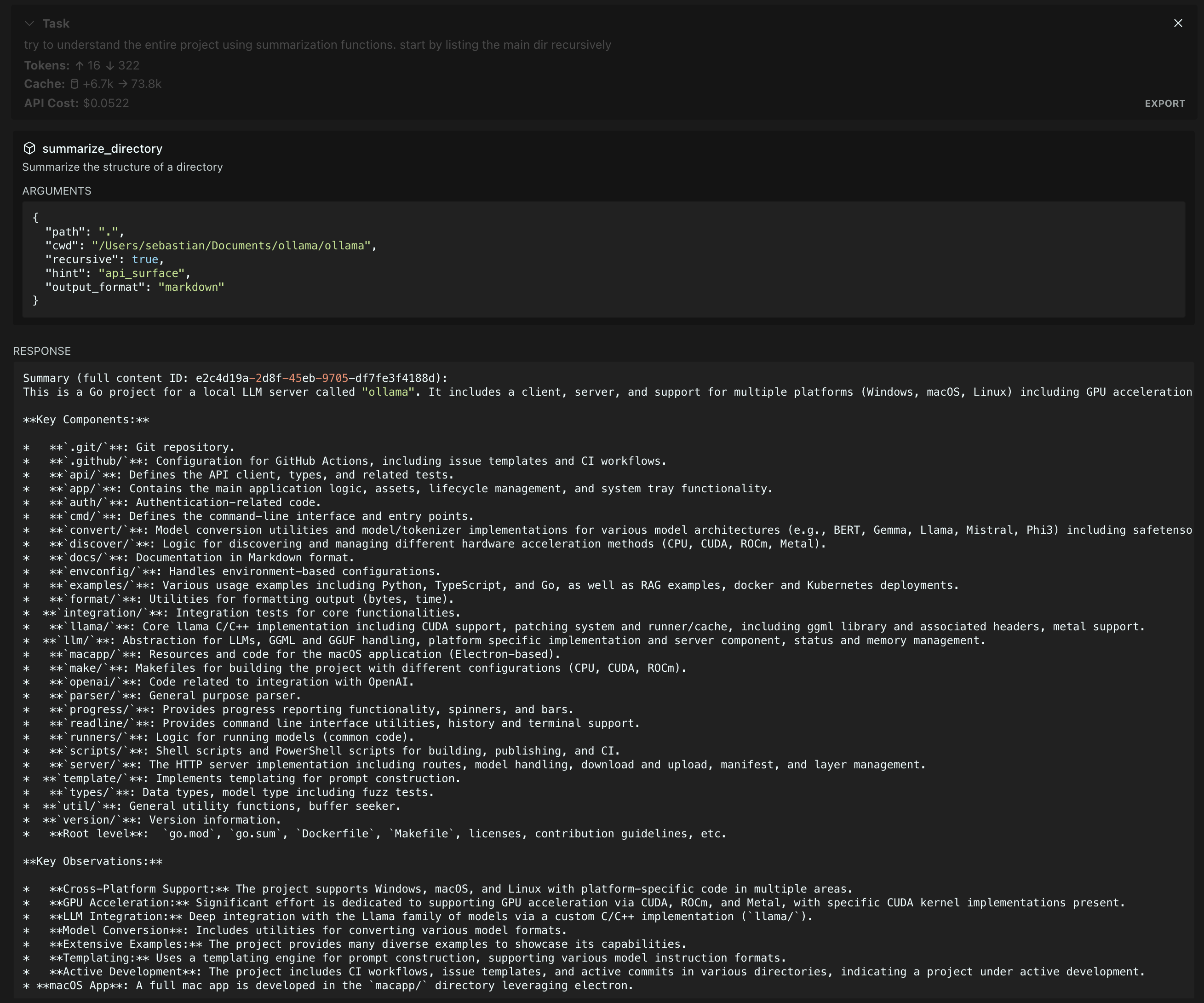
Command Output Summarization
Execute commands and get concise summaries of their output
File Content Analysis
Summarize single or multiple files while maintaining technical accuracy
Directory Structure Understanding
Get clear overviews of complex directory structures
Flexible Model Support Use models from different providers
AI Agent Context Optimization Prevent context window overflow and improve AI agent performance through intelligent summarization
The server supports multiple AI providers through environment variables:
PROVIDER: AI provider to use. Supported values:
- ANTHROPIC - Claude models from Anthropic
- OPENAI - GPT models from OpenAI
- OPENAI-COMPATIBLE - OpenAI-compatible APIs (e.g. Azure)
- GOOGLE - Gemini models from GoogleAPI_KEY: API key for the selected providerMODEL_ID: Specific model to use (defaults to provider's standard model)PROVIDER_BASE_URL: Custom API endpoint for OpenAI-compatible providersMAX_TOKENS: Maximum tokens for model responses (default: 1024)SUMMARIZATION_CHAR_THRESHOLD: Character count threshold for when to summarize (default: 512)SUMMARIZATION_CACHE_MAX_AGE: Cache duration in milliseconds (default: 3600000 - 1 hour)MCP_WORKING_DIR - fallback directory for trying to find files with relative paths from# Anthropic Configuration
PROVIDER=ANTHROPIC
API_KEY=your-anthropic-key
MODEL_ID=claude-3-5-sonnet-20241022
# OpenAI Configuration
PROVIDER=OPENAI
API_KEY=your-openai-key
MODEL_ID=gpt-4-turbo-preview
# Azure OpenAI Configuration
PROVIDER=OPENAI-COMPATIBLE
API_KEY=your-azure-key
PROVIDER_BASE_URL=https://your-resource.openai.azure.com
MODEL_ID=your-deployment-name
# Google Configuration
PROVIDER=GOOGLE
API_KEY=your-google-key
MODEL_ID=gemini-2.0-flash-exp
Add the server to your MCP configuration file:
{
		"mcpServers": {
				"MUST_USE_summarization": {
						"command": "node",
						"args": ["path/to/summarization-functions/build/index.js"],
						"env": {
								"PROVIDER": "ANTHROPIC",
								"API_KEY": "your-api-key",
								"MODEL_ID": "claude-3-5-sonnet-20241022",
                "MCP_WORKING_DIR": "default_working_directory"
						}
				}
		}
}
The server provides the following summarization tools:
summarize_commandExecute and summarize command output.
{
  // Required
  command: string,    // Command to execute
  cwd: string,       // Working directory for command execution

  // Optional
  hint?: string,      // Focus area: "security_analysis" | "api_surface" | "error_handling" | "dependencies" | "type_definitions"
  output_format?: string  // Format: "text" | "json" | "markdown" | "outline" (default: "text")
}
summarize_filesSummarize file contents.
{
  // Required
  paths: string[],    // Array of file paths to summarize (relative to cwd)
  cwd: string,       // Working directory for resolving file paths

  // Optional
  hint?: string,      // Focus area: "security_analysis" | "api_surface" | "error_handling" | "dependencies" | "type_definitions"
  output_format?: string  // Format: "text" | "json" | "markdown" | "outline" (default: "text")
}
summarize_directoryGet directory structure overview.
{
  // Required
  path: string,       // Directory path to summarize (relative to cwd)
  cwd: string,       // Working directory for resolving directory path

  // Optional
  recursive?: boolean,  // Whether to include subdirectories. Safe for deep directories
  hint?: string,       // Focus area: "security_analysis" | "api_surface" | "error_handling" | "dependencies" | "type_definitions"
  output_format?: string   // Format: "text" | "json" | "markdown" | "outline" (default: "text")
}
summarize_textSummarize arbitrary text content.
{
  // Required
  content: string,    // Text content to summarize
  type: string,       // Type of content (e.g., "log output", "API response")

  // Optional
  hint?: string,      // Focus area: "security_analysis" | "api_surface" | "error_handling" | "dependencies" | "type_definitions"
  output_format?: string  // Format: "text" | "json" | "markdown" | "outline" (default: "text")
}
get_full_contentRetrieve the full content for a given summary ID.
{
  // Required
  id: string         // ID of the stored content
}
The evals package loads an mcp client that then runs the index.ts file, so there is no need to rebuild between tests. You can load environment variables by prefixing the npx command. Full documentation can be found here.
OPENAI_API_KEY=your-key npx mcp-eval src/evals/evals.ts src/server/mcp-server.ts
MIT
Claim this server with your GitHub account to request manual ownership verification.
Link to the catalog listing for Summarization Functions from your README. This badge does not certify ownership, compatibility or security.
[](https://awesome-mcp.com/servers/summarization)Public repository statistics could not be verified. Check the configured source address; unavailable counts are not zero.
Separate sources, scopes and periods. Never combined or treated as installations, active users or security reviews.
No reviewed package or image identity; download statistics are not listed yet.
Alternative and complementary servers in the same category
A directory listing describing a cancellation-letter and mailing-address service. The configured public GitHub repository returned 404 during source verification.

A hosted MCP service for browsing and searching through Singapore mobile-network proxies.

A directory listing describing a Markdown-to-PDF service. The configured public GitHub repository returned 404 during source verification.