
A Rust CAD application with an MCP server for creating, inspecting and rendering drawings, either headlessly or through a connection to the desktop app.
8K
Media & Design
A Sweet Home 3D plugin that runs a built-in MCP server over HTTP so AI assistants can control the application without a separate server process.
Sweet Home 3D plugin embedding an MCP server is cataloged as an MCP server attributed to grimashevich. A Sweet Home 3D plugin that runs a built-in MCP server over HTTP so AI assistants can control the application without a separate server process. It is categorized under media design. See the capability inspector for recorded interfaces and their independent review status; consult upstream documentation for the current interface.
Installation configuration is not reviewed. No executable setup is offered for this entry; inspect the source repository before proceeding.
Catalog license label: GNU General Public License v2.0. Check the source repository's current license and terms before using, modifying or distributing this software.
Capability definitions are not reviewed. Unreviewed imports are not exposed as trusted interfaces.
No reviewed records to display. This does not establish that upstream lacks this capability.
No reviewed records to display. This does not establish that upstream lacks this capability.
No reviewed records to display. This does not establish that upstream lacks this capability.
Email delivery is not connected. This page does not collect email addresses or create subscriptions.
Browse the registry for current listings instead.
Reviews for Sweet Home 3D plugin embedding an MCP server are not available yet
Review publishing and storage are not connected. This page does not collect or publish ratings or comments, including after sign-in.
No, the MCP server is embedded directly inside the Sweet Home 3D application and starts automatically with it.
Units are centimeters, with X pointing right and Y pointing down like screen coordinates.
Token authentication is off by default; when enabled, every request to /mcp must carry a bearer token.
README.md · 026d602bdb5b · Fetched 2026-11-13 09:57:40 UTC
Original upstream text, without AI rewriting. Scripts, forms and unsafe links are filtered for safety.
Showing the last retrieved documentation snapshot; check the source for current changes.



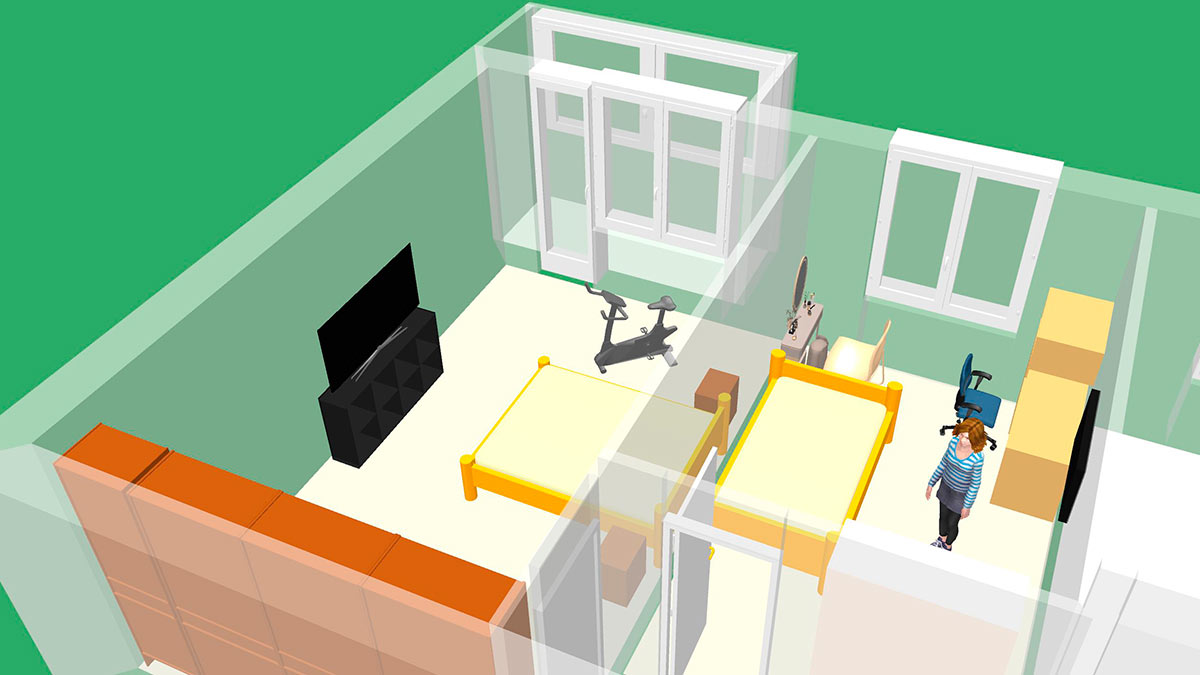
A plugin for Sweet Home 3D that embeds an MCP (Model Context Protocol) server directly inside the application. Lets Claude and other AI assistants control Sweet Home 3D over HTTP — create walls, place furniture, render photos, and more — without any external proxy or separate server process.
Claude Desktop / Claude Code
         │  HTTP (JSON-RPC 2.0)
         ▼
┌─────────────────────────────────────┐
│  Sweet Home 3D  +  MCP Plugin       │
│  Built-in HTTP server on port 9877  │
│  http://127.0.0.1:9877/mcp         │
└─────────────────────────────────────┘
Claude Code connects to this endpoint directly. Claude Desktop needs a small local bridge (mcp-remote) in
between — see Claude Configuration.
| Requirement | Version |
|---|---|
| Sweet Home 3D | 7.x (tested with 7.5) |
| Java (bundled with SH3D or system) | 8 or newer |
| Node.js | current LTS — only for Claude Desktop (runs the mcp-remote bridge) |
The plugin works with Sweet Home 3D's bundled Java 8 runtime. Building the plugin requires JDK 11+; running it does not.
Step 1. Download sh3d-mcp-plugin-1.2.0.sh3p from Releases.
Step 2. Install it.
macOS (easiest): double-click the .sh3p file. Sweet Home 3D opens, installs the
plugin itself and confirms with a dialog. Nothing to copy by hand. If Finder does not
open the file with Sweet Home 3D, right-click it and choose Open With → Sweet Home 3D.
Double-clicking works the same way on Windows and Linux wherever the .sh3p extension
is associated with Sweet Home 3D.
Any platform (manual): copy the file into the plugins folder, creating the folder if it does not exist:
| OS | Plugins folder |
|---|---|
| Windows | %APPDATA%\eTeks\Sweet Home 3D\plugins\ |
| macOS | ~/Library/Application Support/eTeks/Sweet Home 3D/plugins/ |
| Linux | ~/.eteks/sweethome3d/plugins/ |
Step 3. (Re)start Sweet Home 3D. The MCP server starts automatically on port 9877.
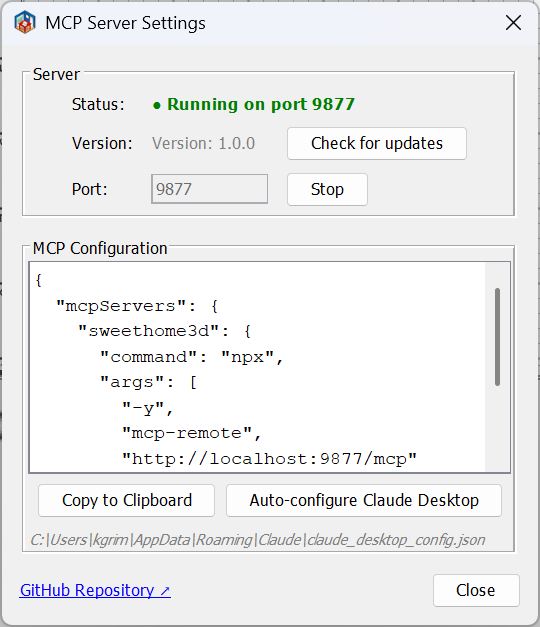
You can verify it is running: Tools → MCP Server... shows the server status.
The Mac App Store build of Sweet Home 3D is sandboxed and ships without the
com.apple.security.network.server entitlement, so it is not allowed to open a
listening socket. Because the plugin listens on port 9877, the MCP server
cannot start under that build.
Fix: use a non-sandboxed build of Sweet Home 3D — the standalone "Java version" / installer from sweethome3d.com instead of the Mac App Store version.
Token authentication is off by default. In this mode clients connect without an
Authorization header, and the plugin creates no token files or changes to existing token files.
Any program running on this machine can control Sweet Home 3D through the MCP endpoint, including writing files with the permissions of Sweet Home 3D.
Enable token authentication if untrusted programs or other users share the machine.
To require authentication, select Require a token in Tools → MCP Server.... The change takes
effect on the next request, including requests in existing sessions, without restarting the server.
The setting is saved as sh3d.mcp.requireToken=true in sh3d-mcp.properties in the plugins folder.
The JVM property -Dsh3d.mcp.requireToken=true|false overrides that file and locks the checkbox.
Clear the checkbox to allow connections without a token again; existing token files are left in place.
When authentication is enabled, every request to /mcp must carry Authorization: Bearer <token>;
a missing or incorrect token returns 401. /health does not require a token.
The plugin generates a random token (32 bytes, base64url) when needed and stores it next to the
plugin, readable only by you (0600 on POSIX, an explicit owner-only ACL on Windows):
| File | Contents |
|---|---|
sh3d-mcp.token | the raw token |
sh3d-mcp.token.headers | Authorization: Bearer <token> (for mcp-remote --header-file) |
Both live in the plugins folder listed above. Tools → MCP Server... shows the token (masked),
lets you copy it, and lets you rotate it when authentication is enabled; clients using the
old token then get 401. If token storage is unavailable, enabling authentication fails, and a
server configured to require a token refuses to start. Token values are never written to logs or
client configuration files.
With authentication enabled, configure Claude Code using headersHelper or --header, and
Claude Desktop using mcp-remote --header-file, as shown below.
Host/Origin checks apply in both modes, to /mcp and /health. The server listens only on
127.0.0.1 and rejects (403) any request whose Host is not 127.0.0.1:<port> or
localhost:<port>, or that carries an Origin other than http://127.0.0.1:<port> /
http://localhost:<port> (DNS-rebinding and cross-site protection). No CORS headers are sent.
Host and Origin comparisons ignore case; repeated or comma-separated values are rejected.
On port 80, the same addresses without :80 are also accepted.
Request bodies are limited to 5 MB (413).
Start Sweet Home 3D first: the MCP server exists only while the application is running.
With the default token-free mode, copy .mcp.json.example to .mcp.json in your project directory,
or register the endpoint with:
claude mcp add --transport http sweethome3d http://127.0.0.1:9877/mcp
When token authentication is enabled, use the following .mcp.json. headersHelper reads the
token file on every connect, so the token is never copied into the config and a rotation is picked
up automatically (macOS path shown; adjust for your OS):
{
  "mcpServers": {
    "sweethome3d": {
      "type": "http",
      "url": "http://127.0.0.1:9877/mcp",
      "headersHelper": "printf '{\"Authorization\":\"Bearer %s\"}' \"$(cat \"$HOME/Library/Application Support/eTeks/Sweet Home 3D/plugins/sh3d-mcp.token\")\""
    }
  }
}
Alternatively, with a static header (you must update it after a rotation):
claude mcp add --transport http sweethome3d http://127.0.0.1:9877/mcp \
  --header "Authorization: Bearer <token>"
Claude Desktop does not load "type": "http" entries from claude_desktop_config.json — such an entry is ignored.
It starts MCP servers as local commands, so the plugin is reached through a pinned
mcp-remote bridge (requires Node.js).
In the default token-free mode, add this to claude_desktop_config.json:
{
  "mcpServers": {
    "sweethome3d": {
      "command": "npx",
      "args": ["-y", "mcp-remote@0.14.3", "http://127.0.0.1:9877/mcp"]
    }
  }
}
When token authentication is enabled, add --header-file and the absolute path to the headers
file as below (macOS path shown). The token is read from that file and never appears in the config
or on the process command line:
{
  "mcpServers": {
    "sweethome3d": {
      "command": "npx",
      "args": [
        "-y", "mcp-remote@0.14.3", "http://127.0.0.1:9877/mcp",
        "--header-file", "/Users/<you>/Library/Application Support/eTeks/Sweet Home 3D/plugins/sh3d-mcp.token.headers"
      ]
    }
  }
}
Then quit Claude Desktop completely and start it again.
The built-in "Auto-configure Claude Desktop" button in Tools → MCP Server... writes this entry for the current token mode, including the headers path only when authentication is enabled (and keeps a
.bakcopy of the previous config). The Copy to Clipboard button uses the same mode. Configure the client again after changing token mode, and restart Claude Desktop after rotating the token.
46 commands across 14 categories.
| Command | Description |
|---|---|
get_state | Full scene state: walls, furniture, rooms, camera, labels, levels |
clear_scene | Remove all objects from the scene |
| Command | Description |
|---|---|
create_wall | Single wall between two points |
create_walls | Rectangular room (4 connected walls) |
modify_wall | Change height, thickness, color, arc, coordinates |
delete_wall | Delete wall by ID |
connect_walls | Connect two walls for correct corner rendering |
| Command | Description |
|---|---|
create_room_polygon | Room from an array of polygon points |
modify_room | Change name, floor/ceiling color, visibility |
delete_room | Delete room by ID |
| Command | Description |
|---|---|
list_categories | All furniture catalog categories with item counts |
list_furniture_catalog | Browse catalog; filter by name, category, or type |
place_furniture | Place a catalog item in the scene |
modify_furniture | Move, rotate, resize, recolor furniture by ID; set door/window swing arcs (sashPreset / sashes) |
delete_furniture | Delete furniture by ID |
duplicate_objects | Duplicate one or more objects by ID |
group_furniture | Group multiple pieces into one object |
ungroup_furniture | Split a group back into individual pieces |
| Command | Description |
|---|---|
place_door_or_window | Place from catalog into a wall (auto-computes position and angle); optional sashPreset / sashes for the plan's swing arc |
| Command | Description |
|---|---|
list_textures_catalog | Browse texture catalog; filter by name or category |
apply_texture | Apply catalog texture to wall side or room surface |
set_environment | Ground/sky colors, lighting, wall transparency, drawing mode |
| Command | Description |
|---|---|
generate_shape | Create custom 3D geometry: primitives (box, sphere, cylinder, cone, wedge, arch, stairs, torus, hemisphere, pipe), extrude, mesh, and CSG boolean operations (union, subtract, intersect) |
| Command | Description |
|---|---|
add_label | Text annotation on the 2D floor plan |
modify_label | Change a label's text, position, angle, colors, font style or 3D placement by ID |
delete_label | Delete label by ID |
add_dimension_line | Measurement line with auto-offset |
modify_dimension_line | Move a dimension line's endpoints or offset by ID |
delete_dimension_line | Delete dimension line by ID |
| Command | Description |
|---|---|
set_camera | Switch to top/observer mode; set position, lookAt point, or target object |
store_camera | Save the current viewpoint as a named bookmark |
get_cameras | List all saved camera viewpoints |
| Command | Description |
|---|---|
add_level | Add a new level (floor/storey) |
list_levels | List all levels with stable string id, zero-based index, and current selection |
set_selected_level | Switch the active level |
delete_level | Delete a level and all its objects |
| Command | Description |
|---|---|
render_photo | Ray-traced 3D render (Sunflow); standard or overhead bird's-eye view; inline JPEG or saved PNG |
export_plan_image | 2D floor plan as PNG |
export_svg | 2D floor plan as SVG |
export_to_obj | 3D scene as Wavefront OBJ (ZIP: OBJ + MTL + textures) |
| Command | Description |
|---|---|
save_home | Save the scene to a .sh3d file |
load_home | Load a .sh3d file containing Home.xml, replacing the current scene |
| Command | Description |
|---|---|
checkpoint | Save an in-memory snapshot with a stable, never-reused numeric ID (optional description) |
restore_checkpoint | Restore from a snapshot (supports force mode) |
list_checkpoints | List all snapshots with the current undo cursor position |
| Command | Description |
|---|---|
batch_commands | Execute multiple commands in one request |
Files saved by plugin 1.1.0 or earlier, and by Sweet Home 3D versions before 5.3,
must be opened and saved again in Sweet Home 3D before load_home can read them.
See the 1.2.0 upgrade notes.
Prerequisites: JDK 11+ for building and tests, Maven 3.9+ (or use the included mvnw wrapper).
# 1. Clone
git clone https://github.com/grimashevich/sweethome3d-mcp-server.git
cd sweethome3d-mcp-server

# 2. Obtain SweetHome3D.jar (copies from your SH3D installation or downloads it)
./scripts/setup-dev.sh        # macOS / Linux / Git Bash on Windows
# scripts\setup-dev.bat       # Windows Command Prompt

# 3. Build
./mvnw clean package

# 4. Run tests
./mvnw test

# The plugin artifact is at:
# target/sh3d-mcp-plugin-1.2.0.sh3p
Why the setup script?
SweetHome3D.jaris a 46 MB binary excluded from git. The script first checks your local Sweet Home 3D installation (fastest, works offline), then falls back to downloading from SourceForge. The three Java3D JARs (j3dcore,j3dutils,vecmath) are included inlib/directly.
The plugin is a single self-contained component with no external runtime dependencies:
plugin — Entry point (SH3DMcpPlugin), settings dialoghttp — Streamable HTTP MCP server (JSON-RPC 2.0, port 9877), RequestGuard filtercommand — registry and interfaces; 46 handlers in command.handler, generators in command.shape, shared helpers in command.utilbridge — Thread-safe Sweet Home 3D API wrapper (HomeAccessor via EDT, CheckpointManager, ObjectResolver)protocol — Hand-written JSON parser (zero external dependencies)config — Plugin settings, AuthTokenStore, Claude Desktop auto-configuratorSee ARCHITECTURE.md for the full design, ADR decisions, and sequence diagrams.
Create src/main/java/com/sh3d/mcp/command/handler/MyCommandHandler.java:
package com.sh3d.mcp.command.handler;

import com.sh3d.mcp.bridge.HomeAccessor;
import com.sh3d.mcp.command.CommandDescriptor;
import com.sh3d.mcp.command.CommandHandler;
import com.sh3d.mcp.command.util.SchemaBuilder;
import com.sh3d.mcp.protocol.Request;
import com.sh3d.mcp.protocol.Response;

import java.util.LinkedHashMap;
import java.util.Map;

public class MyCommandHandler implements CommandHandler, CommandDescriptor {
    @Override
    public Response execute(Request request, HomeAccessor accessor) {
        String name = request.getString("name");
        if (name == null || name.trim().isEmpty()) {
            return Response.error("Missing or empty parameter: name");
        }

        Map<String, Object> data = accessor.runOnEDT(() -> {
            Map<String, Object> result = new LinkedHashMap<>();
            result.put("name", name);
            result.put("wallCount", accessor.getHome().getWalls().size());
            return result;
        });
        return Response.ok(data);
    }

    @Override
    public String getDescription() {
        return "Returns a name and the current wall count.";
    }

    @Override
    public Map<String, Object> getSchema() {
        return SchemaBuilder.create()
                .requiredString("name", "Name to include in the result (non-empty)")
                .build();
    }
}
Then import the handler and register it in SH3DMcpPlugin.createCommandRegistry():
registry.register("my_command", new MyCommandHandler());
See CONTRIBUTING.md for the full development guide.
Code contributions:
Thank you for detailed bug reports:
GNU General Public License v2.0 — see LICENSE for details.
This plugin uses the Sweet Home 3D Plugin API (GPL v2) and Java3D (BSD / JOGL license).
Claim this server with your GitHub account to request manual ownership verification.
Link to the catalog listing for Sweet Home 3D plugin embedding an MCP server from your README. This badge does not certify ownership, compatibility or security.
[](https://awesome-mcp.com/servers/sweethome3d-mcp-server)Public repository statistics could not be verified. Check the configured source address; unavailable counts are not zero.
Separate sources, scopes and periods. Never combined or treated as installations, active users or security reviews.
No reviewed package or image identity; download statistics are not listed yet.
Alternative and complementary servers in the same category
A Rust CAD application with an MCP server for creating, inspecting and rendering drawings, either headlessly or through a connection to the desktop app.

Liquid Composer is a browser-based Liquid Glass icon design tool that offers a local MCP server for agent-driven icon workflows.

agent-media makes short drama series and other short vertical videos from Claude, ChatGPT or Codex through one MCP connection, with OAuth sign-in and no API keys.