
A stateless streamable HTTP MCP server for interacting with the official source of government spending data.
Repository stats unavailable
Finance & Analytics
An MCP server that exposes Tally Prime ERP functionalities to MCP-capable LLMs such as Claude and ChatGPT.
Tally Prime MCP Server is cataloged as an MCP server attributed to dhananjay1405. An MCP server that exposes Tally Prime ERP functionalities to MCP-capable LLMs such as Claude and ChatGPT. It is categorized under finance crypto. See the capability inspector for recorded interfaces and their independent review status; consult upstream documentation for the current interface.
Installation configuration is not reviewed. No executable setup is offered for this entry; inspect the source repository before proceeding.
Catalog license label: Not specified. Check the source repository's current license and terms before using, modifying or distributing this software.
Capability definitions are not reviewed. Unreviewed imports are not exposed as trusted interfaces.
No reviewed records to display. This does not establish that upstream lacks this capability.
No reviewed records to display. This does not establish that upstream lacks this capability.
No reviewed records to display. This does not establish that upstream lacks this capability.
Email delivery is not connected. This page does not collect email addresses or create subscriptions.
Browse the registry for current listings instead.
Reviews for Tally Prime MCP Server are not available yet
Review publishing and storage are not connected. This page does not collect or publish ratings or comments, including after sign-in.
Yes. It can create or update ledgers and create journal vouchers; the README warns that the ledger tool can modify existing records and advises backing up the company first.
Tally Prime Silver or Gold is listed as a prerequisite, and the README advises avoiding the Educational version because of date-range limitations.
README.md · ed885e45ba96 · Fetched 2026-11-13 08:09:44 UTC
Original upstream text, without AI rewriting. Scripts, forms and unsafe links are filtered for safety.
Showing the last retrieved documentation snapshot; check the source for current changes.
Tally Prime MCP (Model Context Protocol) Server implementation to feed Tally Prime ERP data to popular LLM like Claude, ChatGPT supporting MCP client. This MCP Server helps expose functionalities of Tally to LLM directly.
Ensure below things are pre-installed and setup:
TallyPrime acts as = Server
Port = 9000
Note: Kindly avoid using Educational version of Tally Prime, which has limitations of date range. It will result in invalid / partial data being fed to LLM, leading to highly degraded & incorrect responses.
Avoid cloning repository directly. Utility is available for download (with required dependencies) on below link
https://excelkida.com/resource/tally-mcp-server-v7.12.zip
One-click installer extension for Claude Desktop
https://excelkida.com/resource/tally-mcp-server-v7.12.mcpb
Last updated: version 7.12 [25-Oct-2026]
Refer docs/CHANGELOG.md for details
Project developed & maintained by:
Dhananjay Gokhale
(Chartered Accountant)
Email: info@excelkida.com
Whatsapp: (+91) 90284-63366
Implementation was tested on below AI platform
| Platform | Local | Remote |
|---|---|---|
| Claude AI | :heavy_check_mark: | :heavy_check_mark: |
| ChatGPT | :heavy_check_mark: | :heavy_check_mark: |
| Grok | :heavy_check_mark: | |
| Mistral | :heavy_check_mark: | |
| LM Studio | :heavy_check_mark: |
This mode of setup is to be used when MCP Client (like Claude Desktop, Perplexity etc.) and Tally Prime both exists in local PC. MCP Client software itself runs the MCP Server internally in such scenario.
Simply download & extract zip file somewhere on the disk. Assuming that we downloaded & extracted zip file on below path (folder)
D:\Software\Tally MCP Server
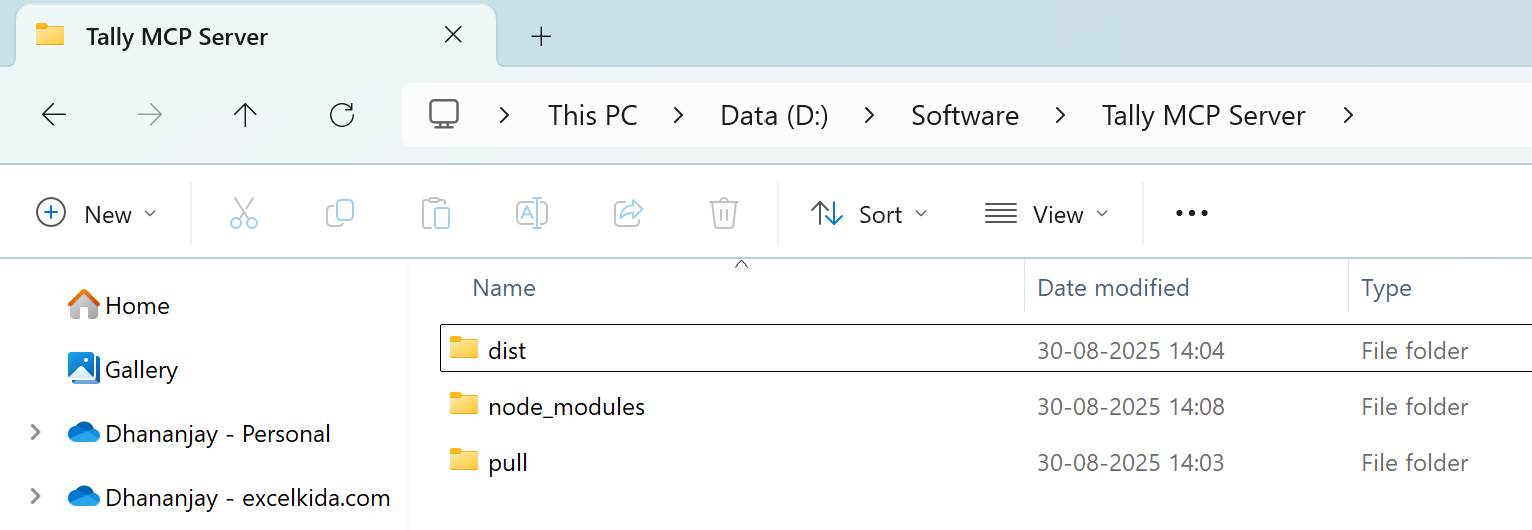
A sample setup for few popular tools is demonstrated.
Video tutorial: Claude Desktop (extension)
Desktop version of Claude AI supports loading of local MCP server. Ensure you have Pro / Team / Max / Enterprise subscription of Claude, which supports higher limit compared to Free. MCP makes multiple calls to Tally for validation and inference, which might exhaust free limits quickly. Download Claude Desktop from following link claude.ai/download
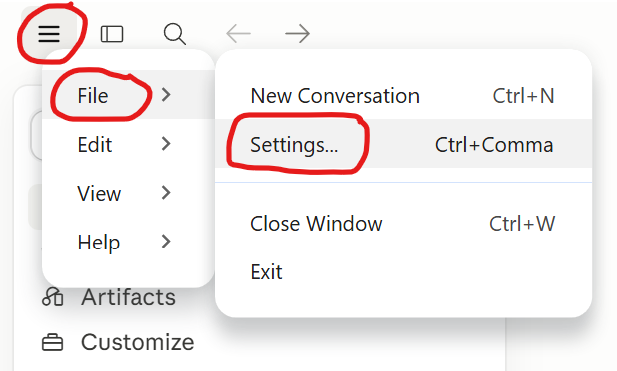
Go to menu > File > Settings
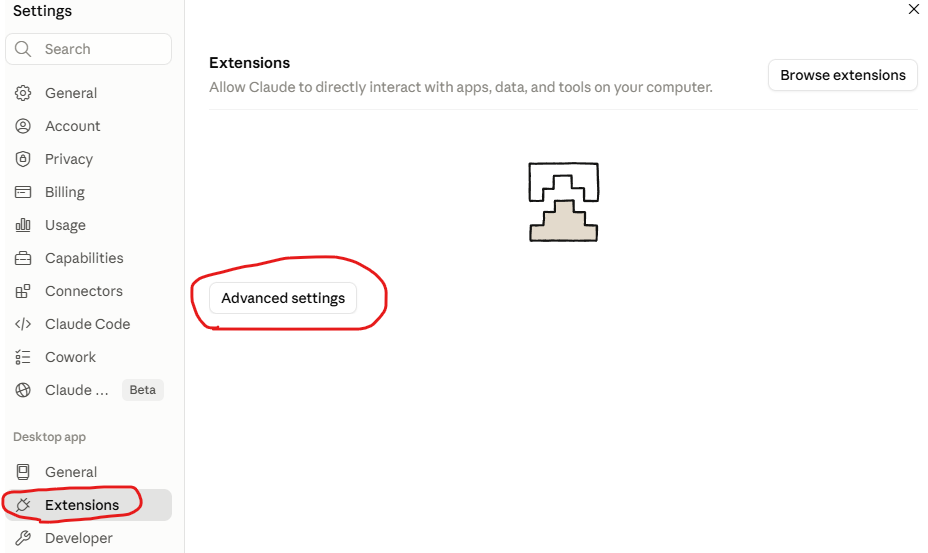
Extensions > Advance Settings
Click on install extension button
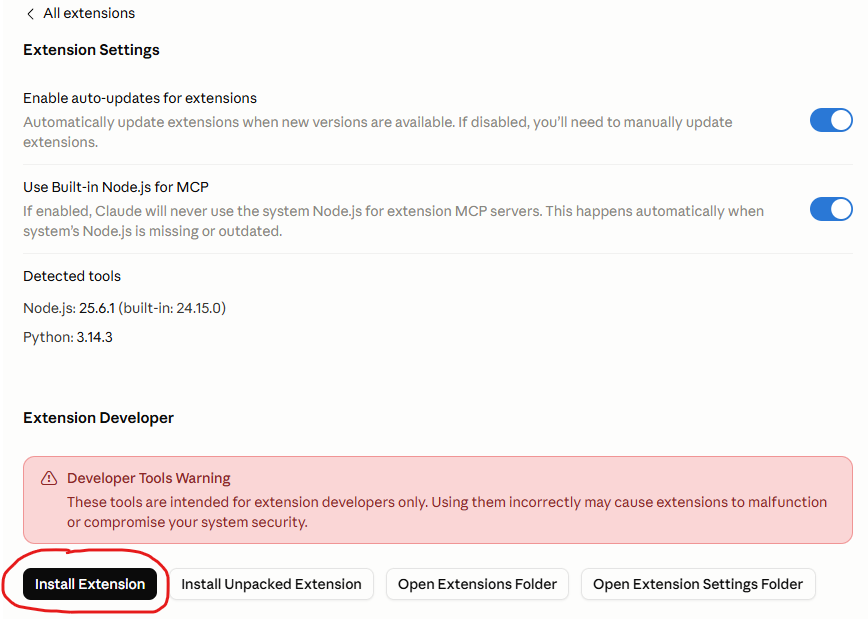
Browse the extension file (with file extension mcpb) download at the start
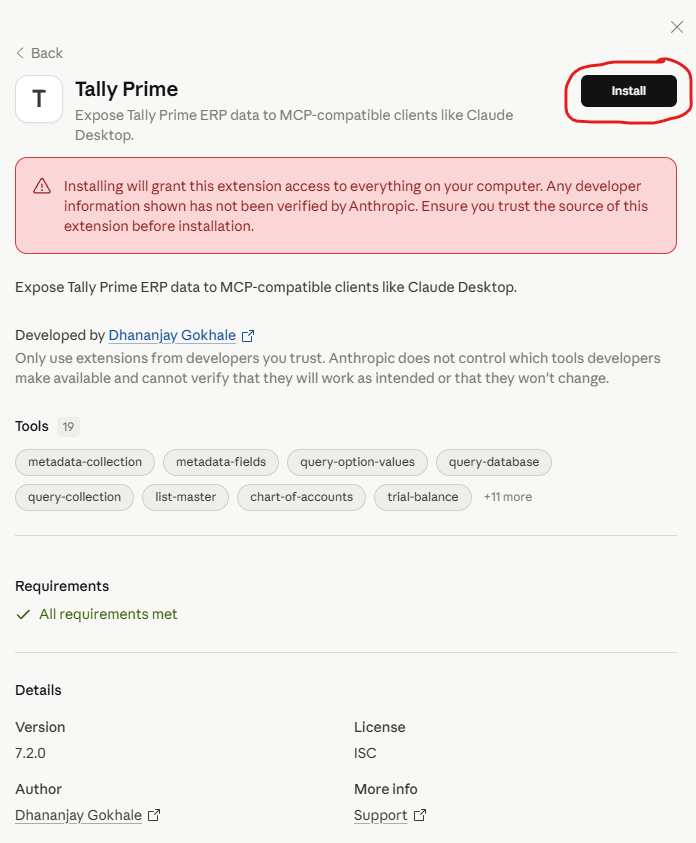
A dialog window will appear asking Do you want to install Tally Prime? click Install button, which would install the Tally MCP Server
Go to menu > File > Settings > Developer
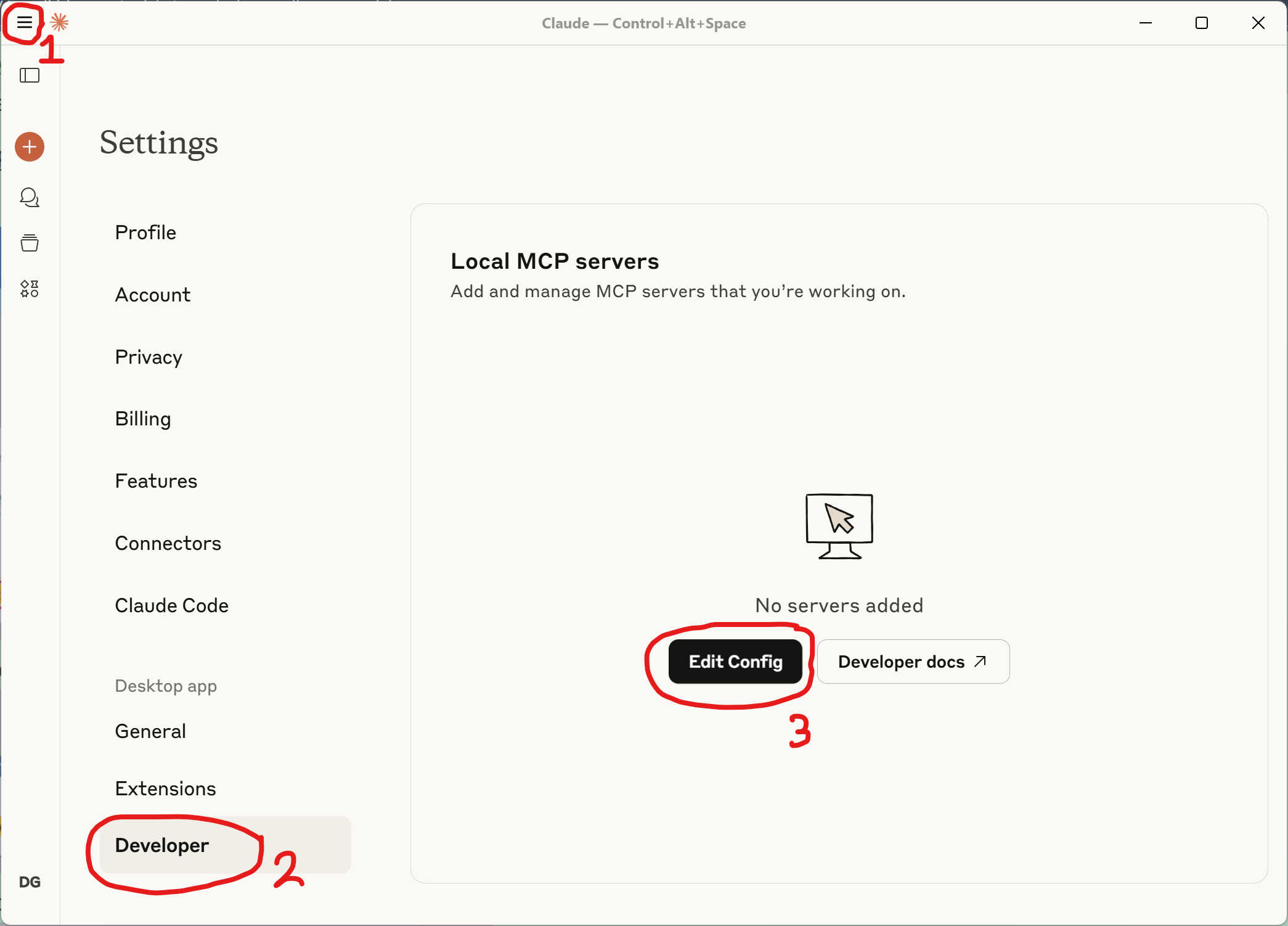
This will open My Computer window. Right click and edit claude_desktop_config.json file (via Notepad) with as below JSON
{
  "mcpServers": {
	  "Tally Prime": {
		  "command": "node",
		  "args": ["D:\\Software\\Tally MCP Server\\dist\\index.mjs"]
	  }
  }
}
Note: single slash in folder path needs to be substituted with double slash
Save the file. Close Claude Desktop (menu > File > Exit) and again re-launch it.
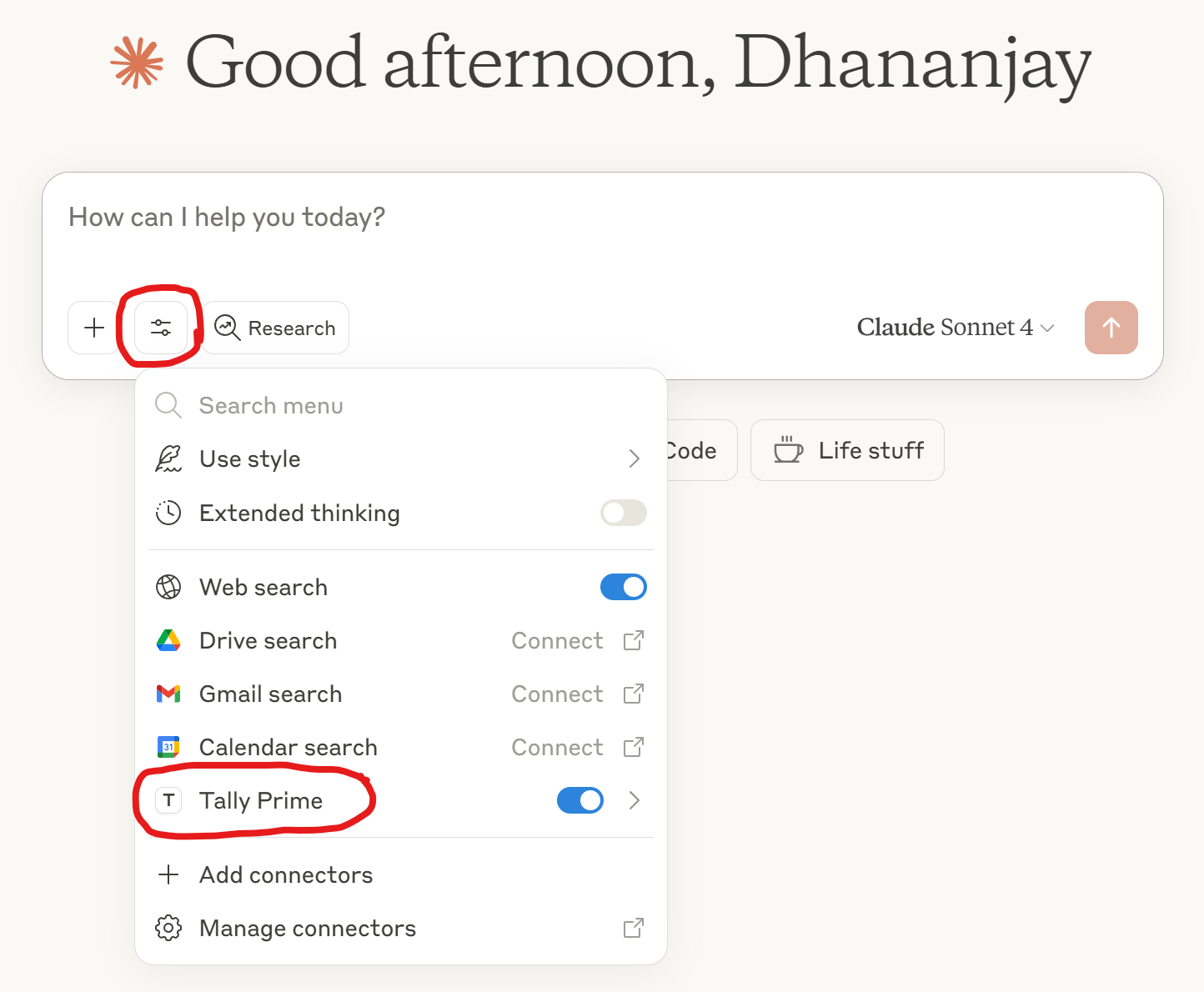
Verify by clicking on Tools button and check if Tally Prime appears in the list (screenshot below)
Video tutorial: ChatGPT Desktop
Download & install ChatGPT Desktop from Microsoft Store. Login to it.
Go to Edit > Settings
Navigate to Integration > Plugins. Click Add button and choose Add MCP Server
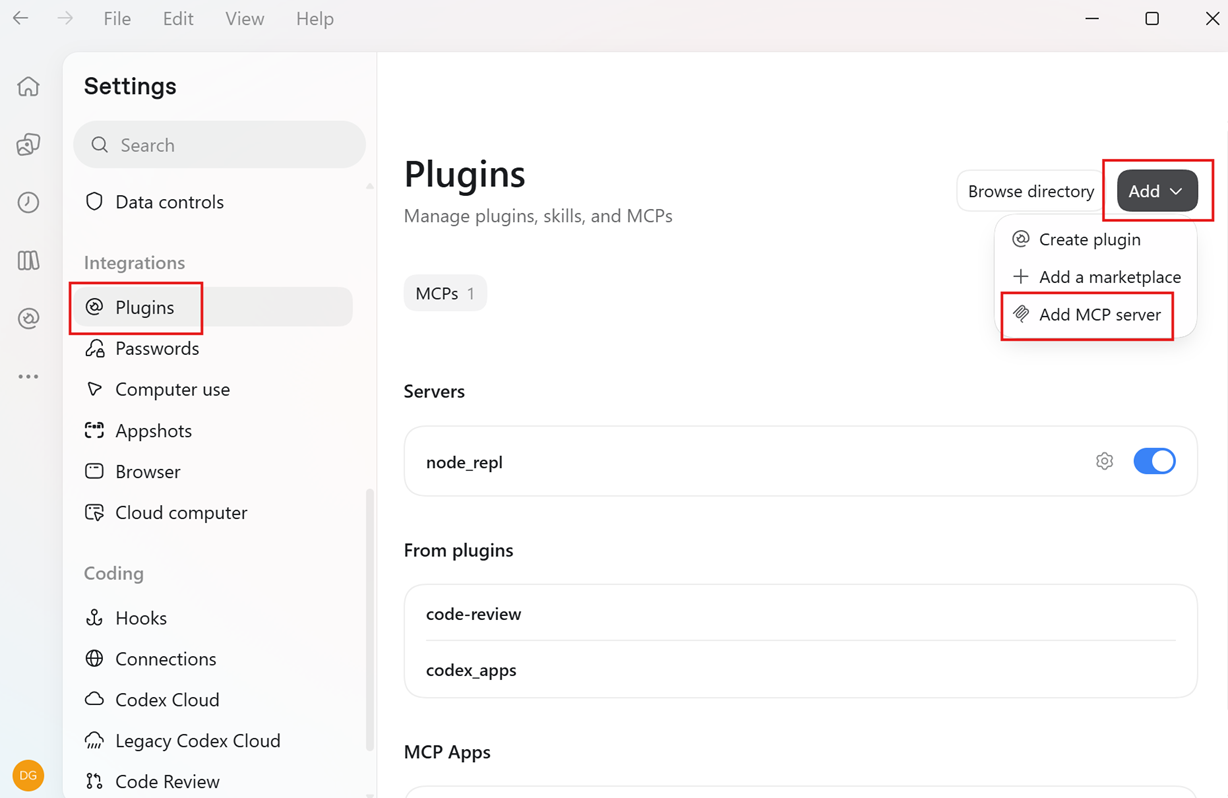
In the MCP settings page enter / apply below options or values
Name = Tally Prime (or any other value)
Command to launch = node
Arguments = D:\Software\Tally MCP Server\dist\index.mjs (or other path)
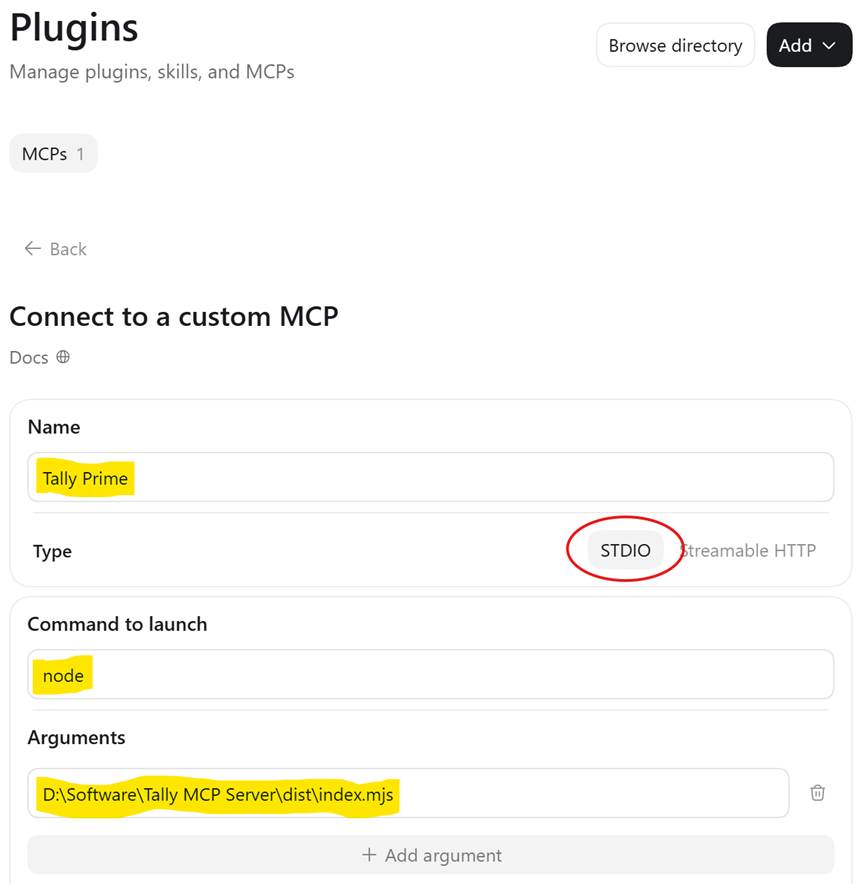
Click Save button
Close & Re-Open ChatGPT Desktop app
This mode of setup is to be used, when using browser-based MCP client like ChatGPT, Claude AI, Copilot, OR mobile-based app for these LLM which cannot access Tally Prime running inside local PC. In this scenario, MCP Server needs to run as web-server, internally connected to Tally securely. Setup is quite complicated, and is covered in detail in docs folder of this project.
This server currently exposes 20 MCP tools.
Returns metadata for supported collections.
Input No input.
Output JSON array with objects containing:
collectiondescriptionReturns predefined option values used by input fields.
Input
| Argument | Description |
|---|---|
| optionName | Supported: country-state |
Output JSON array of option values for the selected option name.
Returns field metadata for a selected collection.
Input
| Argument | Description |
|---|---|
| collection | Collection name. Use metadata-collection to discover valid values |
Output
JSON array of field metadata containing field name, description (if any), and normalized datatype (string, number, date, boolean).
Runs SQL query on in-memory pglite tables previously created by reporting tools.
Input
| Argument | Description |
|---|---|
| sql | SELECT query only |
| outputFormat | One of JSON Array of Objects, JSON with Schema and Rows, CSV, Markdown Table. Default is JSON Array of Objects which is preferred format |
Output Query result in tab-separated text format.
Queries a Tally collection for selected fields and caches output in an in-memory table.
Input
| Argument | Description |
|---|---|
| collection | Collection name |
| fields | Array of field names to fetch |
| targetCompany (optional) | Company name (defaults to active company) |
| fromDate (optional) | Date in YYYY-MM-DD |
| toDate (optional) | Date in YYYY-MM-DD |
Output
JSON: { "tableID": "..." }
Fetches list of masters for validation and auto-completion.
Input
| Argument | Description |
|---|---|
| targetCompany (optional) | Company name (defaults to active company) |
| collection | One of: group, ledger, vouchertype, unit, godown, stockgroup, stockitem, costcategory, costcentre, attendancetype, company, currency, gstin, gstclassification |
| containsFilter (optional) | filter to apply CONTAINS operation to restrict values |
Output
JSON: { "list": [ ... ] }
Extracts Chart of Accounts (or Group hierarchy) useful for preparing Balance Sheet, Profit and Loss, Trial Balance
Input
| Argument | Description |
|---|---|
| targetCompany (optional) | Company name (defaults to active company) |
Output
JSON: { "tableID": "..." } with columns:
ledger_namegroup_nameprimary_groupbs_pl (boolean) [true = Profit & Loss / false = Balance Sheet]dr_cr (boolean) [true = Debit / false = Credit]affects_gross_profit (boolean) [true = Affects Gross Profit / false = Does not affect Gross Profit]sort_position (number)Fetches trial balance for period.
Input
| Argument | Description |
|---|---|
| targetCompany (optional) | Company name (defaults to active company) |
| fromDate | Date in YYYY-MM-DD |
| toDate | Date in YYYY-MM-DD |
| group_name (optional) | Filter by group name |
Output
JSON: { "tableID": "..." } with columns:
ledger_namegroup_nameopening_balance (number) [negative = Debit / positive = Credit]net_debitnet_creditclosing_balance (number) [negative = Debit / positive = Credit]Fetches profit and loss data for period.
Input
| Argument | Description |
|---|---|
| targetCompany (optional) | Company name (defaults to active company) |
| fromDate | Date in YYYY-MM-DD |
| toDate | Date in YYYY-MM-DD |
Output
JSON: { "tableID": "..." } with columns:
ledger_namegroup_nameclosing_balance (number) [negative = Debit / positive = Credit]Fetches balance sheet data for period.
Input
| Argument | Description |
|---|---|
| targetCompany (optional) | Company name (defaults to active company) |
| fromDate | Date in YYYY-MM-DD |
| toDate | Date in YYYY-MM-DD |
Output
JSON: { "tableID": "..." } with columns:
ledger_namegroup_nameclosing_balance (number) [negative = Debit / positive = Credit]Fetches stock item summary for period.
Input
| Argument | Description |
|---|---|
| targetCompany (optional) | Company name (defaults to active company) |
| fromDate | Date in YYYY-MM-DD |
| toDate | Date in YYYY-MM-DD |
| stockGroup (optional) | Filter by stock group name |
Output
JSON: { "tableID": "..." } with columns:
stock_item_namestock_group_nameopening_quantity (number)opening_value (number) [negative = Debit / positive = Credit]inward_quantity (number)inward_value (number)outward_quantity (number)outward_value (number)closing_quantity (number)closing_value (number) [negative = Debit / positive = Credit]Returns ledger closing balance as on date.
Input
| Argument | Description |
|---|---|
| targetCompany (optional) | Company name (defaults to active company) |
| ledgerName | Exact ledger name |
| toDate | Date in YYYY-MM-DD |
Output
JSON: { "amount": number } where negative = Debit and positive = Credit.
Returns stock item closing quantity as on date.
Input
| Argument | Description |
|---|---|
| targetCompany (optional) | Company name (defaults to active company) |
| itemName | Exact stock item name |
| toDate | Date in YYYY-MM-DD |
Output
JSON: { "quantity": number, "unit_of_measurement": string } when found.
Fetches receivable/payable bill-wise outstanding as on date.
Input
| Argument | Description |
|---|---|
| targetCompany (optional) | Company name (defaults to active company) |
| nature | receivable or payable |
| toDate | Date in YYYY-MM-DD |
Output
JSON: { "tableID": "..." } with columns:
bill_datereference_numberoutstanding_amountparty_nameoverdue_daysFetches ledger account statement for period.
Input
| Argument | Description |
|---|---|
| targetCompany (optional) | Company name (defaults to active company) |
| ledgerName | Ledger name |
| fromDate | Date in YYYY-MM-DD |
| toDate | Date in YYYY-MM-DD |
Output
JSON: { "tableID": "..." } with columns:
guiddatevoucher_typevoucher_numberalternate_ledgerparty_nameamount (number) [negative = Debit / positive = Credit]narrationFetches stock item account statement for period.
Input
| Argument | Description |
|---|---|
| targetCompany (optional) | Company name (defaults to active company) |
| itemName | Stock item name |
| fromDate | Date in YYYY-MM-DD |
| toDate | Date in YYYY-MM-DD |
Output
JSON: { "tableID": "..." } with columns:
datevoucher_typevoucher_numberparty_ledgerquantityamount (number) [negative = Debit / positive = Credit]narrationtracking_numbervoucher_categoryCreates or updates one or more ledger.
Note: This tool has ability to modify existing ledger. Always backup your Company before instructing this tool.
Input
| Argument | Description |
|---|---|
| targetCompany (optional) | Company name (defaults to active company) |
| masters | Array of ledger master objects to create/update |
Master ledger object accepts following
| Property | Description |
|---|---|
| name | Ledger name or New Ledger name (during update) |
| _name | Existing ledger name |
| parent | Group under which ledger would exists |
| openingBalance | (optional) Opening Balance of the Ledger |
| isBillWise | (optional) flag to set Bill-by-Bill referencing |
| billCreditPeriod | (optional) Credit Period for bill in days |
| mailingDetails | (optional) Business Name for mailing purpose, country, state, pincode, address |
| gstRegistrationDetails | (optional) GST registration details like GST Number, Registration Type, Place of Supply (state) |
Output JSON result returned by import operation (success/failure details).
Delete one (or more) masters from Tally
Input
| Argument | Description |
|---|---|
| targetCompany (optional) | Company name (defaults to active company) |
| collection | Type of master or collection to delete. One of: group, ledger, vouchertype, unit, godown, stockgroup, stockitem, costcategory, costcentre, attendancetype, company, currency, gstin, gstclassification |
| name | array of name(s) of master to be deleted |
Output JSON result returned by delete operation (count of deleted, skipped, etc).
Creates one (or more) Journal vouchers in Tally.
Input
| Argument | Description |
|---|---|
| targetCompany (optional) | Company name (defaults to active company) |
| vouchers | Array of journal voucher objects to create |
Voucher object accepts following
| Property | Description |
|---|---|
| isoptional | (optional) Set to true to create Optional voucher |
| date | Voucher date in YYYY-MM-DD |
| voucherType | (optional) Voucher type (defaults to Journal and must belong to Journal parent) |
| voucherNumber | (optional) Voucher number |
| narration | (optional) Narration text |
| accountingEntry | Array of accounting lines (minimum 2 lines and sum of amount must be zero) |
Accounting entry object accepts following
| Property | Description |
|---|---|
| ledgerName | Ledger name |
| amount | Amount for the line (positive = Credit / negative = Debit) |
Output JSON result returned by import operation (success/failure details).
Sets active company context in Tally Prime.
Input
| Argument | Description |
|---|---|
| companyName | Company name to activate |
Output
JSON string: "OK" on success.
Sets active reporting period context in Tally Prime.
Input
| Argument | Description |
|---|---|
| fromDate | Start date in YYYY-MM-DD |
| toDate | End date in YYYY-MM-DD |
Output
JSON string: "OK" on success.
End-users are free to hard-code few settings which needs to be applied
| Variable | Description |
|---|---|
| TALLY_PORT | Port Number of XML Server of Tally (optional, default is 9000) |
| TALLY_HOST | Host name or IP where XML Server is running (optional, default is localhost) |
| BLOCK_WRITE | Controls if MCP completely block access of write functionality. Setting this flag to value 1 will completely hide write functionality tools from the tool list. [ 0 = Allow , 1 = Block ] (optional, default is 0 i.e. allowed). Not applicable for Claude Desktop (as it offers graphical switch to disable write functionality) |
| PORT | Tally MCP Server port number. Applicable only if Tally Prime MCP Server is deployed as Remote MCP server (optional, default is 3000). Not applicable for Claude Desktop |
| MCP_DOMAIN | Domain name of Tally MCP Server website (optional, default is https://localhost:9000). Not applicable for Claude Desktop |
| PASSWORD | Password for the OAuth Login front-end page to authenticate genuine user (kindly set this to some complex password default is password). Not applicable for Claude Desktop |
Claim this server with your GitHub account to request manual ownership verification.
Link to the catalog listing for Tally Prime MCP Server from your README. This badge does not certify ownership, compatibility or security.
[](https://awesome-mcp.com/servers/tally-mcp-server)Public repository statistics could not be verified. Check the configured source address; unavailable counts are not zero.
Separate sources, scopes and periods. Never combined or treated as installations, active users or security reviews.
No reviewed package or image identity; download statistics are not listed yet.
Alternative and complementary servers in the same category
A stateless streamable HTTP MCP server for interacting with the official source of government spending data.

A hosted, remote MCP server for Fortnox that lets AI assistants answer questions from a company's bookkeeping and propose changes for approval before writing them.

OptimistFi is a read-only remote MCP server that provides perpetual futures market data, perps prop firm rules and pricing, and US equity investment research.