
A directory listing describing a cancellation-letter and mailing-address service. The configured public GitHub repository returned 404 during source verification.
Repository stats unavailable
Developer Tools
An MCP server from Tecton that exposes tools for querying Tecton code examples, documentation, SDK reference, and metrics to MCP clients like Cursor and Claude Code.
Tecton MCP server for AI-assisted feature engineering is cataloged as an MCP server attributed to tecton-ai. An MCP server from Tecton that exposes tools for querying Tecton code examples, documentation, SDK reference, and metrics to MCP clients like Cursor and Claude Code. It is categorized under developer tools. See the capability inspector for recorded interfaces and their independent review status; consult upstream documentation for the current interface.
Installation configuration is not reviewed. No executable setup is offered for this entry; inspect the source repository before proceeding.
Catalog license label: MIT License. Check the source repository's current license and terms before using, modifying or distributing this software.
Capability definitions are not reviewed. Unreviewed imports are not exposed as trusted interfaces.
No reviewed records to display. This does not establish that upstream lacks this capability.
No reviewed records to display. This does not establish that upstream lacks this capability.
No reviewed records to display. This does not establish that upstream lacks this capability.
Email delivery is not connected. This page does not collect email addresses or create subscriptions.
Browse the registry for current listings instead.
Reviews for Tecton MCP server for AI-assisted feature engineering are not available yet
Review publishing and storage are not connected. This page does not collect or publish ratings or comments, including after sign-in.
The server is documented for use with MCP clients including Cursor and Claude Code, and setup is also described for Augment.
It queries the Tecton Metrics API and returns point-in-time system metrics in human-readable or raw OpenMetrics format.
README.md · 2c17df0da0ba · Fetched 2026-11-13 10:42:26 UTC
Original upstream text, without AI rewriting. Scripts, forms and unsafe links are filtered for safety.
Showing the last retrieved documentation snapshot; check the source for current changes.
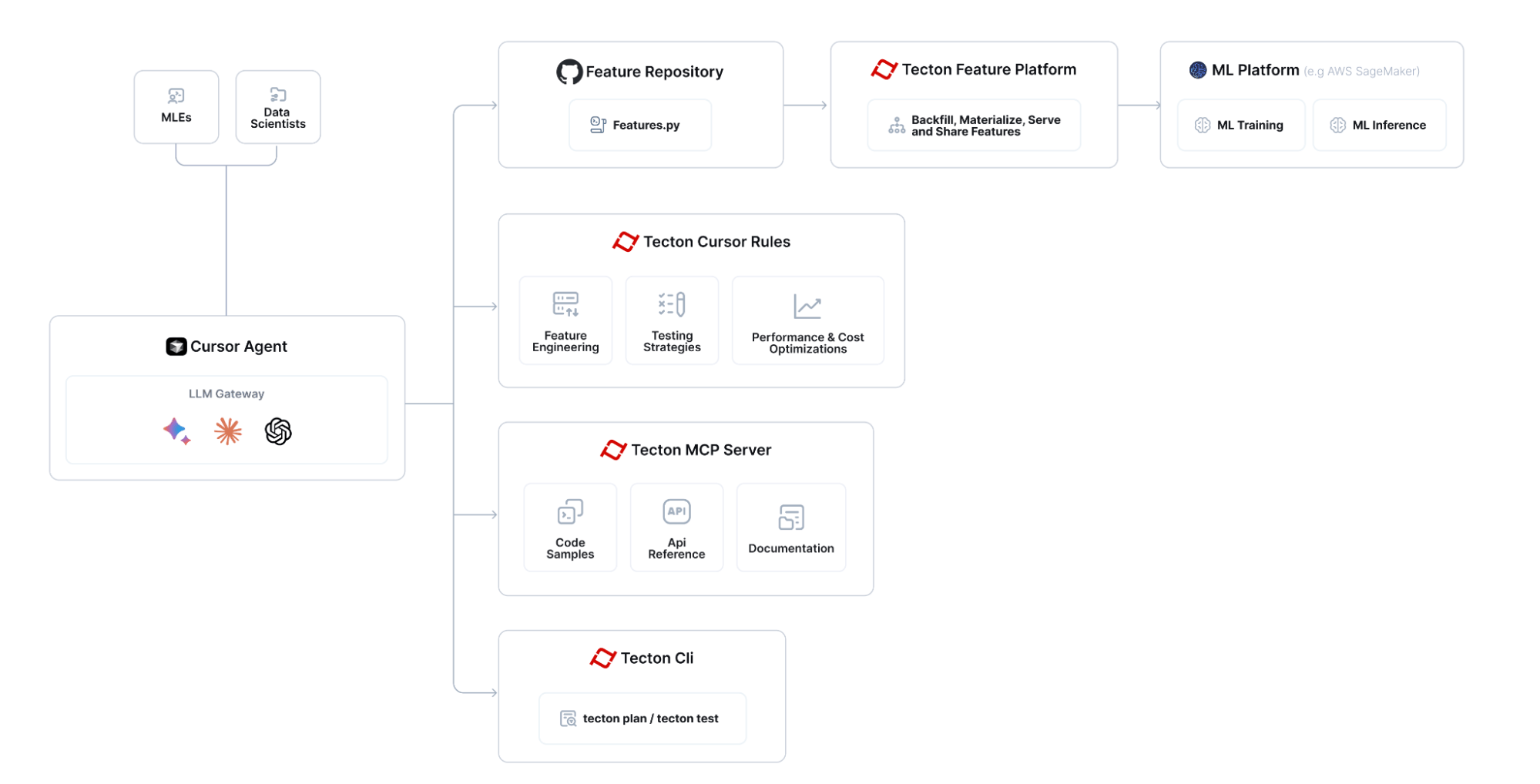
Tecton's Co-Pilot consists of an MCP Server rules for MCP clients such as Cursor and Claude Code. Read this blog to learn much more.
ℹ️ Info: This guide will walk you through setting up the Tecton MCP server with this repository and configuring your feature repository to use it while developing features with Tecton.
The Tecton MCP server exposes the following tools that can be used by an MCP client such as Cursor or Claude Code:
| Tool Name | Description |
|---|---|
query_example_code_snippet_index_tool | Finds relevant Tecton code examples using a vector database. Helpful for finding usage patterns before writing new Tecton code. |
query_documentation_index_tool | Retrieves Tecton documentation snippets based on a query. Provides context directly from Tecton's official documentation. |
get_full_tecton_sdk_reference_tool | Fetches the complete Tecton SDK reference, including all available classes and functions. Use when a broad overview of the SDK is needed. |
query_tecton_sdk_reference_tool | Fetches the Tecton SDK reference for a specified list of classes or functions. Ideal for targeted information on specific SDK components. |
query_tecton_metrics_tool | Queries the Tecton Metrics API. Returns point-in-time system metrics in human-readable or raw OpenMetrics format. |
ℹ️ API-based Tools: If the MCP server is configured with a
TECTON_API_KEYenvironment variable, the MCP server will register additional API-based tools including Tecton Feature Services and the Metrics API tool. This makes it possible for agents to query online feature services for fresh features from batch, streaming and real-time data sources and access system metrics.
Install the uv package manager:
brew install uv
Clone this repository to your local machine:
git clone https://github.com/tecton-ai/tecton-mcp.git
cd tecton-mcp
pwd
Note: The directory where you just cloned the repository will be referred to as <path-to-local-clone> in the following steps.
Verify your installation by running the following command.
MCP_SMOKE_TEST=1 uv --directory <path-to-local-clone> run mcp run src/tecton_mcp/mcp_server/server.py
The command should exit without any errors and print a message similar to MCP_SMOKE_TEST is set. Exiting after initialization.. This confirms that your local setup works correctly—Cursor will automatically spawn the MCP server as a subprocess when needed.
Log into your Tecton cluster to authenticate the Tecton SDK used by the Tecton MCP server:
tecton login yourcluster.tecton.ai
Configure Cursor (or any other MCP client) with the MCP server (see below)
Now you can go to your Feature Repository in Cursor and start using Tecton's Co-Pilot - directly integrated in Cursor.
View this Loom to see how you can use the integration to build new features: https://www.loom.com/share/3658f665668a41d2b0ea2355b433c616
The following is tested with Cursor 0.48 and above
Navigate to Cursor Settings -> MCP Tools and click the "Add a Custome MCP Server" button, which will open Cursor's mcp.json file.
Add the following configuration to this file. Make sure you modify the path <path-to-local-clone> to match the directory where you cloned the repository:
{
    "mcpServers": {
        "tecton": {
            "command": "uv",
            "args": [
                "--directory",
                "<path-to-local-clone>",
                "run",
                "mcp",
                "run",
                "src/tecton_mcp/mcp_server/server.py"
            ]
        }
    }
}
Symlink the cursorrules from this repository's . cursor/rules folder into your feature repository. Using symlinks ensures that any updates to the original rules will automatically be picked up in your feature repository:
# Symlink the entire .cursor directory in your feature repo
ln -s <path-to-local-clone>/.cursor <path-to-tecton-feature-repo>/.cursor
To make sure that your integration works as expected, ask the Cursor Agent a question like the following and make sure it's properly invoking your Tecton MCP tools:
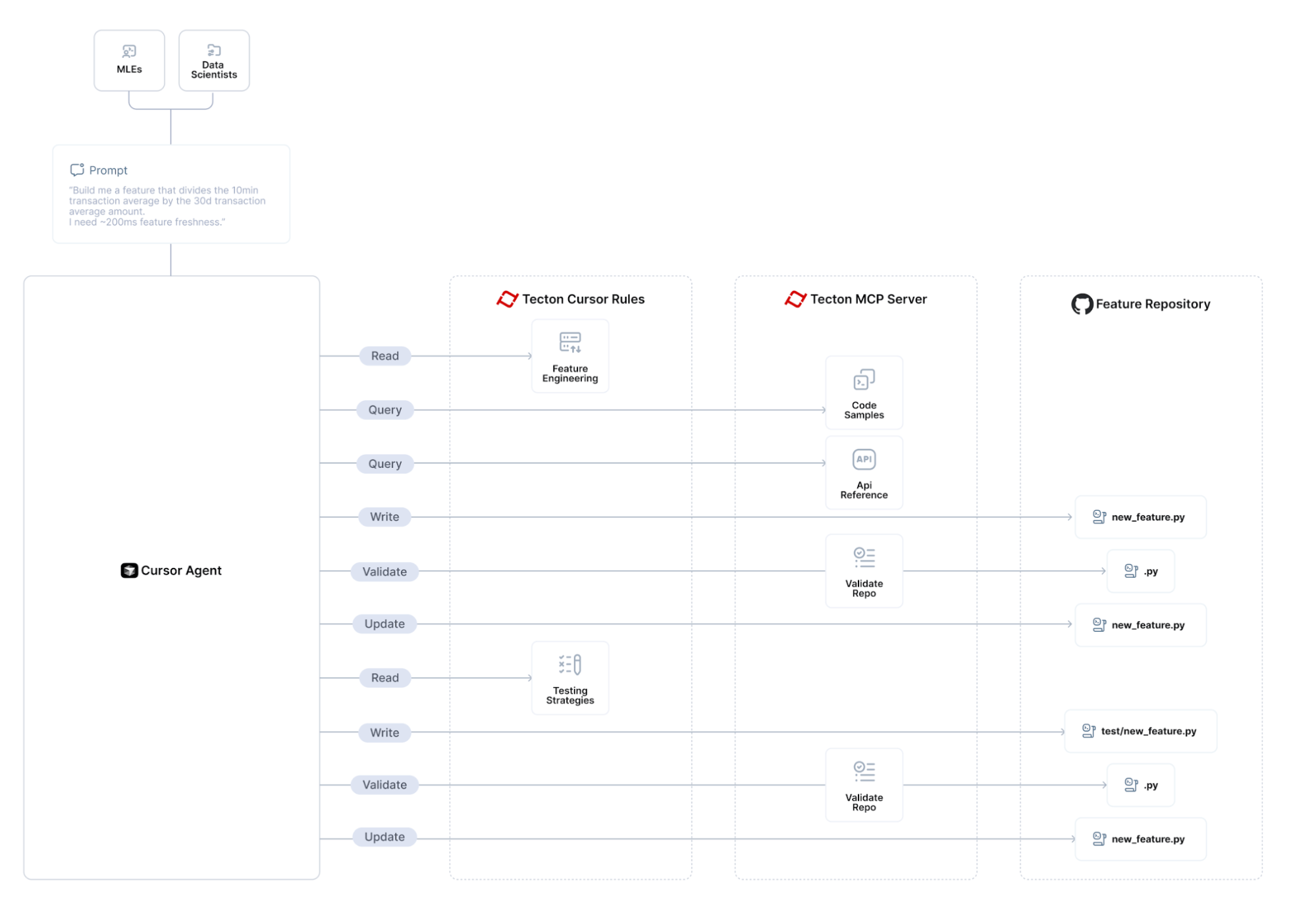
Query Tecton's Examples Index and tell me something about BatchFeatureViews and how they differ from StreamFeatureViews. Also look at the SDK Reference.
If no calls are made to Tecton MCP tools, you may need to restart Cursor or reload your Cursor window to ensure new tools are properly registered.
Navigate to your Tecton feature respoitory and run the following command.
claude mcp add-json tecton-mcp '{
  "command": "uv",
  "args": [
    "--directory",
    "<path-to-local-clone>",
    "run",
    "mcp",
    "run",
    "src/tecton_mcp/mcp_server/server.py"
  ]
}'
You should see the following message:
Added stdio MCP server tecton-mcp2 to local config
Next, start claude and run /mcp to ensure tecton-mcp is connected.
claude "/mcp"
You should see the following:
tecton-mcp ✔ connected · Enter to view details
CLAUDE.md rulesSymlink the Tecton-recommended CLAUDE.md into your feature repository. Using symlinks ensures that any updates to the original rules will automatically be picked up in your feature repository:
ln -s <path-to-local-clone>/CLAUDE.md <path-to-tecton-feature-repo>/CLAUDE.md
You can connect Tecton's MCP server to Augment to enable intelligent completion and responses tailored to Tecton's internal codebase.
Navigate to Augment -> Settings -> Tools -> MCP -> Import from JSON, and import the following configuration(updating <path-to-local-clone> to the path where you cloned this repository):
{
  "mcpServers": {
    "tecton": {
      "command": "uv",
      "args": [
        "--directory",
        "<path-to-local-clone>",
        "run",
        "mcp",
        "run",
        "src/tecton_mcp/mcp_server/server.py"
      ]
    }
  }
}
You should see the MCP server appear in Augment MCP settings.
As of June 2025, the following is the stack ranked list of best performing Tecton feature engineering LLMs in Cursor; this list may evolve over time as new models are released:
The Tecton MCP integrates with LLM-powered editors like Cursor to provide tool-based context and assistance for feature engineering:
The overall flow for building features with Tecton MCP looks like:
To update the Tecton MCP server to the latest version:
Pull the latest changes from the repository:
cd <path-to-local-clone>
git pull
Close and restart Cursor to ensure the updated MCP server is loaded.
That's it! The MCP server runs as a subprocess spawned by Cursor, so there's no persistent background service to manually stop or restart. Cursor will automatically use the updated code the next time it needs to communicate with the MCP server.
By default, this tool provides guidance for the latest pre-release of the Tecton SDK. If you need the tools to align with a specific released version of Tecton (for example 1.0.34 or 1.1.10), follow these steps:
pyproject.toml. Open pyproject.toml and replace the existing dependency linedependencies = [
# ... other dependencies ...
"tecton>=0.8.0a0"
]
with the exact version you want, e.g.
dependencies = [
  # ... other dependencies ...
  "tecton==1.1.10"
]
uv.lock records the dependency graph, you must delete it so that uv can resolve the new Tecton version:cd <path-to-local-clone>
rm uv.lock
Re-generate the lock-file by re-running Step 2 (the MCP_SMOKE_TEST=1 uv --directory command) of the Quick Start section. (This will download the pinned version into an isolated environment for MCP and re-create uv.lock.)
Restart Cursor so that the new Tecton version is loaded into the MCP virtual environment.
Supported versions: The tools currently support Tecton ≥ 1.0.0. Code examples are not versioned yet – they always use the latest stable SDK – however the documentation and SDK reference indices will now match the version you've pinned.
Make sure that Cursor shows "tecton" as an "Enabled" MCP server in "Cursor Settings -> MCP". If you don't see a "green dot", run the MCP server in Diagnostics mode (see below)
To debug the Tecton MCP Server you can run the following command. Replace <path-to-local-clone> with the actual path where you cloned the repository:
uv --directory <path-to-local-clone> run mcp dev src/tecton_mcp/mcp_server/server.py
Note: Launching Tecton's MCP Server will take a few seconds because it's loading an embedding model into memory that it uses to search for relevant code snippets.
Wait a few seconds until the stdout tells you that the MCP Inspector is up and running and then access it at the printed URL (something like http://localhost:5173)
Click "Connect" and then list tools. You should see the Tecton MCP Server tools and be able to query them.
This project is licensed under the MIT License.
Claim this server with your GitHub account to request manual ownership verification.
Link to the catalog listing for Tecton MCP server for AI-assisted feature engineering from your README. This badge does not certify ownership, compatibility or security.
[](https://awesome-mcp.com/servers/tecton-mcp)Public repository statistics could not be verified. Check the configured source address; unavailable counts are not zero.
Separate sources, scopes and periods. Never combined or treated as installations, active users or security reviews.
No reviewed package or image identity; download statistics are not listed yet.
Alternative and complementary servers in the same category
A directory listing describing a cancellation-letter and mailing-address service. The configured public GitHub repository returned 404 during source verification.

A hosted MCP service for browsing and searching through Singapore mobile-network proxies.

A directory listing describing a Markdown-to-PDF service. The configured public GitHub repository returned 404 during source verification.