
A directory listing describing a cancellation-letter and mailing-address service. The configured public GitHub repository returned 404 during source verification.
Repository stats unavailable
Developer Tools
An MCP server that exposes runtime-level tools for a running Phoenix application, letting coding agents execute code, read logs, query the development database, look up source locations, and read version-pinned docs.
Tidewave Phoenix MCP server is cataloged as an MCP server attributed to tidewave-ai. An MCP server that exposes runtime-level tools for a running Phoenix application, letting coding agents execute code, read logs, query the development database, look up source locations, and read version-pinned docs. It is categorized under developer tools. See the capability inspector for recorded interfaces and their independent review status; consult upstream documentation for the current interface.
Installation configuration is not reviewed. No executable setup is offered for this entry; inspect the source repository before proceeding.
Catalog license label: Apache License, Version 2.0. Check the source repository's current license and terms before using, modifying or distributing this software.
Capability definitions are not reviewed. Unreviewed imports are not exposed as trusted interfaces.
No reviewed records to display. This does not establish that upstream lacks this capability.
No reviewed records to display. This does not establish that upstream lacks this capability.
No reviewed records to display. This does not establish that upstream lacks this capability.
Email delivery is not connected. This page does not collect email addresses or create subscriptions.
Browse the registry for current listings instead.
Reviews for Tidewave Phoenix MCP server are not available yet
Review publishing and storage are not connected. This page does not collect or publish ratings or comments, including after sign-in.
A `mix tidewave.proxy` command can be added as a STDIO MCP server, adding a "port" parameter to all tool definitions and dispatching to the correct application.
No. Tidewave only allows requests from localhost by default, even if the server listens on other interfaces, for security purposes.
README.md · 8b429f8fdcfa · Fetched 2026-11-13 11:44:39 UTC
Original upstream text, without AI rewriting. Scripts, forms and unsafe links are filtered for safety.
Showing the last retrieved documentation snapshot; check the source for current changes.
Tidewave Phoenix is an MCP server that provides runtime-level tools for developing Phoenix apps using coding agents.
Your agent will be able to use this MCP server to talk to your running Phoenix app in development to:
This MCP server is an open-source component of Tidewave, the agentic development environment for Phoenix and Rails.
You can use this project as a standalone MCP server or integrated with the Tidewave product by following the installation instructions below.
Add the tidewave package to your mix.exs:
def deps do
  [
    {:tidewave, "~> 0.9", only: :dev},
    {:phoenix, ...},
  ]
end
Then, for Phoenix applications, go to your lib/my_app_web/endpoint.ex and right above the if code_reloading? do block, add:
+  if Mix.env() == :dev do
+    plug Tidewave
+  end

   if code_reloading? do
[!TIP] Tidewave works best with Phoenix LiveView v1.1 or later. Once you update it, make sure to enable the following options in your
config/dev.exs:config :phoenix_live_view, debug_heex_annotations: true, debug_attributes: trueThose are enabled by default for Phoenix v1.8+ apps.
Alternatively, you can use igniter to automatically install Tidewave MCP into an existing Phoenix application:
# install igniter_new if you haven't already
mix archive.install hex igniter_new

# install tidewave
mix igniter.install tidewave
For umbrella projects, you can follow the manual steps above in the application that defines your Phoenix endpoint (typically apps/your_app_web).
Add the Tidewave MCP server to your editor or MCP client configuration as the type "http" (streamable), pointing to the /tidewave/mcp path and port your web application is running at. For example, http://localhost:4000/tidewave/mcp.
We also have specific instructions for:
[!TIP] If you are using worktrees, you are likely running your web server on different ports, and therefore there isn't a single host and port combo you can use.
In such cases, you may want to add
mix tidewave.proxyas STDIO MCP instead, which adds a "port" parameter to all tool definitions, and is responsible to dispatch to the correct application.
As with any other MCP server, your agent will call the tools exposed by the Tidewave MCP whenever it sees fit. But you can also prompt it to call them explicitly.
project_evalEvaluates Elixir code within your running application, giving the agent access to your runtime, dependencies, and in-memory data. It's like an IEx for the agent.
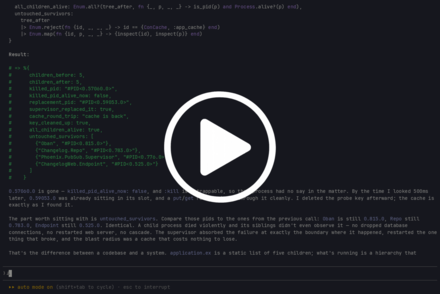
Your agent can use it when it would rather run code than assume behavior, grounding its next step in what the running app actually does. For example, calling a function to see what comes back or reproducing a failing code path against live app state to debug it.
execute_sql_queryExecutes a SQL query within your app's development database.
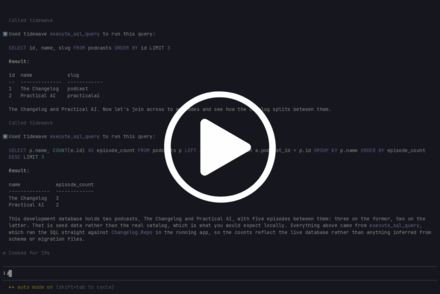
Your agent can use it to run any SQL against your development database. Useful for the agent to verify the result of an action.
get_docsGet the documentation for a given module/function. It consults the exact versions locked in your project's mix.lock, ensuring you get correct information.
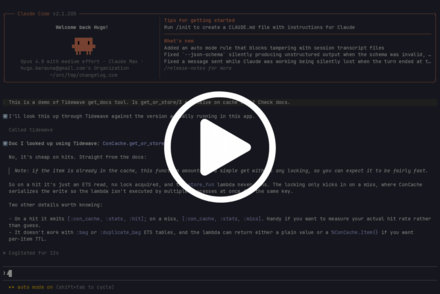
get_logsReads logs written by the server.
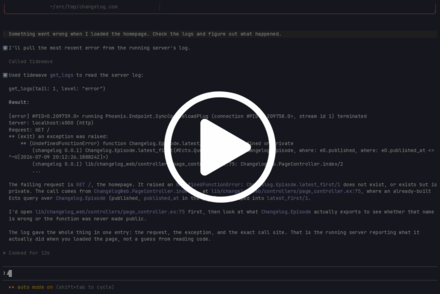
Your agent can use it to see what happened after a request. For example, reading the request log and backtrace when something misbehaves.
get_source_locationGet the source location for a given module/function, across both your app and its dependencies.
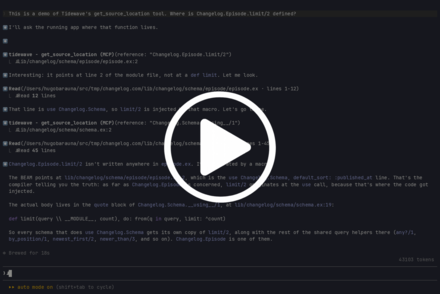
Your agent can use it to jump straight to where a module/function is defined, by file and line, instead of grepping for it, including when the definition lives in a hex dependency.
If you are using multiple hosts/subdomains during development, you must use *.localhost, as such domains are considered secure by browsers. Additionally, add the following immediately @session_options definition in your lib/your_app_web/endpoint.ex:
@session_options [
  # ... your configuration
]

if code_reloading? do
  @session_options Keyword.merge(@session_options, same_site: "None", secure: true)
end
The above will allow your application to run embedded within Tidewave across multiple subdomains, as long as it is using a secure context (such as admin.localhost, www.foobar.localhost, etc).
If you have enabled Content-Security-Policy, Tidewave will automatically enable "unsafe-eval" under script-src in order for contextual browser testing to work correctly. It also disables the frame-ancestors directive. This is done only in the environments that Tidewave is loadead (development by default).
You may configure the Tidewave plug using the following syntax:
plug Tidewave, options
The following options are available:
:allow_remote_access - Tidewave only allows requests from localhost by default, even if your server listens on other interfaces, for security purposes. Read our security guidelines for more information and when to allow remote access. Use this option with extreme care and, once enabled, ensure you have an authentication proxy in front of your app.
:allowed_origins - a list of values matched against the Origin and Host headers to prevent cross origin and DNS rebinding attacks. Each value must be a string of shape [scheme:]//host[:port], where both scheme and port are optional. The host may also start with "*". Only the host is compared against the Host header. IP addresses, localhost, and *.localhost are always allowed as hosts. When not set, defaults to the host of your Phoenix endpoint URL. Example: ["//localhost:8000", "//*.test"]
:inspect_opts - custom options passed to Kernel.inspect/2 when formatting some tool results. Defaults to: [charlists: :as_lists, limit: 50, pretty: true]
:team - set your Tidewave Team configuration, such as team: [id: "my-company"]
:toolbar - controls whether the Tidewave toolbar is injected into your HTML pages. Defaults to true
tmp_dir - temporary directory Tidewave uses for screenshots and recordings. It must be a relative directory to the current application root. Defaults to tmp, storing files under tmp/tidewave/screenshots and tmp/tidewave/recordings
Copyright (c) 2025 Dashbit
Licensed under the Apache License, Version 2.0 (the "License"); you may not use this file except in compliance with the License. You may obtain a copy of the License at http://www.apache.org/licenses/LICENSE-2.0
Unless required by applicable law or agreed to in writing, software distributed under the License is distributed on an "AS IS" BASIS, WITHOUT WARRANTIES OR CONDITIONS OF ANY KIND, either express or implied. See the License for the specific language governing permissions and limitations under the License.
Claim this server with your GitHub account to request manual ownership verification.
Link to the catalog listing for Tidewave Phoenix MCP server from your README. This badge does not certify ownership, compatibility or security.
[](https://awesome-mcp.com/servers/tidewave_phoenix)Public repository statistics could not be verified. Check the configured source address; unavailable counts are not zero.
Separate sources, scopes and periods. Never combined or treated as installations, active users or security reviews.
No reviewed package or image identity; download statistics are not listed yet.
Alternative and complementary servers in the same category
A directory listing describing a cancellation-letter and mailing-address service. The configured public GitHub repository returned 404 during source verification.

A hosted MCP service for browsing and searching through Singapore mobile-network proxies.

A directory listing describing a Markdown-to-PDF service. The configured public GitHub repository returned 404 during source verification.