
A modular FastMCP server for interacting with Microsoft Graph API, supporting advanced queries for users, sign-in logs, MFA status, and privileged users.
Repository stats unavailable
Security & Secrets
A remote MCP server that lets you scan TLS configurations, issue and renew Let's Encrypt certificates, and monitor certificate expiry, usable via a Claude Code/Cowork plugin or a Claude.ai custom connector.
TLS Radar MCP server for SSL/TLS scanning and certificate management is cataloged as an MCP server attributed to tls-radar. A remote MCP server that lets you scan TLS configurations, issue and renew Let's Encrypt certificates, and monitor certificate expiry, usable via a Claude Code/Cowork plugin or a Claude.ai custom connector. It is categorized under auth security. See the capability inspector for recorded interfaces and their independent review status; consult upstream documentation for the current interface.
Installation configuration is not reviewed. No executable setup is offered for this entry; inspect the source repository before proceeding.
Catalog license label: MIT. Check the source repository's current license and terms before using, modifying or distributing this software.
Capability definitions are not reviewed. Unreviewed imports are not exposed as trusted interfaces.
No reviewed records to display. This does not establish that upstream lacks this capability.
No reviewed records to display. This does not establish that upstream lacks this capability.
No reviewed records to display. This does not establish that upstream lacks this capability.
Email delivery is not connected. This page does not collect email addresses or create subscriptions.
Browse the registry for current listings instead.
Reviews for TLS Radar MCP server for SSL/TLS scanning and certificate management are not available yet
Review publishing and storage are not connected. This page does not collect or publish ratings or comments, including after sign-in.
No. The plugin generates the key and CSR locally and sends only the CSR; the private key never leaves your computer.
The free plan includes one monitor and one alert per month delivered 7 days before expiry, plus unlimited free scans and free Let's Encrypt issuance.
No. Certificate issuance is a Claude Code/Cowork feature because it needs a local shell; the Claude.ai connector offers scanning and monitoring.
README.md · 1fdc122ea483 · Fetched 2026-11-13 11:07:56 UTC
Original upstream text, without AI rewriting. Scripts, forms and unsafe links are filtered for safety.
Showing the last retrieved documentation snapshot; check the source for current changes.


Run SSL/TLS scans, issue free Let's Encrypt certificates, and manage cert monitoring from inside Claude Code or Claude Cowork - through a single MCP server, with nothing to configure.
Independent monitoring from a vendor that doesn't sell certificates - built for the 90-day-cert era, where manual renewal tracking is already finished.
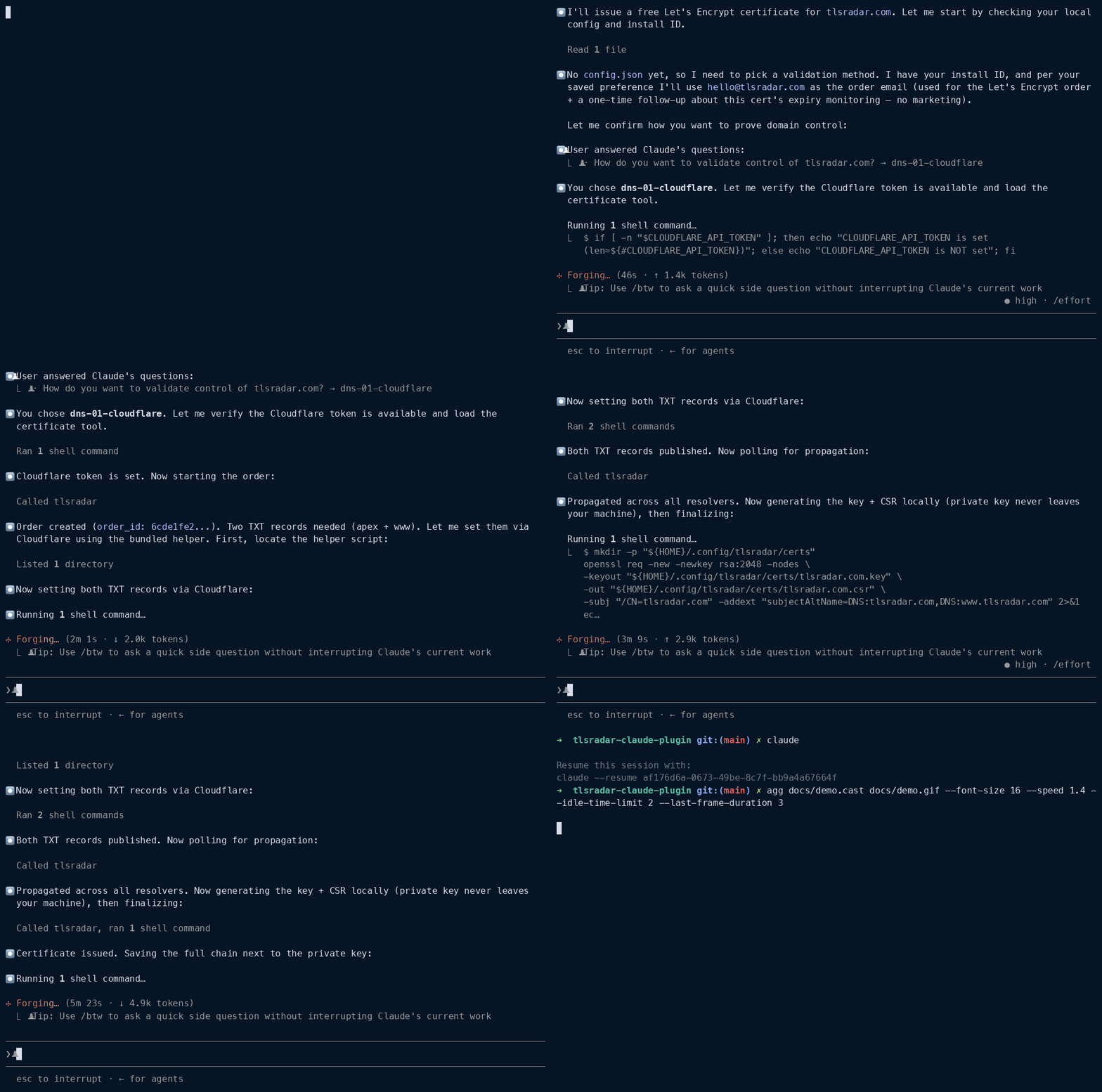
# Public - no account, no setup
/tls-scan example.com                       # free SSL/TLS scan
/tls-cert mydomain.dev                      # free 90-day Let's Encrypt cert (private key stays local)
/tls-renew mydomain.dev                     # renew a cert

# Connect once for monitoring (OAuth via /mcp)
/mcp                                        # built-in Claude Code OAuth flow
/tls-monitor add api.foo.io                 # one or many: /tls-monitor add a.com b.com c.com
/tls-monitor list
/tls-monitor remove api.foo.io
/tls-diagnose                               # health check (use when something's off)
/tls-upgrade                                # open pricing page
See real output before installing: sample scan report
Other actions - "what's expiring soon," "scan history for X," "what plan am I on," "export/import my monitors," "invite a teammate" - just ask in plain language; the plugin's skill routes them to the right tool. No slash command needed.
Claude Code's MCP client talks to one remote server:
tlsradar.com/api/v1/mcpCertificate issuance is proxied through that server to the Let's Encrypt backend (Beacon), so there's a single connection and a single auth model - no second server, no token to paste into your shell.
scan, create_certificate, check_certificate_propagation, finalize_certificate, get_certificate_status, renew_certificate) work with no account./mcp once, pick the tlsradar server, approve in the browser; the token is managed by Claude Code.When you run /mcp, Claude Code fetches tlsradar.com/.well-known/oauth-authorization-server (RFC 8414), dynamically registers as a public client (RFC 7591), opens the browser for consent (PKCE / RFC 7636), and includes the token on subsequent requests automatically.
/tls-cert generates the key + CSR on your machine (via a bundled, tested helper that writes the key with 0600 permissions and never overwrites an existing key - it backs it up) and sends only the CSR. The private key never leaves your computer and no passphrase is ever typed into the chat. Before presenting the issued certificate, the plugin verifies locally that the returned chain actually covers your domain. If you want a .p12 bundle (e.g. for Windows/Java import), the plugin packages it locally too.
An interrupted issuance is resumable: the order state is saved to ~/.config/tlsradar/orders/<domain>.json, so you can close the session mid-flow and later say "finish my cert for example.com" (or re-run /tls-cert) to pick up where you left off. /tls-renew reuses the saved email and challenge method from that file, with confirmation.
You choose how to prove control of the domain, and the plugin remembers your choice (in ~/.config/tlsradar/config.json):
dns-01 - you add a TXT record by hand (works anywhere).dns-01-cloudflare / dns-01-route53 - the plugin sets the TXT record for you via the provider API, reading your token from the local environment (CLOUDFLARE_API_TOKEN, or your configured aws CLI). Those credentials stay on your machine - they're never sent to TLS Radar or Beacon.http-01 - serve a file on http://yourdomain (port 80); issues the apex only.When a cert is issued, TLS Radar emails you about ongoing monitoring - the cert → monitoring handoff is fully automatic and server-side.
This is a standard plugin, so it runs in both Claude Code and Claude Cowork. Scanning, certificate issuance, and monitoring all work in either client: the tools come from one MCP server, and the certificate flow runs openssl plus a bundled helper script locally (both clients can run local commands and the bundled script via ${CLAUDE_PLUGIN_ROOT}). Connecting for monitoring uses your client's built-in OAuth - /mcp in Claude Code, or the equivalent connect step in Cowork.
You don't need Claude Code to scan and monitor from Claude. TLS Radar is a standard remote MCP server, so you can add it as a custom connector in the Claude.ai apps (web, desktop, mobile) on any plan - Free included (Free allows one connector).
https://tlsradar.com/api/v1/mcp/connectThen just ask in plain language - "scan example.com", "what certs are expiring soon", "monitor api.foo.io". There are no slash commands in Claude.ai; the tool descriptions route your request.
No account? Use Claude Code instead. The anonymous, no-signup scanning and free cert issuance live in the Claude Code plugin (below), which talks to the public
…/api/v1/mcpendpoint. The Claude.ai connector requires a one-time sign-in because hosted connectors must authenticate.
Certificate issuance stays a Claude Code / Cowork feature.
/tls-certgenerates your private key locally withopenssl, which the Claude.ai apps can't do (no local shell). In a connector you get scanning and monitoring; to issue a Let's Encrypt cert with the key staying on your machine, use the plugin in Claude Code/Cowork, or the web form at beacon.tlsradar.com.
In Claude Code, add the marketplace and install - two commands, no clone, no paths:
/plugin marketplace add TLS-Radar/tlsradar-claude-plugin
/plugin install tlsradar@tlsradar
(Or browse it in the /plugin menu after adding the marketplace.) In Claude Cowork, add it from the plugin catalog (search "TLS Radar"). That's it - scanning and cert issuance work immediately. Run /mcp (or Cowork's connect step) when you want monitoring.
git clone https://github.com/TLS-Radar/tlsradar-claude-plugin ~/.claude/plugins/tlsradar
When you hit the monitor limit, the tool's response includes the recommended upgrade and a pricing URL.
Nothing is required. Optional environment variables:
TLSRADAR_BASE_URL - override the TLS Radar URL (default https://tlsradar.com). Useful for staging/self-host.Anonymous usage id. The first time you run a scan or cert command, the plugin mints a random id at ~/.config/tlsradar/install_id and passes it (as a client_id argument) so anonymous usage can be attributed to one install. It identifies an install, not a person. The plugin runs no startup hook, does not modify your shell config, and sends no tracking header - the id travels only as that argument, read from the local file.
To opt out: rm ~/.config/tlsradar/install_id. With the file gone, no id is sent.
SECURITY.md.CLOUDFLARE_API_TOKEN, AWS CLI) are read from your local environment and never sent to TLS Radar or Beacon.~/.config/tlsradar/install_id (see Configuration to opt out). The plugin modifies no shell files and sends no tracking header. It identifies an install, not a person.https://tlsradar.com/oauth/authorized_applications or remove the MCP server in /mcp..
├── README.md # this file
├── CLAUDE.md # architecture / funnel / contracts (humans + AI agents)
├── CONTRIBUTING.md # dev loop + how to add commands
├── CHANGELOG.md # version history
├── SECURITY.md # reporting + why the plugin holds no secrets
├── LICENSE # MIT
├── .claude-plugin/plugin.json # plugin manifest
├── .claude-plugin/marketplace.json # self-hosting marketplace entry
├── .mcp.json # MCP server config (one remote URL)
├── commands/ # slash commands (how to add one: CONTRIBUTING.md)
├── skills/ # NL skill router (with its own README)
├── tools/manifest.json # single source of truth for tool names
├── scripts/ # CI guards + tested local helpers (DNS provider, cert CSR/chain)
└── evals/ # tool-routing evals (prompt → expected tool)
Start with CONTRIBUTING.md for the dev loop (all checks are offline and run with python3). For architecture, the funnel, contract pitfalls, and the release process, read CLAUDE.md - useful for both humans and AI agents. Changes are tracked in CHANGELOG.md.
Security reports: security@tlsradar.com (never a public issue) - see SECURITY.md.
MIT © TLS Radar
Claim this server with your GitHub account to request manual ownership verification.
Link to the catalog listing for TLS Radar MCP server for SSL/TLS scanning and certificate management from your README. This badge does not certify ownership, compatibility or security.
[](https://awesome-mcp.com/servers/tlsradar-claude-plugin)Public repository statistics could not be verified. Check the configured source address; unavailable counts are not zero.
Separate sources, scopes and periods. Never combined or treated as installations, active users or security reviews.
No reviewed package or image identity; download statistics are not listed yet.
Alternative and complementary servers in the same category
A modular FastMCP server for interacting with Microsoft Graph API, supporting advanced queries for users, sign-in logs, MFA status, and privileged users.

A Model Context Protocol (MCP) server that provides programmatic access to Keycloak administration functionality.

An MCP server for LLM-driven penetration testing that wraps Kali tools and adds scope enforcement, engagement tracking, and structured output.