





A stateless streamable HTTP MCP server for interacting with the official source of government spending data.
Repository stats unavailable
Finance & Analytics
An open-source, local-first memory and pre-trade brake MCP server for AI trading agents that records and recalls trades, analyzes behavior, and keeps a tamper-evident audit trail.
TradeMemory Protocol is cataloged as an MCP server attributed to mnemox-ai. An open-source, local-first memory and pre-trade brake MCP server for AI trading agents that records and recalls trades, analyzes behavior, and keeps a tamper-evident audit trail. It is categorized under finance crypto. See the capability inspector for recorded interfaces and their independent review status; consult upstream documentation for the current interface.
Installation configuration is not reviewed. No executable setup is offered for this entry; inspect the source repository before proceeding.
Catalog license label: MIT. Check the source repository's current license and terms before using, modifying or distributing this software.
Capability definitions are not reviewed. Unreviewed imports are not exposed as trusted interfaces.
No reviewed records to display. This does not establish that upstream lacks this capability.
No reviewed records to display. This does not establish that upstream lacks this capability.
No reviewed records to display. This does not establish that upstream lacks this capability.
Email delivery is not connected. This page does not collect email addresses or create subscriptions.
Browse the registry for current listings instead.
Reviews for TradeMemory Protocol are not available yet
Review publishing and storage are not connected. This page does not collect or publish ratings or comments, including after sign-in.
No. The default memory server never places orders and never asks for broker keys; it only records and recalls trades in a local SQLite file.
Refused orders do not reach the broker, and anything the brake cannot evaluate is refused rather than passed through.
README.md · cb599bd36145 · Fetched 2026-11-13 13:40:27 UTC
Original upstream text, without AI rewriting. Scripts, forms and unsafe links are filtered for safety.
Showing the last retrieved documentation snapshot; check the source for current changes.

TradeMemory remembers what it cost. It is an open-source, local-first memory and brake for AI trading agents: it pulls in your fills, finds where your own history loses money, puts those losing trades in front of your agent before the next order, and can refuse an order that breaks rules you set, before it reaches the broker.
Brokers now let AI agents trade over MCP, with different guardrails: Webull and tastytrade set size or buying-power limits, Interactive Brokers only lets the agent draft an order for you to submit, and Robinhood and Public set no cap you can impose on an external agent (StockBrokers, 2026-09-30). The caps are fixed numbers. None of them looks at how your own past trades went.
pip install tradememory-protocol

# Hyperliquid: public fills, no key needed
tradememory sync hyperliquid --address 0xYourAddress

# Alpaca: read-only calls with your own keys, kept in a local file
tradememory sync alpaca --env-file ~/.secrets/alpaca.env
Each closed trade is stored in memory once; running it again stores only new trades. Then it prints where your history loses money. The format, with illustrative numbers:
After 2 losses in a row (20 trades):
  5 of them (25%) were 1.5x your usual size or more.
  All 20 won 60% and made -$1,500.
  The 5 sized-up trades won 20% and made -$1,700.

Median hold: winners 1.5h, losers 9.0h.
These are descriptive statistics of your own past trades, not advice about the next one. Hyperliquid's API serves only an address's recent fills, not its whole history, so the sooner it is synced, the more history is kept. Other venues: MT5 and Binance spot sync scripts are in scripts/, and any agent can record a trade with remember_trade.
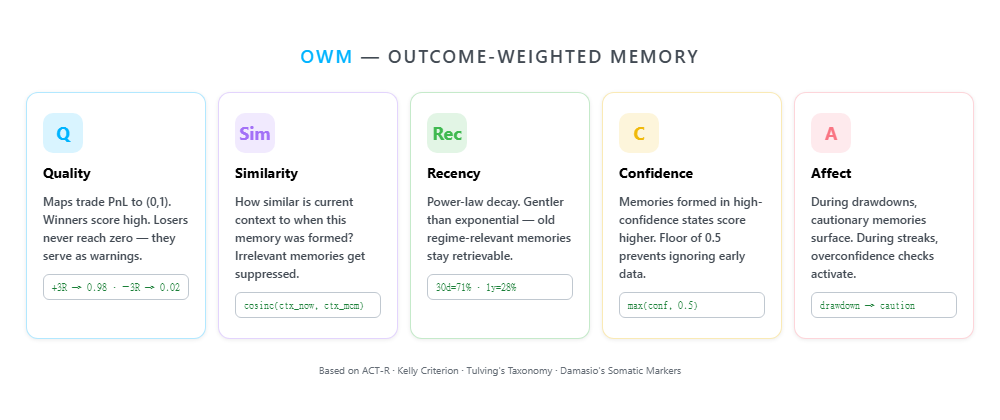
recall_memories(order="losses_first") puts every losing trade ahead of the rest, the bigger losses in similar conditions first, with their size and P&L. Besides the symbol's most recent trades, it searches the symbol's recent losing trades, so an older loss is not crowded out. The server tells connected agents to call it before proposing a trade. The default order ranks better outcomes higher (by R multiple, where one was recorded) and keeps at least 20% losses in the list.
pip install tradememory-protocol
Add to Claude Desktop (claude_desktop_config.json):
{
  "mcpServers": {
    "tradememory": {
      "command": "uvx",
      "args": ["tradememory-protocol"]
    }
  }
}
Then tell Claude: "Record my AAPL long at $195 — earnings beat, institutional buying, high confidence."
# Claude Code
claude mcp add tradememory -- uvx tradememory-protocol

# From source
git clone https://github.com/mnemox-ai/tradememory-protocol.git
cd tradememory-protocol && pip install -e . && python -m tradememory

# Docker
docker compose up -d
Full walkthrough: Getting Started (Trader Track + Developer Track)
The proxy extra runs TradeMemory between your agent and your broker's MCP server (Alpaca today). Every tool is forwarded unchanged except the order-placing ones, which Mnemox Control evaluates against a policy you own before they reach the broker. Every evaluation, allowed or refused, is recorded and chained into the audit log. An allowed order comes back with your losing trades from similar conditions first, and tradememory sync alpaca later fills in how each forwarded trade ended, in R when the entry carried a stop. The agent you already have keeps working; only one line of its MCP config changes.
pip install "tradememory-protocol[proxy]"   # Python 3.12+
tradememory proxy init --account-id <your Alpaca account id> --symbols AAPL,MSFT
tradememory proxy doctor --env-file ~/.secrets/alpaca-paper.env   # checks the live tool names and the account id
tradememory proxy config                                           # prints the MCP client entry that replaces the direct Alpaca one
Refused by default: symbols outside your list, orders above your notional and position limits, entries without a bracket stop, any new order after your daily-loss or drawdown limit, cancelling the protective stop of an open position, any tool the brake has not classified, and everything while you have run tradememory proxy halt FULL_HALT. Never blocked: closing a position. Orders at or above approval_notional wait for tradememory proxy approve <intent_id> --terms <fingerprint>, which approves exactly the terms you read; the agent retries with the same client_order_id and the same terms, and the proxy forwards it at most once. evaluate_order returns the same decision without placing anything, for pre-checks and for advisory layers in other frameworks. Anything the brake cannot evaluate (a dead quote feed, an unknown asset, an order type the policy does not cover) is refused, not passed through.
Status: tested end-to-end against a stateful fake of Alpaca's MCP server (tests/proxy/), and run against a real Alpaca paper account on 2026-10-01: three refusals (symbol not on the list, entry without a stop, notional over the limit), one allowed one-share bracket order that reached the broker, and one retry with the same client_order_id that was answered from the record without a second order. Options, order replacement, stop-limit and trailing orders are refused rather than evaluated. Your broker keys go only to the broker process the proxy starts; TradeMemory never stores them.
Walkthrough with the real outputs: docs/recipes/alpaca-brake.md.
| US equity trader | Forex EA system | Audit trail (illustrative) | |
|---|---|---|---|
| Market | Stocks (AAPL, TSLA, ...) | XAUUSD (Gold) | Multi-asset |
| How | Pre-flight checklist before every trade | Automated sync from MT5 | Decision records with a hash chain |
| Who | One independent user (March 2026) | The maintainer's own MT5 account | An example, not a customer |
| Details | Read more | Read more | Read more |
remember_trade writes to five memory layers: episodic, semantic, procedural, affective, and trade records| Category | Tools | Description |
|---|---|---|
| Memory | remember_trade · recall_memories | Record and recall trades with outcome-weighted scoring |
| State | get_agent_state · get_behavioral_analysis | Confidence, drawdown, streaks, behavioral patterns |
| Planning | create_trading_plan · check_active_plans | Prospective plans with conditional triggers |
| Risk | check_trade_legitimacy | 5-factor pre-trade gate (full / reduced / skip) |
| Audit | export_audit_trail · verify_audit_hash | SHA-256 tamper detection + bulk export |
| Category | Tools |
|---|---|
| Core Memory | get_strategy_performance · get_trade_reflection |
| OWM Cognitive | remember_trade · recall_memories · get_behavioral_analysis · get_agent_state · create_trading_plan · check_active_plans |
| Risk & Governance | check_trade_legitimacy · validate_strategy · compute_dqs |
| Evolution | evolution_fetch_market_data · evolution_discover_patterns · evolution_run_backtest · evolution_evolve_strategy · evolution_get_log |
| Audit | export_audit_trail · verify_audit_hash · verify_audit_chain · get_daily_root |
REST API: 35+ endpoints for trade recording, reflections, risk, MT5 sync, OWM, evolution, and audit. Full reference →
Running an agent against a broker, or want your history synced and read? Open a brake-integration issue or book 30 minutes. Setup help is free, and the people who use it decide what gets built next.
Every trading decision your agent makes — including decisions not to trade — is recorded as a Trading Decision Record (TDR). Per-record SHA-256 content hashes are linked into a forward-chained audit ledger; every UTC day is summarised by a Merkle root which itself chains across days. Tampering with any historical record invalidates every subsequent link.
Rules that require decision records bind investment firms, not retail users. Under the EU AI Act, the Annex III high-risk logging obligations were postponed to 2 December 2027, and ESMA's February 2026 supervisory briefing on algorithmic trading states that AI-based algorithmic trading is currently excluded from the high-risk scope. The table shows which TradeMemory features map to those texts if and when they apply to you. It is not a compliance claim.
| Regulation | Requirement | TradeMemory Coverage |
|---|---|---|
| MiFID II Article 17 | Record every algorithmic trading decision factor | Full decision chain: conditions, filters, indicators, execution |
| EU AI Act Article 14 | Human oversight of high-risk AI systems | Explainable reasoning + memory context for every decision |
| EU AI Act Article 12 | Automatic, tamper-resistant logs over system lifetime | Linked SHA-256 chain + daily Merkle roots (RFC 3161 TSA anchoring, on by default since 0.5.3) |
# Verify a single record hasn't been tampered with
verify_audit_hash(trade_id="MT5-7047640363")
# → {"verified": true, "chain_entry": {"sequence_num": 42, ...}}

# Walk the entire chain (or a slice) end-to-end
verify_audit_chain(from_seq=1, to_seq=None)
# → {"verified": true, "checked_count": 1284, "first_break_at": null}

# Daily Merkle root — single 32-byte anchor over every TDR for that day
get_daily_root(date="2026-05-14")
# → {"verified": true, "root_hash": "a05544...", "record_count": 18}

# Bulk export
GET /audit/export?strategy=VolBreakout&start=2026-03-01&format=jsonl
Daily roots are timestamped by an RFC 3161 authority by default since 0.5.3. Not built: signing records with a private key, anchoring to a public log, proving that nothing was left out. See LIMITATIONS.md.
tradememory sync hyperliquid reads public data with no key. tradememory sync alpaca makes read-only calls with keys from a file on your machine. Synced trades stay in your local database.proxy extra). Forwards the orders your policy allows to your broker's MCP server. Your broker keys are passed only to the broker process the proxy starts; TradeMemory never stores them.TRADEMEMORY_TSA=off turns it off). tradememory sync calls the venue you name. The evolution tools read public Binance market data (api.binance.com) when an agent calls them, and evolution calls the Anthropic API only if you set ANTHROPIC_API_KEY. Replay calls DeepSeek by default (or Anthropic), and only with that provider's key set. If you install sentence-transformers for hybrid recall, it downloads its model from Hugging Face on first use. The MT5 and Binance sync scripts in scripts/ read their credentials from your environment, and the MT5 one posts trade summaries (symbol, prices, P&L) to a Discord webhook only if you set DISCORD_WEBHOOK_URL.TradeMemory's OWM framework is grounded in cognitive science (Tulving 1972) and reinforcement learning (Schaul et al. 2015). Current status:
| Doc | Description |
|---|---|
| Getting Started | Install → first trade → pre-flight checklist |
| Use Cases | 3 usage scenarios, each labelled first-party or independent |
| API Reference | All REST endpoints |
| OWM Framework | Outcome-Weighted Memory theory |
| Architecture | System design & layer separation |
| Tutorial | Detailed walkthrough |
| MT5 Setup | MetaTrader 5 integration |
| Research Log | Evolution experiments & data |
| Failure Taxonomy | 11 trading AI failure modes |
| 中文版 | Traditional Chinese |
See Contributing Guide · Security Policy
MIT, see LICENSE. The optional proxy extra installs Mnemox Control, whose engine is AGPL-3.0-only (a commercial license is available); TradeMemory itself stays MIT. For educational and research purposes only. Not financial advice.
Claim this server with your GitHub account to request manual ownership verification.
Link to the catalog listing for TradeMemory Protocol from your README. This badge does not certify ownership, compatibility or security.
[](https://awesome-mcp.com/servers/tradememory-protocol)Public repository statistics could not be verified. Check the configured source address; unavailable counts are not zero.
Separate sources, scopes and periods. Never combined or treated as installations, active users or security reviews.
No reviewed package or image identity; download statistics are not listed yet.
Alternative and complementary servers in the same category
A stateless streamable HTTP MCP server for interacting with the official source of government spending data.

A hosted, remote MCP server for Fortnox that lets AI assistants answer questions from a company's bookkeeping and propose changes for approval before writing them.

OptimistFi is a read-only remote MCP server that provides perpetual futures market data, perps prop firm rules and pricing, and US equity investment research.