

A directory listing describing a cancellation-letter and mailing-address service. The configured public GitHub repository returned 404 during source verification.
Repository stats unavailable
Developer Tools
An MCP server that runs a reverse proxy to inject hover annotations into web pages and exposes UI elements to an AI assistant by name.
UI Annotator MCP is cataloged as an MCP server attributed to mcpware. An MCP server that runs a reverse proxy to inject hover annotations into web pages and exposes UI elements to an AI assistant by name. It is categorized under developer tools. See the capability inspector for recorded interfaces and their independent review status; consult upstream documentation for the current interface.
Installation configuration is not reviewed. No executable setup is offered for this entry; inspect the source repository before proceeding.
Catalog license label: MIT. Check the source repository's current license and terms before using, modifying or distributing this software.
Capability definitions are not reviewed. Unreviewed imports are not exposed as trusted interfaces.
No reviewed records to display. This does not establish that upstream lacks this capability.
No reviewed records to display. This does not establish that upstream lacks this capability.
No reviewed records to display. This does not establish that upstream lacks this capability.
Email delivery is not connected. This page does not collect email addresses or create subscriptions.
Browse the registry for current listings instead.
Reviews for UI Annotator MCP are not available yet
Review publishing and storage are not connected. This page does not collect or publish ratings or comments, including after sign-in.
No; the README states no browser extensions or code changes are needed and that it works in any browser.
The proxy runs on port 7077 by default and can be changed with the UI_ANNOTATOR_PORT environment variable.
README.md · 6b89c1ce7021 · Fetched 2026-11-13 11:36:31 UTC
Original upstream text, without AI rewriting. Scripts, forms and unsafe links are filtered for safety.
Showing the last retrieved documentation snapshot; check the source for current changes.




English | 廣東話
Bridge the gap between what you see and what AI can reference — in any browser, zero extensions.
The only tool that puts visible labels on every web element. Hover any element, see its name. Tell your AI assistant "make the sidebar wider" — it knows exactly which element you mean. No screenshots, no CSS selectors, no miscommunication.
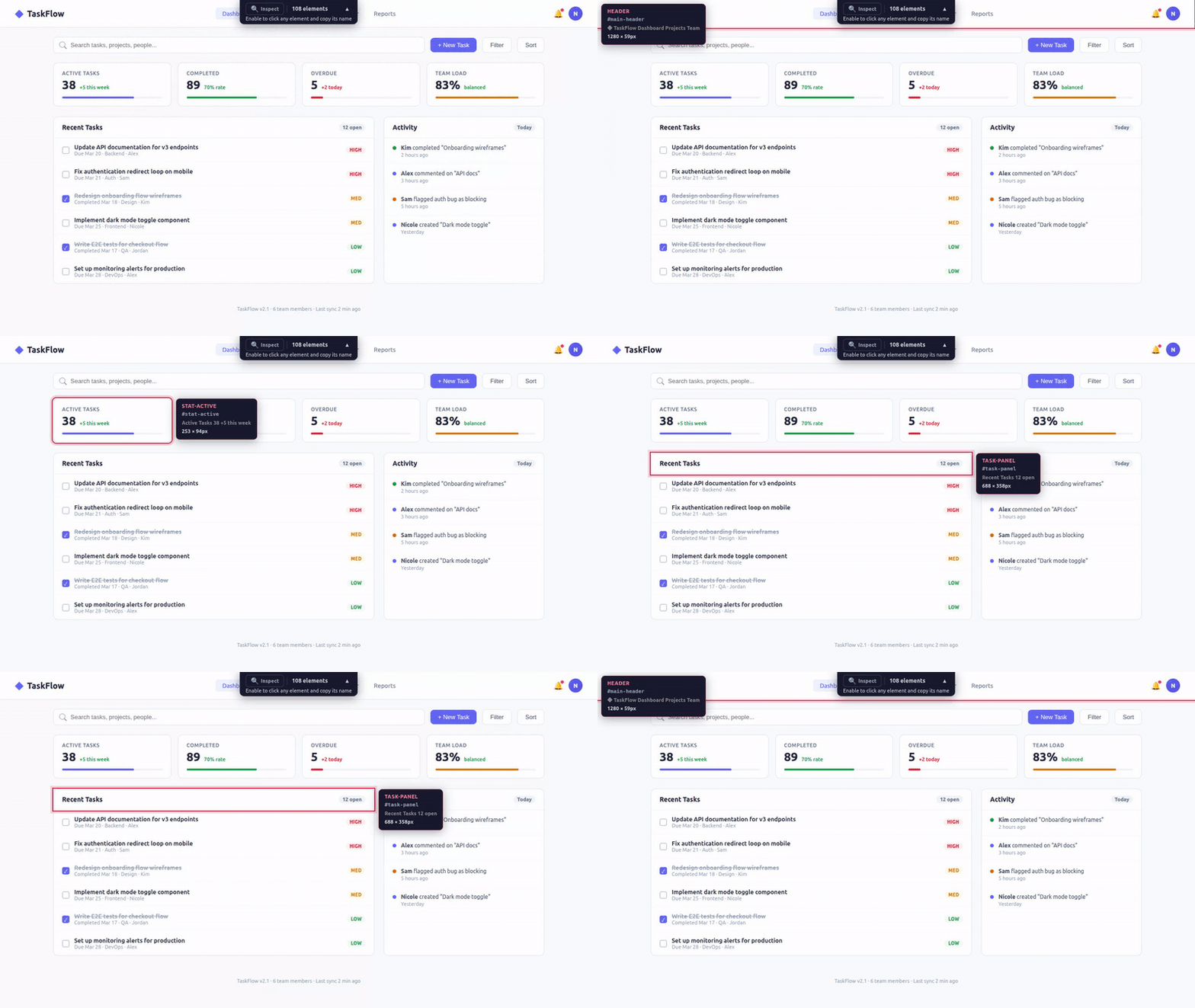
Dramatically improves AI-driven UI design and iteration. The pain: telling AI "move that button next to the search bar" never works because the AI can't see your page. UI Annotator fixes this — hover over any element and its component name appears as a label. Now you say "move SearchButton below NavBar" and Claude edits the right component instantly. No browser extensions, works with any framework. The workflow becomes: open page → hover to identify elements → describe changes using real component names → Claude edits → refresh and repeat. Turns a frustrating back-and-forth into a fluid design loop.
When reviewing a web UI with an AI coding assistant, the hardest part isn't the code change — it's describing which element you want changed.
"That thing on the left... the second row... no, the one with the icon..."
You don't know what it's called. The AI doesn't know what you're pointing at. You waste time on miscommunication instead of shipping.
Open your page through the annotator proxy. Hover any element — instantly see its name, CSS selector, and dimensions. Now you both speak the same language.
# Start the MCP server
npx @mcpware/ui-annotator

# Open in ANY browser
http://localhost:7077/localhost:3847
That's it. No browser extensions. No code changes. No setup. Works in Chrome, Firefox, Safari, Edge — any browser.
Your app (localhost:3847)
        │
        ▼
┌─────────────────────┐
│  UI Annotator Proxy  │ ← Reverse proxy on port 7077
│  (MCP Server)        │
└─────────────────────┘
        │
        ▼
Proxied page with hover annotations injected
        │
        ├──► User sees: hover overlay + tooltip with element names
        └──► AI sees: structured element data via MCP tools
The proxy fetches your page, injects a lightweight annotation script, and serves it back. The script scans the DOM, identifies named elements, and reports them to the MCP server. Your AI assistant queries the server to understand what's on the page.
Hover any element to see:
Click the Inspect button in the toolbar (or let your AI toggle it). In inspect mode:
The toolbar sits at the top center of the page showing:
| Tool | What it does |
|---|---|
annotate(url) | Returns proxy URL for user to open in any browser |
get_elements() | Returns all detected UI elements with names, selectors, positions |
highlight_element(name) | Flash-highlights a specific element so user can confirm |
rescan_elements() | Force DOM rescan after page changes |
inspect_mode(enabled) | Toggle inspect mode remotely |
| Browser DevTools | UI Annotator | |
|---|---|---|
| Target user | Frontend developers who know the DOM | Anyone — QA, PM, designer, junior dev |
| Learning curve | Need to understand DOM tree, CSS selectors, box model | Hover and read — zero learning |
| Communication | "The div.flex.gap-4 inside the second child of..." | "The sidebar" |
| Language | CSS/HTML technical terms | Human-readable names |
| Setup | Teach people to open DevTools + navigate the DOM | Open a URL |
| AI integration | None — AI can't see what you're inspecting | MCP — AI sees the same element names you do |
DevTools is for debugging. UI Annotator is for communication — giving humans and AI a shared vocabulary for UI elements.
None of these do what UI Annotator does — live visual labels on every element via reverse proxy:
| Tool | Approach | Why we're different |
|---|---|---|
| browser-use (82K⭐) | AI automation framework | Automates browsers, doesn't label elements for humans. Different use case entirely. |
| Chrome DevTools MCP (31K⭐) | DOM snapshot + element UIDs | AI can inspect, but humans don't see visual annotations. No shared vocabulary. |
| Playwright MCP (29K⭐) | Accessibility tree snapshot | Returns structured text, no visual overlay. Truncates important context. |
| OmniParser | Screenshot + CV detection | Screenshot-based, not live DOM. ~40% accuracy on hard benchmarks. |
| MCP Pointer (526 users) | Chrome extension + MCP | Requires Chrome extension. Human clicks to select — no hover overlay. |
| Agentation | npm embedded in your app | Requires code changes. React 18+ dependency. Not zero-config. |
| Vibe Annotations | Chrome extension | Extension-based, developer-only annotation workflow. |
| Feature | UI Annotator | MCP Pointer | Agentation | Cursor | Chrome DevTools MCP |
|---|---|---|---|---|---|
| Visual hover annotation | Yes | No | Partial | Yes (IDE only) | No |
| Shows element names | Yes | Yes | Yes | No (high-level) | Programmatic |
| Shows dimensions | Yes | Yes | Yes (Detailed) | Yes | Programmatic |
| MCP server | Yes | Yes | Yes | No | Yes |
| Zero browser extensions | Yes | No | Yes | N/A | No |
| Zero code changes | Yes | Yes | No | N/A | Yes |
| Any browser | Yes | Chrome only | Desktop only | Cursor only | Chrome only |
| Zero dependencies | Yes | Chrome ext | React 18+ | Cursor | Chrome |
| Click to copy element name | Yes | No | No | No | No |
http module@modelcontextprotocol/sdk (stdio transport)localhost:7077/localhost:3847http://localhost:3847fetch() / XMLHttpRequest interceptor (rewrites API paths through proxy)href="/..." and src="/..." attributes to route through proxy</body>Content-Security-Policy headers to allow injected scriptid, class, semantic roles, or interactive rolesborder-radius) + positions tooltip (always within viewport)POST /__annotator/elementsGET /__annotator/commands every second for server instructions (highlight, rescan, inspect toggle)MutationObserver auto-rescans when DOM changes# Add as MCP server
claude mcp add ui-annotator -- npx @mcpware/ui-annotator
# Then in conversation:
# "Annotate my app at localhost:3847"
# → AI returns proxy URL, you open it, hover elements, discuss changes by name
npx @mcpware/ui-annotator
# Proxy starts on http://localhost:7077
# Open http://localhost:7077/localhost:YOUR_PORT
| Variable | Default | Description |
|---|---|---|
UI_ANNOTATOR_PORT | 7077 | Port for the proxy server |
| Project | What it does | Install |
|---|---|---|
| Instagram MCP | 23 Instagram Graph API tools — posts, comments, DMs, stories, analytics | npx @mcpware/instagram-mcp |
| Claude Code Organizer | Visual dashboard for Claude Code memories, skills, MCP servers, hooks | npx @mcpware/claude-code-organizer |
| Pagecast | Record browser sessions as GIF or video via MCP | npx @mcpware/pagecast |
| LogoLoom | AI logo design → SVG → full brand kit export | npx @mcpware/logoloom |
MIT
Claim this server with your GitHub account to request manual ownership verification.
Link to the catalog listing for UI Annotator MCP from your README. This badge does not certify ownership, compatibility or security.
[](https://awesome-mcp.com/servers/ui-annotator-mcp)Public repository statistics could not be verified. Check the configured source address; unavailable counts are not zero.
Separate sources, scopes and periods. Never combined or treated as installations, active users or security reviews.
No reviewed package or image identity; download statistics are not listed yet.
Alternative and complementary servers in the same category
A directory listing describing a cancellation-letter and mailing-address service. The configured public GitHub repository returned 404 during source verification.

A hosted MCP service for browsing and searching through Singapore mobile-network proxies.

A directory listing describing a Markdown-to-PDF service. The configured public GitHub repository returned 404 during source verification.