
A directory listing describing a cancellation-letter and mailing-address service. The configured public GitHub repository returned 404 during source verification.
Repository stats unavailable
Developer Tools
An MCP server that transforms unified code diffs into visual comparisons, with GitHub Gist sharing and local file output.
Unified Diff MCP Server is cataloged as an MCP server attributed to gorosun. An MCP server that transforms unified code diffs into visual comparisons, with GitHub Gist sharing and local file output. It is categorized under developer tools. See the capability inspector for recorded interfaces and their independent review status; consult upstream documentation for the current interface.
Installation configuration is not reviewed. No executable setup is offered for this entry; inspect the source repository before proceeding.
Catalog license label: MIT License. Check the source repository's current license and terms before using, modifying or distributing this software.
Capability definitions are not reviewed. Unreviewed imports are not exposed as trusted interfaces.
No reviewed records to display. This does not establish that upstream lacks this capability.
No reviewed records to display. This does not establish that upstream lacks this capability.
No reviewed records to display. This does not establish that upstream lacks this capability.
Email delivery is not connected. This page does not collect email addresses or create subscriptions.
Browse the registry for current listings instead.
Reviews for Unified Diff MCP Server are not available yet
Review publishing and storage are not connected. This page does not collect or publish ratings or comments, including after sign-in.
The system falls back to saving the diff as a temporary HTML file and opening it automatically in the browser.
Gist expiry is configurable from 1 to 1440 minutes, with a default of 30 minutes.
README.md · f25af3adf10b · Fetched 2026-11-13 10:09:07 UTC
Original upstream text, without AI rewriting. Scripts, forms and unsafe links are filtered for safety.
Showing the last retrieved documentation snapshot; check the source for current changes.
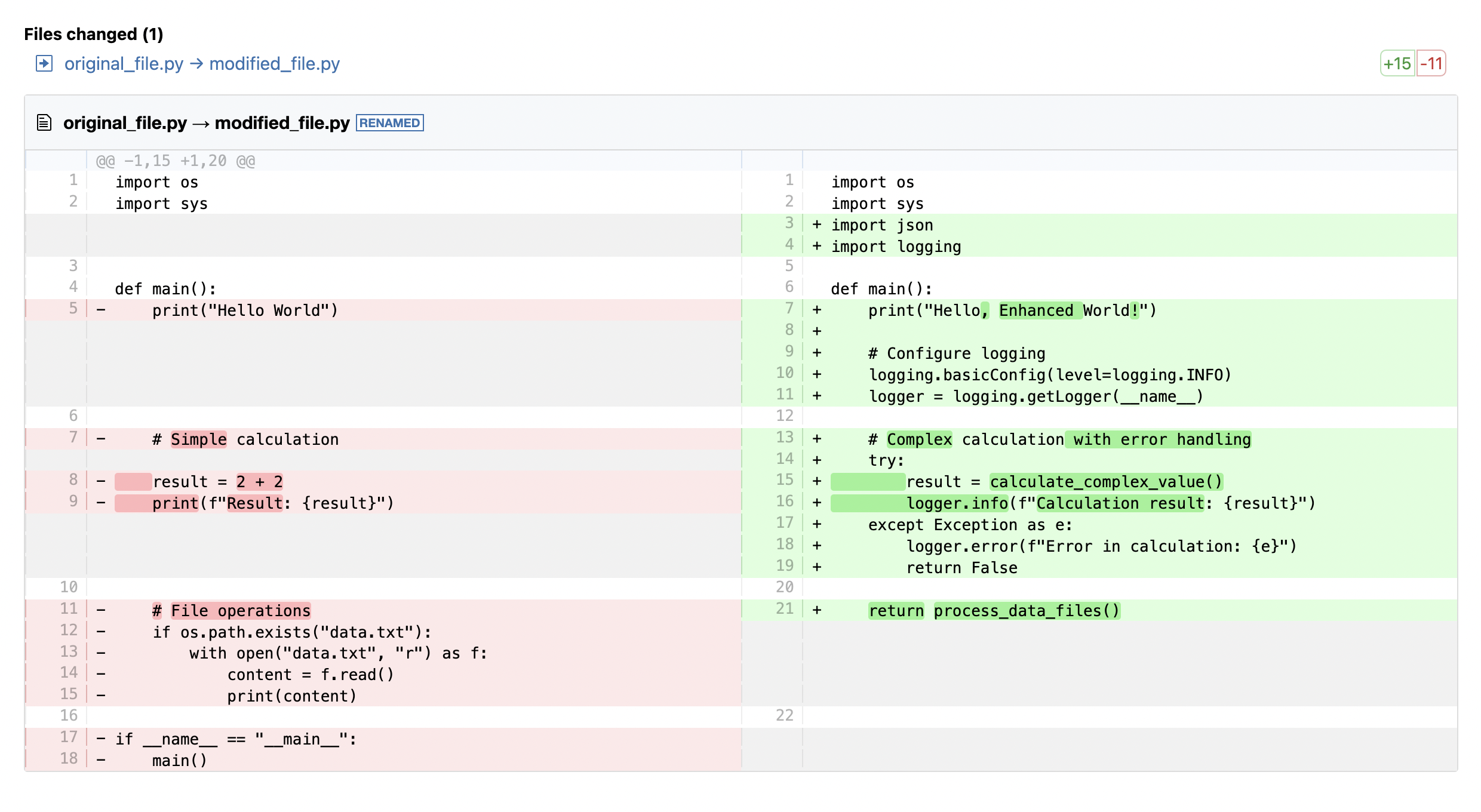
Beautiful diff visualization for Claude Desktop. Transform code diffs into stunning visual comparisons with GitHub Gist integration and local file output.
bunx @smithery/cli install @gorosun/unified-diff-mcp --client claude --config '{
  "defaultAutoOpen": true,
  "defaultOutputMode": "html",
  "githubUsername": "your_actual_github_username",
  "githubToken": "ghp_your_actual_token_here"
}'
git clone https://github.com/gorosun/unified-diff-mcp.git
cd unified-diff-mcp
bun install
| Tool | Purpose | Output | Best For |
|---|---|---|---|
visualize_diff_html_content | Browser display & sharing | GitHub Gist + HTML preview URL | Quick sharing, instant viewing |
visualize_diff_output_file | Local file storage | PNG/HTML files | Local storage, presentations |
| Purpose | Recommended Prompt | Tool Used | Output |
|---|---|---|---|
| Quick Preview | Please visualize and preview the following diff:以下のdiffを可視化してプレビューしてください | visualize_diff_html_content | GitHub Gist + HTML preview URL |
| Local Storage | Please visualize and save the following diff to a file:以下のdiffを可視化してファイルに保存してください | visualize_diff_output_file | Local HTML/PNG file |
| Share with Others | Please visualize the following diff and create a shareable link:以下のdiffを可視化して共有リンクを作成してください | visualize_diff_html_content | GitHub Gist with shareable URL |
| Image Export | Please visualize and save the following diff as a PNG image:以下のdiffを可視化してPNG画像で保存してください | visualize_diff_output_file | Local PNG image |
| Code Review | Please visualize the following diff in side-by-side format:以下のdiffをside-by-side形式で可視化してください | Either tool | Side-by-side comparison |
| Documentation | Please visualize and save the following diff as an HTML file:以下のdiffを可視化してHTMLファイルで保存してください | visualize_diff_output_file | Local HTML file |
| 🔒 Secure Sharing | Please visualize this diff with high security:以下のdiffを高セキュリティで可視化してください | visualize_diff_html_content | Secret Gist with auto-delete |
visualize_diff_html_content:
- Creates temporary GitHub Gist
- Auto-deletes after 30 minutes
- Instant browser-ready URLs
- Perfect for code reviews
visualize_diff_output_file:
- Saves PNG or HTML to local disk
- Auto-opens in browser (optional)
- Perfect for documentation
| Variable | Description | Default |
|---|---|---|
GITHUB_TOKEN | GitHub Personal Access Token (for Gist integration) | Required for visualize_diff_html_content |
DEFAULT_AUTO_OPEN | Auto-open generated files | false |
DEFAULT_OUTPUT_MODE | Default output format (html or image) | html |
gist scopeexport GITHUB_TOKEN="your_token_here"
macOS:
code ~/Library/Application\ Support/Claude/claude_desktop_config.json
Windows:
code %APPDATA%\Claude\claude_desktop_config.json
Configuration template:
{
  "mcpServers": {
    "unified-diff-mcp": {
      "command": "bun",
      "args": ["run", "/path/to/unified-diff-mcp/src/index.ts"],
      "env": {
        "GITHUB_TOKEN": "your_github_token_here",
        "DEFAULT_AUTO_OPEN": "true",
        "DEFAULT_OUTPUT_MODE": "html"
      }
    }
  }
}
| Parameter | Type | Default | Description |
|---|---|---|---|
diff | string | (required) | Unified diff text |
format | string | side-by-side | Display format (line-by-line or side-by-side) |
showFileList | boolean | true | Show file list summary |
highlight | boolean | true | Enable syntax highlighting |
oldPath | string | file.txt | Original file path |
newPath | string | file.txt | Modified file path |
autoOpen | boolean | false | Auto-open in browser |
| Parameter | Type | Default | Description |
|---|---|---|---|
expiryMinutes | number | 30 | Auto-delete time (1-1440 minutes) |
public | boolean | false | Public vs secret gist |
| Parameter | Type | Default | Description |
|---|---|---|---|
outputType | string | html | Output format (html or image) |
| Platform | Auto-Open | Commands |
|---|---|---|
| Windows | ✅ | start (primary), explorer (fallback) |
| macOS | ✅ | open (primary), AppleScript (fallback) |
| Linux | ✅ | xdg-open |
Development mode (with hot reload):
{
  "command": "bun",
  "args": ["--watch", "/path/to/unified-diff-mcp/src/index.ts"]
}
Production mode:
{
  "command": "bun",
  "args": ["run", "/path/to/unified-diff-mcp/src/index.ts"]
}
When GitHub Token isn't available or for secure sharing, you can choose from multiple security levels:
| Security Level | Configuration | Features | Use Cases |
|---|---|---|---|
| 🟢 Low | Secret Gist + 60min auto-delete | URL-only access | Code examples, learning |
| 🟡 Medium | Secret Gist + Password + 30min auto-delete | URL + Access code required | Team reviews |
| 🔴 High | Secret Gist + Password + 15min auto-delete | URL + Access code + Short duration | Sensitive code |
Please visualize this diff with high security:
--- a/config.js
+++ b/config.js
@@ -1,3 +1,4 @@
 const config = {
-  apiKey: 'old-key'
+  apiKey: 'new-secure-key',
+  timeout: 5000
 };
Response Example:
🔒 **Secure Diff Visualization**

🔴 **Security Level**: High Security - Secret Gist + Password (15min auto-delete)
📋 **Preview Link**: https://htmlpreview.github.io/?...
🔑 **Access Code**: `a7x9k2`
⏰ **Auto-delete**: 15 minutes
When GitHub Token is unavailable, the system falls back to local files:
For detailed setup and integration guides:
MIT License - see LICENSE file for details.
| Library | License | Purpose |
|---|---|---|
| diff2html | MIT | HTML diff generation |
| playwright-core | Apache 2.0 | Browser automation |
| @modelcontextprotocol/sdk | MIT | MCP integration |
Made with ❤️ for the Claude Desktop community
Claim this server with your GitHub account to request manual ownership verification.
Link to the catalog listing for Unified Diff MCP Server from your README. This badge does not certify ownership, compatibility or security.
[](https://awesome-mcp.com/servers/unified-diff-mcp)Public repository statistics could not be verified. Check the configured source address; unavailable counts are not zero.
Separate sources, scopes and periods. Never combined or treated as installations, active users or security reviews.
No reviewed package or image identity; download statistics are not listed yet.
Alternative and complementary servers in the same category
A directory listing describing a cancellation-letter and mailing-address service. The configured public GitHub repository returned 404 during source verification.

A hosted MCP service for browsing and searching through Singapore mobile-network proxies.

A directory listing describing a Markdown-to-PDF service. The configured public GitHub repository returned 404 during source verification.