
A directory listing describing a cancellation-letter and mailing-address service. The configured public GitHub repository returned 404 during source verification.
Repository stats unavailable
Developer Tools
A Unity Editor plugin hosting a local HTTP server, paired with a Node/TypeScript MCP server that exposes Unity Editor tools to Claude, focused on VRChat/UdonSharp and Basis worlds.
MCP server that drives the Unity Editor from MCP clients like Claude is cataloged as an MCP server attributed to swax. A Unity Editor plugin hosting a local HTTP server, paired with a Node/TypeScript MCP server that exposes Unity Editor tools to Claude, focused on VRChat/UdonSharp and Basis worlds. It is categorized under developer tools. See the capability inspector for recorded interfaces and their independent review status; consult upstream documentation for the current interface.
Installation configuration is not reviewed. No executable setup is offered for this entry; inspect the source repository before proceeding.
Catalog license label: CC BY-NC 4.0. Check the source repository's current license and terms before using, modifying or distributing this software.
Capability definitions are not reviewed. Unreviewed imports are not exposed as trusted interfaces.
No reviewed records to display. This does not establish that upstream lacks this capability.
No reviewed records to display. This does not establish that upstream lacks this capability.
No reviewed records to display. This does not establish that upstream lacks this capability.
Email delivery is not connected. This page does not collect email addresses or create subscriptions.
Browse the registry for current listings instead.
Reviews for MCP server that drives the Unity Editor from MCP clients like Claude are not available yet
Review publishing and storage are not connected. This page does not collect or publish ratings or comments, including after sign-in.
The Editor endpoint binds only to 127.0.0.1, and every command must carry a random per-Editor-session token read from the local instance registry.
It runs on Unity 2022.3 through Unity 6, with the command sandbox selecting a compile backend per project.
README.md · 36bce2af3386 · Fetched 2026-11-13 08:09:47 UTC
Original upstream text, without AI rewriting. Scripts, forms and unsafe links are filtered for safety.
Showing the last retrieved documentation snapshot; check the source for current changes.
Drive the Unity Editor from Claude (or any MCP client). A Unity Editor plugin hosts a small HTTP server inside the Editor, and a small MCP server (Node/TypeScript) sends it one request per tool call and exposes the tools to Claude — run C# in the Editor, read editor/scene state, and pull Unity console logs.
Forked from Arodoid/UnityMCP and extensively
refactored, with a focus on using Claude to build VRChat / UdonSharp and Basis
worlds — though most of it works for ordinary Unity development too. It runs on Unity
2022.3 through Unity 6 (the command sandbox picks a compile backend per project — see
below). The take_screenshot and get_object_details tools were ported from
setohima/UnityMCP-VRC and adapted to this
project's connection model.
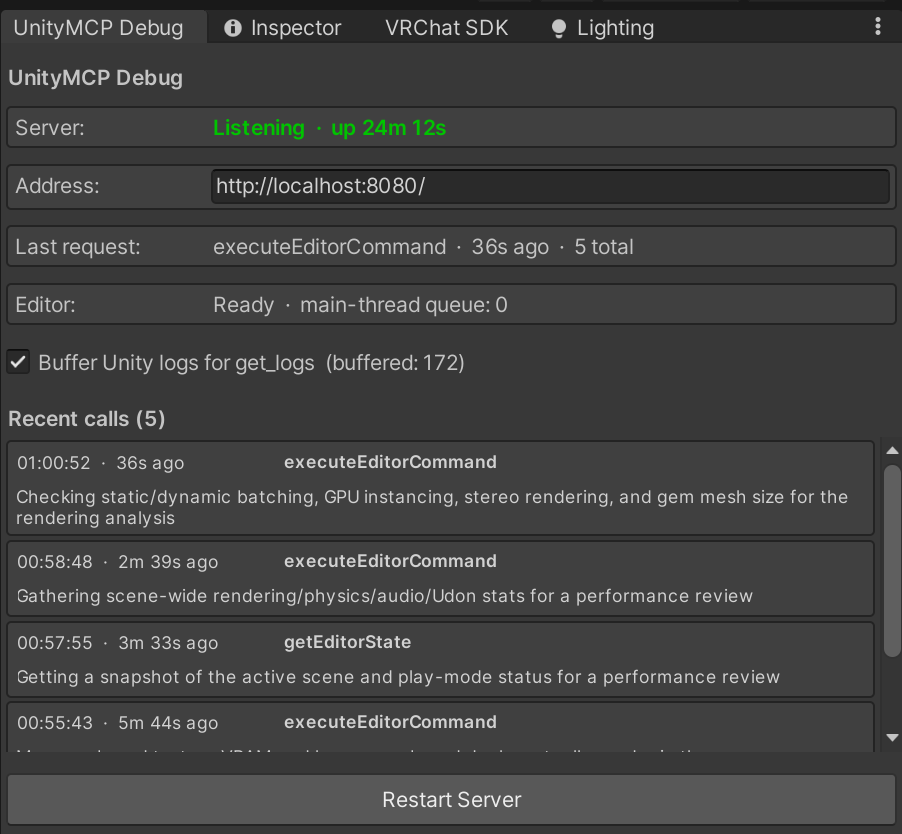
The Debug Window — the plugin's HTTP server, listening inside the Editor (each instance on its own port).
127.0.0.1, and every command must
carry a cryptographically random per-Editor-session token read from the local instance registry.execute_editor_command runs LLM-authored C# (its own usings,
classes, functions) with assembly references auto-discovered from everything loaded —
UnityEngine, packages, VRChat/UdonSharp, Basis, project scripts — no hand-maintained list.csc on .NET Standard projects (the Unity 6 default), where
the Mono path is unavailable. The fallback is detected once and cached; nothing to
configure. Detail: docs/005.get_editor_state returns scene/project state on demand, capped so
a big project can't blow up the context window.take_screenshot renders the Scene or game camera back to Claude
as an image, and get_object_details dumps a GameObject's components/bounds — so visual
iteration and inspection don't need hand-written C# each time.| Tool | What it does |
|---|---|
list_unity_instances | Lists the Unity Editors currently running (name, project, instanceId) so you can pick one. |
select_unity_instance | Chooses which Editor subsequent calls target by default (per session); calls can also override with instance=. |
execute_editor_command | Compiles and runs LLM-authored C# in the Editor; returns result + logs. Optional timeoutMs (default 60s, max 300s) for heavy ops like large imports. |
get_editor_state | Returns Unity/scene/project state on demand (bounded). |
get_object_details | Inspects one GameObject: transform, components, and size info (Renderer bounds, mesh vertex counts, shared mesh/material names). |
get_logs | Returns recent Unity console logs. |
clear_logs | Clears the Editor's buffered console logs (e.g. stale errors from a failed snippet) so later get_logs reads aren't ambiguous. |
take_screenshot | Renders the Scene view or game camera to a JPEG/PNG image, so Claude can see the result of edits. |
get_command_page | Fetches later pages of any oversized tool result that was paged — execute_editor_command, get_object_details, get_editor_state (used automatically). |
1. Build the MCP server
cd unity-mcp-server
npm install
npm run build      # compiles to build/index.js and copies text resources
2. Add the plugin to Unity
UnityMCPPlugin/ folder into your project's Assets/. Unity
regenerates .meta files on import — the repo doesn't track them.Debug Window and dock it; with Unity running, the
Server row should be green / Listening.3. Point Claude at it — add the stdio MCP server to your client. Claude Desktop (enable developer mode, then File > Settings):
{
  "mcpServers": {
    "unity": {
      "command": "node",
      "args": ["C:\\git\\UnityMCP\\unity-mcp-server\\build\\index.js"]
    }
  }
}
Or Claude Code: claude mcp add unity -- node C:\git\UnityMCP\unity-mcp-server\build\index.js
4. Verify — in the Debug Window, confirm Server: Listening and that an MCP Client row appears once Claude starts (attach more than one session and each shows up). Prompt Claude; if a script errors, diagnose it in UnityMCP > Script Tester.
Open as many projects as you like — each registers itself under its project-folder name. Within a Claude session:
list_unity_instances — see what's running (name · project · instanceId).select_unity_instance <name> — target one for the rest of the session; individual calls can
override with instance=<name>.Tools refuse to run until an instance is selected, so a call never lands in the wrong project. To pin
a session to one project up front, set UNITYMCP_INSTANCE=<name> in the MCP server's env (then the
agent never has to select). Discovery records live in %LOCALAPPDATA%\UnityMCP\instances\ (override
with UNITYMCP_REGISTRY_DIR); they also carry the private session token used by the local MCP server,
so don't copy or publish them. Each Editor shows its name + instanceId in the Debug Window.
The plugin restricts the registry directory and token files to the current OS user. A custom
UNITYMCP_REGISTRY_DIR must be a dedicated directory owned by that user; its permissions will be
restricted too. Use the same directory for the Editor and MCP server.
When upgrading from the unauthenticated transport, update the plugin in every Unity project, rebuild the MCP server, and restart your MCP client. Old plugins without a session token are not discovered by the updated server.
Loaded All Assemblies, in N seconds line in the Editor log, and only after a recompile. Add
real-time-scan exclusions for your project's Library/ folder, the Unity editor install, and the
Unity.exe/bee_backend.exe processes — in every active scanner (a machine can run more than
one, e.g. Windows Defender and a vendor agent such as HP Wolf Pro Security). Reloads typically
fall from ~20 s to ~3 s; since an execute_editor_command that writes a .cs triggers a reload,
this directly speeds up the MCP loop. Detail:
docs/004 — when a reload is slow.More detail in docs/001 — Architecture.
CopyProxyToUdon), why each step is needed, and how UdonSharpHelper packages it in one call.Licensed under the Creative Commons Attribution-NonCommercial 4.0 International (CC BY-NC 4.0).
Claim this server with your GitHub account to request manual ownership verification.
Link to the catalog listing for MCP server that drives the Unity Editor from MCP clients like Claude from your README. This badge does not certify ownership, compatibility or security.
[](https://awesome-mcp.com/servers/unitymcp-vrc)Public repository statistics could not be verified. Check the configured source address; unavailable counts are not zero.
Separate sources, scopes and periods. Never combined or treated as installations, active users or security reviews.
No reviewed package or image identity; download statistics are not listed yet.
Alternative and complementary servers in the same category
A directory listing describing a cancellation-letter and mailing-address service. The configured public GitHub repository returned 404 during source verification.

A hosted MCP service for browsing and searching through Singapore mobile-network proxies.

A directory listing describing a Markdown-to-PDF service. The configured public GitHub repository returned 404 during source verification.