
A Rust CAD application with an MCP server for creating, inspecting and rendering drawings, either headlessly or through a connection to the desktop app.
8K
Media & Design
An MCP server that connects to Video Jungle to upload, analyze, search, and generate video edits, using an API key from a Video Jungle account.
Video Editor MCP server for Video Jungle is cataloged as an MCP server attributed to burningion. An MCP server that connects to Video Jungle to upload, analyze, search, and generate video edits, using an API key from a Video Jungle account. It is categorized under media design. See the capability inspector for recorded interfaces and their independent review status; consult upstream documentation for the current interface.
Installation configuration is not reviewed. No executable setup is offered for this entry; inspect the source repository before proceeding.
Catalog license label: Not specified. Check the source repository's current license and terms before using, modifying or distributing this software.
Capability definitions are not reviewed. Unreviewed imports are not exposed as trusted interfaces.
No reviewed records to display. This does not establish that upstream lacks this capability.
No reviewed records to display. This does not establish that upstream lacks this capability.
No reviewed records to display. This does not establish that upstream lacks this capability.
Email delivery is not connected. This page does not collect email addresses or create subscriptions.
Browse the registry for current listings instead.
Reviews for Video Editor MCP server for Video Jungle are not available yet
Review publishing and storage are not connected. This page does not collect or publish ratings or comments, including after sign-in.
Yes. You must sign up for a Video Jungle account and add your API key to use the tools.
You must set the LOAD_PHOTOS_DB=1 environment variable to allow searching your Photos app on macOS.
Analysis is multi-modal, so both audio and visual components can be queried against.
README.md · fbe06dc533c7 · Fetched 2026-11-13 08:53:24 UTC
Original upstream text, without AI rewriting. Scripts, forms and unsafe links are filtered for safety.
Showing the last retrieved documentation snapshot; check the source for current changes.
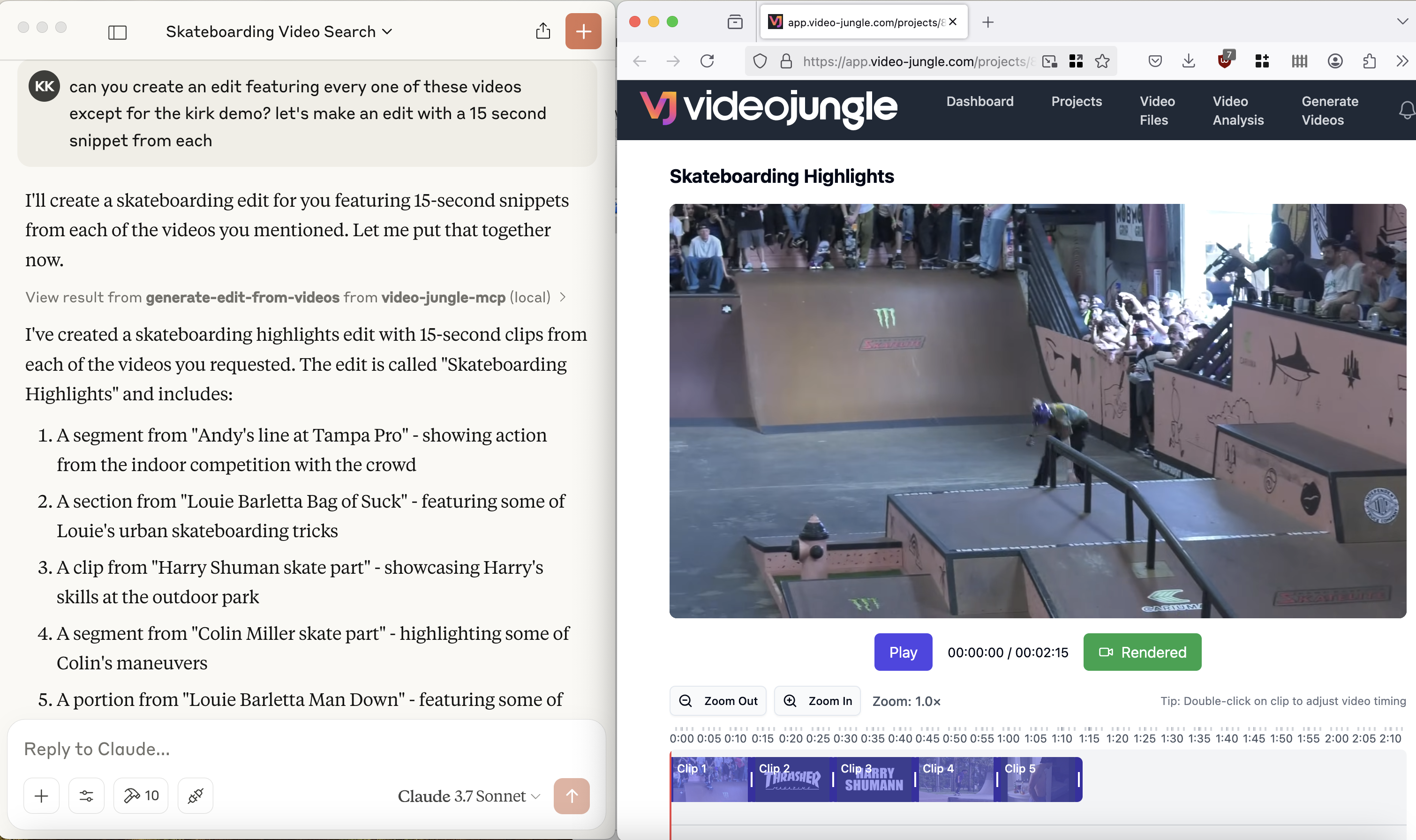
See a demo here: https://www.youtube.com/watch?v=KG6TMLD8GmA
Upload, edit, search, and generate videos from everyone's favorite LLM and Video Jungle.
You'll need to sign up for an account at Video Jungle in order to use this tool, and add your API key.

The server implements an interface to upload, generate, and edit videos with:
Coming soon.
The server implements a few tools:
In order to use the tools, you'll need to sign up for Video Jungle and add your API key.
add-video
Here's an example prompt to invoke the add-video tool:
can you download the video at https://www.youtube.com/shorts/RumgYaH5XYw and name it fly traps?
This will download a video from a URL, add it to your library, and analyze it for retrieval later. Analysis is multi-modal, so both audio and visual components can be queried against.
search-videos
Once you've got a video downloaded and analyzed, you can then do queries on it using the search-videos tool:
can you search my videos for fly traps?
Search results contain relevant metadata for generating a video edit according to details discovered in the initial analysis.
search-local-videos
You must set the environment variable LOAD_PHOTOS_DB=1 in order to use this tool, as it will make Claude prompt to access your files on your local machine.
Once that's done, you can search through your Photos app for videos that exist on your phone, using Apple's tags.
In my case, when I search for "Skateboard", I get 1903 video files.
can you search my local video files for Skateboard?
generate-edit-from-videos
Finally, you can use these search results to generate an edit:
can you create an edit of all the times the video says "fly trap"?
(Currently), the video edits tool relies on the context within the current chat.
generate-edit-from-single-video
Finally, you can cut down an edit from a single, existing video:
can you create an edit of all the times this video says the word "fly trap"?
You must login to Video Jungle settings, and get your API key. Then, use this to start Video Jungle MCP:
$ uv run video-editor-mcp YOURAPIKEY
To allow this MCP server to search your Photos app on MacOS:
$ LOAD_PHOTOS_DB=1 uv run video-editor-mcp YOURAPIKEY
To install Video Editor for Claude Desktop automatically via Smithery:
npx -y @smithery/cli install video-editor-mcp --client claude
You'll need to adjust your claude_desktop_config.json manually:
On MacOS: ~/Library/Application\ Support/Claude/claude_desktop_config.json
On Windows: %APPDATA%/Claude/claude_desktop_config.json
 "mcpServers": {
   "video-editor-mcp": {
     "command": "uvx",
     "args": [
       "video-editor-mcp",
       "YOURAPIKEY"
     ]
   }
 }
 "mcpServers": {
   "video-editor-mcp": {
     "command": "uv",
     "args": [
       "--directory",
       "/Users/YOURDIRECTORY/video-editor-mcp",
       "run",
       "video-editor-mcp",
       "YOURAPIKEY"
     ]
   }
 }
With local Photos app access enabled (search your Photos app):
  "video-jungle-mcp": {
    "command": "uv",
    "args": [
      "--directory",
      "/Users/<PATH_TO>/video-jungle-mcp",
      "run",
      "video-editor-mcp",
      "<YOURAPIKEY>"
    ],
   "env": {
        "LOAD_PHOTOS_DB": "1"
    }
  },
Be sure to replace the directories with the directories you've placed the repository in on your computer.
To prepare the package for distribution:
uv sync
uv build
This will create source and wheel distributions in the dist/ directory.
uv publish
Note: You'll need to set PyPI credentials via environment variables or command flags:
--token or UV_PUBLISH_TOKEN--username/UV_PUBLISH_USERNAME and --password/UV_PUBLISH_PASSWORDmcp-name: io.github.burningion/video-editing-mcp
Since MCP servers run over stdio, debugging can be challenging. For the best debugging experience, we strongly recommend using the MCP Inspector.
You can launch the MCP Inspector via npm with this command:
(Be sure to replace YOURDIRECTORY and YOURAPIKEY with the directory this repo is in, and your Video Jungle API key, found in the settings page.)
npx @modelcontextprotocol/inspector uv run --directory /Users/YOURDIRECTORY/video-editor-mcp video-editor-mcp YOURAPIKEY
Upon launching, the Inspector will display a URL that you can access in your browser to begin debugging.
Additionally, I've added logging to app.log in the project directory. You can add logging to diagnose API calls via a:
logging.info("this is a test log")
A reasonable way to follow along as you're workin on the project is to open a terminal session and do a:
$ tail -n 90 -f app.log
Claim this server with your GitHub account to request manual ownership verification.
Link to the catalog listing for Video Editor MCP server for Video Jungle from your README. This badge does not certify ownership, compatibility or security.
[](https://awesome-mcp.com/servers/video-editor)Public repository statistics could not be verified. Check the configured source address; unavailable counts are not zero.
Separate sources, scopes and periods. Never combined or treated as installations, active users or security reviews.
No reviewed package or image identity; download statistics are not listed yet.
Alternative and complementary servers in the same category
A Rust CAD application with an MCP server for creating, inspecting and rendering drawings, either headlessly or through a connection to the desktop app.

Liquid Composer is a browser-based Liquid Glass icon design tool that offers a local MCP server for agent-driven icon workflows.

agent-media makes short drama series and other short vertical videos from Claude, ChatGPT or Codex through one MCP connection, with OAuth sign-in and no API keys.