
A Model Context Protocol (MCP) server for controlling Chrome with debugging capabilities, userscript injection, and extension support.
Repository stats unavailable
Browser & Scraping
A Model Context Protocol server that uses Playwright to inspect and test web interfaces, offering screenshots, DOM inspection, workflow validation, console and performance capture, API testing, and visual comparison.
VUDA — Visual UI Debug Agent MCP server is cataloged as an MCP server attributed to samihalawa. A Model Context Protocol server that uses Playwright to inspect and test web interfaces, offering screenshots, DOM inspection, workflow validation, console and performance capture, API testing, and visual comparison. It is categorized under browser automation. See the capability inspector for recorded interfaces and their independent review status; consult upstream documentation for the current interface.
Installation configuration is not reviewed. No executable setup is offered for this entry; inspect the source repository before proceeding.
Catalog license label: ISC. Check the source repository's current license and terms before using, modifying or distributing this software.
Capability definitions are not reviewed. Unreviewed imports are not exposed as trusted interfaces.
No reviewed records to display. This does not establish that upstream lacks this capability.
No reviewed records to display. This does not establish that upstream lacks this capability.
No reviewed records to display. This does not establish that upstream lacks this capability.
Email delivery is not connected. This page does not collect email addresses or create subscriptions.
Browse the registry for current listings instead.
Reviews for VUDA — Visual UI Debug Agent MCP server are not available yet
Review publishing and storage are not connected. This page does not collect or publish ratings or comments, including after sign-in.
Yes. The browser can run locally, on Browserbase, on Anchor Browser, or at an existing CDP endpoint, and every tool uses the same selected browser runtime.
VUDA returns screenshots as MCP image content and exposes generated screenshots, browser status, and debugging prompts as MCP resources.
No. No provider account is required for local mode.
README.md · 33af9e8a58a0 · Fetched 2026-11-13 11:40:14 UTC
Original upstream text, without AI rewriting. Scripts, forms and unsafe links are filtered for safety.
Showing the last retrieved documentation snapshot; check the source for current changes.


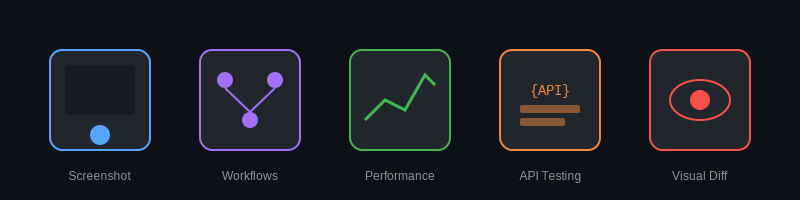
Give an MCP-compatible AI client a real browser, screenshots, DOM inspection, workflow validation, console capture, API checks, and visual comparison.
29 MCP tools · Local, Browserbase, Anchor, or any CDP browser · Node.js 20+
VUDA (Visual UI Debug Agent) is a Model Context Protocol server for inspecting and testing web interfaces with Playwright. The MCP server runs locally over standard input/output; its browser can run locally, on Browserbase, on Anchor Browser, or at an existing CDP endpoint. Every tool uses the same selected browser runtime.
npx -y visual-ui-debug-agent-mcp
The default local mode needs a Chromium-compatible browser. If one is not already available, install the matching browser once:
npx playwright install chromium
{
  "mcpServers": {
    "vuda": {
      "command": "npx",
      "args": ["-y", "visual-ui-debug-agent-mcp"]
    }
  }
}
Restart the client after changing its MCP configuration. The server writes protocol messages to stdout and diagnostics to its temporary log file.
No provider account is required for local mode.
Docker users can use the same stdio transport:
{
  "mcpServers": {
    "vuda": {
      "command": "docker",
      "args": ["run", "--interactive", "--rm", "ghcr.io/samihalawa/visual-ui-debug-agent-mcp:latest"]
    }
  }
}
To use provider credentials from a file with Docker, add "--env-file", "/absolute/path/to/.env" immediately after "run" in the args array.
Ask your client to:
Use VUDA to inspect https://example.com, capture a screenshot, list the
interactive elements, and report console errors and obvious layout issues.
| Tool | Purpose |
|---|---|
enhanced_page_analyzer | Screenshot, console, performance, and interactive-element analysis |
screenshot_url | Capture a URL, viewport, full page, or selected element |
batch_screenshot_urls | Capture multiple URLs for side-by-side review |
screenshot_local_files | Render and capture local HTML files |
dom_inspector | Return element properties, children, and computed styles |
visual_comparison | Compare two rendered pages or elements |
| Tool | Purpose |
|---|---|
ui_workflow_validator | Execute and verify a described user journey |
navigation_flow_validator | Validate a sequence of browser actions |
console_monitor | Capture browser console messages over a time window |
performance_analysis | Collect navigation and page performance metrics |
api_endpoint_tester | Exercise multiple HTTP endpoints |
sitemap_crawler | Discover and inspect pages from a sitemap |
tunnel_helper | Store or retrieve a remote tunnel URL and setup guidance |
debug_memory | Keep small debugging notes during one server session |
playwright_navigate, playwright_click, playwright_iframe_click, playwright_fill, playwright_select, playwright_hover, playwright_evaluate, playwright_console_logs, playwright_get_visible_text, playwright_get_visible_html, playwright_go_back, playwright_go_forward, playwright_press_key, playwright_drag, and playwright_screenshot.
VUDA reads environment variables normally and automatically loads .env from its working directory. Copy .env.example when running from a source checkout. For an npx installation, either put .env in the MCP process working directory, pass variables in the client configuration, or set DOTENV_CONFIG_PATH to an absolute .env path.
| Mode | Required configuration | Account state |
|---|---|---|
| Local (default) | VUDA_BROWSER_PROVIDER=local | VUDA_STORAGE_STATE_PATH, cookie JSON, or a cookie file |
| Browserbase | VUDA_BROWSER_PROVIDER=browserbase, BROWSERBASE_API_KEY | Reuse BROWSERBASE_CONTEXT_ID or inject cookies |
| Anchor Browser | VUDA_BROWSER_PROVIDER=anchor, ANCHOR_API_KEY | Use an Anchor profile in VUDA_ANCHOR_SESSION_JSON or inject cookies |
| Existing browser | VUDA_BROWSER_PROVIDER=cdp, VUDA_CDP_URL | Uses that browser context; cookie injection is optional |
Browserbase example:
VUDA_BROWSER_PROVIDER=browserbase
BROWSERBASE_API_KEY=your_api_key
BROWSERBASE_PROJECT_ID=your_project_id
BROWSERBASE_CONTEXT_ID=your_saved_context_id
Anchor Browser example with a persistent authenticated profile:
VUDA_BROWSER_PROVIDER=anchor
ANCHOR_API_KEY=your_api_key
VUDA_ANCHOR_SESSION_JSON={"browser":{"profile":{"name":"vuda","persist":true}}}
All 29 tools keep their existing names and inputs in every mode. Read the MCP resource browser://status to confirm the selected provider, current connection state, session ID, and whether a live view is available. CDP and live-view URLs are never returned.
Cookie injection works with every provider. Supply a Playwright cookie array inline or by file:
VUDA_COOKIES_FILE=/absolute/path/to/cookies.json
# VUDA_COOKIES_JSON=[{"name":"session","value":"...","domain":"example.com","path":"/"}]
For local mode, VUDA_STORAGE_STATE_PATH loads a Playwright storage-state file. Set VUDA_PERSIST_STORAGE_STATE=true to write the updated state back when VUDA exits cleanly. Browserbase Contexts and Anchor profiles are the provider-native choices for state that must survive multiple cloud sessions.
Provider-specific session options remain available without another wrapper or SDK:
VUDA_BROWSERBASE_SESSION_JSON is merged into Browserbase's create-session request.VUDA_ANCHOR_SESSION_JSON is sent as Anchor's create-session request.All timeout settings are optional:
| Variable | Default | Purpose |
|---|---|---|
VUDA_DEFAULT_TIMEOUT | 15000 | General Playwright timeout in milliseconds |
VUDA_NAVIGATION_TIMEOUT | 15000 | Navigation timeout |
VUDA_SELECTOR_TIMEOUT | 12000 | Selector wait timeout |
VUDA_STABILITY_WAIT | 5000 | Delay after navigation before capture |
VUDA_UI_UPDATE_WAIT | 1000 | Delay for short UI updates |
VUDA_PERFORMANCE_THRESHOLD | 15000 | Slow-page threshold |
VUDA_INTERACTION_DELAY | 500 | Delay between direct interactions |
Example:
{
  "mcpServers": {
    "vuda": {
      "command": "npx",
      "args": ["-y", "visual-ui-debug-agent-mcp"],
      "env": {
        "VUDA_NAVIGATION_TIMEOUT": "30000",
        "VUDA_STABILITY_WAIT": "2000"
      }
    }
  }
}
git clone https://github.com/samihalawa/visual-ui-debug-agent-mcp.git
cd visual-ui-debug-agent-mcp
npm ci
npm test
npm test builds the TypeScript server, starts it through the MCP stdio transport, verifies the exact 29-tool inventory, reads a bundled resource, exercises a stateful tool call, and captures a real browser screenshot.
It also validates Browserbase and Anchor session request/cleanup shapes, CDP selection, cookie loading, and the crawler's browser initialization. Provider calls use deterministic mocks in CI; use your own .env for a live cloud session.
Before opening a pull request, also run:
npm audit
npm pack --dry-run
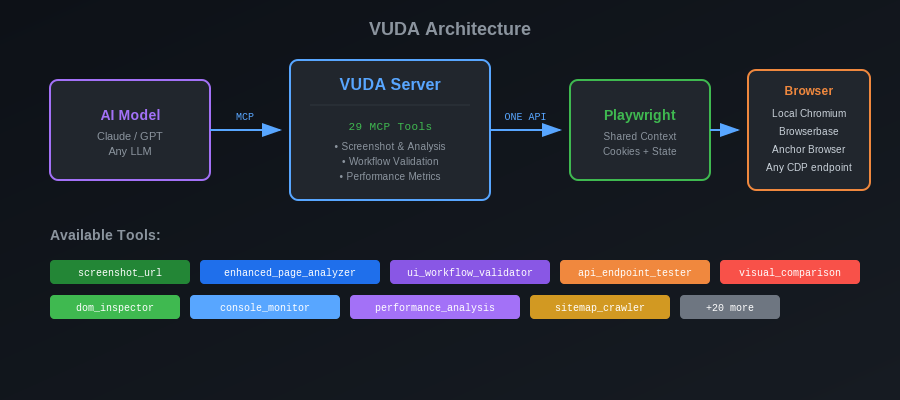
VUDA keeps one Playwright control plane across all providers. Local mode creates isolated contexts for page-level analyses; remote modes reuse the provider context so authenticated state survives across tools. VUDA returns screenshots as MCP image content and exposes generated screenshots, browser status, and debugging prompts as MCP resources.
Issues and focused pull requests are welcome. See CONTRIBUTING.md for the development workflow and review checklist. Release history is recorded in CHANGELOG.md.
ISC © 2023–2026 Sami Halawa and contributors.
Claim this server with your GitHub account to request manual ownership verification.
Link to the catalog listing for VUDA — Visual UI Debug Agent MCP server from your README. This badge does not certify ownership, compatibility or security.
[](https://awesome-mcp.com/servers/visual-ui-debug-agent-mcp)Public repository statistics could not be verified. Check the configured source address; unavailable counts are not zero.
Separate sources, scopes and periods. Never combined or treated as installations, active users or security reviews.
No reviewed package or image identity; download statistics are not listed yet.
Alternative and complementary servers in the same category
A Model Context Protocol (MCP) server for controlling Chrome with debugging capabilities, userscript injection, and extension support.

An MCP server that lets AI assistants browse websites and extract content using optional CSS selectors.

An MCP server that reads pages, fills forms, takes screenshots, and hands the browser to a person for logins or CAPTCHAs.