
An AI receptionist platform with an MCP server for accessing business calls, contacts and appointments from AI assistants.
52
Communication
An MCP server that lets AI assistants initiate and manage real-time voice calls using Twilio and OpenAI's GPT-4o Realtime model.
Voice Call MCP Server is cataloged as an MCP server attributed to lukaskai. An MCP server that lets AI assistants initiate and manage real-time voice calls using Twilio and OpenAI's GPT-4o Realtime model. It is categorized under communication social. See the capability inspector for recorded interfaces and their independent review status; consult upstream documentation for the current interface.
Installation configuration is not reviewed. No executable setup is offered for this entry; inspect the source repository before proceeding.
Catalog license label: MIT License. Check the source repository's current license and terms before using, modifying or distributing this software.
Capability definitions are not reviewed. Unreviewed imports are not exposed as trusted interfaces.
No reviewed records to display. This does not establish that upstream lacks this capability.
No reviewed records to display. This does not establish that upstream lacks this capability.
No reviewed records to display. This does not establish that upstream lacks this capability.
Email delivery is not connected. This page does not collect email addresses or create subscriptions.
Browse the registry for current listings instead.
Reviews for Voice Call MCP Server are not available yet
Review publishing and storage are not connected. This page does not collect or publish ratings or comments, including after sign-in.
It uses Twilio for placing calls and OpenAI's GPT-4o Realtime model for real-time audio processing.
Phone numbers must be in E.164 format, starting with a plus sign and country code.
README.md · 13e3bd99ed2d · Fetched 2026-11-13 09:00:34 UTC
Original upstream text, without AI rewriting. Scripts, forms and unsafe links are filtered for safety.
Showing the last retrieved documentation snapshot; check the source for current changes.
A Model Context Protocol (MCP) server that enables Claude and other AI assistants to initiate and manage voice calls using Twilio and OpenAI (GPT-4o Realtime model).
Use this as a base to kick-start your AI-powered voice calling explorations, save time and develop additional functionality on top of it.
sequenceDiagram
    participant AI as AI Assistant (e.g., Claude)
    participant MCP as MCP Server
    participant Twilio as Twilio
    participant Phone as Destination Phone
    participant OpenAI as OpenAI

    AI->>MCP: 1) Initiate outbound call request <br>(POST /calls)
    MCP->>Twilio: 2) Place outbound call via Twilio API
    Twilio->>Phone: 3) Ring the destination phone
    Twilio->>MCP: 4) Call status updates & audio callbacks (webhooks)
    MCP->>OpenAI: 5) Forward real-time audio to OpenaAI's realtime model
    OpenAI->>MCP: 6) Return voice stream
    MCP->>Twilio: 7) Send voice stream
    Twilio->>Phone: 8) Forward voice stream
    Note over Phone: Two-way conversation continues <br>until the call ends
The Model Context Protocol (MCP) bridges the gap between AI assistants and real-world actions. By implementing MCP, this server allows AI models like Claude to:
This open-source implementation provides transparency and customizability, allowing developers to extend functionality while maintaining control over their data and privacy.
nvm (Node Version Manager):
nvm install 22
nvm use 22
Clone the repository
git clone https://github.com/lukaskai/voice-call-mcp-server.git
cd voice-call-mcp-server
Install dependencies and build
npm install
npm run build
The server requires several environment variables:
TWILIO_ACCOUNT_SID: Your Twilio account SIDTWILIO_AUTH_TOKEN: Your Twilio auth tokenTWILIO_NUMBER: Your Twilio numberOPENAI_API_KEY: Your OpenAI API keyNGROK_AUTHTOKEN: Your ngrok authtokenRECORD_CALLS: Set to "true" to record calls (optional)To use this server with Claude Desktop, add the following to your configuration file:
macOS: ~/Library/Application Support/Claude/claude_desktop_config.json
Windows: %APPDATA%\Claude\claude_desktop_config.json
{
  "mcpServers": {
    "voice-call": {
      "command": "node",
      "args": ["/path/to/your/mcp-new/dist/start-all.cjs"],
      "env": {
        "TWILIO_ACCOUNT_SID": "your_account_sid",
        "TWILIO_AUTH_TOKEN": "your_auth_token",
        "TWILIO_NUMBER": "your_e.164_format_number",
        "OPENAI_API_KEY": "your_openai_api_key",
        "NGROK_AUTHTOKEN": "your_ngrok_authtoken"
      }
    }
  }
}
After that, restart Claude Desktop to reload the configuration. If connected, you should see Voice Call under the 🔨 menu.
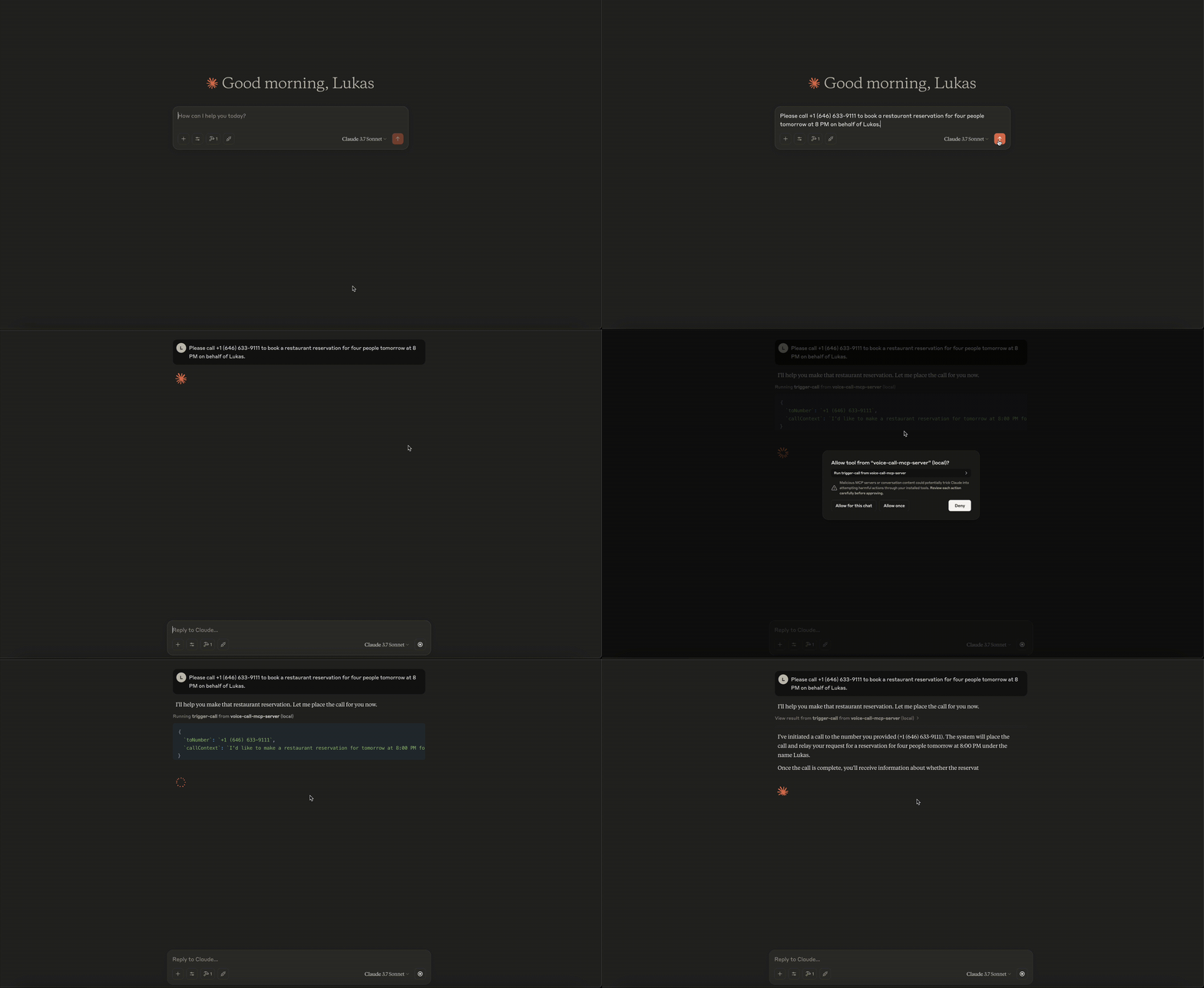
Here are some natural ways to interact with the server through Claude:
Can you call +1-123-456-7890 and let them know I'll be 15 minutes late for our meeting?
Please call Delicious Restaurant at +1-123-456-7890 and make a reservation for 4 people tonight at 7:30 PM. Please speak in German.
Please call Expert Dental NYC (+1-123-456-7899) and reschedule my Monday appointment to next Friday between 4–6pm.
Common error messages and solutions:
"Phone number must be in E.164 format"
"Invalid credentials"
"OpenAI API error"
"Ngrok tunnel failed to start"
"OpenAI Realtime does not detect the end of voice input, or is lagging."
Contributions are welcome! Here are some areas we're looking to improve:
If you'd like to contribute, please open an issue to discuss your ideas before submitting a pull request.
This project is licensed under the MIT License - see the LICENSE file for details.
Please do not include any sensitive information (like phone numbers or API credentials) in GitHub issues or pull requests. This server handles sensitive communications; deploy it responsibly and ensure all credentials are kept secure.
We’re hiring engineers to build at the frontier of voice AI — and bake it into a next-gen telco.
Curious? Head to careers.popcorn.space 🍿 !
Claim this server with your GitHub account to request manual ownership verification.
Link to the catalog listing for Voice Call MCP Server from your README. This badge does not certify ownership, compatibility or security.
[](https://awesome-mcp.com/servers/voice-call-mcp-server)Public repository statistics could not be verified. Check the configured source address; unavailable counts are not zero.
Separate sources, scopes and periods. Never combined or treated as installations, active users or security reviews.
No reviewed package or image identity; download statistics are not listed yet.
Alternative and complementary servers in the same category
An AI receptionist platform with an MCP server for accessing business calls, contacts and appointments from AI assistants.
Pidgeon provides an MCP server and an email inbox API that gives AI agents their own addresses for sending, awaiting, and replying to email.

A Telegram CLI with background sync that can run an optional MCP server for a personal account using MTProto, not the bot API.
