


Store and retrieve entities, relations and observations in a persistent local knowledge graph.
create_entitiescreate_relationsadd_observations+6 more
92K
AI & Multi-Agent
An MCP server included in the voyageai-cli that exposes tools for embedding, vector search, reranking, ingestion, and concept explanations to MCP-compatible AI agents over stdio or HTTP.
Vai MCP server exposing RAG and embedding tools to AI agents is cataloged as an MCP server attributed to mrlynn. An MCP server included in the voyageai-cli that exposes tools for embedding, vector search, reranking, ingestion, and concept explanations to MCP-compatible AI agents over stdio or HTTP. It is categorized under ai agents-models. See the capability inspector for recorded interfaces and their independent review status; consult upstream documentation for the current interface.
Installation configuration is not reviewed. No executable setup is offered for this entry; inspect the source repository before proceeding.
Catalog license label: MIT. Check the source repository's current license and terms before using, modifying or distributing this software.
Capability definitions are not reviewed. Unreviewed imports are not exposed as trusted interfaces.
No reviewed records to display. This does not establish that upstream lacks this capability.
No reviewed records to display. This does not establish that upstream lacks this capability.
No reviewed records to display. This does not establish that upstream lacks this capability.
Email delivery is not connected. This page does not collect email addresses or create subscriptions.
Browse the registry for current listings instead.
Reviews for Vai MCP server exposing RAG and embedding tools to AI agents are not available yet
Review publishing and storage are not connected. This page does not collect or publish ratings or comments, including after sign-in.
Yes; in addition to the default local stdio mode, it supports an HTTP transport on a configurable port for remote, multi-client use.
No; the install command merges into existing configs and does not touch other MCP servers.
README.md · 19bced702921 · Fetched 2026-11-13 12:56:13 UTC
Original upstream text, without AI rewriting. Scripts, forms and unsafe links are filtered for safety.
Showing the last retrieved documentation snapshot; check the source for current changes.




The fastest path from documents to semantic search. Chunk files, generate Voyage AI embeddings, store in MongoDB Atlas, and query with two-stage retrieval — from the terminal, your browser, or a desktop app.
⚠️ Disclaimer: This is an independent, community-built tool — not an official product of MongoDB, Inc. or Voyage AI. See Disclaimer for details.
Voyage AI provides state-of-the-art embedding models with the best quality-to-cost ratio in the industry. Here's why developers choose Voyage AI:
| Advantage | What It Means |
|---|---|
| 🎯 #1 on RTEB | Voyage 4 ranks first on retrieval benchmarks, outperforming OpenAI, Cohere, and other providers |
| 💰 Up to 83% Cost Savings | Asymmetric retrieval: embed docs with voyage-4-lite, query with voyage-4-large, same quality, fraction of the cost |
| 🔗 Shared Embedding Space | All Voyage 4 models produce compatible embeddings, so you can mix and match for optimal cost-quality tradeoffs |
| 🏢 Domain-Specific Models | Specialized models for code, finance, law, and multilingual content that beat general-purpose alternatives |
| ⚡ Two-Stage Retrieval | Rerank-2.5 boosts search precision by re-scoring candidates with a powerful cross-encoder |
Get started:
# Get a free API key at https://dash.voyageai.com
vai quickstart    # Interactive tutorial — zero to semantic search in 2 minutes
Learn more: Voyage AI Docs · Pricing · Blog
🖥️ CLIvai22 commands · 5 chunking strategies End-to-end RAG pipeline from your terminal curl -fsSL https://vaicli.com/install.sh | sh
|
🌐 Web Playgroundvai playground7 interactive tabs + Workflow Store with 20+ installable workflow packages Launches in your browser |
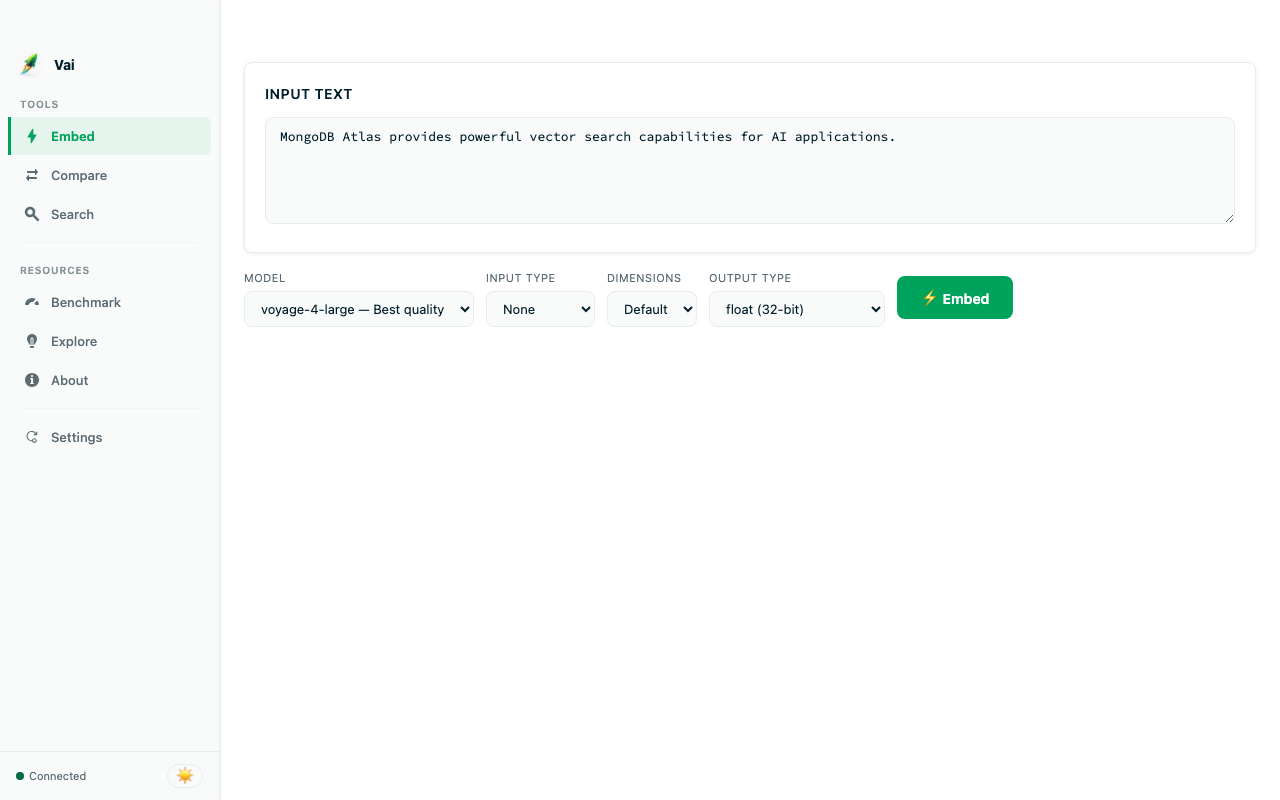
💻 Desktop AppStandalone Electron appSecure keychain storage, dark/light themes, MongoDB LeafyGreen design system Download from GitHub Releases |
🏪 Workflow Storevai store or PlaygroundBrowse, install, and run pre-built RAG workflows from npm Official + community packages |
A standalone desktop application built with Electron and the MongoDB LeafyGreen design system. Everything the CLI and playground can do — in a native app experience.
Download the latest release for your platform from GitHub Releases:
| Platform | Download |
|---|---|
| macOS (Apple Silicon) | .dmg |
| macOS (Intel) | .dmg |
| Windows | .exe installer |
| Linux | .AppImage / .deb |
Prefer the CLI? Install with
curl -fsSL https://vaicli.com/install.sh | shorbrew install mrlynn/vai/vai
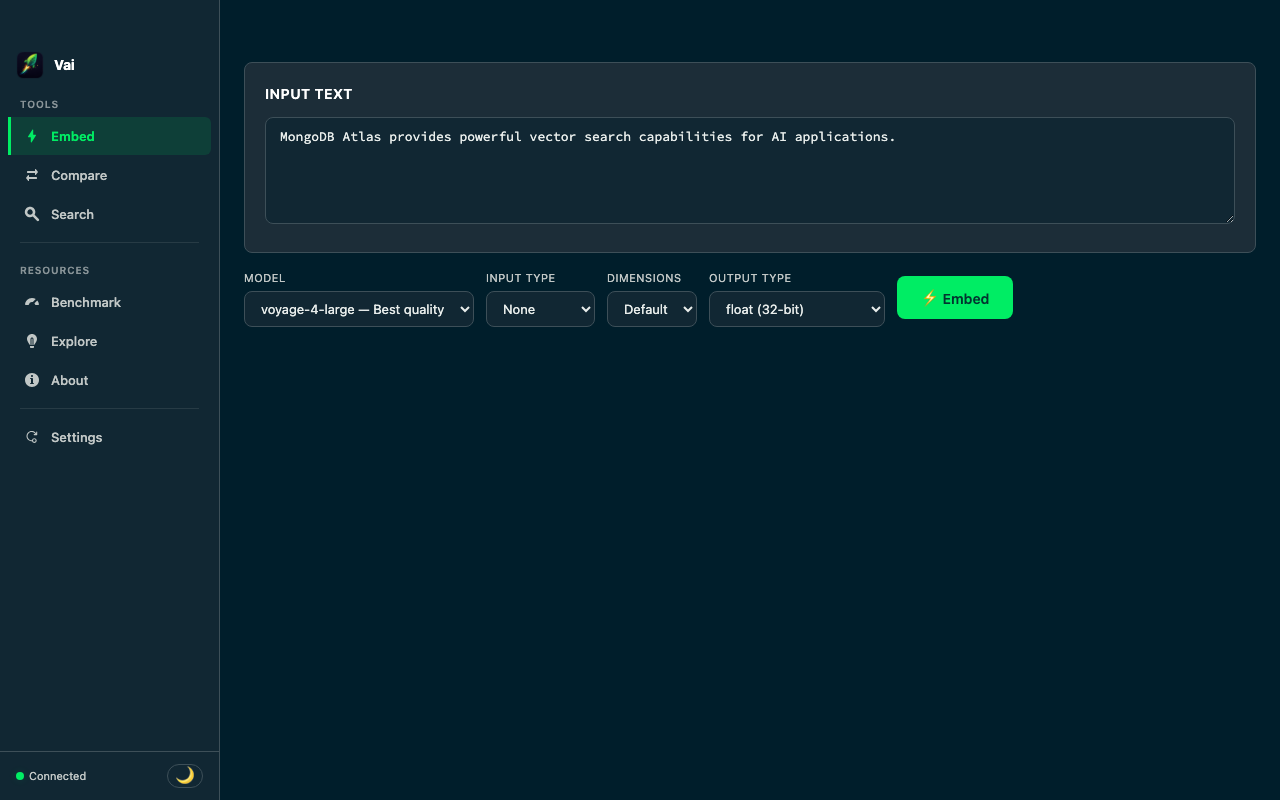
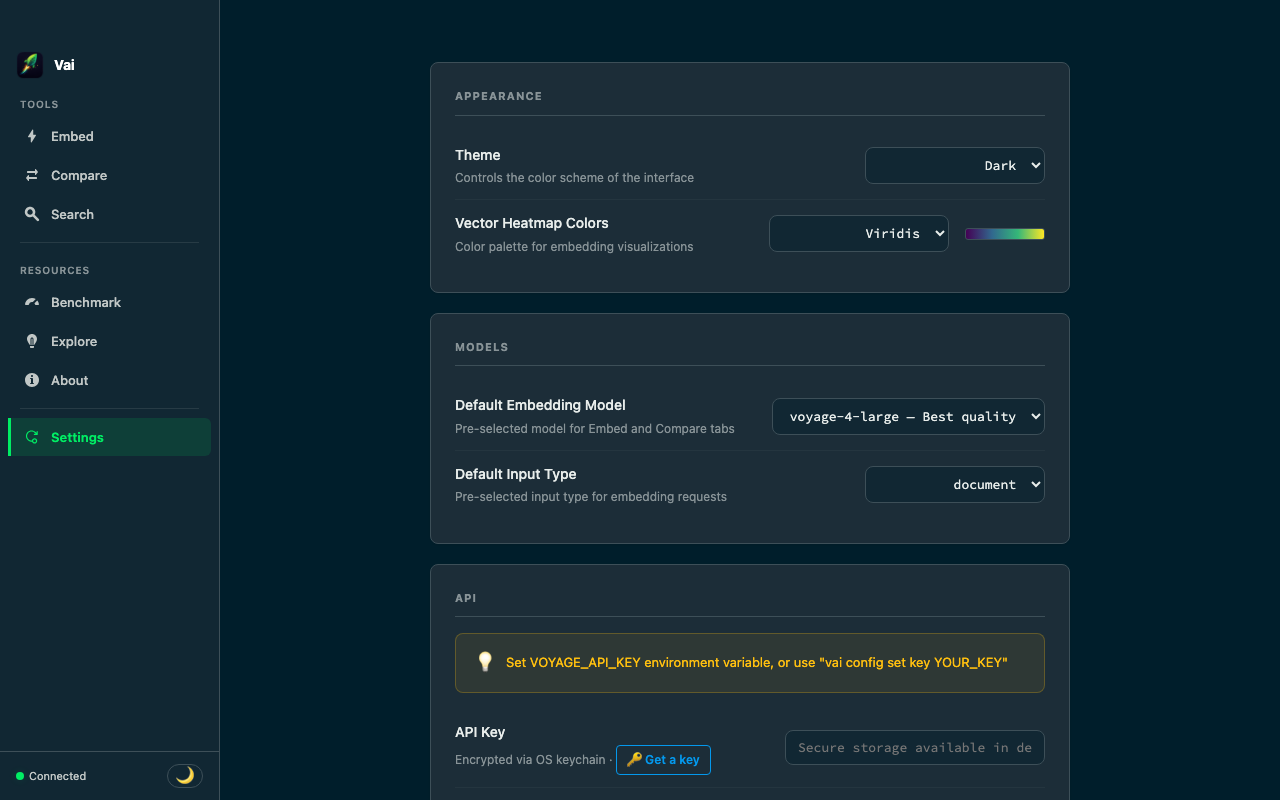
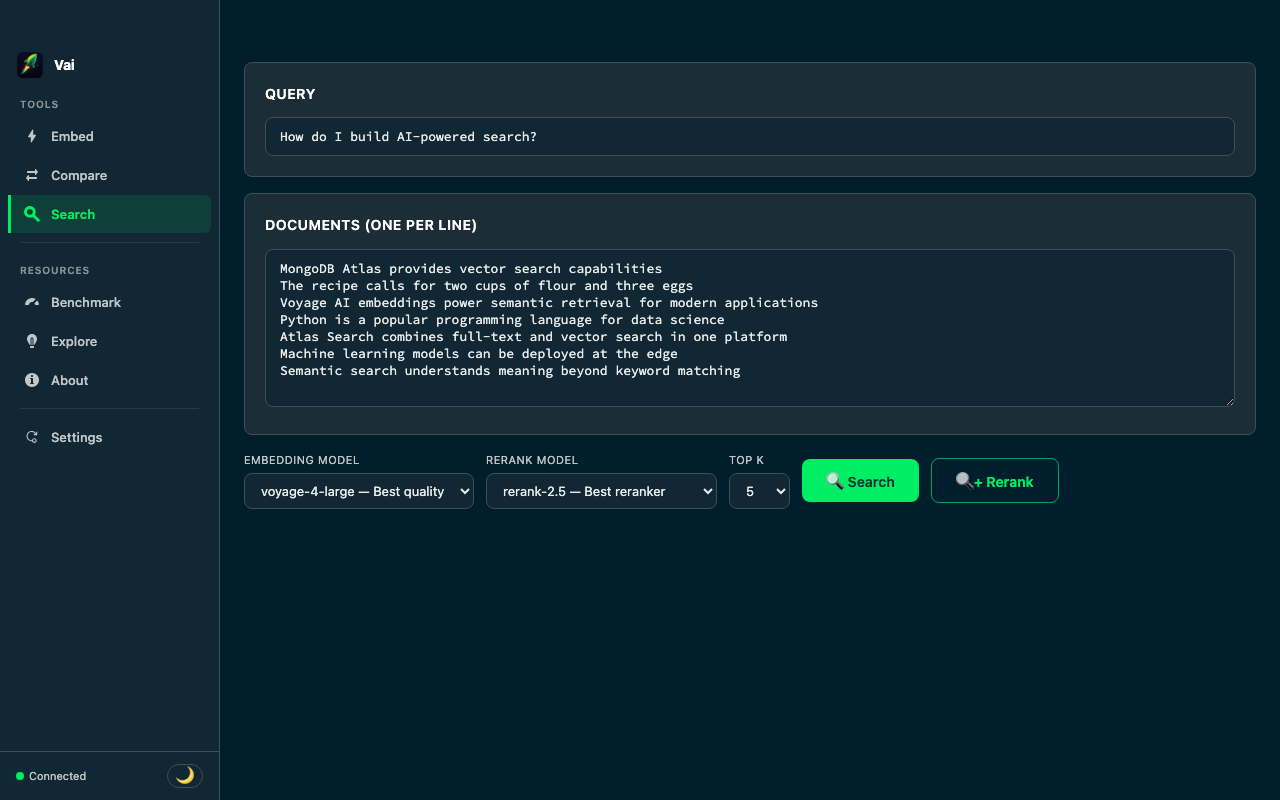
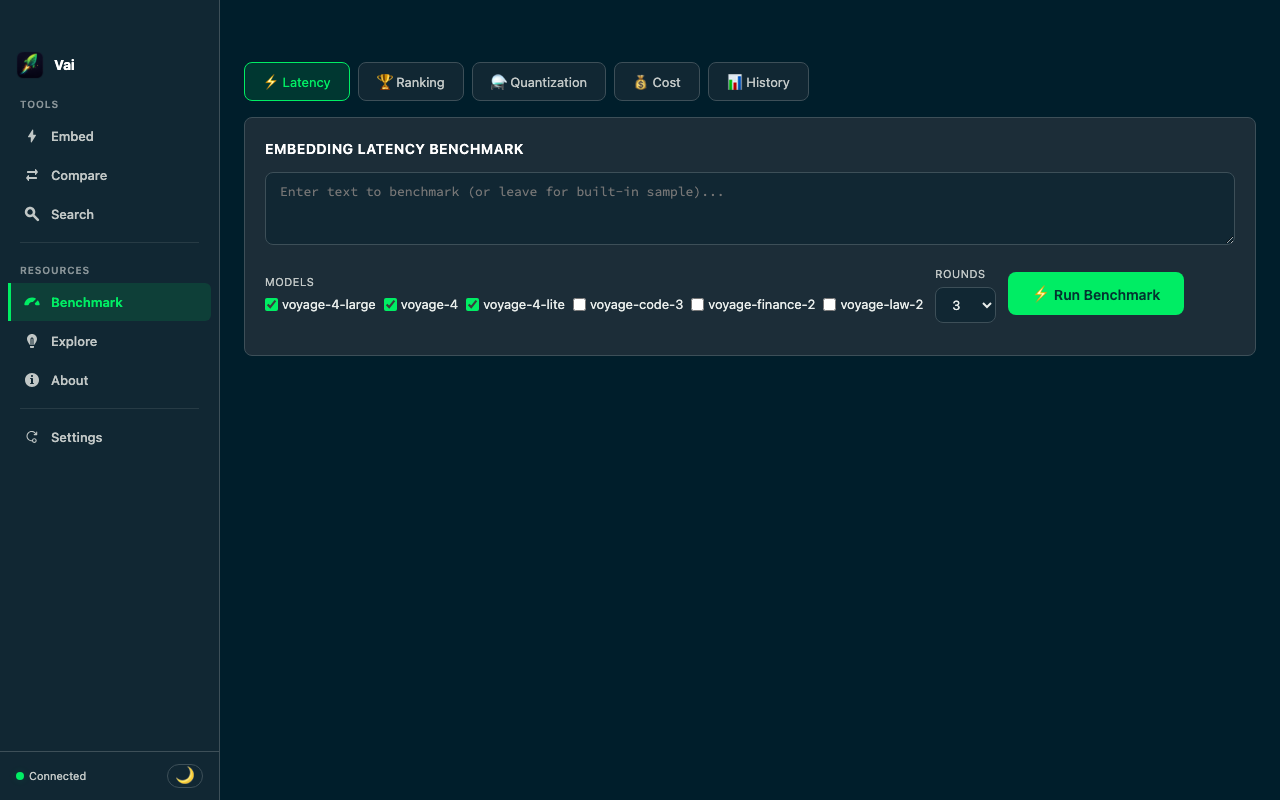
An interactive, browser-based interface for exploring Voyage AI embeddings without writing code. Ships with the CLI — just run:
vai playground
Your default browser opens with a full-featured UI:
| Tab | What It Does |
|---|---|
| Embed | Generate embeddings for any text, inspect vectors, adjust dimensions and models |
| Compare | Side-by-side similarity comparison of two or more texts with cosine similarity scores |
| Search | Connect to MongoDB Atlas and run vector similarity searches with filters and reranking |
| Benchmark | Compare model latency, cost, and quality across the Voyage 4 family on your own data |
| Explore | Visualize embedding spaces with dimensionality reduction (PCA/t-SNE) and clustering |
| Workflow Store | Browse, install, and run 20+ official and community workflow packages |
| About | Project info, links, and version details |
| Settings | Configure API keys, MongoDB URI, default model, and preferences |
The playground connects to the same backend as the CLI. Any API keys or MongoDB URIs you've configured via vai config are available automatically.
22 commands · 1,000+ tests · 5 chunking strategies · End-to-end RAG pipeline
# Fastest — one command, no dependencies
curl -fsSL https://vaicli.com/install.sh | sh

# Via npm
npm install -g voyageai-cli

# Via Homebrew
brew install mrlynn/vai/vai
Go from a folder of documents to a searchable vector database:
# Set credentials
export VOYAGE_API_KEY="your-key"
export MONGODB_URI="mongodb+srv://user:pass@cluster.mongodb.net/"

# Initialize project
vai init --yes

# Chunk → embed → store (one command)
vai pipeline ./docs/ --db myapp --collection knowledge --create-index

# Search with two-stage retrieval
vai query "How do I configure replica sets?" --db myapp --collection knowledge
That's it. Documents chunked, embedded with voyage-4-large, stored in Atlas with metadata, vector index created, and searchable with reranking.
Stop typing --db myapp --collection docs on every command:
vai init
Creates .vai.json with your defaults — model, database, collection, chunking strategy. Every command reads it automatically. CLI flags override when needed.
{
  "model": "voyage-4-large",
  "db": "myapp",
  "collection": "knowledge",
  "field": "embedding",
  "dimensions": 1024,
  "chunk": {
    "strategy": "recursive",
    "size": 512,
    "overlap": 50
  }
}
vai generate — Production code snippetsGenerate ready-to-use code from your .vai.json config:
# List available components
vai generate --list

# Generate and pipe to files
vai generate client > lib/voyage.js
vai generate retrieval > lib/retrieval.js
vai generate search-api > routes/search.js

# Different targets
vai generate client --target python    # Flask
vai generate retrieval --target nextjs # Next.js + MUI
Components: client, connection, retrieval, ingest, search-api
Targets: vanilla (Node.js/Express), nextjs (Next.js + MUI), python (Flask)
vai scaffold — Complete starter projectsCreate a full project directory with all files pre-configured:
# Node.js + Express API (9 files)
vai scaffold my-rag-api

# Next.js + Material UI (13 files)
vai scaffold my-app --target nextjs

# Python + Flask (8 files)
vai scaffold flask-api --target python

# Preview without creating files
vai scaffold my-app --dry-run
Each project includes: server, API routes, Voyage AI client, MongoDB connection, retrieval module, ingestion pipeline, .env.example, and README.
vai purge — Remove stale embeddingsRemove embeddings from MongoDB based on criteria:
# Remove docs embedded with an old model
vai purge --model voyage-3.5

# Remove docs whose source files no longer exist
vai purge --stale

# Remove docs older than a date
vai purge --before 2026-01-01

# Filter by source pattern
vai purge --source "docs/old/*.md"

# Preview before deleting
vai purge --model voyage-3.5 --dry-run
vai refresh — Re-embed with new settingsRe-embed documents in-place with a new model, dimensions, or chunk settings:
# Upgrade to a new model
vai refresh --model voyage-4-large

# Change dimensions for cost savings
vai refresh --model voyage-4-large --dimensions 256

# Re-chunk with a better strategy, then re-embed
vai refresh --rechunk --strategy markdown --chunk-size 1024

# Preview what would change
vai refresh --model voyage-4-large --dry-run
vai pipeline — Chunk → embed → storeThe end-to-end command. Takes files or directories, chunks them, embeds in batches, stores in MongoDB Atlas.
# Directory of docs
vai pipeline ./docs/ --db myapp --collection knowledge --create-index

# Single file
vai pipeline whitepaper.pdf --db myapp --collection papers

# Preview without API calls
vai pipeline ./docs/ --dry-run

# Custom chunking
vai pipeline ./docs/ --strategy markdown --chunk-size 1024 --overlap 100
Supports: .txt, .md, .html, .json, .jsonl, .pdf (optional pdf-parse dependency). Auto-detects markdown files for heading-aware chunking.
vai query — Search + rerankTwo-stage retrieval in one command: embed query → vector search → rerank → results.
# Search with reranking (default)
vai query "How does authentication work?" --db myapp --collection knowledge

# Vector search only (skip rerank)
vai query "auth setup" --no-rerank

# With pre-filter
vai query "performance tuning" --filter '{"category": "guides"}' --top-k 10
vai chunk — Document chunkingStandalone chunking for when you need control over the pipeline.
# Chunk a directory, output JSONL
vai chunk ./docs/ --output chunks.jsonl --stats

# Specific strategy
vai chunk paper.md --strategy markdown --chunk-size 1024

# Preview
vai chunk ./docs/ --dry-run
Five strategies: fixed, sentence, paragraph, recursive (default), markdown.
vai estimate — Cost estimatorCompare symmetric vs. asymmetric embedding strategies before committing.
vai estimate --docs 10M --queries 100M --months 12
Shows cost breakdown for every Voyage 4 model combination, including asymmetric retrieval (embed docs with voyage-4-large, query with voyage-4-lite — same quality, fraction of the cost).
For when you need fine-grained control:
# Embed text
vai embed "What is MongoDB?" --model voyage-4-large --dimensions 512

# Rerank documents
vai rerank --query "database performance" \
  --documents "MongoDB is fast" "PostgreSQL is relational" "Redis is cached"

# Compare similarity
vai similarity "MongoDB is a database" "Atlas is a cloud database"

# Store a single document
vai store --db myapp --collection docs --field embedding \
  --text "MongoDB Atlas provides managed cloud databases"

# Bulk import from file
vai ingest --file corpus.jsonl --db myapp --collection docs --field embedding

# Vector search (raw)
vai search --query "cloud database" --db myapp --collection docs

# Manage indexes
vai index create --db myapp --collection docs --field embedding
vai index list --db myapp --collection docs
# List models with architecture and shared space info
vai models --wide

# Show RTEB benchmark scores
vai models --benchmarks
| Model | Architecture | Price/1M tokens | RTEB Score | Best For |
|---|---|---|---|---|
| voyage-4-large | MoE | $0.12 | 71.41 | Best quality — first production MoE embedding model |
| voyage-4 | Dense | $0.06 | 70.07 | Balanced quality/cost |
| voyage-4-lite | Dense | $0.02 | 68.10 | High-volume, budget |
| voyage-4-nano | Dense | Free (open-weight) | — | Local dev, edge, HuggingFace |
Shared embedding space: All Voyage 4 models produce compatible embeddings. Embed docs with voyage-4-large, query with voyage-4-lite — no re-vectorization needed.
| Model | Score |
|---|---|
| voyage-4-large | 71.41 |
| voyage-4 | 70.07 |
| Gemini Embedding 001 | 68.66 |
| voyage-4-lite | 68.10 |
| Cohere Embed v4 | 65.75 |
| OpenAI v3 Large | 62.57 |
Also available: voyage-code-3 (code), voyage-finance-2 (finance), voyage-law-2 (legal), rerank-2.5 / rerank-2.5-lite.
Run embeddings locally with voyage-4-nano -- no API key, no network, no cost.
Nano shares the same embedding space as the Voyage 4 API models, so you can
prototype locally and upgrade to the API when ready.
Prerequisites: Python 3.10+ and ~700MB disk space for the model.
vai nano setup      # Creates venv, installs deps, downloads model
vai nano status     # Verify everything is ready
# Embed text locally
vai embed "What is MongoDB?" --local

# Run the full pipeline locally
vai pipeline ./docs/ --local --db myapp --collection knowledge

# Bulk ingest with local embeddings
vai ingest --file corpus.jsonl --local --db myapp --collection docs
vai demo nano # Zero-dependency guided walkthrough
Covers similarity matrices, MRL dimension comparison, and interactive REPL -- all without an API key or MongoDB connection.
| Command | Description |
|---|---|
vai nano setup | Set up Python venv, install deps, download model |
vai nano status | Check local inference readiness |
vai nano test | Smoke-test local inference |
vai nano info | Show model details and cache location |
vai nano clear-cache | Remove cached model files |
Since nano shares the Voyage 4 embedding space, your local embeddings are
compatible with voyage-4, voyage-4-lite, and voyage-4-large. No
re-vectorization needed when you add an API key.
Published benchmarks measure average quality across standardized datasets. vai benchmark measures what matters for your use case:
# Compare model latency and cost
vai benchmark embed --models voyage-4-large,voyage-4,voyage-4-lite --rounds 5

# Test asymmetric retrieval on your data
vai benchmark asymmetric --file your-corpus.txt --query "your actual query"

# Validate shared embedding space
vai benchmark space

# Compare quantization tradeoffs
vai benchmark quantization --model voyage-4-large --dtypes float,int8,ubinary

# Project costs at scale
vai benchmark cost --tokens 500 --volumes 100,1000,10000,100000
Measure and compare your retrieval quality:
# Evaluate retrieval pipeline
vai eval --test-set test.jsonl --db myapp --collection docs

# Save results for later comparison
vai eval --test-set test.jsonl --save baseline.json

# Compare against a baseline (shows deltas)
vai eval --test-set test.jsonl --baseline baseline.json

# Compare multiple configurations
vai eval compare --test-set test.jsonl --configs baseline.json,experiment.json

# Evaluate reranking in isolation
vai eval --mode rerank --test-set rerank-test.jsonl

# Compare rerank models
vai eval --mode rerank --models "rerank-2.5,rerank-2.5-lite" --test-set test.jsonl
Metrics: MRR, nDCG@K, Recall@K, MAP, Precision@K
Test set format (JSONL):
{"query": "What is vector search?", "relevant": ["doc_id_1", "doc_id_2"]}
Interactive explanations of key concepts:
vai explain embeddings        # What are vector embeddings?
vai explain moe               # Mixture-of-experts architecture
vai explain shared-space      # Shared embedding space & asymmetric retrieval
vai explain rteb              # RTEB benchmark scores
vai explain quantization      # Matryoshka dimensions & quantization
vai explain two-stage         # The embed → search → rerank pattern
vai explain nano              # voyage-4-nano open-weight model
vai explain models            # How to choose the right model
17 topics covering embeddings, reranking, vector search, RAG, and more.
| Variable | Required For | Description |
|---|---|---|
VOYAGE_API_KEY | All embedding/reranking | Model API key from MongoDB Atlas |
MONGODB_URI | store, search, query, pipeline, index | MongoDB Atlas connection string |
Credentials resolve in order: environment variables → .env file → ~/.vai/config.json.
# Or use the built-in config store
echo "your-key" | vai config set api-key --stdin
vai config set mongodb-uri "mongodb+srv://..."
| CLI Key | Description | Example |
|---|---|---|
api-key | Voyage AI API key | vai config set api-key pa-... |
mongodb-uri | MongoDB Atlas connection string | vai config set mongodb-uri "mongodb+srv://..." |
base-url | Override API endpoint (Atlas AI or Voyage) | vai config set base-url https://ai.mongodb.com/v1 |
default-model | Default embedding model | vai config set default-model voyage-3 |
default-dimensions | Default output dimensions | vai config set default-dimensions 512 |
default-db | Default MongoDB database for workflows/commands | vai config set default-db my_knowledge_base |
default-collection | Default MongoDB collection for workflows/commands | vai config set default-collection documents |
llm-provider | LLM provider for chat/generate (anthropic, openai, ollama) | vai config set llm-provider anthropic |
llm-api-key | LLM provider API key | vai config set llm-api-key sk-... |
llm-model | LLM model override | vai config set llm-model claude-sonnet-4-5-20250929 |
llm-base-url | LLM endpoint override (e.g. for Ollama) | vai config set llm-base-url http://localhost:11434 |
show-cost | Show cost estimates after operations | vai config set show-cost true |
telemetry | Enable/disable anonymous usage telemetry | vai config set telemetry false |
Config is stored in ~/.vai/config.json. Use vai config get to see all values (secrets are masked) or vai config get <key> for a specific value. The desktop app's Settings → Database page also reads and writes this file.
vai collects anonymous usage telemetry for the CLI and desktop app. On first launch, vai shows a one-time notice before any telemetry is sent. The CLI and desktop app share the same telemetry preference and notice state via ~/.vai/config.json.
Use the built-in telemetry controls:
vai telemetry
vai telemetry off
vai telemetry on
vai telemetry status
vai telemetry reset
You can also disable telemetry with environment variables:
export VAI_TELEMETRY=0
export DO_NOT_TRACK=1
For local auditing, set:
export VAI_TELEMETRY_DEBUG=1
This prints telemetry payloads to stderr instead of sending them.
# Bash
vai completions bash >> ~/.bashrc

# Zsh
mkdir -p ~/.zsh/completions
vai completions zsh > ~/.zsh/completions/_vai
Covers all 22 commands, subcommands, flags, model names, and explain topics.
| Command | Description |
|---|---|
| Project Setup | |
vai init | Initialize project with .vai.json |
vai generate | Generate code snippets (retrieval, ingest, client) |
vai scaffold | Create complete starter projects |
| RAG Pipeline | |
vai pipeline | Chunk → embed → store (end-to-end) |
vai query | Search + rerank (two-stage retrieval) |
vai chunk | Chunk documents (5 strategies) |
vai estimate | Cost estimator (symmetric vs asymmetric) |
| Embeddings | |
vai embed | Generate embeddings |
vai rerank | Rerank documents by relevance |
vai similarity | Compare text similarity |
| Data Management | |
vai store | Embed and store single documents |
vai ingest | Bulk import with progress |
vai search | Vector similarity search |
vai index | Manage Atlas Vector Search indexes |
vai purge | Remove embeddings by criteria |
vai refresh | Re-embed with new model/settings |
| Evaluation | |
vai eval | Evaluate retrieval quality (MRR, nDCG, Recall) |
vai eval compare | Compare configurations side-by-side |
vai benchmark | 8 subcommands for model comparison |
| Workflow Store | |
vai store list | Browse available workflows (official + community) |
vai store install | Install a workflow package from npm |
vai store run | Run an installed workflow |
vai store uninstall | Remove an installed workflow |
| MCP Server | |
vai mcp | Start the MCP server (expose vai tools to AI agents) |
vai mcp install | Install vai into AI tool configs (Claude, Cursor, etc.) |
vai mcp uninstall | Remove vai from AI tool configs |
vai mcp status | Show installation status across all tools |
vai mcp generate-key | Generate API key for HTTP server auth |
| Tools & Learning | |
vai models | List models, benchmarks, architecture |
vai explain | 25 interactive concept explainers |
vai config | Manage persistent configuration |
vai ping | Test API and MongoDB connectivity |
vai playground | Interactive web playground |
vai demo | Guided walkthrough |
vai completions | Shell completion scripts |
vai about | About this tool |
vai version | Print version |
Browse, install, and run pre-built RAG workflows — from the Playground UI or the CLI. The Workflow Store features 20 official workflows and a growing ecosystem of community packages published on npm.
# Open the visual Workflow Store in the Playground
vai playground    # Click the grid icon → Store

# Or from the CLI
vai store list                    # Browse available workflows
vai store install model-shootout  # Install a workflow
vai store run model-shootout      # Run it
| Workflow | Category | What It Does |
|---|---|---|
| model-shootout | Utility | Compare voyage-4-large, voyage-4, and voyage-4-lite side-by-side on your data |
| asymmetric-search | Retrieval | Embed with voyage-4-large, query with voyage-4-lite — ~83% cost reduction |
| cost-optimizer | Utility | Quantify exact cost savings of asymmetric retrieval |
| question-decomposition | Retrieval | Break complex questions into sub-queries, search in parallel, merge & rerank |
| knowledge-base-bootstrap | Integration | End-to-end onboarding: ingest → verify → test query → status report |
| hybrid-precision-search | Retrieval | Three retrieval strategies in parallel, merged and reranked |
| embedding-drift-detector | Analysis | Monitor embedding quality over time |
| multilingual-search | Retrieval | Translate queries into multiple languages, search each in parallel |
Plus 12 more covering code migration, financial risk scanning, clinical protocol matching, meeting action items, and more.
Anyone can publish a workflow to npm. Tag your package with vai-workflow and add a vai-workflow field to your package.json:
{
  "name": "vai-workflow-my-pipeline",
  "keywords": ["vai-workflow"],
  "vai-workflow": {
    "category": "retrieval",
    "tags": ["custom", "my-use-case"],
    "tools": ["query", "rerank", "generate"]
  }
}
Community workflows appear automatically in the Store alongside official packages.
Expose vai's RAG tools to any MCP-compatible AI agent — Claude Desktop, Claude Code, Cursor, Windsurf, VS Code, and more. 11 tools for embedding, retrieval, reranking, ingestion, and learning — all accessible without writing code.
# Install into your AI tool of choice
vai mcp install claude
vai mcp install cursor
vai mcp install all          # all supported tools at once

# Check what's configured
vai mcp status
The install command merges into existing configs — it won't touch your other MCP servers.
| Target | AI Tool |
|---|---|
claude | Claude Desktop |
claude-code | Claude Code |
cursor | Cursor |
windsurf | Windsurf |
vscode | VS Code |
Once installed, your AI agent can use these tools:
| Tool | What It Does |
|---|---|
vai_query | Full RAG: embed → vector search → rerank |
vai_search | Raw vector similarity search |
vai_rerank | Rerank documents against a query |
vai_embed | Generate embedding vectors |
vai_similarity | Cosine similarity between texts |
vai_ingest | Chunk, embed, and store documents |
vai_collections | List MongoDB collections with vector indexes |
vai_models | List models with pricing and benchmarks |
vai_topics | Browse educational topics |
vai_explain | Get detailed concept explanations |
vai_estimate | Estimate embedding costs |
vai mcp                                    # stdio (default, local)
vai mcp --transport http --port 3100       # HTTP (remote, multi-client)
📖 Full documentation: docs/mcp-server.md
This is a monorepo-lite that separates the CLI from the desktop app:
voyageai-cli/
├── src/            ← Core library + CLI + web playground (npm package)
├── electron/       ← Desktop app (distributed via GitHub Releases)
├── docs/           ← Shared documentation
├── test/           ← Test suites
└── .github/
    └── workflows/
        ├── ci.yml           ← Tests + npm publish for CLI
        └── release-app.yml  ← Electron builds + GitHub Releases
| Product | Channel | What users get |
|---|---|---|
CLI (vai) | npm install -g voyageai-cli | Terminal tool, 22 commands, RAG pipeline |
| Web Playground | vai playground | Runs locally, no install beyond the CLI |
| Desktop App | GitHub Releases | Standalone app, no Node required |
# CLI development
npm test                    # Run test suite
npm run test:watch         # Watch mode

# Electron app development
npm run app:install        # Install electron dependencies
npm run app:start          # Launch electron app
npm run app:dev            # Launch with DevTools
npm run app:build          # Build for all platforms
Built by Michael Lynn, Principal Staff Developer Advocate at MongoDB.
This is a community tool and is not affiliated with, endorsed by, or supported by MongoDB, Inc. or Voyage AI. All trademarks belong to their respective owners.
For official documentation and support:
Claim this server with your GitHub account to request manual ownership verification.
Link to the catalog listing for Vai MCP server exposing RAG and embedding tools to AI agents from your README. This badge does not certify ownership, compatibility or security.
[](https://awesome-mcp.com/servers/voyageai-cli)Public repository statistics could not be verified. Check the configured source address; unavailable counts are not zero.
Separate sources, scopes and periods. Never combined or treated as installations, active users or security reviews.
No reviewed package or image identity; download statistics are not listed yet.
Alternative and complementary servers in the same category
Store and retrieve entities, relations and observations in a persistent local knowledge graph.
Organize problem solving into revisable, branching thought steps through an MCP tool.

Query-aware context compression with an MCP plugin for coding agents, plus Python and HTTP interfaces for reducing the context sent to a language model.