
Store and retrieve entities, relations and observations in a persistent local knowledge graph.
create_entitiescreate_relationsadd_observations+6 more
92K
AI & Multi-Agent
A Python MCP server that exposes IBM Watsonx.ai text generation as a chat tool, with a greeting resource and a symptom-assessment prompt template.
Watsonx.ai MCP chatbot server is cataloged as an MCP server attributed to ruslanmv. A Python MCP server that exposes IBM Watsonx.ai text generation as a chat tool, with a greeting resource and a symptom-assessment prompt template. It is categorized under ai agents-models. See the capability inspector for recorded interfaces and their independent review status; consult upstream documentation for the current interface.
Installation configuration is not reviewed. No executable setup is offered for this entry; inspect the source repository before proceeding.
Catalog license label: Not specified. Check the source repository's current license and terms before using, modifying or distributing this software.
Capability definitions are not reviewed. Unreviewed imports are not exposed as trusted interfaces.
No reviewed records to display. This does not establish that upstream lacks this capability.
No reviewed records to display. This does not establish that upstream lacks this capability.
No reviewed records to display. This does not establish that upstream lacks this capability.
Email delivery is not connected. This page does not collect email addresses or create subscriptions.
Browse the registry for current listings instead.
Reviews for Watsonx.ai MCP chatbot server are not available yet
Review publishing and storage are not connected. This page does not collect or publish ratings or comments, including after sign-in.
It uses a greedy decoding method with a maximum of 200 new tokens.
It requires a Watsonx API key, service URL, and project ID loaded from environment variables.
README.md · bd3234be815b · Fetched 2026-11-13 12:31:21 UTC
Original upstream text, without AI rewriting. Scripts, forms and unsafe links are filtered for safety.
Showing the last retrieved documentation snapshot; check the source for current changes.
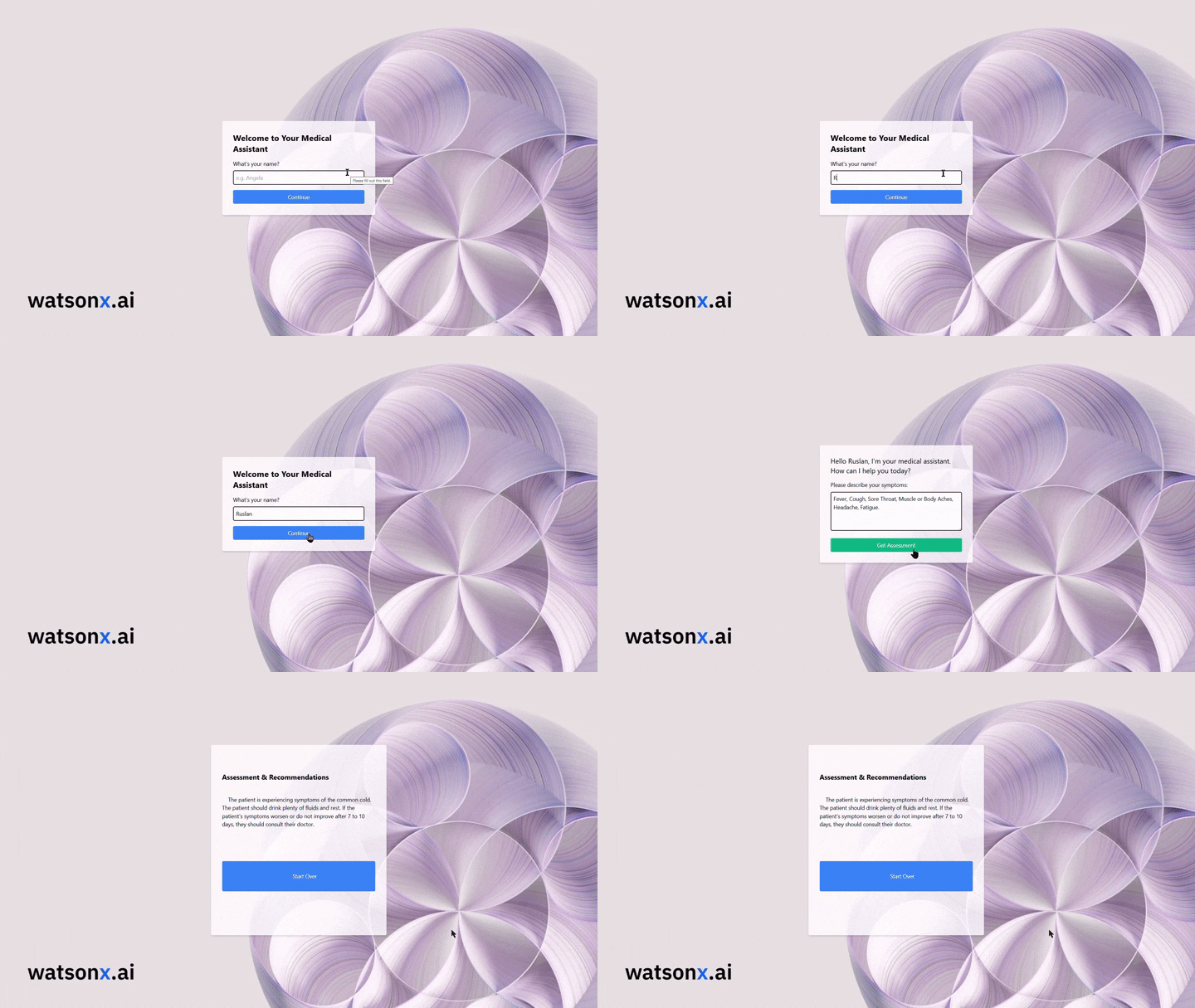
In this in-depth tutorial, you’ll learn how to create a professional, production‑ready chatbot server powered by IBM Watsonx.ai and exposed via the Model Context Protocol (MCP) Python SDK. By the end, you’ll have a reusable MCP service that any MCP‑compatible client (e.g., Claude Desktop, custom Python clients) can invoke as a standardized “chat” tool.
We’ll walk through:
IBM Watsonx.ai offers cutting‑edge large‑language‑model (LLM) inference via IBM Cloud, while the Model Context Protocol (MCP) standardizes how applications expose tools, resources, and prompts to LLM clients. By combining these two, you get:
Whether you’re building an internal helpdesk bot or a public chatbot API, this pattern scales and adapts easily.
Before you begin, ensure you have:
venv or virtualenv)We’ll install the following Python packages:
python-dotenv – load environment variables from a .env fileibm-watsonx-ai – IBM’s official Watsonx.ai SDKmcp[cli] – MCP Python SDK & CLI toolsCreate a new directory for your project. Your final tree will look like this:
watsonx-mcp-server/
├── .env
├── .gitignore
├── requirements.txt
└── server.py
.env — your secret credentials (never commit to source control!).gitignore — ignore .env, __pycache__, .venvrequirements.txt — pinned dependency listserver.py — the full MCP chatbot server implementationCreate & activate a virtual environment
python3 -m venv .venv
source .venv/bin/activate      # macOS/Linux
.venv\Scripts\activate.bat     # Windows
Pin and install dependencies
For the requirements.txt
python-dotenv>=0.21.0
ibm-watsonx-ai==1.3.8
mcp[cli]>=1.6.0
pip install --upgrade pip
pip install -r requirements.txt
.env in the project root.WATSONX_APIKEY=your-ibm-watsonx-api-key
WATSONX_URL=https://api.your-region.watsonx.ai
PROJECT_ID=your-watsonx-project-id
.env (and .venv/, __pycache__/) to .gitignore:
.env
.venv/
__pycache__/
server.py)Open server.py and follow these sections.
# server.py

import os
import logging
from dotenv import load_dotenv
from mcp.server.fastmcp import FastMCP

# IBM Watsonx.ai SDK
from ibm_watsonx_ai import APIClient, Credentials
from ibm_watsonx_ai.foundation_models import ModelInference
from ibm_watsonx_ai.metanames import GenTextParamsMetaNames as GenParams
# Load .env variables
load_dotenv()

# Fetch credentials
API_KEY    = os.getenv("WATSONX_APIKEY")
URL        = os.getenv("WATSONX_URL")
PROJECT_ID = os.getenv("PROJECT_ID")
MODEL_ID   = os.getenv("MODEL_ID", "ibm/granite-13b-instruct-v2")
# Validate env vars
for name, val in [
    ("WATSONX_APIKEY", API_KEY),
    ("WATSONX_URL", URL),
    ("PROJECT_ID", PROJECT_ID)
]:
    if not val:
        raise RuntimeError(f"{name} is not set. Please add it to your .env file.")

# Configure logging
logging.basicConfig(
    level=logging.INFO,
    format="%(asctime)s [%(levelname)s] %(message)s"
)

# Initialize IBM credentials & client
creds  = Credentials(url=URL, api_key=API_KEY)
client = APIClient(credentials=creds, project_id=PROJECT_ID)

# Initialize the inference model
model = ModelInference(
    model_id=MODEL_ID,
    credentials=creds,
    project_id=PROJECT_ID
)

logging.info(
    f"Initialized Watsonx.ai model '{MODEL_ID}' "
    f"for project '{PROJECT_ID}'."
)
# Create the MCP server instance
mcp = FastMCP("Watsonx Chatbot Server")

@mcp.tool()
def chat(query: str) -> str:
    """
    MCP tool: generate a chatbot response via Watsonx.ai

    :param query: User's input message
    :return: Watsonx.ai generated response
    """
    logging.info("Received chat query: %r", query)

    # Define generation parameters
    params = {
        GenParams.DECODING_METHOD: "greedy",
        GenParams.MAX_NEW_TOKENS:   200,
    }

    # Run the model
    try:
        # Request the full JSON response rather than just a string
        resp = model.generate_text(
            prompt=query,
            params=params,
            raw_response=True
        )
        print("AI raw response:", resp)

        # Extract the generated text from the dict
        text = resp["results"][0]["generated_text"].strip()
        logging.info("Generated response: %r", text)
        return text

    except Exception as e:
        logging.error("Inference error: %s", e, exc_info=True)
        return f"Error generating response: {e}"
Exposing Resources
Resources let you inject dynamic data into your LLM’s context. For example, here we expose a personalized greeting:
# Expose a greeting resource that dynamically constructs a personalized greeting.
@mcp.resource("greeting://patient/{name}")
def get_greeting(name: str) -> str:
    """
    Return a medical‑style greeting for the given patient name.

    :param name: The patient's name.
    :return: A personalized greeting.
    """
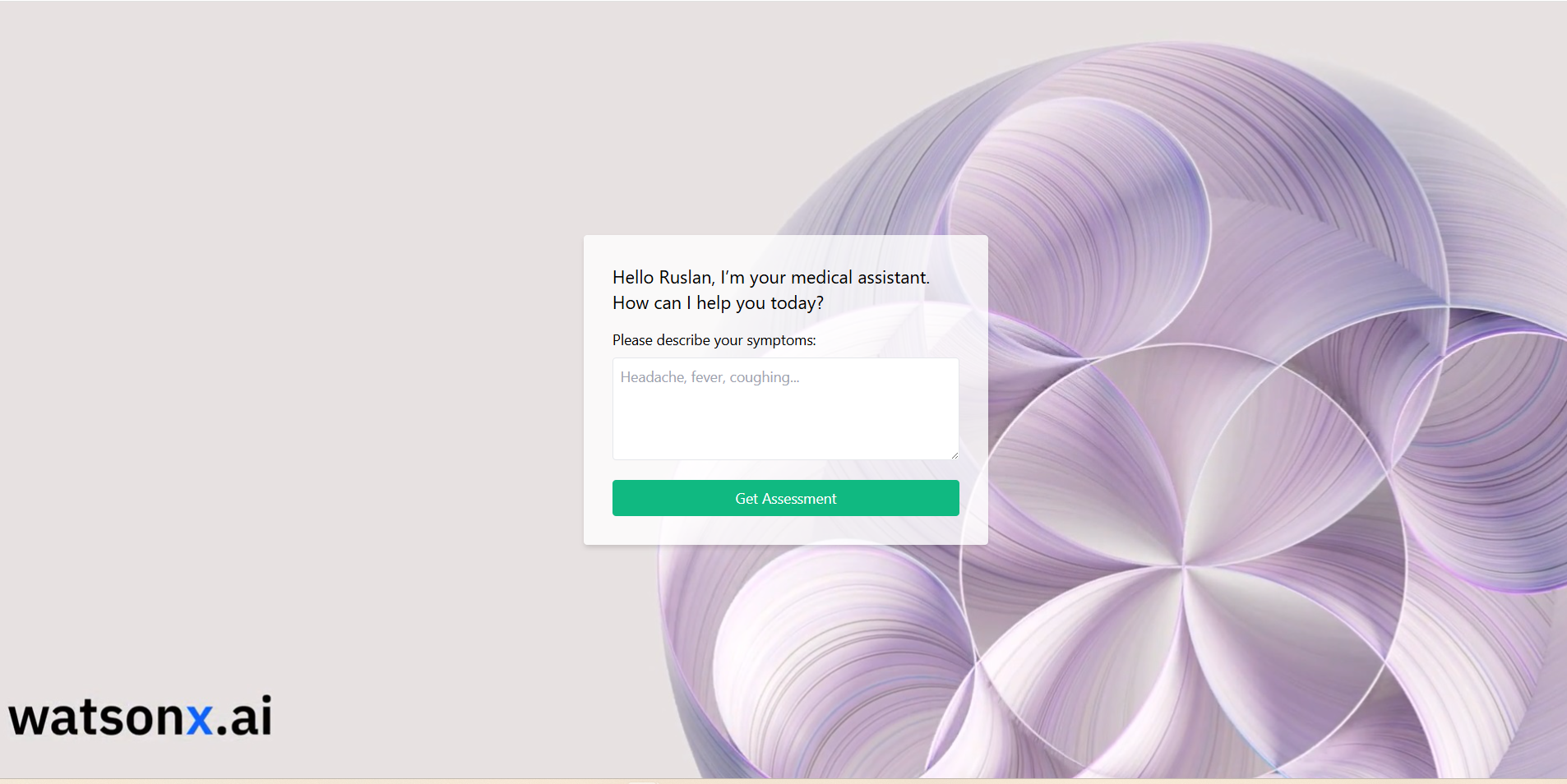
    return f"Hello {name}, I’m your medical assistant. How can I help you today?"
Adding Prompts (Optional)
Prompts let you define reusable templates. Here’s a simple medical‑chat example that asks the model to assess symptoms:
from mcp.server.fastmcp.prompts import base

@mcp.prompt()
def assess_symptoms(symptoms: str) -> str:
    """
    Prompt template for symptom assessment.

    :param symptoms: Description of patient symptoms.
    :return: A prompt asking the LLM to analyze and suggest next steps.
    """
    return (
        f"{base}\n"
        "You are a qualified medical assistant. The patient reports the following symptoms:\n"
        f"{symptoms}\n\n"
        "Please provide possible causes, recommended next steps, and when to seek immediate care."
    )
if __name__ == "__main__":
    # Start the MCP server (blocking call)
    logging.info("Starting MCP server on STDIO transport...")
    mcp.run()
That’s it! You now have:
chat tool that correctly parses raw_response from Watsonx.ai.First we load our enviroment
source .venv/bin/activate
mcp devThe fastest way to iterate is:
mcp dev server.py
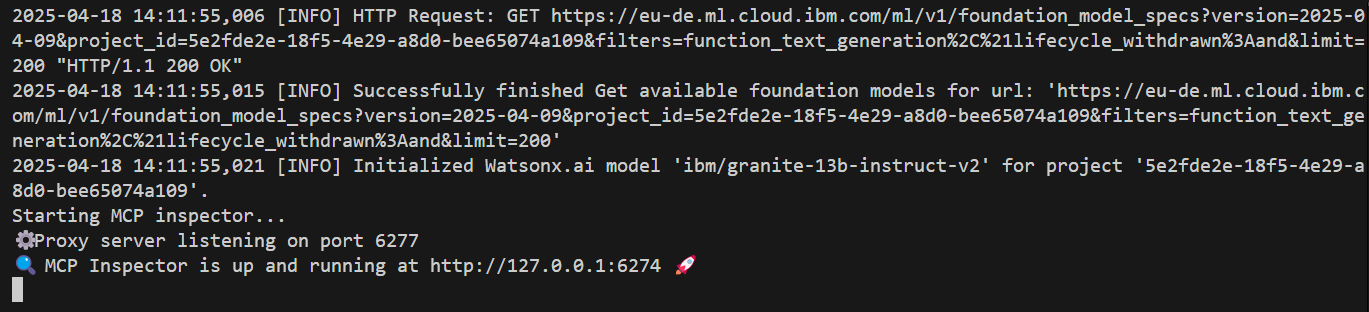
http://localhost:6274/chat toolYou can enter to http://localhost:6274/
When you open the Inspector in your browser, you will notice several key sections designed to facilitate server testing.
Go to the top of the MCP Inspector interface where it shows:
Transport Type: STDIO
Command: python
Arguments: run --with mcp mcp run server.py
Due to in our server.py is a standalone script using a normal pip-based virtual environment, we need to correct configuration in the MCP Inspector to:
Transport Type: STDIO
Command: python
Arguments: server.py
Then click Connect and our server will be launched properly using the Python interpreter.
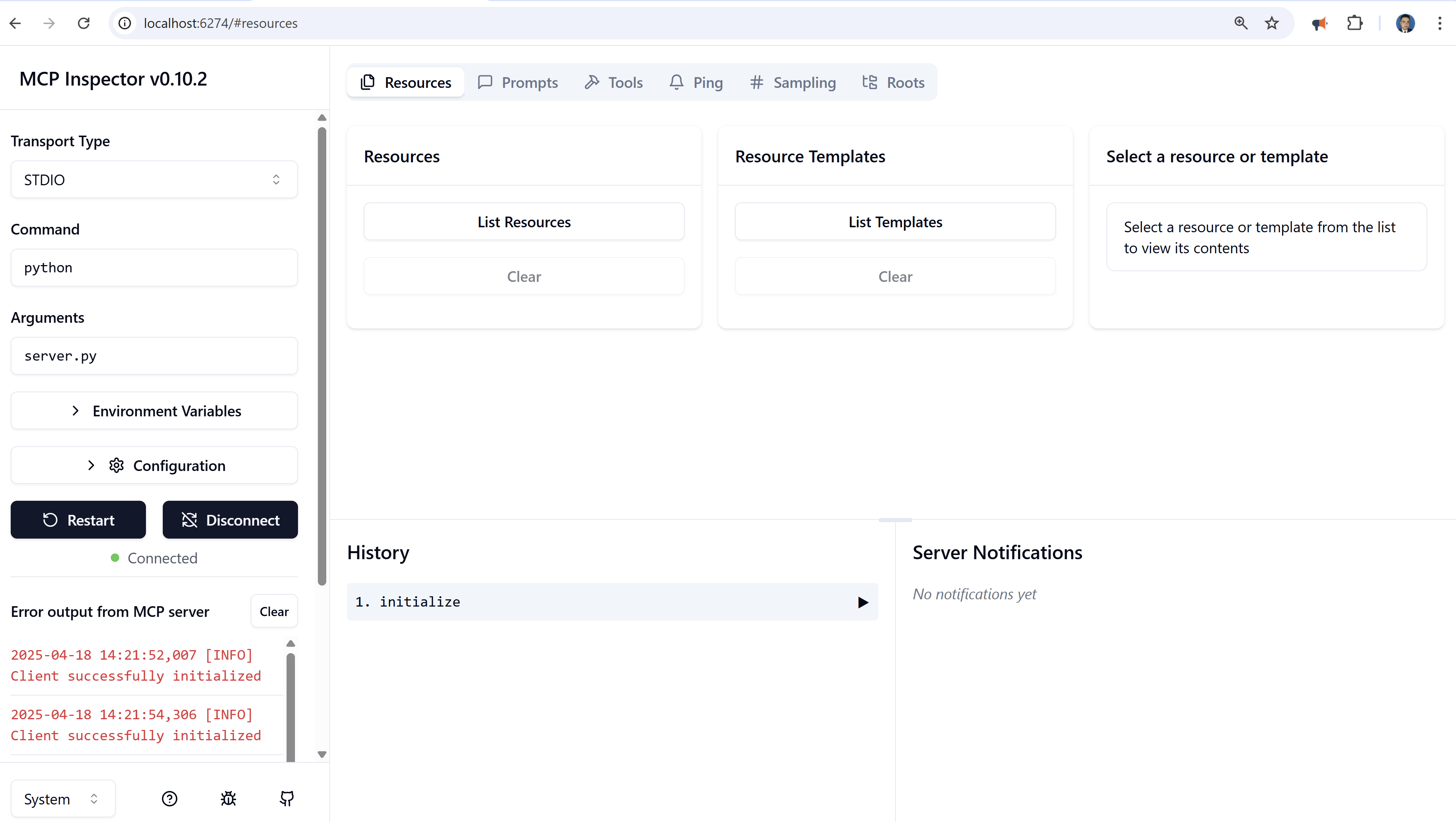
Then go to tools then list tools and click on chat tna dhten in the query you can type
What is watsonx in IBM?
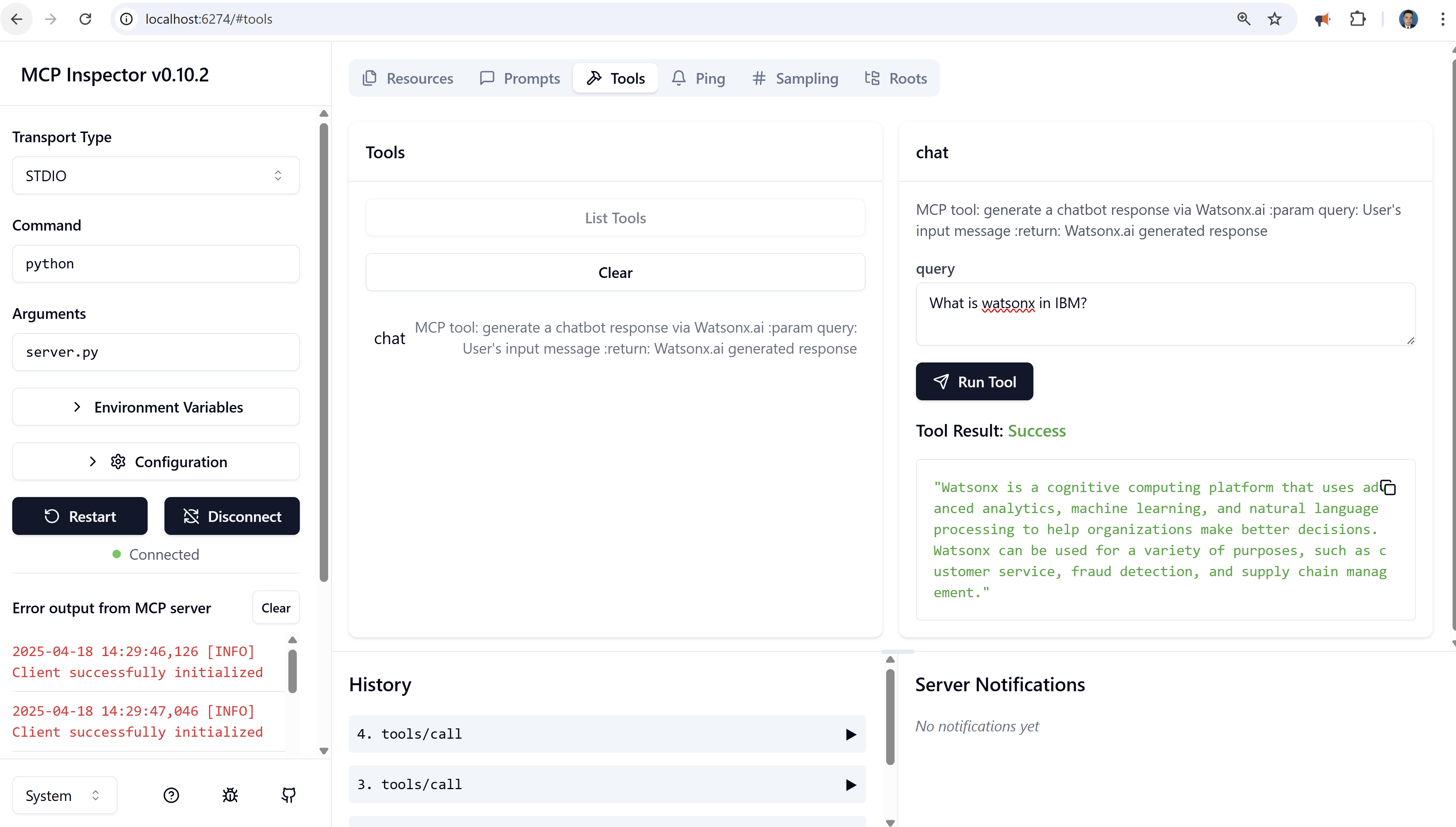
In the Inspector’s sidebar, expand Prompts → List prompts.
You should see assess_symptoms listed.
In the prompt pane, you’ll find a form or JSON editor ready to accept arguments.
Supply the code parameter. For example:
persistent dull ache, stiffness, and general back pain
Click Get Prompt.
You will receive:
{
  "messages": [
    {
      "role": "user",
      "content": {
        "type": "text",
        "text": "<module 'mcp.server.fastmcp.prompts.base' from '/mnt/c/Blog/Watsonx-ai-Chatbot-Server-with-MCP/.venv/lib/python3.11/site-packages/mcp/server/fastmcp/prompts/base.py'>\nYou are a qualified medical assistant. The patient reports the following symptoms:\npersistent dull ache, stiffness, and general back pain\n\nPlease provide possible causes, recommended next steps, and when to seek immediate care."
      }
    }
  ]
}
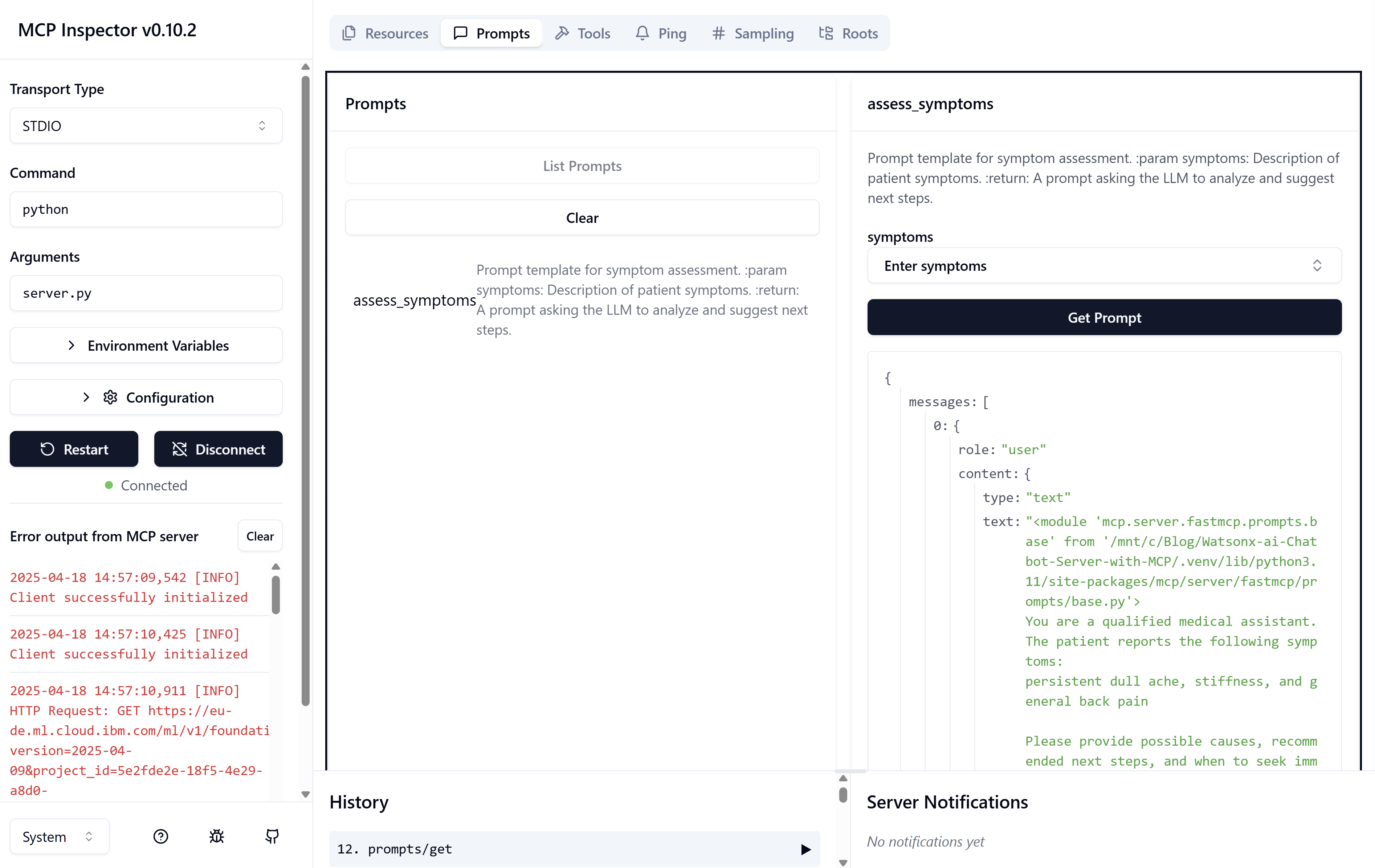
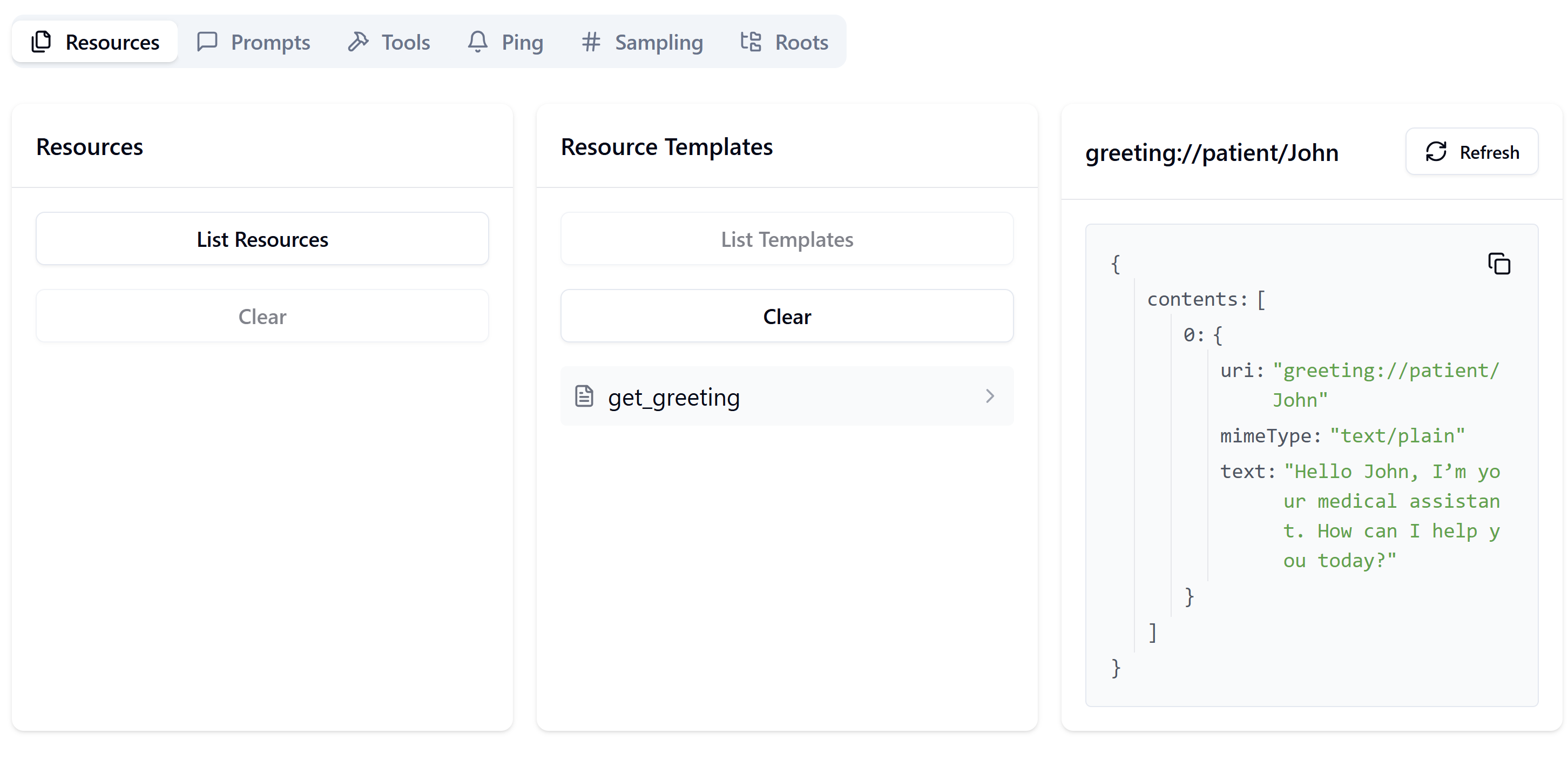
Once your server is up and running in the Inspector (using the setup from above), you can invoke any registered resource by its URI:
{
  "contents": [
    {
      "uri": "greeting://patient/John",
      "mimeType": "text/plain",
      "text": "Hello John, I’m your medical assistant. How can I help you today?"
    }
  ]
}
This confirms your dynamic greeting resource is wired up correctly and returns personalized output on demand.
To run without the Inspector:
python server.py
It will sit silently waiting for MCP‑formatted requests on STDIO.
Save this as client.py alongside server.py:
# client.py
import asyncio
from mcp import ClientSession
from mcp.client.stdio import stdio_client
from mcp import StdioServerParameters

async def main():
    server_params = StdioServerParameters(command="python", args=["server.py"])
    async with stdio_client(server_params) as (reader, writer):
        async with ClientSession(reader, writer) as session:
            await session.initialize()
            # Call the chat tool
            user_msg = "Hello, how are you today?"
            response = await session.call_tool("chat", arguments={"query": user_msg})
            print("Bot:", response)

if __name__ == "__main__":
    asyncio.run(main())
Run your server in one terminal (python server.py),
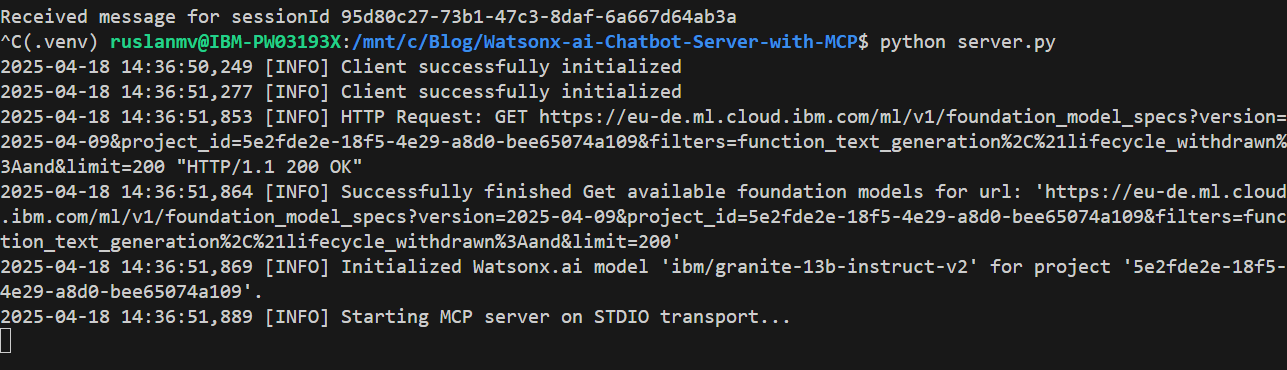
then in another:
python client-tool.py
You should see:
Bot: meta=None content=[TextContent(type='text', text='I am good. Thank you.', annotations=None)] isError=False

Lets now walk through creating a web‑based medical chatbot using:
By the end, you’ll have a Flask app that:
├─ chatbot.py
├─ server.py                # Your MCP server implementation
├─ static/
│   └─ assets/
│       └─ watsonx-wallpaper.jpg
└─ templates/
    ├─ base.html
    ├─ home.html
    ├─ symptoms.html
    └─ diagnosis.html
All front‑end templates live under templates/. Static assets (like our wallpaper) go in Flask’s static/ directory.
chatbot.pyThis script initializes a single long‑lived MCP client session on import and reuses it across requests.
import os
import atexit
import asyncio
from flask import Flask, render_template, request, redirect, url_for, session
from mcp import ClientSession, StdioServerParameters
from mcp.client.stdio import stdio_client

# Flask app setup
app = Flask(__name__)
app.secret_key = os.environ.get("SECRET_KEY", os.urandom(24))

# MCP server parameters
SERVER_PARAMS = StdioServerParameters(command="python", args=["server.py"], env=None)

# Dedicated asyncio loop for MCP
loop = asyncio.new_event_loop()
asyncio.set_event_loop(loop)

# Globals for client and session contexts
_stdio_ctx = None
_session_ctx = None
SESSION = None

async def _init_session():
    global _stdio_ctx, _session_ctx, SESSION
    _stdio_ctx = stdio_client(SERVER_PARAMS)
    _reader, _writer = await _stdio_ctx.__aenter__()
    _session_ctx = ClientSession(_reader, _writer)
    SESSION = await _session_ctx.__aenter__()
    await SESSION.initialize()

# Initialize once at import
loop.run_until_complete(_init_session())
app.logger.info("MCP client session initialized once.")

async def _close_session():
    if _session_ctx:
        await _session_ctx.__aexit__(None, None, None)
    if _stdio_ctx:
        await _stdio_ctx.__aexit__(None, None, None)

atexit.register(lambda: loop.run_until_complete(_close_session()))

# Helper: fetch greeting text
def fetch_greeting(name: str) -> str:
    resp = loop.run_until_complete(SESSION.read_resource(f"greeting://patient/{name}"))
    contents = getattr(resp, 'contents', None)
    if isinstance(contents, list):
        return "\n".join(c.text for c in contents).strip()
    return str(resp)

# Helper: assess symptoms via chat tool
def assess_symptoms(symptoms: str) -> str:
    prompt_resp = loop.run_until_complete(
        SESSION.get_prompt("assess_symptoms", arguments={"symptoms": symptoms})
    )
    # Extract clean text from prompt_resp.messages
    msgs = getattr(prompt_resp, 'messages', None)
    if msgs:
        lines = []
        for m in msgs:
            txt = m.content.text if hasattr(m.content, 'text') else str(m.content)
            if txt.startswith("<module"):
                txt = txt.split("\n", 1)[1]
            lines.append(txt)
        diagnosis_prompt = "\n".join(lines).strip()
    else:
        diagnosis_prompt = str(prompt_resp)

    tool_resp = loop.run_until_complete(
        SESSION.call_tool("chat", arguments={"query": diagnosis_prompt})
    )
    cont = getattr(tool_resp, 'content', None)
    if isinstance(cont, list):
        return "\n".join(c.text for c in cont).strip()
    return str(cont).strip()

# Flask routes
@app.route("/", methods=["GET", "POST"])
def home():
    if request.method == "POST":
        session['name'] = request.form['name']
        return redirect(url_for('symptoms'))
    return render_template("home.html")

@app.route("/symptoms", methods=["GET", "POST"])
def symptoms():
    name = session.get('name')
    if not name:
        return redirect(url_for('home'))

    if request.method == "POST":
        diag = assess_symptoms(request.form['symptoms'])
        return render_template("diagnosis.html", diagnosis=diag)

    greet = fetch_greeting(name)
    return render_template("symptoms.html", greeting=greet)

if __name__ == "__main__":
    app.run(debug=True)
Explanation:
- We call
stdio_clientandClientSessionat import time to avoid reconnecting on every HTTP request.fetch_greetingreads a resource and extracts only the text.assess_symptomsbuilds a clean prompt, invokes thechattool, and returns the AI’s reply.
base.html)A single file to handle the wallpaper and layout for all pages.
<!doctype html>
<html lang="en">
<head>
  <meta charset="utf-8">
  <title>{% block title %}{% endblock %}</title>
  <link href="https://cdn.jsdelivr.net/npm/tailwindcss/dist/tailwind.min.css" rel="stylesheet">
  <style>
    body {
      background-image: url('{{ url_for("static", filename="assets/watsonx-wallpaper.jpg") }}');
      background-size: cover;
      background-position: center;
      background-repeat: no-repeat;
    }
  </style>
</head>
<body class="min-h-screen flex items-center justify-center p-4">
  {% block content %}{% endblock %}
</body>
</html>
Explanation:
- We load the wallpaper as a full‑screen background.
- Use Tailwind utility classes to center content.
home.html){% extends "base.html" %}
{% block title %}Medical Chatbot – Welcome{% endblock %}
{% block content %}
<div class="bg-white bg-opacity-80 p-8 rounded shadow-md w-full max-w-md">
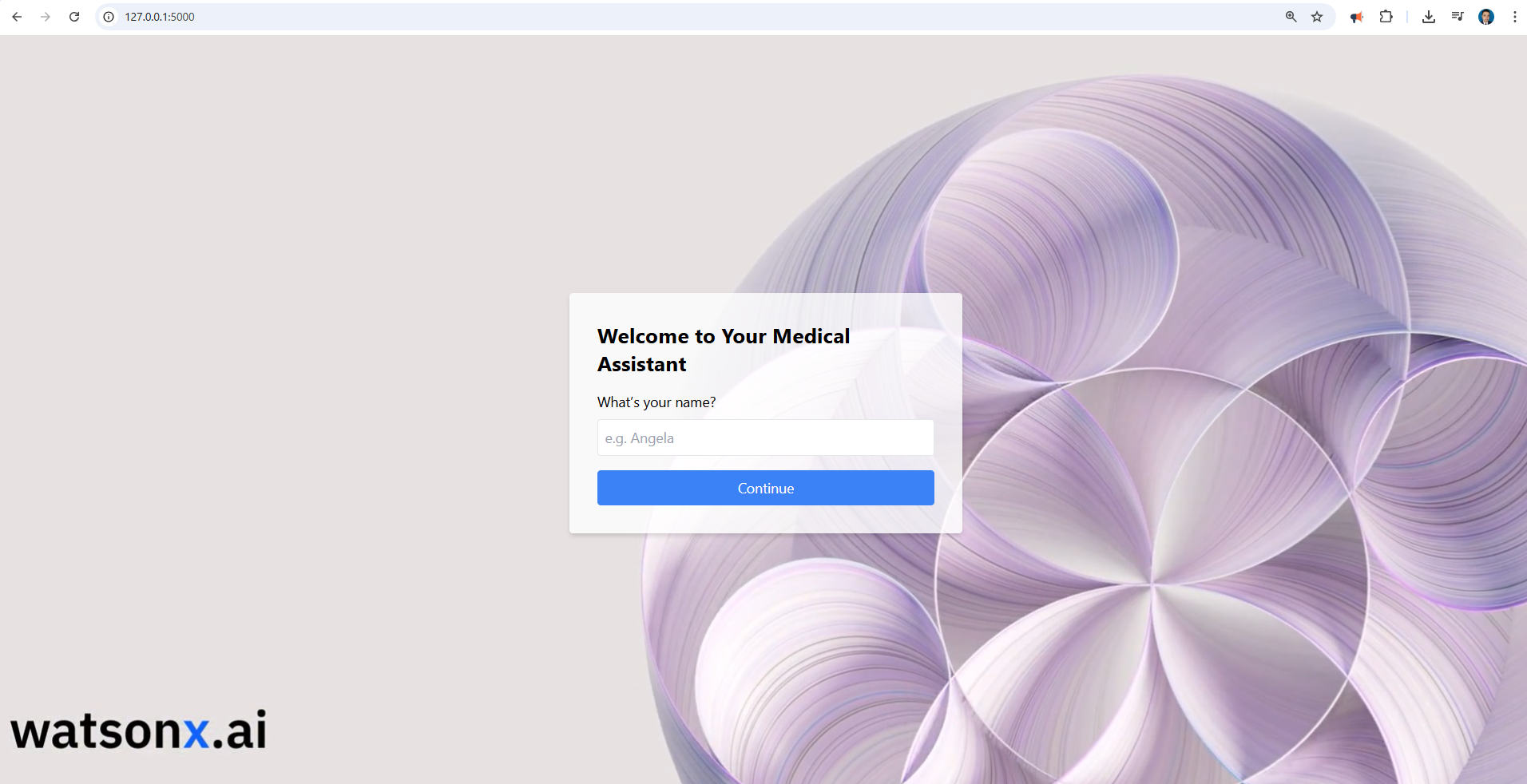
<h1 class="text-2xl mb-4 font-bold">Welcome to Your Medical Assistant</h1>
<form method="post">
<label class="block mb-2">What’s your name?</label>
<input name="name" required class="w-full p-2 border rounded mb-4" placeholder="e.g. Angela"/>
<button type="submit" class="w-full bg-blue-500 text-white py-2 rounded">Continue</button>
</form>
</div>
{% endblock %}
Explanation:
- Extends
base.htmlto inherit the background.- Simple form to collect
name.
symptoms.html){% extends "base.html" %}
{% block title %}Medical Chatbot – Symptoms{% endblock %}
{% block content %}
<div class="bg-white bg-opacity-80 p-8 rounded shadow-md w-full max-w-md">
<h2 class="text-xl mb-4">{{ greeting }}</h2>
<form method="post">
<label class="block mb-2">Please describe your symptoms:</label>
<textarea name="symptoms" rows="4" required class="w-full p-2 border rounded mb-4"
placeholder="Headache, fever, coughing..."></textarea>
<button type="submit" class="w-full bg-green-500 text-white py-2 rounded">Get Assessment</button>
</form>
</div>
{% endblock %}
Explanation:
- Displays the greeting fetched from MCP.
- Collects
symptomstext.
diagnosis.html){% extends "base.html" %}
{% block title %}Medical Chatbot – Assessment{% endblock %}
{% block content %}
<div class="bg-white bg-opacity-80 p-8 rounded shadow-md w-full max-w-lg whitespace-pre-wrap">
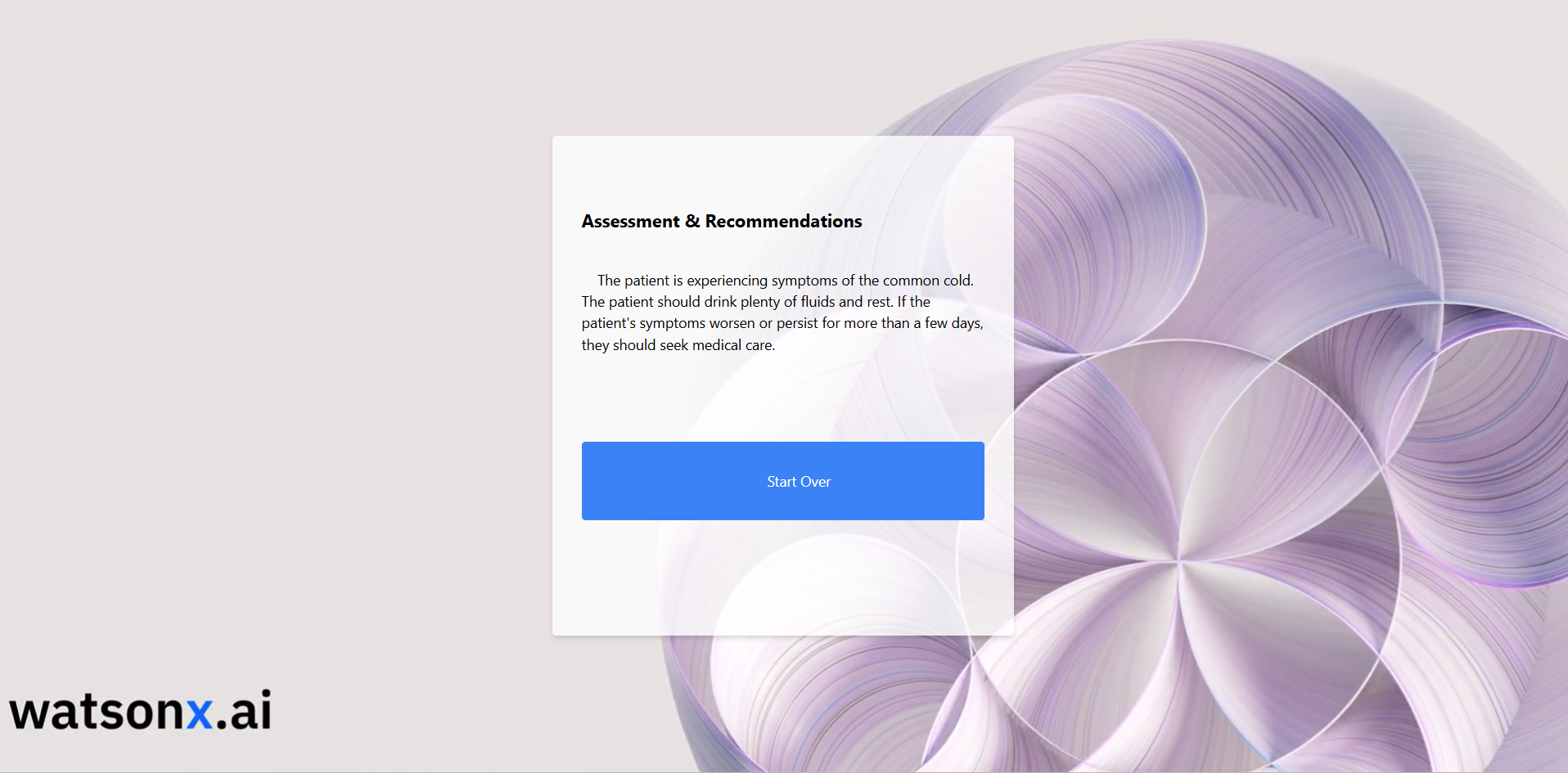
<h2 class="text-xl mb-4 font-bold">Assessment & Recommendations</h2>
{{ diagnosis }}
<div class="mt-6">
<a
href="{{ url_for('home') }}"
class="w-full block bg-blue-500 text-white py-2 rounded text-center"
>
Start Over
</a>
</div>
</div>
{% endblock %}
Explanation:
- Renders the AI’s advice with preserved line breaks (
whitespace-pre-wrap).
Once you have created the full project you simple run
pyhon server.py
and in another terminal
python chatbot.py
you got
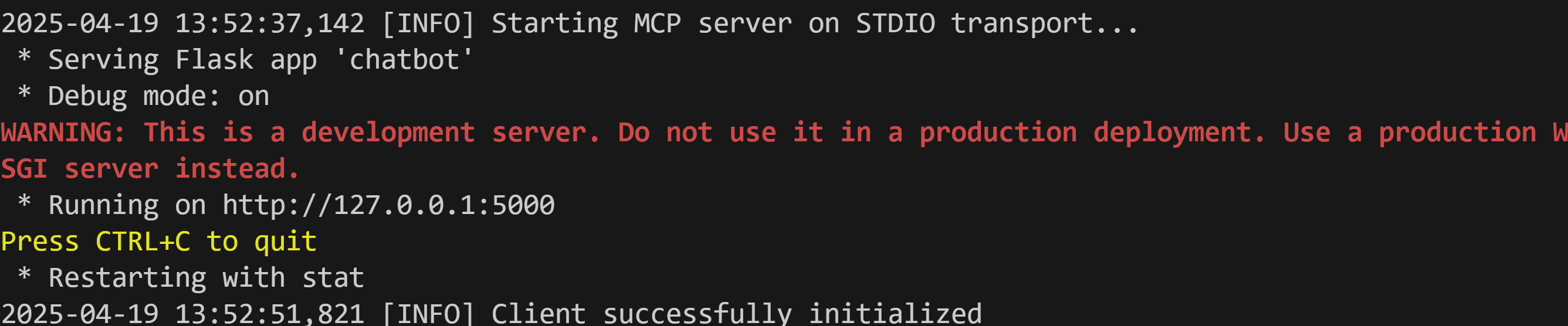
then you can simply enter to http://127.0.0.1:5000/
First you can type the name of the patient
You can provide to the AI the following symptoms as example
Fever, Cough, Sore Throat, Muscle or Body Aches, Headache, Fatigue.
load_dotenv() is called before os.getenv.mcp dev or python server.py) before the client..env.DEBUG during development (logging.basicConfig(level=logging.DEBUG)).@mcp.prompt() methods to standardize greeting flows or FAQs.Congratulations! You now have a full‑featured, production‑mindset Watsonx.ai chatbot server exposed via MCP. This pattern gives you a clean separation of concerns:
Happy coding!
Claim this server with your GitHub account to request manual ownership verification.
Link to the catalog listing for Watsonx.ai MCP chatbot server from your README. This badge does not certify ownership, compatibility or security.
[](https://awesome-mcp.com/servers/watsonx-mcp-server)Public repository statistics could not be verified. Check the configured source address; unavailable counts are not zero.
Separate sources, scopes and periods. Never combined or treated as installations, active users or security reviews.
No reviewed package or image identity; download statistics are not listed yet.
Alternative and complementary servers in the same category
Store and retrieve entities, relations and observations in a persistent local knowledge graph.
Organize problem solving into revisable, branching thought steps through an MCP tool.

Query-aware context compression with an MCP plugin for coding agents, plus Python and HTTP interfaces for reducing the context sent to a language model.