
A directory listing describing a cancellation-letter and mailing-address service. The configured public GitHub repository returned 404 during source verification.
Repository stats unavailable
Developer Tools
A coding-agent plugin that writes illustrated end-user guides from source code and connects to agents through a local MCP server.
WTFM is cataloged as an MCP server attributed to supportpages-io. A coding-agent plugin that writes illustrated end-user guides from source code and connects to agents through a local MCP server. It is categorized under developer tools. See the capability inspector for recorded interfaces and their independent review status; consult upstream documentation for the current interface.
Installation configuration is not reviewed. No executable setup is offered for this entry; inspect the source repository before proceeding.
Catalog license label: Apache 2.0. Check the source repository's current license and terms before using, modifying or distributing this software.
Capability definitions are not reviewed. Unreviewed imports are not exposed as trusted interfaces.
No reviewed records to display. This does not establish that upstream lacks this capability.
No reviewed records to display. This does not establish that upstream lacks this capability.
No reviewed records to display. This does not establish that upstream lacks this capability.
Email delivery is not connected. This page does not collect email addresses or create subscriptions.
Browse the registry for current listings instead.
Reviews for WTFM are not available yet
Review publishing and storage are not connected. This page does not collect or publish ratings or comments, including after sign-in.
No. WTFM writes end-user documentation: how-to and troubleshooting guides for product users, with screenshots.
WTFM rebuilds mockups from the project's markup, styles, and branding, then renders them to PNG in a local headless Chromium.
Local projects send SupportPages.io only anonymous usage counts and crash reports; publishing uploads the article, its images, and a small provenance record, while source code is never uploaded.
README.md · 1dceab5b7615 · Fetched 2026-11-13 05:37:31 UTC
Original upstream text, without AI rewriting. Scripts, forms and unsafe links are filtered for safety.
Showing the last retrieved documentation snapshot; check the source for current changes.
Write the F***ing Manual.
A plugin for your coding agent that writes the user docs. Screenshots included.



Install · Quick start · Examples · CLI · Publish · FAQ · Docs · Website
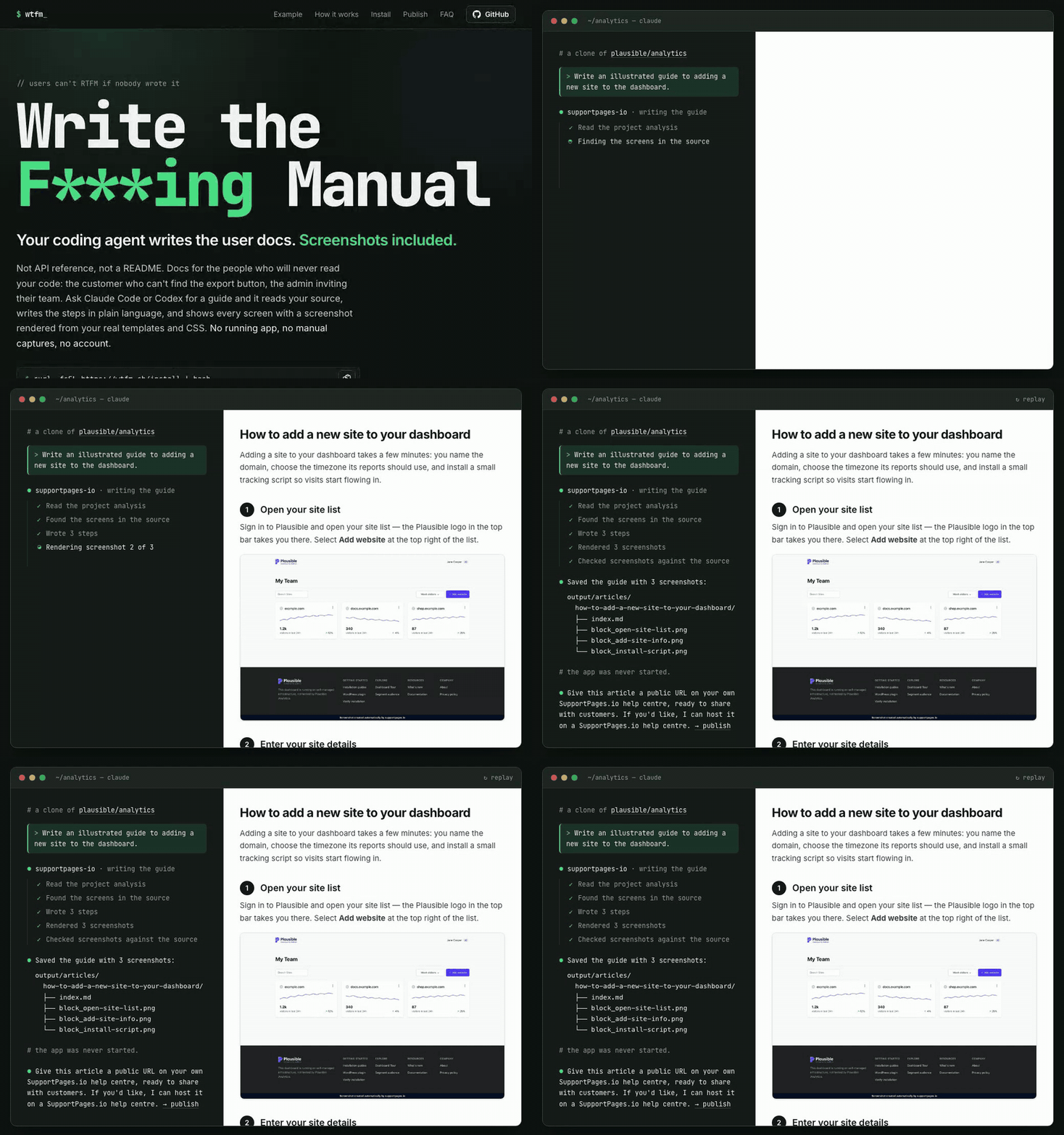
Real output from plausible/analytics, replayed fast. A real run takes a few minutes.
WTFM is a plugin for your coding agent that writes your user docs. Ask Claude Code or Codex for a guide and it reads your source, writes the steps in plain language, and shows every screen with a screenshot rendered from your real templates and CSS. No running app, no manual captures, no account.
Not API reference, not a README: docs for the people who will never read your code, like the customer who can't find the export button, or the admin inviting their team.
WTFM was formerly SupportPages Writer. The
supportpagescommand still works as an alias forwtfm, and existing installations, settings andSUPPORTPAGES_*environment variables are unchanged.
Set it up once in your terminal, then just ask your agent:
curl -fsSL https://wtfm.sh/install | bash
wtfm setup # once per computer
wtfm init # once per project
You → Claude Code: Write an illustrated guide to inviting a teammate.
index.md with its images beside it,
ready to commit next to your code or drop into any docs site.The same loop on other open-source codebases. Each image is one screenshot from a guide WTFM wrote from that repository's source; the apps were never run.
| immich-app/immich · SvelteKit | paperless-ngx/paperless-ngx · Angular | maybe-finance/maybe · Rails |
|---|---|---|
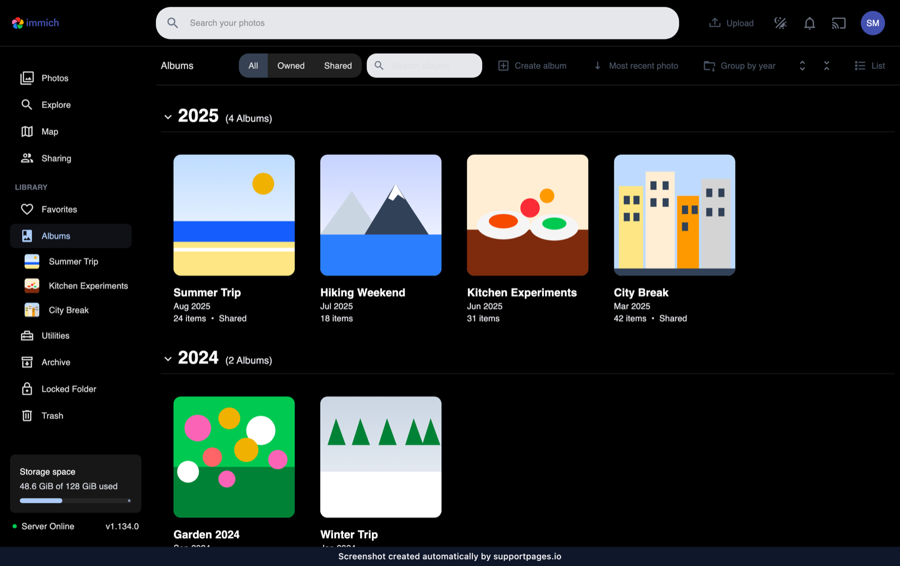 | 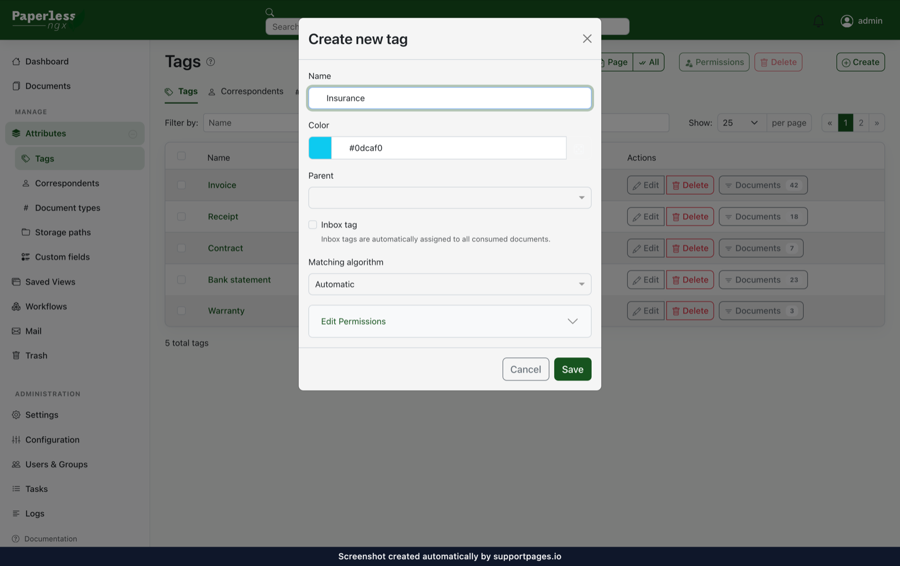 | 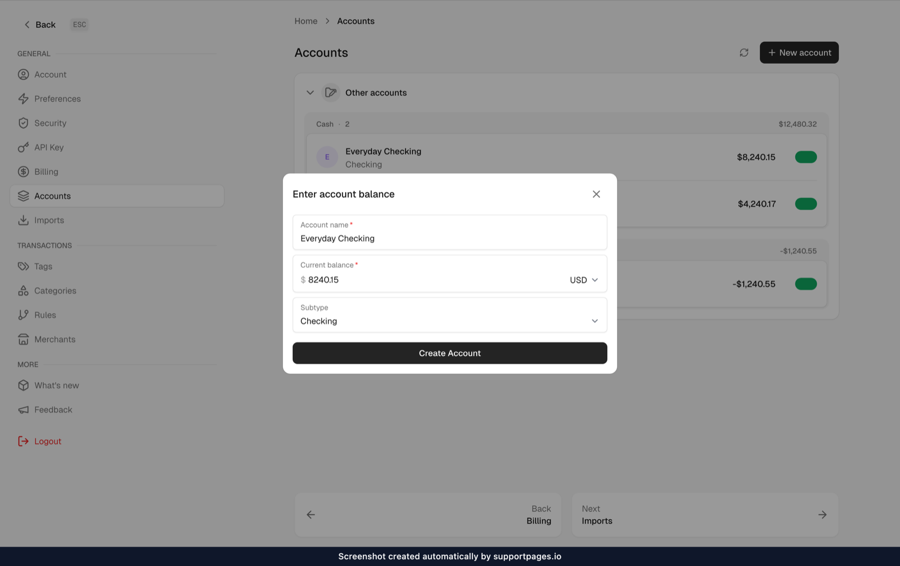 |
| How to create a new album | How to create a tag and apply it to a document | How to add a new account |
For a whole help centre, see WTFM's own docs: every article and screenshot there was written by WTFM from this repository.
curl -fsSL https://wtfm.sh/install | bash
The installer downloads a checksum-verified release with its own Node.js, installs
the wtfm command into ~/.local/bin (no sudo), and offers to add it to your
PATH. It also installs supportpages as an alias for wtfm.
You'll need:
Chromium for screenshots is downloaded the first time you run wtfm setup.
Updating: releases check for updates once a day and install them in the background.
Run wtfm update to update now, or set SUPPORTPAGES_AUTO_UPDATE=0 to turn
automatic updates off.
WTFM is also a Codex plugin. You'll need Node.js 22.12 or later with npm on your
PATH.
codex plugin marketplace add SupportPages-io/wtfm
codex plugin add wtfm@supportpages
Then start a new Codex session. The first time the plugin starts, it installs its npm
packages (without running their install scripts) and downloads Chromium for
screenshots in the background. Codex asks you to review the plugin's two hooks in
/hooks before they run; WTFM works without them. To update, run
codex plugin add wtfm@supportpages again.
You'll need Node.js 22.12 or later, npm and Git.
git clone https://github.com/SupportPages-io/wtfm.git
cd wtfm
./install-cli.sh
This builds your checkout and installs it as wtfm (with the supportpages alias).
Run ./install-cli.sh again after pulling changes.
Configure once in the terminal, then do everything else in your coding agent.
wtfm setup
This connects Claude Code and/or Codex, adds the SupportPages.io writer to them and downloads the screenshot renderer. When it asks how you want to work, choose Save articles in my projects without an account.
cd path/to/your-product
wtfm init
Pick where articles should be saved and which model to use. WTFM then studies the project's structure, styles and branding once, so every article starts from that analysis.
Open Claude Code or Codex in your project (restart any session that was already open) and ask for an article in plain words:
Write an illustrated guide to inviting a teammate.
A few minutes later the article is in your project:
output/articles/how-to-invite-a-teammate/
├── index.md
├── block_open-settings.png
├── block_invite-form.png
└── block_send-invite.png
That's the whole loop. Some other things to ask:
What help articles do we have?
Write a troubleshooting article for when a sign-in link has expired.
You only need the terminal to set things up and keep them running. Writing happens in your coding agent.
| Command | What it does |
|---|---|
wtfm setup | Set up this computer: connect your coding agents and install the renderer |
wtfm init | Set up this project: where articles go, which model, project analysis |
wtfm configure | Change this project's agent, model, writing style or article folder |
wtfm analyse | Re-run project analysis after big changes (--refresh) |
wtfm status | Show this project's setup and article progress |
wtfm doctor | Check that everything is installed and connected |
wtfm telemetry off | Stop anonymous usage counts and crash reports (on, status) |
wtfm update | Install the latest release |
wtfm uninit | Forget this project's setup (keeps a recovery archive) |
wtfm remove | Disconnect from your coding agents (keeps projects and articles) |
wtfm uninstall | Remove WTFM from this computer; --purge-config also signs out and forgets project bindings |
Run wtfm --help for every option. status and doctor accept --json.
output/articles/<slug>/ by default. To keep them in your repo,
choose a folder like docs/help during init or with wtfm configure.wtfm configure.setup connects a local MCP server and a
writer agent to Claude Code or Codex.init has your agent map the project once: framework, routes, layouts, CSS and
branding.Give your users somewhere to read it. A Markdown folder in your repo helps nobody who can't find it. SupportPages.io, made by the same team, turns the guides WTFM writes into a help centre your users can search and ask: on your own domain, in your branding, and kept current as the product changes.

Everything above works without it, and a free account hosts up to 10 articles.
The same pattern applies: connect once in the terminal, then work in your agent.
Connect a project:
wtfm publish
You'll sign in or create an account in your browser and choose a help centre. Any
articles you've already saved upload as drafts. (Setting up a new project? Choose
Publish them to a SupportPages.io help centre during wtfm init instead.)
Then keep asking your agent:
Write a guide to exporting a report.
New articles arrive in the help centre as drafts, with a link to review them in the editor. Publishing is always a separate step: click Publish in the editor, or ask:
Publish the guide to exporting a report.
| Command | What it does |
|---|---|
wtfm publish | Sign in, pick a help centre and upload this project's saved articles |
wtfm yolo | Write the whole manual on SupportPages.io (account required; drafts only) |
wtfm login / logout | Sign this computer in or out |
wtfm sync | Refresh help-centre settings and article history |
A help centre never needs access to your GitHub or Bitbucket. Only wtfm yolo does.
wtfm yolo: write the whole manualStarting from nothing? wtfm yolo plans every guide your product needs and
writes them all at once, on SupportPages.io's servers instead of your computer and your
coding agent's usage.
wtfm yolo
It walks you through whatever is missing: browser sign-in, choosing or creating a help
centre, and connecting your repository (SupportPages.io needs read access to write from
your code). It then shows your plan's article allowance and asks before starting
(--yes skips the question). The free plan covers your first 10 guides.
Progress shows live: sections, recommended articles, then drafts as they are written.
Everything lands as drafts; nothing goes live until you publish it in the editor, whose
link is printed at the end. Ctrl+C only stops watching: the run keeps going, and
wtfm status picks it up again. If a run fails, run wtfm yolo again to resume it
without losing the drafts already written.
wtfm yolo writes on SupportPages.io from the repository you connect there;
it is the only command that gives SupportPages.io access to your code.~/.config/supportpages, never in
your repository. Signing in also saves your account email there, to show which
account is connected.OPENAI_API_KEY; WTFM never sets it.init and analyse start your agent with its
permission prompts off (--dangerously-skip-permissions for Claude Code,
--dangerously-bypass-approvals-and-sandbox for Codex). Writing articles uses the
agent's normal approval prompts.Installed as a Claude Code plugin, WTFM registers two hooks. Neither sends anything over the network except the Chromium download, and neither can block or change a tool call.
SessionStart checks whether Chromium for screenshots is installed. If it
isn't, it starts puppeteer's Chromium download in the background, once, and
returns straight away without printing anything into the session.PostToolUse runs after every tool call, but does nothing unless an article
is being written (a .rtfm-trace/CURRENT marker in your project). During a run it
appends one line per tool call to .rtfm-trace/<article>.ndjson in your project:
the time, tool name, file path, search pattern and the first 500 characters of a
shell command. The trace stays on your computer and is used to spot repeated
work in a run. It prints nothing and always exits successfully.WTFM tells us how many installs are in use and when something breaks, so we can fix it. It says so the first time you set up a project, and it's easy to turn off. It is sent to SupportPages.io without your sign-in and stays anonymous until you sign in from this computer; after that, usage from this computer is linked to your account. Turning it off stops both.
What is sent
claude-code), your OS, CPU architecture
and Node.js major version.wtfm yolo run starts and ends.<external>. Messages from other code are
never sent.What is never sent: your code, file names or paths, article titles or content, repository or project names, or credentials. Your IP address is not stored. The install ID is also sent when you sign in from this computer, which is what links later usage from it to your account.
Turn it off with any of these:
wtfm telemetry off;SUPPORTPAGES_TELEMETRY=0 or DO_NOT_TRACK=1.It is always off in CI. wtfm doctor shows whether it's on and why; set
SUPPORTPAGES_TELEMETRY_DEBUG=1 to print each report to stderr as it is sent.
Is this for API docs or READMEs? No. WTFM writes end-user documentation: how-to and troubleshooting guides for the people who use your product, with screenshots. Your agent already handles developer docs well.
Why not just ask Claude Code to write the docs? It will write you decent steps. It won't show the screen, and it guesses at labels it hasn't looked up. WTFM adds a project analysis, a renderer that builds screenshots from your own UI code, and checks that run before anything is saved.
What does it cost?
WTFM is free and Apache 2.0. Articles run on your own Claude Code or Codex subscription.
wtfm yolo is the exception: it runs on SupportPages.io and needs an account; the free
plan covers 10 guides.
wtfm: command not found
Open a new terminal, or run the PATH command the installer printed.
My agent can't see the SupportPages tools.
Restart any Claude Code or Codex sessions that were open during wtfm setup.
Setup won't finish.
Run wtfm doctor, fix what it reports, then run wtfm init again.
An article was interrupted halfway.
Ask your agent to continue it, or run wtfm status to see where it stopped.
Does it collect usage data? Only anonymous counts and crash reports, never your code or articles. See Anonymous usage counts and crash reports to see exactly what is sent or turn it off.
Can I use it on Windows? Yes, inside WSL.
More on supportpages.io/wtfm.
Bug reports and pull requests are welcome. When reporting a bug, include your OS,
wtfm --version, the command you ran and its output, with credentials and
private code removed. For larger changes, open an issue first so we can agree on the
approach.
To work on the code:
npm ci
npm test
node scripts/cli.mjs --help
The article engine in engine/ is synced from upstream on each engine release, so
changes there are reviewed here and ported back by the maintainers.
Apache 2.0. The UI stylesheets bundled under engine/ keep their own
licenses; see NOTICE. The license doesn't cover the SupportPages name or logo.
Claim this server with your GitHub account to request manual ownership verification.
Link to the catalog listing for WTFM from your README. This badge does not certify ownership, compatibility or security.
[](https://awesome-mcp.com/servers/wtfm)Public repository statistics could not be verified. Check the configured source address; unavailable counts are not zero.
Separate sources, scopes and periods. Never combined or treated as installations, active users or security reviews.
No reviewed package or image identity; download statistics are not listed yet.
Alternative and complementary servers in the same category
A directory listing describing a cancellation-letter and mailing-address service. The configured public GitHub repository returned 404 during source verification.

A hosted MCP service for browsing and searching through Singapore mobile-network proxies.

A directory listing describing a Markdown-to-PDF service. The configured public GitHub repository returned 404 during source verification.