
A stateless streamable HTTP MCP server for interacting with the official source of government spending data.
Repository stats unavailable
Finance & Analytics
A self-hostable personal finance tracker that exposes its own MCP Streamable HTTP endpoint for AI agents to read and manage account finance data.
xpenser is cataloged as an MCP server attributed to cleverbrush. A self-hostable personal finance tracker that exposes its own MCP Streamable HTTP endpoint for AI agents to read and manage account finance data. It is categorized under finance crypto. See the capability inspector for recorded interfaces and their independent review status; consult upstream documentation for the current interface.
Installation configuration is not reviewed. No executable setup is offered for this entry; inspect the source repository before proceeding.
Catalog license label: MIT License. Check the source repository's current license and terms before using, modifying or distributing this software.
Capability definitions are not reviewed. Unreviewed imports are not exposed as trusted interfaces.
No reviewed records to display. This does not establish that upstream lacks this capability.
No reviewed records to display. This does not establish that upstream lacks this capability.
No reviewed records to display. This does not establish that upstream lacks this capability.
Email delivery is not connected. This page does not collect email addresses or create subscriptions.
Browse the registry for current listings instead.
Reviews for xpenser are not available yet
Review publishing and storage are not connected. This page does not collect or publish ratings or comments, including after sign-in.
MCP clients use the same API key from Settings, Preferences, API keys as a bearer token, and the MCP endpoint still requires API keys or OAuth.
MCP access is treated as full account data access, since tools can read and manage the API-key owner's vendors, categories, and transactions.
README.md · 75fa7f0bc194 · Fetched 2026-11-13 11:52:05 UTC
Original upstream text, without AI rewriting. Scripts, forms and unsafe links are filtered for safety.
Showing the last retrieved documentation snapshot; check the source for current changes.
xpenser is an open-source, self-hostable personal finance tracker for people who want to track and analyze income and expenses with dashboards, categories, vendors, reports, and API/MCP access.
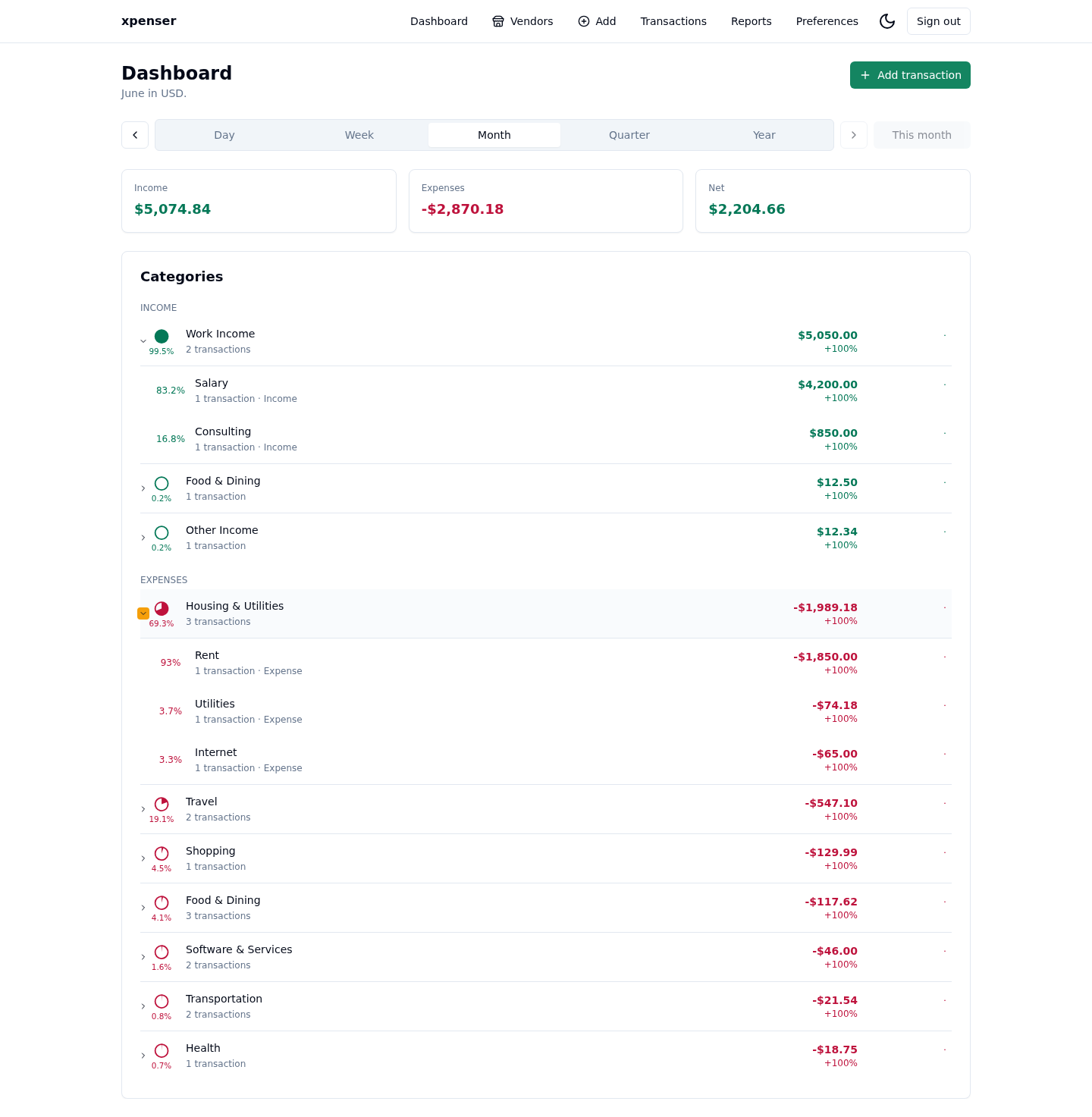
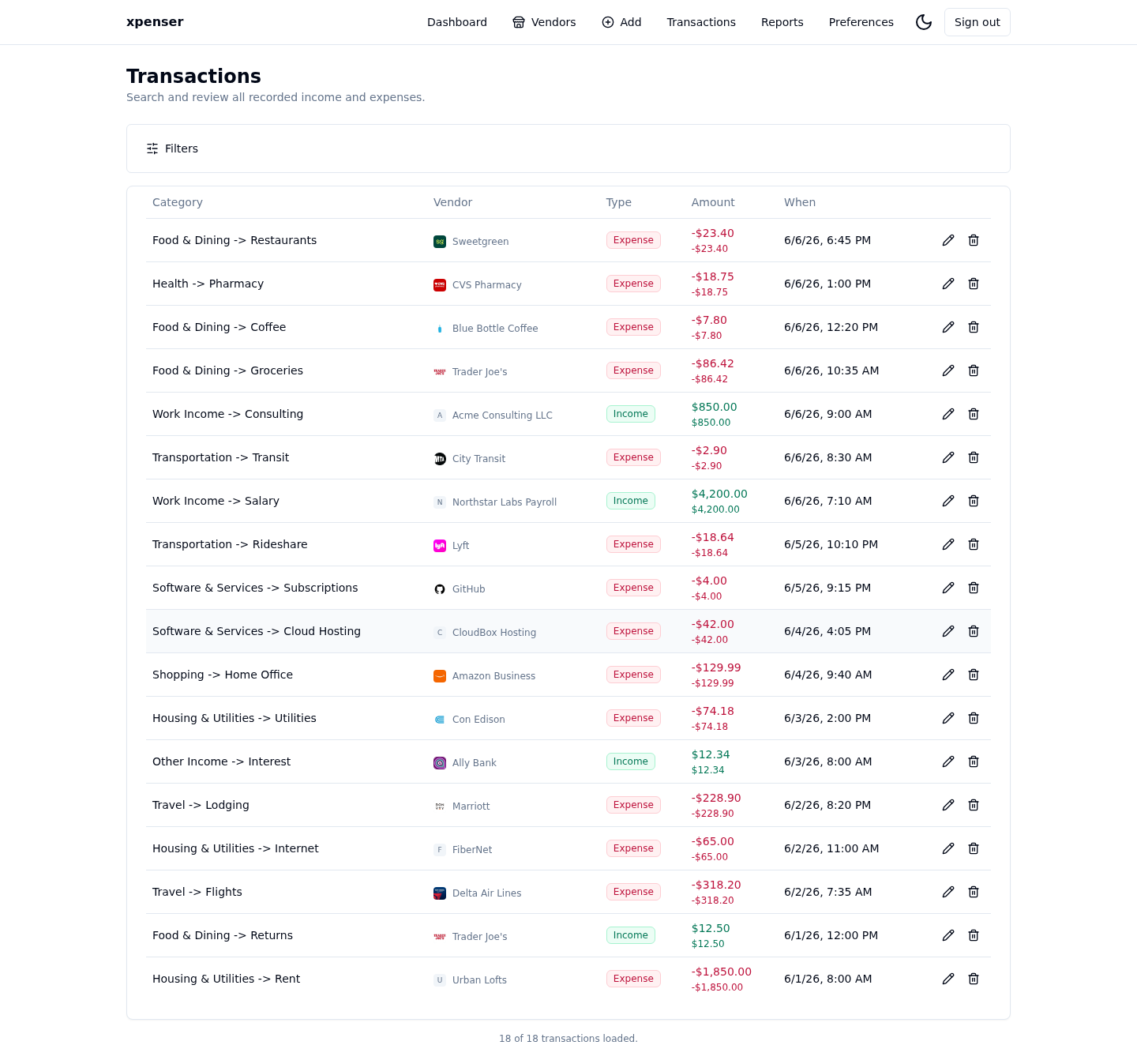
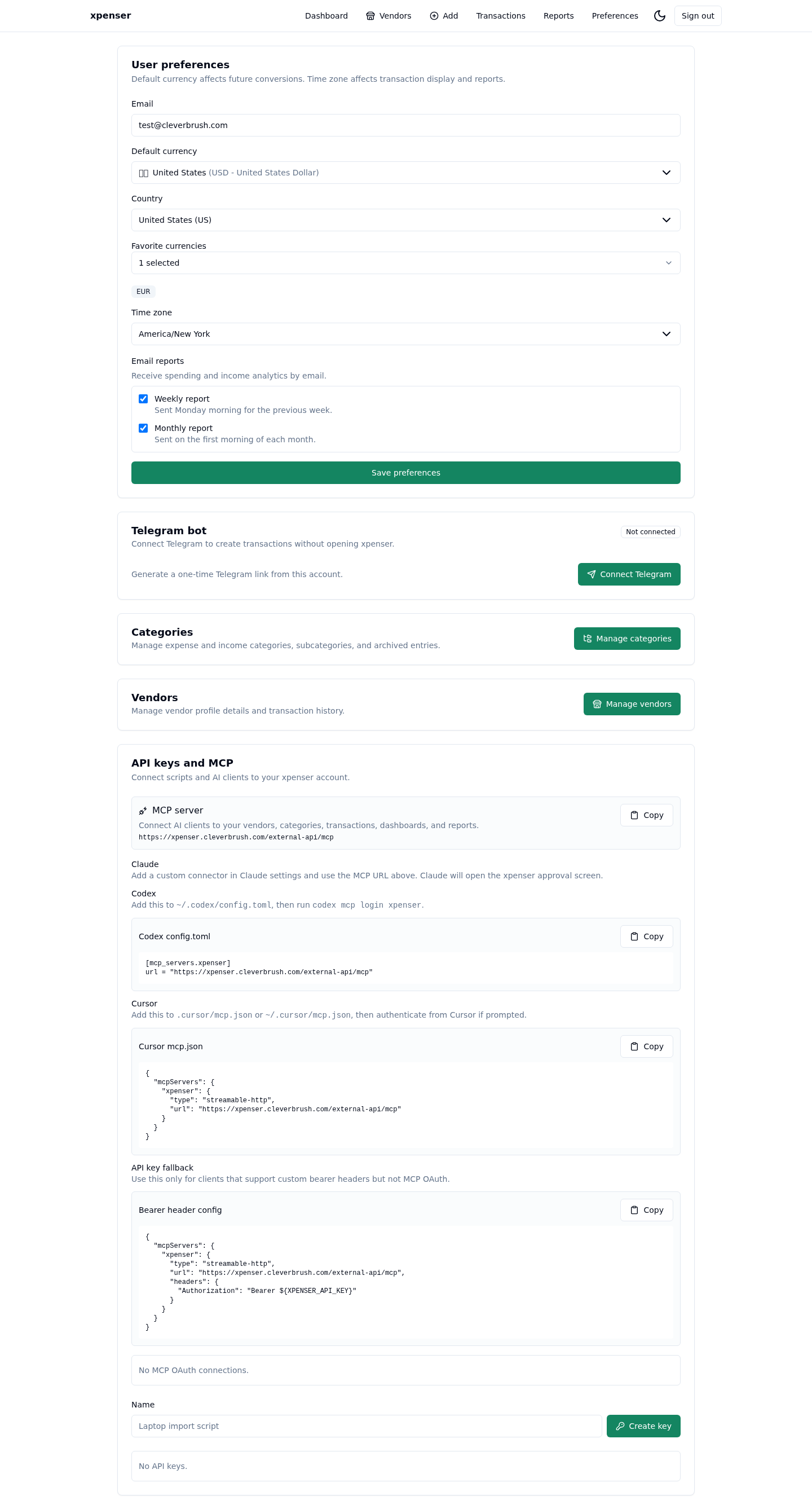
It grew out of a personal Telegram bot plus Google Sheets workflow. The project is early and still evolving, but it is useful enough to run, inspect, extend, self-host, or use as a working Cleverbrush Framework reference app. If you track or analyze expenses somewhere else today, feedback is welcome on whether xpenser could replace or complement that setup and what would need to be added.
xpenser is also a real-world reference app for Cleverbrush Framework, showing how a schema-first TypeScript stack can drive API contracts, validation, OpenAPI, typed clients, React forms, auth-aware endpoints, observability, Telegram workflows, and MCP access from one cohesive application.
|
|
|
|
| Dashboard month view | Transaction history | Email reports, API keys, and MCP |
xpenser is intentionally small enough to inspect while still exercising production-shaped framework patterns:
packages/contracts defines the public contract with Cleverbrush schemas.apps/api exposes the contract through Cleverbrush server handlers,
auth metadata, OpenAPI, DI, logging, tracing, and MCP.packages/client wraps the generated Cleverbrush client with retry, timeout,
dedupe, batching, cache tags, and OpenTelemetry propagation.packages/ui binds Cleverbrush schema fields to reusable React form
controls.Start with Cleverbrush Reference Notes if you are here to learn the framework patterns behind the app. For upstream framework docs, use:
docker compose)npm install
cp .env.example .env
The defaults in .env.example are safe for local development and point the app
at PostgreSQL on localhost:5432.
Set DISABLE_GTM=1 when a deployment should not load Google Tag Manager.
The apps import local packages from their built dist outputs, so build the
shared packages once before starting dev servers:
npm run build -w @xpenser/contracts
npm run build -w @xpenser/client
npm run build -w @xpenser/ui
docker compose up -d postgres
Useful checks:
docker compose ps postgres
docker compose logs postgres
npm run dev
The API runs database migrations on startup.
Local URLs:
Email/password sign-in works without any external auth provider. Accounts created this way must confirm their email before signing in.
Self-hosted deployments that need only one user can skip account auth entirely:
XPENSER_SINGLE_USER_MODE=1
XPENSER_SINGLE_USER_EMAIL=you@example.com
WEB_API_SERVICE_SECRET=replace-with-at-least-32-characters
In single-user mode, the web app opens directly to the authenticated app, creates or reuses the configured email as the owner, hides login, registration, and marketing pages, and keeps Swagger/OpenAPI available. The public API and MCP endpoint still require API keys or OAuth; only the trusted web service bypasses the account login flow.
Google sign-in supports two modes:
Select the mode with GOOGLE_SIGN_IN_MODE:
GOOGLE_SIGN_IN_MODE=auto
auto uses direct Google OAuth when AUTH_GOOGLE_ID and
AUTH_GOOGLE_SECRET are configured. If those are not set, it uses Passport only
when all Passport variables are configured. If neither auth provider is
configured, the Google sign-in button is hidden and email/password sign-in still
works.
Use GOOGLE_SIGN_IN_MODE=direct to require direct Google OAuth,
GOOGLE_SIGN_IN_MODE=passport to require Passport, or
GOOGLE_SIGN_IN_MODE=disabled to hide Google sign-in even when credentials are
present.
Create an OAuth 2.0 client in Google Cloud Console:
APP_URL${APP_URL}/authjs/callback/googleFor local development with the default APP_URL, use:
http://localhost:3000/authjs/callback/google
Configure the web app with Auth.js-standard Google variables:
APP_URL=https://xpenser.example.com
AUTH_URL=https://xpenser.example.com/authjs
NEXTAUTH_URL=https://xpenser.example.com/authjs
NEXTAUTH_SECRET=replace-with-at-least-32-characters
AUTH_SECRET=replace-with-the-same-value-as-NEXTAUTH_SECRET
GOOGLE_SIGN_IN_MODE=auto
AUTH_GOOGLE_ID=your-google-oauth-client-id
AUTH_GOOGLE_SECRET=your-google-oauth-client-secret
Google accounts must have a verified email address. If a local email/password account already exists with the same email, Google sign-in is rejected instead of silently linking the accounts.
Passport is a private Cleverbrush auth broker. Self-hosted deployments should use direct Google OAuth unless they run their own compatible Passport service.
Configure both services with:
GOOGLE_SIGN_IN_MODE=passport
PASSPORT_BASE_URL=https://auth.cleverbrush.com
PASSPORT_PROJECT=xpenser
PASSPORT_ENVIRONMENT=production
PASSPORT_PUBLIC_KEY=
PASSPORT_PUBLIC_KEY is optional. When empty, the API fetches
<PASSPORT_BASE_URL>/.well-known/public-key and caches it in memory. If set,
use the base64-encoded PEM public key.
For a production-like local run, build and start the full Compose stack:
docker compose up --build
This starts the containerized web app, API, PostgreSQL, Swagger UI, and
observability services defined in docker-compose.yml.
Full Docker URLs:
For public deployments, put your reverse proxy in front of the web app and set
APP_URL to the public origin. The API service stays private on the Docker
network and the Next app exposes it under /api.
For a smaller public deployment, use docker-compose.prod.yml as the starting
point and provide production secrets for JWT_SECRET, WEB_API_SERVICE_SECRET,
and TELEGRAM_BOT_SERVICE_SECRET. Normal account-auth deployments also need
NEXTAUTH_SECRET and AUTH_SECRET; single-user deployments can leave those
empty.
The default .env.example keeps external integrations off unless you configure
their provider credentials:
OPENAI_API_KEY, OPENAI_REPORT_MODEL,
RESEND_API_KEY, EMAIL_FROM, EMAIL_REPORTS_ENABLED=1, and
EMAIL_REPORTS_SCHEDULER_ENABLED=1.TELEGRAM_BOT_TOKEN, TELEGRAM_BOT_USERNAME,
and TELEGRAM_BOT_SERVICE_SECRET.BRANDFETCH_API_KEY or BRANDFETCH_CLIENT_ID, then
enable VENDOR_ENRICHMENT_ENABLED=1.FEEDBACK_WEBHOOK_URL to an HTTP or HTTPS n8n webhook.
The authenticated top-menu form stays hidden when this value is empty, which
keeps the integration optional for self-hosted deployments.Create an API key from Settings -> Preferences -> API keys. The API key can be used as a bearer token with curl or with the typed Node client:
curl -X POST "$APP_URL/api/transactions" \
  -H "Authorization: Bearer $XPENSER_API_KEY" \
  -H "Content-Type: application/json" \
  -d '{"categoryId":1,"amount":12.34,"currency":"USD","effect":"normal","occurredAt":"2026-05-13T12:00:00.000Z"}'
import { createXpenserClient } from '@xpenser/client';

const client = createXpenserClient({
    baseUrl:
        process.env.XPENSER_API_BASE_URL ??
        'http://localhost:3000/api',
    getToken: () => process.env.XPENSER_API_KEY ?? null
});

await client.transactions.create({
    body: {
        categoryId: 1,
        amount: 12.34,
        currency: 'USD',
        effect: 'normal',
        occurredAt: new Date()
    }
});
Omit effect or set it to normal for regular transactions. Use
effect: 'reversal' for refunds in expense categories or payments and
chargebacks in income categories; the entered amount stays positive and reports
subtract it from that category.
X-API-Key: $XPENSER_API_KEY is also accepted.
xpenser exposes an MCP Streamable HTTP endpoint for AI agents at
/api/mcp. Use the same API key from Settings -> Preferences -> API keys as a
bearer token. MCP tools can read and manage the API-key owner's
vendors, categories, and transactions, so treat MCP access as full account data
access. Use a dedicated API key for MCP clients and revoke it when access is no
longer needed:
{
  "mcpServers": {
    "xpenser": {
      "type": "streamable-http",
      "url": "https://xpenser.example.com/api/mcp",
      "headers": {
        "Authorization": "Bearer ${XPENSER_API_KEY}"
      }
    }
  }
}
The MCP server exposes tools for the current user, vendors, categories, transactions, dashboard summaries, and statistics. Vendor candidate search and enrichment may call the configured vendor enrichment provider.
npm run lint
npm run typecheck
npm test
npm run test:e2e
Database helpers:
npm run db:run -w @xpenser/api
npm run db:validate -w @xpenser/api
docker compose stop postgres
docker compose down
docker compose down -v
db:validate is read-only and checks the live database schema against the
Cleverbrush ORM entities.
The e2e suite requires PLAYWRIGHT_BASE_URL when run outside the GitHub PR
environment.
Typed-query integration tests require a dedicated PostgreSQL database named
xpenser_queries (never point them at application data):
docker run --name xpenser-query-tests -d -p 127.0.0.1:55437:5432 \
  -e POSTGRES_DB=xpenser_queries -e POSTGRES_USER=xpenser_test \
  -e POSTGRES_PASSWORD=xpenser_test postgres:16-alpine
# Wait until PostgreSQL is ready before running the suite.
docker exec xpenser-query-tests pg_isready -U xpenser_test -d xpenser_queries
QUERY_TEST_DATABASE_URL=postgres://xpenser_test:xpenser_test@127.0.0.1:55437/xpenser_queries \
  npm run test:queries:integration
docker stop xpenser-query-tests
The suite type-checks its fixtures, runs application migrations in a random schema, and drops only that schema afterward. It covers joined projections, aggregate decoding, authorization, numbered paging, filters, scan summaries, eager ordering, and bounded enrichment query counts. It also compares query plans on synthetic data; timings are diagnostic, not production benchmarks. The same suite runs in the PR's Lint and test check.
It also verifies PostgreSQL-backed receipt jobs and recurring report schedules, including worker recovery, retry limits, atomic scan results, and progress authorization. See Background jobs for lifecycle, retention, delivery guarantees, and deployment guidance.
Contributions are welcome. Good first areas include documentation, self-hosting guides, framework reference notes, UI polish, API examples, and small focused product improvements.
xpenser is early, practical, and evolving. It has no meaningful user traction yet; feedback on product fit, README clarity, self-hosting, and MCP workflows is welcome. The goal is to remain useful as a personal finance app while staying clear enough for developers to learn how a Cleverbrush full-stack project fits together.
xpenser does not currently ship bank sync, budget planning, net-worth tracking, native mobile apps, or mature import pipelines.
xpenser is released under the MIT License.
Every push to main validates and deploys production automatically. Builds
run on the existing Docker host and preserve its configuration and database.
See production deployment setup and recovery.
Claim this server with your GitHub account to request manual ownership verification.
Link to the catalog listing for xpenser from your README. This badge does not certify ownership, compatibility or security.
[](https://awesome-mcp.com/servers/xpenser)Public repository statistics could not be verified. Check the configured source address; unavailable counts are not zero.
Separate sources, scopes and periods. Never combined or treated as installations, active users or security reviews.
No reviewed package or image identity; download statistics are not listed yet.
Alternative and complementary servers in the same category
A stateless streamable HTTP MCP server for interacting with the official source of government spending data.

A hosted, remote MCP server for Fortnox that lets AI assistants answer questions from a company's bookkeeping and propose changes for approval before writing them.

OptimistFi is a read-only remote MCP server that provides perpetual futures market data, perps prop firm rules and pricing, and US equity investment research.