
Store and retrieve entities, relations and observations in a persistent local knowledge graph.
create_entitiescreate_relationsadd_observations+6 more
92K
AI & Multi-Agent
A command-line tool that groups MCP servers into workspaces and runs a local gateway exposing them as a single unified MCP server to AI apps.
YAMCP - Model Context Protocol workspace manager and gateway is cataloged as an MCP server attributed to hamidra. A command-line tool that groups MCP servers into workspaces and runs a local gateway exposing them as a single unified MCP server to AI apps. It is categorized under ai agents-models. See the capability inspector for recorded interfaces and their independent review status; consult upstream documentation for the current interface.
Installation configuration is not reviewed. No executable setup is offered for this entry; inspect the source repository before proceeding.
Catalog license label: Not specified. Check the source repository's current license and terms before using, modifying or distributing this software.
Capability definitions are not reviewed. Unreviewed imports are not exposed as trusted interfaces.
No reviewed records to display. This does not establish that upstream lacks this capability.
No reviewed records to display. This does not establish that upstream lacks this capability.
No reviewed records to display. This does not establish that upstream lacks this capability.
Email delivery is not connected. This page does not collect email addresses or create subscriptions.
Browse the registry for current listings instead.
Reviews for YAMCP - Model Context Protocol workspace manager and gateway are not available yet
Review publishing and storage are not connected. This page does not collect or publish ratings or comments, including after sign-in.
Yes; it runs a local gateway exposed as a unified MCP server to AI app MCP clients.
Both local (stdio) and remote (SSE) MCP servers.
Yes; servers can be imported from a config file or added interactively.
README.md · f74f5261bc0c · Fetched 2026-11-13 09:03:23 UTC
Original upstream text, without AI rewriting. Scripts, forms and unsafe links are filtered for safety.
Showing the last retrieved documentation snapshot; check the source for current changes.
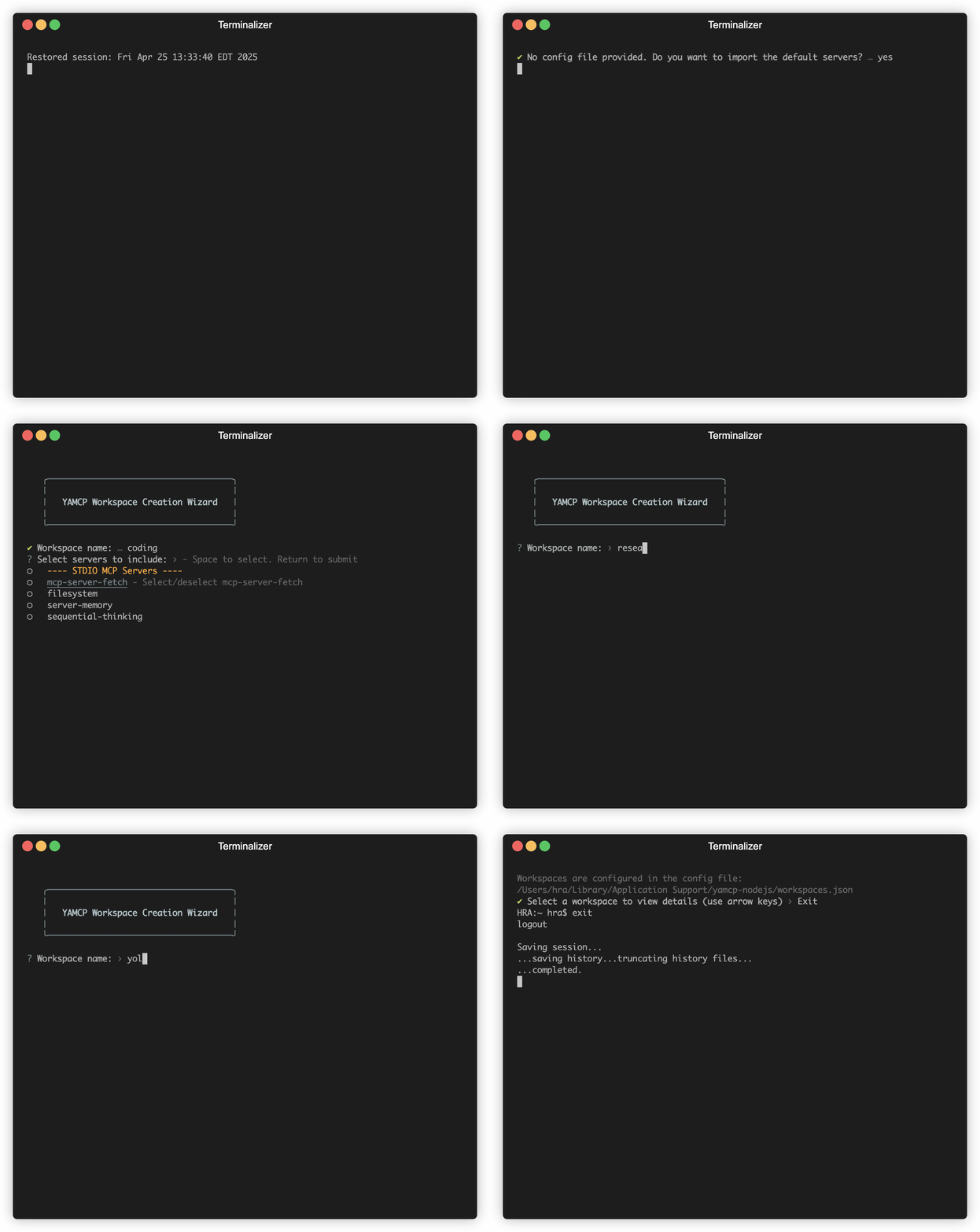
YAMCP (YAM-C-P) is a command-line tool for organizing and managing MCP servers as local workspaces. It seamlessly connects to multiple MCP servers, local or remote, grouping them into a unified workspace exposed as Yet Another MCP server (YAM) for AI applications. You can create dedicated workspaces based on specific functionality (e.g., a YAM workspace for coding, design, research, ...) or based on the AI apps that consume servers (e.g., a YAM for Cursor, Claude, Windsurf) or any other combination in between. In addition, it simplifies monitoring and debugging MCP servers by centralizing all server communication logs in a single store, eliminating the need to dig through each AI client app’s logs separately.
# Install YAMCP
npm install -g yamcp  # or use npx yamcp

# Import servers (choose one)
yamcp server import [config]    # import servers from config file (see src/example-servers.json for format)
yamcp server add                # or add manually

# create workspaces (e.g. a yam for coding, design, data, ...)
yamcp yam create

# Run workspace in your AI app
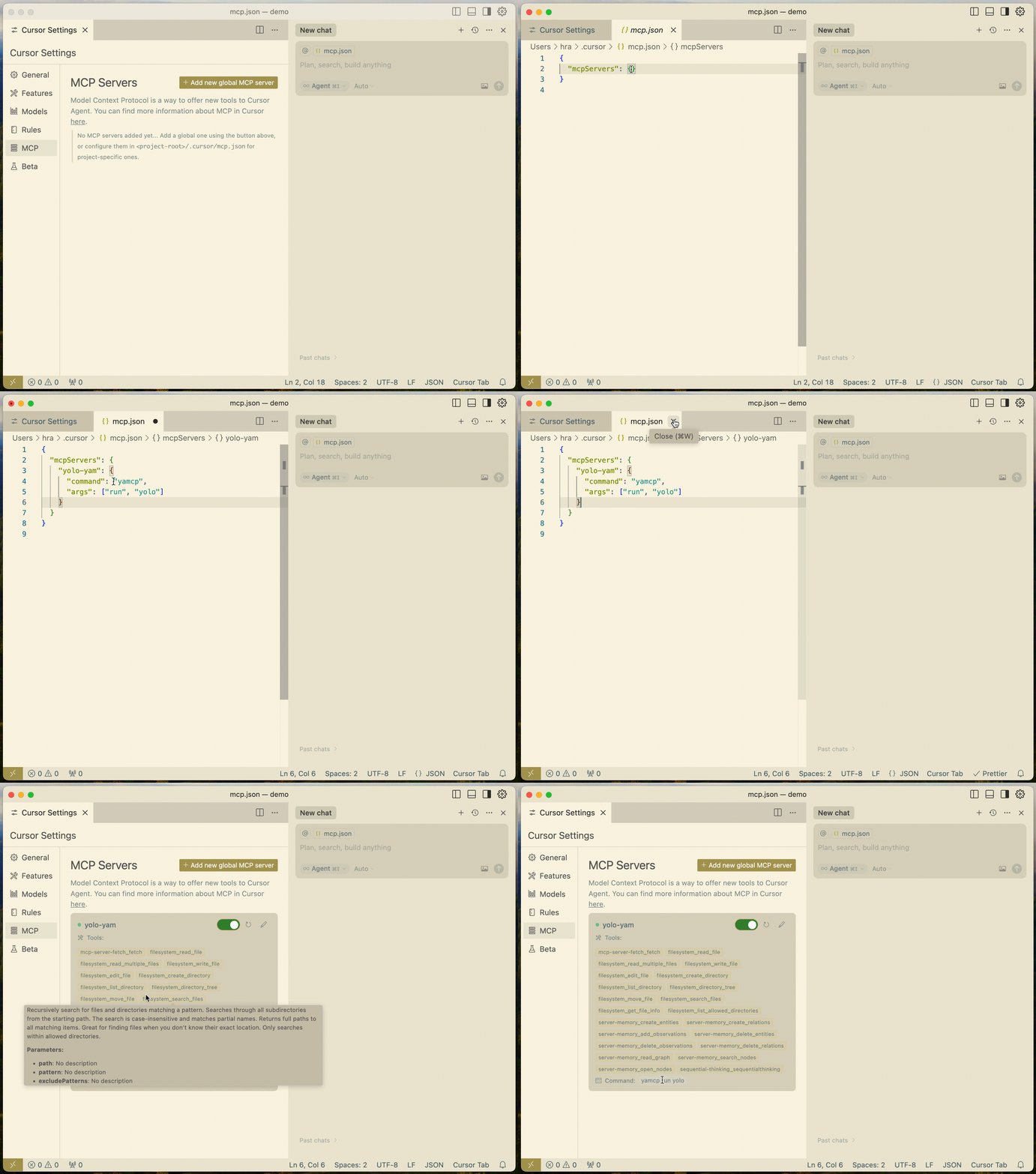
yamcp run <yam-workspace-name>
With YAMCP, you can:
yamcp [command] [subcommand] [flags]
Available top-level commands:
server - Manage MCP providersyam - Manage workspaces (yams)run - Run the gateway with a workspacelog - View the server log locationyamcp server add # Add a new MCP server (interactive)
yamcp server list # List all configured servers and their status
yamcp server remove # Remove a server configuration
yamcp server import # Import server configurations from a JSON file
yamcp yam create      # Create a new workspace (interactive)
yamcp yam list        # List all workspaces or show specific workspace details
yamcp yam edit        # Modify an existing workspace configuration
yamcp yam scan            # Scan workspaces
yamcp yam delete          # Delete a workspace
yamcp run <yam-workspace-name>   # Start the gateway with specified workspace
yamcp log                    # View server communication logs
| Command | Description | Example |
|---|---|---|
server add | Add a new MCP server | yamcp server add |
server list | List configured servers | yamcp server list |
server remove | Remove a server | yamcp server remove [name] |
server import | Import server config | yamcp server import [config] |
yam create | Create workspace | yamcp yam create |
yam list | List workspaces | yamcp yam list |
yam list --name | Show workspace details | yamcp yam list --name my-workspace |
yam edit | Edit workspace | yamcp yam edit |
yam scan | Scan workspace | yamcp yam scan [workspace-name] |
yam delete | Delete workspace | yamcp yam delete [workspace-name] |
run | Start gateway | yamcp run <workspace-name> |
log | View logs | yamcp log |
YAMCP UI provides an intuitive web interface to manage your MCP servers and workspaces through a universal dashboard.
# Run directly with npx (recommended)
npx yamcp-ui

# Or install globally
npm install -g yamcp-ui
yamcp-ui
Refer to the project repo for full documentation: https://github.com/eladcandroid/yamcp-ui.
graph TB
    CLI[CLI Commands]
    GW[McpGateway]
    GS[GatewayServer]
    GR[GatewayRouter]
    LOG[Logger]
    STORE[(Store)]
    AI_APP[AI App]

    %% CLI Command Flow
    CLI -->|manages| STORE
    CLI -->|runs| GW

    %% Gateway Components
    GW -->|uses| GS
    GW -->|uses| GR
    GW -->|logs| LOG

    %% Server & Router
    GS -->|stdio transport| AI_APP
    GR -->|connects to| SERVERX
    GR -->|connects to| SERVERY

    %% Data Store
    STORE -->|loads config| GW

    %% External MCP Servers
    subgraph "Workspace Servers"
        SERVERX["Server x (Stdio)"]
        SERVERY["Server y (SSE)"]
    end
    %% Store Components
    subgraph "Configuration Store"
        PROVIDERS[(Provider Config)]
        WORKSPACES[(Workspace Config)]
    end
    STORE --- PROVIDERS
    STORE --- WORKSPACES

    classDef primary fill:#2374ab,stroke:#2374ab,color:#fff
    classDef secondary fill:#ff7e67,stroke:#ff7e67,color:#fff
    classDef store fill:#95b8d1,stroke:#95b8d1,color:#fff

    class GW,GS,GR primary
    class CLI,AI_APP secondary
    class STORE,PROVIDERS,WORKSPACES store
The diagram shows the main components of the YAMCP system:

Claim this server with your GitHub account to request manual ownership verification.
Link to the catalog listing for YAMCP - Model Context Protocol workspace manager and gateway from your README. This badge does not certify ownership, compatibility or security.
[](https://awesome-mcp.com/servers/yamcp)Public repository statistics could not be verified. Check the configured source address; unavailable counts are not zero.
Separate sources, scopes and periods. Never combined or treated as installations, active users or security reviews.
No reviewed package or image identity; download statistics are not listed yet.
Alternative and complementary servers in the same category
Store and retrieve entities, relations and observations in a persistent local knowledge graph.
Organize problem solving into revisable, branching thought steps through an MCP tool.

Query-aware context compression with an MCP plugin for coding agents, plus Python and HTTP interfaces for reducing the context sent to a language model.