Yandex Maps MCP Server

Yandex Maps MCP Server

yandex-maps-mcp•bypeschinskiy

An MCP server that provides geocoding, reverse geocoding, and map image rendering through the Yandex Maps API.

License: MIT License•Runtime: Awaiting documentation review•Category: search web

WHAT IT DOES

  • •Converts addresses to coordinates using country, optional state, city, district, street, and house number inputs.
  • •Converts latitude and longitude coordinates into addresses.
  • •Renders a map region as a PNG image, optionally displaying coordinate placemarks.

BEST FOR

  • •Displaying maps of cities or locations in response to natural-language requests.
  • •Connecting to web-based MCP clients such as n8n over Streamable HTTP transport.
  • •Geocoding places when addresses or coordinates are supplied by the model, users, web search, or other sources.

ABOUT YANDEX-MAPS-MCP

Yandex Maps MCP Server is cataloged as an MCP server attributed to peschinskiy. An MCP server that provides geocoding, reverse geocoding, and map image rendering through the Yandex Maps API. It is categorized under search web. See the capability inspector for recorded interfaces and their independent review status; consult upstream documentation for the current interface.

HOW TO INSTALL

Installation configuration is not reviewed. No executable setup is offered for this entry; inspect the source repository before proceeding.

LICENSE

Catalog license label: MIT License. Check the source repository's current license and terms before using, modifying or distributing this software.

Capability inspector

Capability definitions are not reviewed. Unreviewed imports are not exposed as trusted interfaces.

Tools (0)

No reviewed records to display. This does not establish that upstream lacks this capability.

Resources (0)

No reviewed records to display. This does not establish that upstream lacks this capability.

Prompts (0)

No reviewed records to display. This does not establish that upstream lacks this capability.

NEWSLETTER - COMING LATER

Newsletter subscriptions are not open yet

Email delivery is not connected. This page does not collect email addresses or create subscriptions.

Browse the registry for current listings instead.

Community Reviews

Coming later

Reviews for Yandex Maps MCP Server are not available yet

Review publishing and storage are not connected. This page does not collect or publish ratings or comments, including after sign-in.

FREQUENTLY ASKED QUESTIONS

Can the server look up addresses of organizations from a name alone?

No; because the Yandex Maps Places API has no free tier, it can only geocode places whose addresses or coordinates are already known or retrieved from other sources.

Does the HTTP mode support authentication?

Yes; an optional Bearer token can be configured, and clients can include it in the Authorization header.

Upstream README

View this exact version on GitHub

README.md · ac9e4aea2f37 · Fetched 2026-11-13 10:03:12 UTC

Original upstream text, without AI rewriting. Scripts, forms and unsafe links are filtered for safety.

Showing the last retrieved documentation snapshot; check the source for current changes.

Yandex Maps MCP Server

MCP Server for the Yandex Maps API.

"Show me the map of Berlin"

"Show me location of ..."
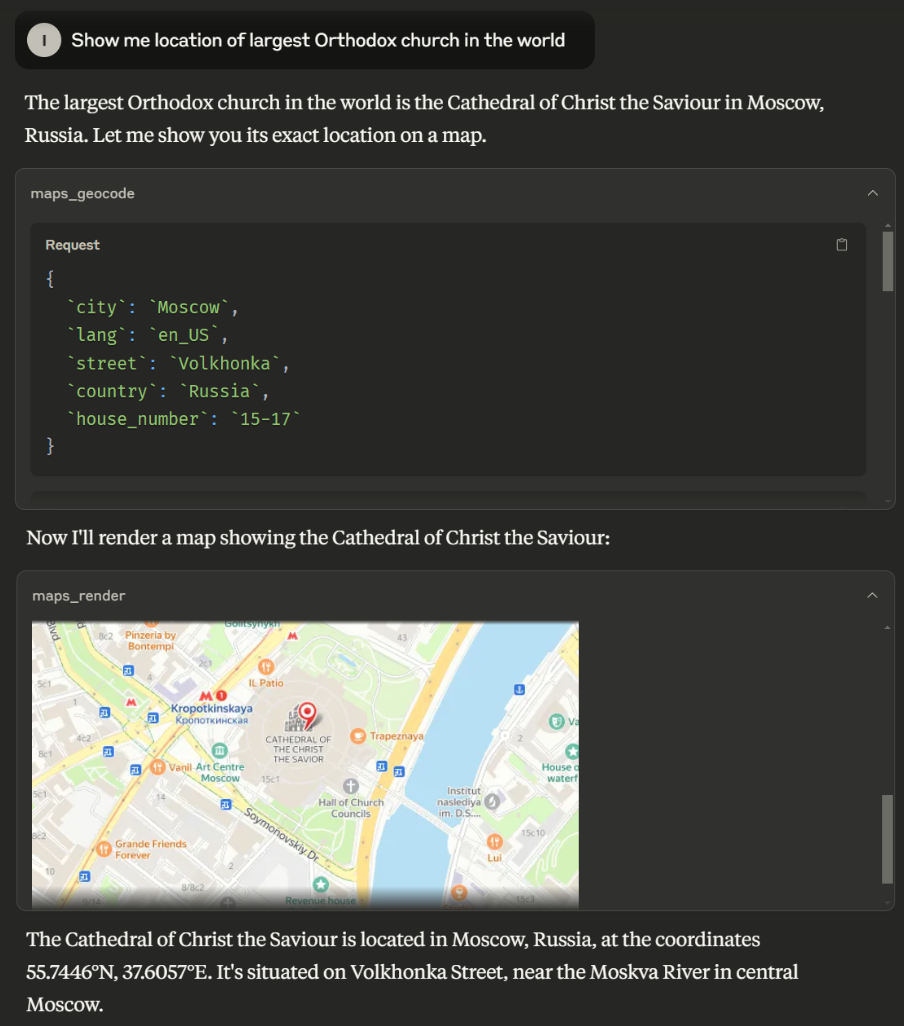
Yandex Maps MCP Screenshot

Tools

  1. maps_geocode

    • Convert address to coordinates
    • Inputs:
      • country (string) - The country name
      • lang (string) - Language code (e.g., 'ru_RU', 'en_US')
      • state (string, optional) - The state, region or province name
      • city (string, optional) - The city or locality name
      • district (string, optional) - The district or neighborhood within the city
      • street (string, optional) - The street name
      • house_number (string, optional) - The house or building number
    • Returns: location, formatted_address, address_components
  2. maps_reverse_geocode

    • Convert coordinates to address
    • Inputs:
      • latitude (number)
      • longitude (number)
      • lang (string) - Language code (e.g., 'ru_RU', 'en_US')
    • Returns: location, formatted_address, address_components
  3. maps_render

    • Render a map as a png image
    • Inputs:
      • latitude (number) - Latitude coordinate of map center
      • longitude (number) - Longitude coordinate of map center
      • latitude_span (number) - Height of map image in degrees
      • longitude_span (number) - Width of map image in degrees
      • lang (string) - Language code (e.g., 'ru_RU', 'en_US')
      • placemarks (array, optional) - Array of placemarks to display on the map with style "pm2rdm"
        • Each placemark should have latitude and longitude properties
    • Returns: PNG image of the map

Setup

API Keys

You'll need two Yandex Maps API keys:

  1. "JavaScript and Geocoder API" key for geocoding functions
  2. Static API key for map rendering

To generate API keys:

  1. Open https://developer.tech.yandex.ru/ and authorize
  2. Click "Connect APIs". Choose "JavaScript and Geocoder API" and fill the form
  3. Navigate to API's dashboard page and copy API key there
  4. Repeat from step 2 for Static API.

Local Run

  1. Clone the repository
  2. Install dependencies:
    npm install
    
  3. Set your API keys:
    export YANDEX_MAPS_API_KEY="your-geocoder-api-key"
    export YANDEX_MAPS_STATIC_API_KEY="your-static-api-key"
    
  4. Build server
    npm run build
    
  5. Run the server:
    node dist/index.js
    

Usage with Claude Desktop (stdio)

Add the following to your claude_desktop_config.json:

{
  "mcpServers": {
    "yandex-maps": {
      "command": "node",
      "args": [
        "path/to/index.js"
      ],
      "env": {
        "YANDEX_MAPS_API_KEY": "<YOUR_GEOCODER_API_KEY>",
        "YANDEX_MAPS_STATIC_API_KEY": "<YOUR_STATIC_API_KEY>"
      }
    }
  }
}

Usage as HTTP Server

The server supports Streamable HTTP transport for remote access and web-based clients like n8n.

Starting the HTTP Server

# Set required environment variables
export YANDEX_MAPS_API_KEY="your-geocoder-api-key"
export YANDEX_MAPS_STATIC_API_KEY="your-static-api-key"
export MCP_TRANSPORT="http"
export MCP_PORT="3000"  # Optional, defaults to 3000
export MCP_AUTH_TOKEN="your-secret-token"  # Optional but recommended

# Run the server
node dist/index.js

Configuration

The HTTP server is stateless and uses the following environment variables:

  • MCP_TRANSPORT: Set to "http" to enable HTTP mode (default: "stdio")
  • MCP_PORT: Port number for HTTP server (default: 3000)
  • MCP_AUTH_TOKEN: Optional Bearer token for authentication. If not set, the server runs without authentication (not recommended for production)
  • YANDEX_MAPS_API_KEY: Your Yandex Geocoder API key (required)
  • YANDEX_MAPS_STATIC_API_KEY: Your Yandex Static Maps API key (required)

Authentication

When MCP_AUTH_TOKEN is set, clients must include it in the Authorization header:

Authorization: Bearer your-secret-token

Usage with n8n

To use with n8n, configure the MCP Client node with:

  • Server Transport: HTTP Streamable
  • URL: http://your-server:3000 (adjust host and port as needed)
  • Authentication: Add Bearer token if configured

Known Limitations

Yandex Maps Places API has no free tier, which means that LLMs cannot retrieve organization addresses and coordinates through the Yandex Maps MCP. It can only geocode places whose addresses or coordinates are already known to the model or retrieved from other sources such as explicit user input, Web Search, or third-party MCPs.

License

This project is licensed under the MIT License - see the LICENSE file for details.

Install configuration

Are you the maintainer?

Claim this server with your GitHub account to request manual ownership verification.

README Embed Badge
Markdown

Link to the catalog listing for Yandex Maps MCP Server from your README. This badge does not certify ownership, compatibility or security.

[![MCP catalog listing](https://img.shields.io/badge/MCP-awesome--mcp-orange?style=flat-square)](https://awesome-mcp.com/servers/yandex-maps-mcp)

REPOSITORY STATS

GitHub StarsUnavailable
ForksUnavailable

Public repository statistics could not be verified. Check the configured source address; unavailable counts are not zero.

Downloads and pulls

Separate sources, scopes and periods. Never combined or treated as installations, active users or security reviews.

No reviewed package or image identity; download statistics are not listed yet.

Related search web MCP Servers

Alternative and complementary servers in the same category

View all in search web →

An MCP server that merges Google Search Console history with a live first-party crawl of your site to produce a prioritised, evidence-backed technical SEO audit inside Claude, complete with paste-ready fixes.

Repository stats unavailable
Search & Web Research

An MCP server that offers intelligent web search using OpenAI reasoning models, with support for fast iterations and deep research.

94
Search & Web Research

