English | Русский
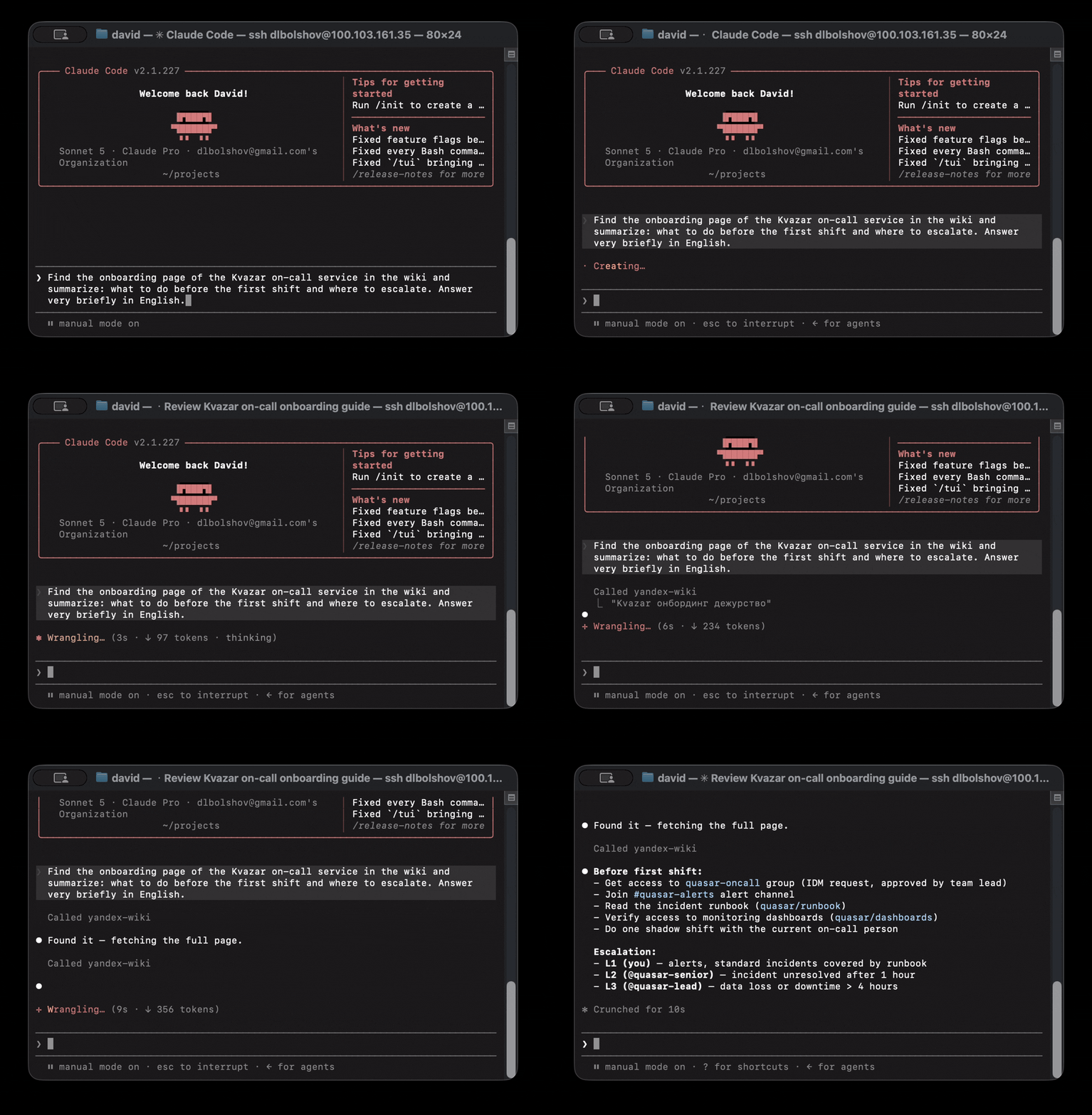
Connect Claude, Cursor, Windsurf, or any MCP client to Yandex Wiki: full-text search,
pages, comments, attachments, and dynamic tables ("grids") — 33 tools with typed schemas.
An unofficial project — not affiliated with or endorsed by Yandex.
- 🔍 Full-text search across the entire wiki — the same backend that powers the Wiki web search bar, up to 50 results per query
- 📄 Full page lifecycle — create, update, append (top / bottom / anchor), clone, delete with a recovery token, comments, file uploads
- 📊 Dynamic tables (grids) — 11 write tools: rows, columns, cells, copy, sort
- 🔒 Server-side read-only mode —
WIKI_READ_ONLY=true simply doesn't register write tools, so the agent can't bypass it
- 🧩 Typed tool surface — every tool ships an input JSON schema and safety annotations (read-only / destructive / idempotent hints), and all but
page_read_attachment, which answers with a native image or resource block, an output schema too
- 🐳 Runs anywhere — stdio for desktop clients, streamable-http + Docker (with optional multi-user OAuth) for teams
Quick start
- Get a Yandex OAuth token with Wiki access (official guide) and your organization ID.
- Install into your client:




The Claude Desktop badge downloads the .mcpb bundle of the latest release —
double-click it and Claude Desktop installs the server, prompting for the token
and org ID (uv must be installed).
Claude Desktop / Windsurf / any JSON-config client (uvx)
{
  "mcpServers": {
    "yandex-wiki-search": {
      "command": "uvx",
      "args": ["yandex-wiki-search-mcp"],
      "env": {
        "WIKI_TOKEN": "YOUR_TOKEN",
        "WIKI_ORG_ID": "YOUR_ORG_ID",
        "WIKI_READ_ONLY": "true"
      }
    }
  }
}
Claude Code (CLI)
claude mcp add yandex-wiki-search \
  -e WIKI_TOKEN=YOUR_TOKEN -e WIKI_ORG_ID=YOUR_ORG_ID -e WIKI_READ_ONLY=true \
  -- uvx yandex-wiki-search-mcp
Docker (no Python required)
{
  "mcpServers": {
    "yandex-wiki-search": {
      "command": "docker",
      "args": ["run","--rm","-i",
        "-e","WIKI_TOKEN","-e","WIKI_ORG_ID","-e","WIKI_READ_ONLY=true",
        "ghcr.io/dlbolshov/yandex-wiki-search-mcp:latest"],
      "env": {"WIKI_TOKEN":"YOUR_TOKEN","WIKI_ORG_ID":"YOUR_ORG_ID"}
    }
  }
}
[!TIP]
Start with WIKI_READ_ONLY=true — the server won't even register write tools.
Flip it to false once you trust your agent with edits.
- Ask your agent something — see below.
Need the old MCP SDK (1.x)?
The server runs on MCP Python SDK v2. That is invisible to clients — one v2 server
answers every protocol revision back to 2024-11-05 as well as the current one, so
there is nothing to change on your side and nothing to reinstall.
The only reason to hold back is a shared environment that pins mcp<2 for something
else. 1.0.1 is the last release built on the 1.x SDK and stays on PyPI:
pip install "yandex-wiki-search-mcp<1.1"
What can it do
"Find our onboarding docs and summarize the key steps."
"What do we have on incident response? Open the most relevant page."
"Create a page team/weekly-notes and append today's standup summary."
"Add a row to the on-call rotation grid: alice, next week."
"Upload this PDF to the project page and link it at the bottom."
"Delete the draft page, but keep the recovery token in case I change my mind."
33 tools. All write tools disappear when WIKI_READ_ONLY=true.
Search & read (10)
Pages: write (12)
Grids: write (11)
Expand the table
Grid specifics:
- Mutations use optimistic locking — fetch the grid first and pass the latest
revision.
grid_update.default_sort takes [{"column": "status", "direction": "asc"}] entries; the server converts them to the wire format the API expects.grid_add_columns requires required on every column because the real API validates it.grid_copy returns operation metadata, not a ready copied grid object.
How it compares
Facts verified against the alternatives' docs and published code, July–August 2026;
the official hosted server's tool list captured live from mcp.wiki.yandex.net
(wiki-mcp-server 1.28.1, 2026-08-11).
Also worth knowing:
- best-doctor/mcp-yandex-wiki (Python) — page create / update plus reads, with a separate
-ro read-only entry point; no delete / recover, no grids, no search; PyPI only
- brekhov-ilya/yandex-wiki-mcp (npm) — pages read / write / move, grids read-only; interactive PKCE token flow with auto-refresh, no full-text search
- n-r-w/yandex-mcp (Go) — Yandex Tracker + Wiki in one server, read-only by design (5 wiki read tools), no search; auth via IAM tokens from the
yc CLI only — Yandex OAuth tokens are not supported
- bim-ba/ycli (Python) — one toolkit for Tracker + Wiki + Forms: a CLI, a Python SDK, a Claude Code plugin, and an MCP server whose Wiki surface is 42
wiki_* tools (15 read / 27 write, annotated, with a --read-only flag); no full-text search tool, and attachment downloads stay CLI/SDK-only
As of August 2026, full-text search exists only here (up to 50 results) and in slartus
(up to 10) — Yandex's own hosted server ships without a search tool — and the
combination of search, grid writes, server-side read-only mode, and typed schemas is
unique to this project.
This project is a fork of ya-yandex-wiki-mcp and builds on findings from
slartus/mcp-yandex-wiki — see Credits.
Full-text search
page_search wraps the POST /v1/search endpoint — the same backend that powers the
Wiki web search bar, undocumented until Yandex published its
API reference in
August 2026. Search first, then open a result with page_get by its slug.
- Two wire modes. By default: up to 50 results in one call (
limit is clamped to
1–50; the API rejects anything else) and no pagination — the response cursors are
always null. With highlight=true: pages are hard-capped at 10 results
regardless of limit, matches come wrapped in <em>, and cursor (the page number
echoed back in next_cursor) walks up to ~100 results. The set ends when
results comes back empty or next_cursor is null on a non-empty page — past the
end next_cursor keeps counting up over empty pages, so it alone does not mean
"more exists".
- Filters run server-side, before the limit — a filtered search does not lose matches to it:
slug_prefix (section filter, deep prefixes like tech-doc/ml are fine), result_type (page/file), authors (page owners by uid/cloud_uid — user_get_current supplies your own, turning "find my pages about X" into two calls), and created_between/modified_between date intervals (both bounds required — the API rejects open ones).
- Quoted
"exact phrase" queries work; page results get absolute https://wiki.yandex.ru/... links, file results get direct download links.
content is a ~510-character excerpt, not the page and not a summary: it is cut from wherever the match sits, the query terms need not be inside it, and its line breaks and tabs are the page's own layout (table cells arrive tab-separated) rather than separators between fragments. Pass highlight=true to get matches wrapped in <em> tags. Read the page with page_get before answering from it. Empty for file results.
Traversing the tree
page_get_descendants returns a subtree as one flat list of {id, slug} from every
nesting level. Passing from_root=true instead of page_id/slug walks the whole
Wiki — the way in when no starting slug is known, so search is not the only entry
point. Prefer a section slug when you have one: wikis run to thousands of pages, and
fetch_all stops at its ~500-item cap with truncated: true.
More verified API behavior (scopes, 403 semantics, error envelopes, limits): docs/api-notes.md.
Configuration
Multi-user OAuth + Redis (HTTP deployments only)
With OAUTH_ENABLED=true the server becomes an OAuth provider: each MCP user
authorizes with their own Yandex account, and requests to the Wiki API are made with
their personal token. page_upload_attachment and page_download_attachment are
not registered in this mode — nor on any HTTP transport: they read and write files
on the machine the server runs on, which over HTTP is not the caller's machine.
Choosing the organization per user. WIKI_ORG_ID / WIKI_CLOUD_ORG_ID are optional
under OAuth, because each request can name its own organization: append ?orgId=... (or
?cloudOrgId=...) to the MCP server URL your client connects to. A query parameter wins
over the server-wide setting, so one deployment can serve several organizations. If a
request carries neither, the tool call fails with a message pointing at both options —
set the environment variable as the default if all your users share one organization.
See .env.example for the full annotated list and compose.yaml for a Redis baseline.
Deployment
%%{init: {"flowchart": {"wrappingWidth": 300}}}%%
flowchart LR
    L["Local MCP client<br/>Claude / Cursor /<br/>Windsurf / VS Code<br/>single user"]
    T["Team MCP clients<br/>multi-user,<br/>optional OAuth"]
    S["yandex-wiki-search-mcp"]
    W["Yandex Wiki API"]
    R[("Redis<br/>optional OAuth<br/>token store")]
    L -- "stdio" --> S
    T -- "streamable-http" --> S
    S --> W
    S -.-> R
HTTP server via Docker (the MCP endpoint is http://localhost:8000/mcp):
docker run --env-file .env -e TRANSPORT=streamable-http -p 127.0.0.1:8000:8000 \
  --log-opt max-size=10m --log-opt max-file=3 \
  ghcr.io/dlbolshov/yandex-wiki-search-mcp:latest
[!WARNING]
Without OAUTH_ENABLED=true the HTTP endpoint has no authentication of its
own: anyone who can reach the port works with your WIKI_TOKEN. The examples
publish it on loopback only, which keeps other machines out, and the server
answers only loopback Host names, which keeps out a web page that rebinds
its own name to 127.0.0.1 (see MCP_ALLOWED_HOSTS). Neither is
authentication: any process on the machine can still use it. Widen access
only behind an authenticating reverse proxy, or with OAuth on.
[!NOTE]
The server writes no log files of its own — everything goes to stderr, which
Docker's default json-file driver stores without a size limit. The
--log-opt flags above cap it; drop them only if your daemon already sets a
default.
Docker Compose
services:
  mcp-wiki:
    image: ghcr.io/dlbolshov/yandex-wiki-search-mcp:latest  # or: build: .
    ports:
      - "127.0.0.1:8000:8000"
    environment:
      - WIKI_TOKEN=${WIKI_TOKEN}
      - WIKI_ORG_ID=${WIKI_ORG_ID}
      - TRANSPORT=streamable-http
      # Only if another container reaches it as http://mcp-wiki:8000:
      # - MCP_ALLOWED_HOSTS=localhost,127.0.0.1,mcp-wiki
    logging:
      driver: json-file
      options:
        max-size: "10m"
        max-file: "3"
For Redis-backed OAuth storage, use the existing compose.yaml as the baseline.
Security
- Read-only is server-side: with
WIKI_READ_ONLY=true write tools are never registered — there is nothing for a confused agent to call.
- Plain-token HTTP is unauthenticated: with an HTTP transport and OAuth off, every caller that reaches the port acts as the owner of
WIKI_TOKEN — in any organization that token can reach, since ?orgId=/?cloudOrgId= on the endpoint override the configured one. Keep it on loopback or behind an authenticating proxy, or enable OAuth. Loopback alone does not keep out a web page that rebinds its own name to 127.0.0.1, so the server also answers only the Host names in MCP_ALLOWED_HOSTS — loopback ones by default. The local-filesystem tools (page_upload_attachment, page_download_attachment) are registered over stdio only, so an HTTP server never reads or writes its own disk on a caller's behalf.
- Wiki API does not enforce OAuth scopes (re-verified 2026-08-11, after Yandex documented the scopes — see docs/api-notes.md): a
wiki:read token can still write, so use the read-only mode rather than relying on token scopes.
- Secrets are
SecretStr throughout — masked in logs and repr; DEBUG HTTP logging never includes headers or bodies.
- Deletion is recoverable:
page_delete returns a recovery token for page_recover.
- Unrelated keys in a shared
.env are ignored, but a misspelled setting (WIKI_READ_ONL) stops the server instead of silently falling back to a default you did not choose.
Development
uv sync --dev
uv run yandex-wiki-search-mcp   # run locally
uv run pytest                   # tests
uv picks an interpreter from Python 3.11–3.14, the range uv.lock has wheels for
(.python-versions), and downloads one if the machine has none.
Before committing, run the full verification set from CONTRIBUTING.md.
How the server is put together — the layers, the code map, testing seams, CI and the
release process — is described in docs/architecture.md.
Verified API behavior and probe scripts are documented in docs/api-notes.md.
The Wiki API drifts (the search endpoint silently changed contract once already, back
when it was undocumented) — scripts/contract_sweep.py re-verifies every client method
against a live organization and reports validation mismatches and undeclared keys:
uv run python scripts/contract_sweep.py users/YOU/contract-sweep            # live contract checks
uv run python scripts/contract_sweep.py users/YOU/contract-sweep --cleanup  # remove fixtures
With SWEEP_SLUG=users/YOU/contract-sweep in .env (see .env.example) the slug argument
can be omitted; the server itself never reads that variable.
The API drift check workflow runs the same sweep
weekly when the DRIFT_* repository secrets are configured
(instructions in the workflow header); without them it skips quietly.
Credits
This project began as a fork of APonkratov/yandex-wiki-mcp
(ya-yandex-wiki-mcp) by Aleksandr Ponkratov, an excellent, well-tested Python MCP server
for the Yandex Wiki API, licensed under Apache-2.0. It has since grown its own surface —
full-text search, typed input schemas on all 33 tools and output schemas on 32, YFM helpers,
cursor draining, multi-user OAuth and a live contract sweep against the API — while the
original copyright and license are preserved (see LICENSE and NOTICE).
The idea and key API findings behind full-text search come from
slartus/mcp-yandex-wiki (JavaScript, MIT):
it was the first to discover the then-undocumented POST /v1/search endpoint (Yandex
published a reference for it only in August 2026) and to report that OAuth scopes are
not enforced. No code was taken from it — only findings and ideas, independently
re-verified against a live organization and extended here.
Trademarks
"Yandex" and "Yandex Wiki" are trademarks of YANDEX LLC. This is an unofficial,
community-built project: not affiliated with, sponsored, or endorsed by Yandex — the
names are used nominatively, to state which service the server talks to. The logo is
an original mark that reproduces neither Yandex Wiki nor MCP branding
(design notes).
mcp-name: io.github.dlbolshov/yandex-wiki-search-mcp









